1
PT2100 8” TELEPROMPTER
8a
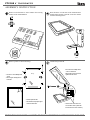
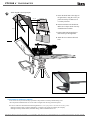
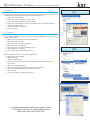
Attach your tripod skid plate directly to the teleprompter.
> Slide in the Part-B or Part-C through the single channel
of the bottom of the Part-P, and secure it with the screw
on your tripod skid plate. See Figure 1.
> Attach the assembled teleprompter to your tripod
Part-B or Part-C
(depends on your tripod skid plate)
ikancorp.com
Part-P
Figure 1.
Part-P (bottom view)
8b
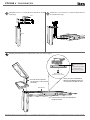
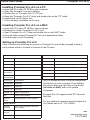
Attach your tripod skid plate to Part-O.
For those who use a tripod that is rear loading (ie: your tripod skid plate slides into the tripod head from the rear), we have provided an
optional piece , Part-O, will allow for more convenient attaching and detaching of the PT2100 Teleprompter on your tripod.
> Loosen the screws and slide out the Metal Bracket
through the channels
> Install 2 x Part-B & Part-F or 2 x Part-C &Part-G
> Slide in the Metal Bracket through the single channel
of the bottom of the Part-P
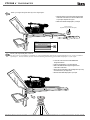
> Attach your tripod skid plate to the remaining Part-O (8” T-Slot)
and secure them on your tripod head
> Attach the assembled teleprompter to your tripod
ikancorp.com
your
tripod
3903 Stoney Brook Dr. Houston TX 77063 | +1.713.272.8822 | www.ikancorp.com | [email protected] | © 2009 ikan Corporation. All right reserved.