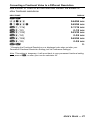
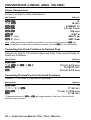
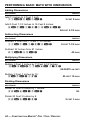
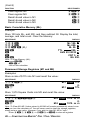
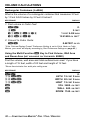
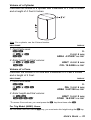
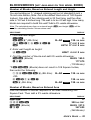
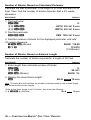
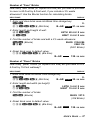
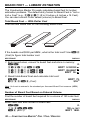
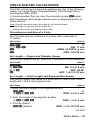
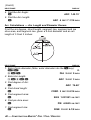
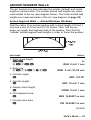
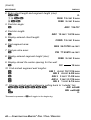
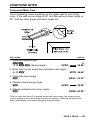
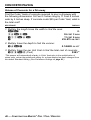
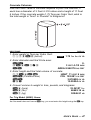
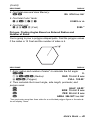
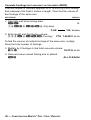
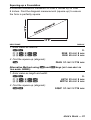
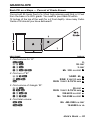
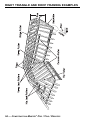
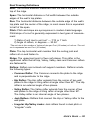
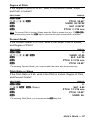
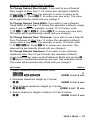
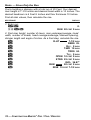
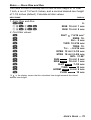
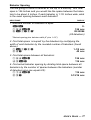
1
CONSTRUCTION M ASTER PRO ® User s Guide For Models: 4065 v3.1 Construction Master Pro 4080 v3.1 Construction Master Pro Trig 44080 v3.1 Construction Master Pro Desktop CONSTRUCTION MASTER® PRO V3.1 USER’S GUIDE This User’s Guide helps you solve common construction math and material estimation problems using the latest Construction Master Pro calculators—three of the most powerful feet-inch-fraction calculators to date: The Construction Master Pro III Series — 1. Construction Master Pro (#4065 v3.1) 2. Construction Master Pro Trig (#4080 v3.1) 3. Construction Master Pro Desktop (#44080 v3.1) IMPORTANT: The Construction Master Pro Trig does not have Block, Concrete Footing, Drywall, or Length, Width, and Height functions. These keys are replaced with standard trigonometric keys. INTRODUCTION The Construction Master Pro line includes the most advanced feetinch-fraction calculators designed specifically for building pro’s! The Pro calculators handle practically any problem involving measurements and can be used to save time, prevent errors, and accurately perform common building projects such as: estimating concrete volume, squaring-up foundations, framing roofs, ordering lumber, building stairs, walls, laying driveways, carpet or floor covering, figuring precise angle calculations, or simply working in feet-inchfractions or decimal feet! Your Calculator Helps You Solve: • Dimensional Math Problems • Conversions Between Feet-Inch-Fractions, Decimal Feet, Decimal Inches, and Yards • Imperial/Metric Conversions • Problems Involving All Common Fractions — 1/2” to 1/64”! • Area/Volume Calculations • Board Feet/Lumber Calculations • Circle Calculations • Column/Cone Area and Volume • Compound Miter Cuts for Crown Moulding • Material Estimations and Costs • Polygons • Rake-Walls • Right Angle/Triangle Solutions • Roofing Materials • Stair Layout (Risers/Treads) • Studs • Weight/Volume Conversions Pro and Desktop Models (NOT AVAILABLE ON TRIG MODEL #4080) Also Solve: • Block/Bricks, Concrete Footings and Drywall • Instant Square-up, Perimeter, Wall Area, Room Area and Volume TABLE OF CONTENTS GETTING STARTED..........................................................................1 KEY DEFINITIONS .........................................................................1 Basic Operation Keys ..................................................................1 Convert Ç Key – Unit Conversions and Second Functions ....1 Memory and Storage Functions...................................................2 Recall ® Key.............................................................................3 Dimensional Measurement Unit Keys..........................................3 Area and Volume Keys (NOT AVAILABLE ON TRIG MODEL #4080)......4 Weight Keys .................................................................................5 Construction Project Keys and Functions....................................6 Block/Brick Function (NOT AVAILABLE ON TRIG MODEL #4080)..........6 Circular/Arc Function Keys ..........................................................7 Column/Cone Function ................................................................8 Compound Miter/Crown Moulding Keys ......................................8 Drywall Function (NOT AVAILABLE ON TRIG MODEL #4080)................9 Footing Function (NOT AVAILABLE ON TRIG MODEL #4080)................9 Polygon Function .........................................................................9 Right Triangle/Roof Framing Keys.............................................10 Hip/Valley and Jack Rafter Keys ................................................11 Rake-Wall Function....................................................................13 Roof Materials/Covering Function..............................................14 Stair Key ....................................................................................14 Studs Function ...........................................................................16 Trigonometric Keys (TRIG #4080 AND DESKTOP #44080 MODELS ONLY) ...........................................................................16 ENTERING DIMENSIONS ............................................................18 Entering Linear Dimensions.......................................................18 Entering Square/Cubic Dimensions ...........................................18 SETTING FRACTIONAL RESOLUTION.......................................20 Setting Fraction Resolution – Using the Preference Setting Mode ...........................................................................20 Converting a Fractional Value to a Different Resolution............21 CONVERSIONS (LINEAR, AREA, VOLUME) ..............................22 Linear Conversions ....................................................................22 Converting Feet-Inch-Fractions to Decimal Feet .......................22 Converting Decimal Feet to Feet-Inch-Fractions .......................22 Converting Fractional Inches to Decimal Inches .......................23 Converting Decimal Inches to Fractional Inches .......................23 Square Conversions ..................................................................23 Cubic Conversions.....................................................................23 PERFORMING BASIC MATH WITH DIMENSIONS .....................24 Adding Dimensions ....................................................................24 Subtracting Dimensions .............................................................24 Multiplying Dimensions ..............................................................24 Dividing Dimensions ..................................................................24 Percentage Calculations ............................................................25 MEMORY OPERATION ................................................................25 Basic Cumulative Memory (M+).................................................26 Permanent Storage Registers (M1 and M2)..............................26 PAPERLESS TAPE OPERATION .................................................27 EXAMPLES – USING THE CONSTRUCTION MASTER PRO......29 LINEAR MEASUREMENT EXAMPLES ........................................29 Adding Linear Measurements ....................................................29 Cutting Boards ...........................................................................29 Window Measurement ...............................................................30 Calculating the Center Point ......................................................30 AREA CALCULATIONS ................................................................31 Square Area (x 2) ........................................................................31 Area of a Rectangular Room (LxW) ..........................................31 Using Multi-Function W Key to Find Area, Square-up and Perimeter (NOT AVAILABLE ON TRIG MODEL #4080)......................31 VOLUME CALCULATIONS...........................................................32 Rectangular Containers (LxWxH) ..............................................32 Using the Multi-Function h Key to Find Volume, Wall Area and Room Area (NOT AVAILABLE ON TRIG MODEL #4080) ......................................32 Volume of a Cylinder..................................................................33 Volume of a Cone ......................................................................33 WEIGHT/VOLUME CONVERSIONS ............................................34 Weight Conversions ...................................................................34 Weight per Volume/Volume Conversions...................................34 BLOCKS/BRICKS (NOT AVAILABLE ON TRIG MODEL #4080)...............35 Number of Blocks, Based on Entered Length and Height ........35 Number of Blocks, Based on Entered Area ...............................35 Number of Blocks, Based on Calculated Perimeter ..................36 Number of Blocks, Based on Entered Length ...........................36 Number of “Face” Bricks ...........................................................37 Number of “Paver” Bricks .........................................................37 BOARD FEET – LUMBER ESTIMATION .....................................38 Total Board Feet – With Dollar Cost ..........................................38 Number of Board Feet Based on Entered Volume ....................38 CIRCLE AND ARC CALCULATIONS............................................39 Circumference and Area of a Circle...........................................39 Arc Length – Degree and Diameter Known ...............................39 Arc Length – Chord Length and Segment Rise Known.............39 Arc Calculations – Arc Length and Diameter Known ................40 ARCHED SEGMENT WALLS .......................................................41 Arched Segment Walls – Arched Windows (No Base) ..............41 Arched Segment Walls – Arched Windows (With Base) ...........42 Arched Segment Walls – Chord Length and Segment Height Known .....................................................................................43 COMPOUND MITER.....................................................................45 Compound Miter Cuts ................................................................45 CONCRETE/PAVING ....................................................................46 Volume of Concrete for a Driveway ...........................................46 Concrete Columns .....................................................................47 Complex Concrete Volume ........................................................48 Polygon, Finding Angles Based on Entered Radius and Number of Sides .....................................................................49 Concrete Footings (NOT AVAILABLE ON TRIG MODEL #4080) ...........50 Squaring-up a Foundation .........................................................51 DRYWALL (NOT AVAILABLE ON TRIG MODEL #4080)...........................52 Number of Drywall Sheets for a Given Area..............................52 Number of Drywall Sheets for a Given Length ..........................52 GRADE/SLOPE.............................................................................53 Back-Fill on a Slope – Percent of Grade Known .......................53 RIGHT TRIANGLE AND ROOF FRAMING EXAMPLES ..............54 Roof Framing Definitions ...........................................................55 Degree of Pitch ..........................................................................57 Percent Grade............................................................................57 Pitch Ratio or Slope ...................................................................57 Common Rafter Length..............................................................58 Common Rafter Length – Pitch Unknown .................................58 Angle and Diagonal (Hypotenuse).............................................59 Rise ............................................................................................59 Rise and Diagonal......................................................................59 Sheathing Cut ............................................................................60 Regular Hip/Valley and Jack Rafters ........................................60 Jack Rafters – Using Other Than 16-Inch On-Center Spacing ..................................................................................61 Irregular Hip/Valley and Jack Rafters – Descending, with On-center Spacing Maintained ...............................................62 Irregular Hip/Valley and Jack Rafters – Ascending, with Jacks Mating at Hip/Valley......................................................64 Rake-Wall – No Base.................................................................66 Rake-Wall – With Base ..............................................................67 ROOFING MATERIALS ................................................................68 Roof Covering – Entering Pitch, Length and Width ..................68 Roof Covering – Entering Rise, Run (No Pitch) and Area.........69 STAIR LAYOUT EXAMPLES ........................................................70 Stair Layout Definitions ..............................................................70 Stairs – Given Only Floor-to-Floor Rise .....................................72 Stairs – Given Only the Run ......................................................74 Stairs – Given Rise and Run .....................................................75 Stairs – Given Rise and Run, Using “Riser Limited” Function for Code Restrictions ..............................................................76 Baluster Spacing........................................................................77 STUDS ..........................................................................................78 BASIC D:M:S AND TRIGONOMETRY EXAMPLES .....................78 Converting Degrees:Minutes:Seconds ......................................78 Time Calculations Using D:M:S .................................................78 TRIGONOMETRIC FUNCTIONS..................................................79 Converting Percent Grade to D:M:S ..........................................80 Converting Tangent/Pitch to Angle.............................................80 Converting Roof Angle in Degrees to Pitch in Inches................80 Angle – Rise and Hypotenuse Known .......................................81 APPENDIX A – DEFAULT SETTINGS ............................................82 APPENDIX B – PREFERENCE SETTINGS ....................................83 How to Set Preferences.............................................................86 Accessing Preference Settings ..................................................86 APPENDIX C – CARE INSTRUCTIONS .........................................89 APPENDIX D – IMPORTANT NOTES FOR OWNERS OF PREVIOUS CONSTRUCTION MASTERS ..................................90 APPENDIX E – ACCURACY/ERRORS, AUTO SHUT-OFF, BATTERIES, RESET ....................................................................91 ACCURACY/ERRORS..................................................................91 Error Codes................................................................................91 AUTO SHUT-OFF .........................................................................91 BATTERIES...................................................................................92 Replacing the Battery(ies)..........................................................92 Battery Replacement Instructions ..............................................92 RESET ..........................................................................................92 APPENDIX F – AREA/VOLUME FORMULAS ................................93 AREA FORMULAS........................................................................93 SURFACE AREA/VOLUME FORMULAS .....................................94 REPAIR AND RETURN ...................................................................95 WARRANTY.....................................................................................96 INDEX...............................................................................................99 GETTING STARTED KEY DEFINITIONS Basic Operation Keys o On/Clear — Turns power on. Pressing once clears the display. Pressing twice clears all temporary values. O Off — Turns all power off, clearing all non-permanent registers. For desktop model 44080, press Ç o to turn power off. +–x ÷= Arithmetic operation keys. % Four-function (+, -, x, ÷) percent key. (See page 25 for examples.) 0 – 9 and • Keys used for entering digits. ) (DESKTOP ONLY) Enters “00” to save keystrokes (e.g., 1 ) to enter 100). B Backspace Key — Used to delete entries one keystroke at a time (unlike the o function, which deletes the entire entry). Convert Ç Key — Unit Conversions and Second Functions The Ç key is used to convert between measurement units or to access the second functions listed below: Çx Clear All — Clears all values, including Memory. Resets all permanent entries to default values (except Preference Settings which are retained). Note: Use only when necessary, as it resets all stored values to factory defaults. See page 82 for a listing of default values. Ç% x 2 — Squares the value in the display. For example, to square the value 10, enter 1 0 then Ç %. ÇB Square Root Function ( ) — Used to find the square root of a non-dimensional or area value (e.g., 1 0 0 Ç B = 10). Ç/ x10 y — Allows entry of an exponent. For example, 8 Ç / 1 4 is 8 times 10 to the 14th power. Ç÷ 1/x — Finds the reciprocal of a number (e.g., 8 Ç ÷ = 0.125). USER’S GUIDE — 1 Ç– Change Sign (+/–) — Toggles the sign of the displayed value to positive or negative. Ç+ Pi (π) — Constant = 3.141593 Ç• Degrees:Minutes:Seconds (dms deg) — Converts between D:M:S and decimal degree formats. Ç0 Total Cost (Cost) — Calculates total material cost given a unit dimension and an entered Per Unit Cost. Çß Access Preference Settings (Prefs) — Used to access various customizable settings, such as dimensional answer formats (see Preference Settings on page 83). Memory and Storage Functions µ Cumulative Memory — Whenever the µ key is pressed, the displayed value will be added to the Memory. Other memory functions: FUNCTION Add to Memory Subtract from Memory Recall total in Memory Display/Clear Memory Clear Memory KEYSTROKES Ç ® ® Ç µ µ µ ® ® Memory is semi-permanent, clearing only when you: 1) 2) 3) 4) turn off the calculator; press ® ®; press Ç ®; press Ç x (Clear All). When memory is recalled (® µ), consecutive presses of µ will display the calculated average and total count of the accumulated values. ß1–3 Storage Registers (M1) through (M3) — Stores the displayed value in non-cumulative, permanent Memory (e.g., 1 0 ß 1). Good for storing a single value, for future reference (® 1 = 10). Note: Non-cumulative means it only accepts one value (does not add or subtract) and a second entered value will replace the first. Permanent means the value is stored even after the calculator is shut off. To delete a stored value, enter a new value or perform a Clear All ( Ç x). 2 — CONSTRUCTION MASTER ® PRO / TRIG / DESKTOP Recall ® Key The ® key is used to recall or review stored values (e.g., ® p to recall a previously entered pitch value). It is also used in reviewing stored settings, or in Paperless Tape and Memory operation (see below). ®= Paperless Tape (Tape) — Accesses the paperless tape mode (see “Paperless Tape” page 27), which keeps track of your past 20 entries. Useful for checking strings of numbers. ®® Clear M+ — Displays and clears M+. ®µ Recall M+ — Displays value stored in M+. ®1–3 Recall (M1) through (M3) — Recalls the value stored in M1, M2, or M3. Dimensional Measurement Unit Keys The following keys are used for entering units of measure, with ease and accuracy: y Yards — Enters or converts to Yards. f Feet — Enters or converts to Feet. Also used with the i and / keys for entering Feet-Inch values (e.g., 6 f 9 i 1 / 2). Note: Repeated presses of f after Ç toggle between FeetInches and Decimal Feet (e.g., 6 f 9 i 1 / 2 Ç f = 6.791667 Feet; press f again to return to Feet-Inch-Fractions). i Inches — Enters or converts to Inches. Also used with the / key for entering fractional Inch values (e.g., 9 i 1 / 2). Note: Repeated presses of i after Ç toggle between Fractional and Decimal Inches (e.g., 9 i 1 / 2 Ç i = 9.5 Inch; press i again to return to Fractional Inches). / Fraction Bar — Used to enter fractions. Fractions may be entered as proper (1/2, 1/8, 1/16) or improper (3/2, 9/8). If the denominator (bottom) is not entered, the calculator's fractional resolution setting is automatically used (e.g., entering 1 5 / = or + will display 15/16, based on the default fractional resolution setting of 16ths. USER’S GUIDE — 3 m Meters — Enters or converts to Meters. Ç7 Centimeters (cm) — Enters or converts to Centimeters. Ç9 Millimeters (mm) — Enters or converts to Millimeters. Ç2 Acres (Acre) — Enters or converts (a square value) to Acres. Ç8 Board Feet (Bd Ft) — Enters or converts cubic values to Board Feet. One Board Foot is equal to 144 Cubic Inches. Area and Volume Keys (NOT AVAILABLE ON TRIG MODEL #4080) l Length — Enters a length for calculation of area or volume. W Width — A multi-function key used to enter a width for calculation of area or volume (if a length and height are also entered). Consecutive presses of this key display or calculate: Press 1 2 3 4 5 6 h Result Displays Entered Width (WDTH) Area (AREA) Square-up (SQUP) Perimeter (PER) Redisplays Entered Length (LNTH) Redisplays Entered Width (WDTH) Height — A multi-function key used to enter a height for calculation of volume (if a length and width are also entered). Consecutive presses of this key display or calculate: Press 1 2 3 4 5 6 Result Displays Entered Height (HGHT) Volume (VOL) Wall Area (WALL) Total Room Area (ROOM) Redisplays Entered Length (LNTH) Redisplays Entered Width (WDTH) 4 — CONSTRUCTION MASTER ® PRO / TRIG / DESKTOP Weight Keys Ç1 Kilograms (kg) — Enters or converts (a weight or volume value) to Kilograms. A dimensioned volume will convert using the stored Weight per Volume value. Ç3 Metric Tons (met tons) — Enters or converts (a weight or volume value) to Metric Tons. A dimensioned volume will convert using the stored Weight per Volume value. Ç4 Pounds (lbs) — Enters or converts (a weight or volume value) to Pounds. A dimensioned volume will convert using the stored Weight per Volume value. Ç6 Tons (tons) — Enters or converts (a weight or volume value) to Tons. A dimensioned volume will convert using the stored Weight per Volume value. ß0 Store Weight per Volume (wt/vol) — Stores a new Weight per Volume value as Tons per Cubic Yard or other format, as listed below: Note: After entering a value and pressing ß 0, continue pressing the 0 digit key until you’ve reached the desired weight per volume format. To recall your setting, press ® 0. • Ton Per CU YD • LB Per CU YD • LB Per CU FEET • MET Ton Per CU M • kG Per CU M This value is permanently stored until you change it or perform a Clear All (Ç x). USER’S GUIDE — 5 Construction Project Keys and Functions The following Construction Project Keys and Functions help you instantly figure quantities and costs of materials, so you can build like a pro! Block/Brick Function (NOT AVAILABLE ON TRIG MODEL #4080) The Blocks function helps you quickly estimate the quantity of blocks or bricks required for building walls, walkways or other areas. Çl Number of Blocks or Bricks (Blocks) — Calculates the number of blocks (or bricks) based on: • an entered or calculated linear value • an entered or calculated area • an entered value in l • values entered in l and h (solved area) Uses a standard block/mortar area of 128 Square Inches and a block length of 16 Inches. This function can also be used for calculating the number of “face” or “paver” bricks by storing a brick size (see below). ß4 Store Block or Brick Size (Blk Size) — Used to store: (1) a block area other than the default block area of 128 Square Inches (e.g., 1 2 0 i i ß 4 stores an area of 120 Square Inches) and (2) a block length other than the default block length of 16 Inches (e.g., 1 8 i ß 4 stores a length of 18 inches). These values are permanently stored until you change them or perform a Clear All (Ç x). To recall the stored settings, press ® 4 (repeated presses of ® 4 toggle between block area and block length). Note: For Brick Estimates — You may also enter a brick size using ß 4. For example, when building with standard “face” bricks, enter a brick size of 21 Square Inches ( 2 1 i i ß 4) or store a “paver” brick size of 32 Square Inches ( 3 2 i i ß 4; based on Modular U.S. brick size of 3-5/8 Inches x 2-1/4 Inches x 7-5/8 Inches, including 3/8-inch mortar = 4 Inches x 2-5/8 Inches x 8 Inches). 6 — CONSTRUCTION MASTER ® PRO / TRIG / DESKTOP Circular/Arc Function Keys The circle key helps you quickly solve circular area, volume or arc problems. C Circle — Displays and calculates the following values, given an entered circle diameter* or radius: • Diameter (DIA) • Circle area (AREA) • Circumference (CIRC) *To enter a diameter (e.g., 10 Feet), press 1 0 f C. Ça Radius — Enters or calculates the circle radius (e.g., 5 f Ç a). a Arc Length or Degree of Arc — A multi-function key that enters or calculates Arc Length or Degree of Arc, and further solves for additional circular/arc values, including arched segment walls (based on the stored On-center spacing), listed below. Press 1 2 3 4 5 6 7 Result Arc Length or Degree of Arc (ARC) Chord Length (CORD) Segment Area (SEG) Pie Slice Area (PIE) Segment Rise (RISE) Stored On-Center Spacing (OC) Length of Arched Wall 1* (AW 1) * The calculator will calculate arched segment wall lengths (if applicable) with consecutive presses of the a key until it reaches the last wall length. R Run (Chord Length) — Enters or calculates the Chord Length. Used in conjunction with an entered segment rise to solve for the radius of a circle or with an entered radius to solve for the segment rise. r Rise (Segment Rise) — Enters or calculates the segment rise. Used in conjunction with an entered Chord Length to solve for the radius of a circle or with an entered radius to solve for the Chord Length. USER’S GUIDE — 7 Column/Cone Function The Column and Cone function helps you quickly estimate volume and surface area of columns or cones. ÇC Column and Cone (Column/Cone) — With an entered diameter and height, the first and second presses of C (following Ç) will calculate the total volume and surface area of a Column; the third and fourth consecutive presses of C calculate the total volume and surface area of a Cone. For Trig Model (#4080) Users: As this model does not have a h key, you must enter the height using the r key. Compound Miter/Crown Moulding Keys The Construction Master Pro also calculates compound miter cut angle solutions for cutting and installing crown moulding on a wall. The Compound Miter function can also be used for finding angle cuts for many types of compound miter problems, such as siding, railing and trim.  Compound Miter — With stored spring (crown) angle and entered wall corner angle*, consecutive presses of  will calculate the following: Press 1 2 3 4 Result Miter Angle (MITR) Bevel Angle (BEVL) Redisplays Stored Spring Angle (SPRG) Redisplays Entered Wall Corner Angle (CRNR) * Wall Corner Angle entries of less than 25 into  will be assumed to be the number of sides of a polygon; in this case, the calculator will calculate the unknown Wall Corner Angle first, then proceed with the above angle calculations. ß Store Spring Angle (Spring Angle) — Stores a value other than the default spring (crown) angle of 45° (e.g., 3 8 ß Â stores 38° spring angle). This value is permanently stored until you change it or perform a Clear All (Ç x). To recall the stored setting, press ® Â. 8 — CONSTRUCTION MASTER ® PRO / TRIG / DESKTOP Drywall Function (NOT AVAILABLE Çh ON TRIG MODEL #4080) Drywall Sheets (Drywall) — Calculates the number of 4 x 8, 4 x 9, and 4 x 12 sheets for an entered or calculated area. Footing Function (NOT AVAILABLE ON TRIG MODEL #4080) The Footing function helps you quickly estimate the volume of concrete required for concrete footings. ÇW Footing — Calculates total quantity of concrete required for concrete footings based on an entered wall length and footing size. Size based on the default footing size of 264 Square Inches (industry standard). ß6 Store Footing Area (Ftg Area) — Used to store a value other than the default footing size of 264 Square Inches (e.g., 1 2 8 i i ß 6 stores a footing size of 128 Square Inches). This value is permanently stored until you change it or perform a Clear All (Ç x). To recall the stored setting, press ® 6. Polygon Function The Polygon function is handy for calculating multi-sided shapes (such as found in concrete applications). ÇR Polygon — With an entered diameter or radius and number of sides of a polygon-shaped figure, Ç R, calculates the following: Press 1 2 3 4 5 6 7 Result Full Angle (FULL) Bi-Sect, or Half Angle (HALF) Side Length (SIDE) Perimeter of Polygon (PER) Area of Polygon (AREA) Radius* (RAD) Redisplays Entered Number of Sides (SIDE) *Solves radius for an entered diameter or redisplays the entered radius. USER’S GUIDE — 9 Right Triangle/Roof Framing Keys Right Triangle: Using the Pythagorean theorem, the top row of keys on your Construction Master Pro will calculate instant solutions in dimensional format to right triangle problems (particularly, roof framing). The Construction Master Pro’s keys are labeled in easy to remember roofing terms. The right triangle is calculated simply by entering two of four variables: Rise, Run, Diagonal, or Pitch. p Pitch — Enters or calculates the Pitch (slope) of a roof (or right triangle). Pitch is the amount of “rise” over 12 Inches (or one meter) of “run.” Pitch may be entered as: • • • • a dimension: 9 i p an angle or degrees: 3 0 p a percentage (percent grade): 7 5 % p a pitch ratio: 0 • 7 5 Ç p Once a Pitch in one of the above formats is entered, consecutive presses of p will convert to the remaining Pitch formats listed above (e.g., Pitch in Inches will convert to Pitch Degrees, Percent Grade and Pitch Ratio/Slope). Note: An entered (vs. calculated) pitch is a permanent entry. This means that it will remain stored even after you turn the calculator off. To change the Pitch, simply enter a new Pitch value. In contrast, a calculated Pitch value is not permanently stored. This means that the calculator will return to the Pitch value you last entered when you clear the calculator or press o twice. 10 — CONSTRUCTION MASTER ® PRO / TRIG / DESKTOP Çp Pitch Ratio or Slope (Slope) — Enters the Pitch as a ratio or Slope of a roof (or right triangle). For example, 0.58 slope is entered as • 5 8 Ç p. r Rise — Enters or calculates the Rise or vertical leg (height) of a right triangle. R Run —Enters or calculates the Run or horizontal leg (base) of a right triangle. d Diagonal — Enters or calculates the diagonal leg (hypotenuse) of a right triangle. Typical applications are “squaring up” slabs or finding common rafter lengths. Additional presses of the d key will also display plumb and level cut angles in degrees. Note: The Common rafter calculation is the “point-to-point” length and does not include the overhang or ridge adjustment. Hip/Valley and Jack Rafter Keys The Construction Master Pro uses the Rise, Run, Diagonal, Pitch and On-center spacing values to calculate Regular and Irregular Hip/Valley and Jack rafter lengths (excluding wood thickness, etc.). USER’S GUIDE — 11 When calculating Regular and Irregular Jack rafter lengths, you will see the letters “JK” (Regular pitch side) or “IJ” (Irregular pitch side) and the corresponding jack number to the left of your calculator display. This will help you keep track of the descending sizes and which side the corresponding rafter is based on. H ÇH Hip/Valley Rafter — Finds the Regular or Irregular Hip/Valley rafter length. • Regular Hip/Valley Length: After right triangle/rafter values are entered or calculated (e.g., Pitch, Rise, Run), pressing H will calculate the length of the Regular Hip/Valley rafter. • Irregular Hip/Valley Length: If an irregular pitch is entered (see next definition), pressing H will calculate the Irregular Hip/Valley rafter length. (An Irregular or “non-standard” roof has two different Pitches/Slopes.) • Subsequent presses of the H key will also display plumb, level, and cheek cut angle values in degrees. Irregular Pitch (Ir/Pitch) — Enters the irregular or secondary pitch value used to calculate lengths of the irregular hip/valley and jack rafters. You may enter the irregular pitch as: • a dimension: 9 i Ç H • an angle: 3 0 Ç H • a percentage: 7 5 % Ç H Note: An entered irregular pitch can be recalled by pressing ® Ç H. j Jack Rafters — Finds the descending Jack rafter sizes for regular pitched roofs, based on the stored On-center spacing and previously entered or calculated right triangle/rafter values (e.g., pitch, rise, run). Repeated presses of the j key will display the incremental jack adjustment, all the rafter sizes (on the Regular pitch side) as well as display the plumb, level, and cheek cut angle values. Additional presses will display the rafter sizes on the Irregular pitch side (if an Irregular Pitch was entered; see above), or repeat the previously displayed values. (Cont’d) 12 — CONSTRUCTION MASTER ® PRO / TRIG / DESKTOP (Cont’d) Note: You may set your calculator to display the Jack Rafter lengths in either ascending or descending order (see Preference Settings on page 83). Note: You may set your calculator to “mate up” with the Jack Rafters, rather than using the entered or default On-center spacing for both sides (see Preference Settings on page 83). ß5 Store On-center (o.c.) Spacing — Used to store a value other than the default of 16 Inches On-center (e.g., 1 8 i ß 5 stores an 18-inch On-center) for Jack Rafter calculations. Press ® 5 to review the stored value. Çj Irregular Side Jacks (Ir/Jack) — Operates same as j, but displays the rafter values from the Irregular pitched side first. Rake-Wall Function Çr Rake-Wall (R/Wall) — This function finds the stud sizes in a Rake-Wall based on calculated or entered values for pitch, rise and/or run. Repeated presses of r will display the various sizes. The sizes can be displayed in either descending (from longest to shortest) or ascending (from shortest to the longest) order, depending upon your preference setting (see Preference Settings on page 83). If a dimensional value is entered before pressing Ç r, this value will be taken as the Rake-Wall base size and automatically added to the various rafter lengths. ß5 Store On-center (o.c.) Spacing — Used to store a value other than the default of 16 Inches On-center (e.g., 1 8 i ß 5 stores an 18-inch On-center) for Rake-Wall stud calculations. Press ® 5 to review the stored value. USER’S GUIDE — 13 Roof Materials/Covering Function The Construction Master Pro's Roof function provides a quick calculation of roof area, number of squares and bundles, and number of 4 x 8 sheets required for roof coverage. Çd Roof — Given an entered Pitch (or Rise and Run) and plan area (or Length and Width), calculates the following: Press 1 2 3 4 5 6 7 Result Roof Area (ROOF) Number of Roof Squares (SQRS) Number of Roof Bundles (BNDL) Roof Bundle Size* (B-SZ) Number of 4 x 8 Sheets (4 X 8 ) Pitch (PTCH) Plan Area (PLAN) *Roof bundle size is 33.33 Square Feet. Stair Key The Construction Master Pro easily calculates stair layout solutions. With entered values for floor-to-floor rise and/or run, it will calculate Riser, Tread, Stringer, and Incline Angle values simply by pressing the s key. s Stair — A multi-function key that uses a stored Riser Height, stored Tread Width, stored Headroom Height and Floor Thickness, and entered Rise and Run values to calculate and display the following: Press 1 2 3 4 5 6 7 8 9 10 11 Result Actual Riser Height (R-HT) Number of Risers (RSRS) Riser Overage/Underage (R+/-) Tread Width (T-WD) Number of Treads (TRDS) Tread Overage/Underage (T+/-) Stairwell Opening (OPEN) Stringer Length (STRG) Incline Angle* (INCL) Run of Treads (RUN) Floor-to-Floor Rise (RISE) (Cont’d) 14 — CONSTRUCTION MASTER ® PRO / TRIG / DESKTOP (Cont’d) Press 12 13 14 15 Result Stored (Desired) Riser Height (R-HT STORED ) Stored (Desired) Tread Width (T-WD STORED ) Stored Headroom (HDRM STORED ) Stored Floor Thickness (FLOR STORED ) Note: Default values are 7-1/2 Inches for Desired Riser Height and 10 Inches for Desired Tread Width, 10 Inches for Floor Thickness, and 6 Feet 8 Inches for Headroom Height. Note: It is not possible for the calculator to include the nose/overhang measurement. Thus, you need to adjust for this measurement per local codes. *If the inclination angle exceeds the stored riser height and Tread Width ratio by 10%, the yield symbol will appear, indicating a steep incline. ß7 Store Desired Riser Height (Riser Ht) — Stores a value other than the default desired stair riser height of 7-1/2 Inches (e.g., 8 i ß 7 stores an 8-inch desired stair riser height). To recall the stored setting, press ® 7. ß8 Store Floor Thickness/Height (Floor Ht) — Stores a value other than the default desired floor thickness of 10 Inches (e.g., 8 i ß 8 stores an 8-inch desired floor thickness). To recall the stored setting, press ® 8. This is used, along with stored headroom height, for calculating the length of the stairwell opening. ß9 Store Desired Tread Width (Tread W) — Stores a value other than the default desired stair Tread Width of 10 Inches (e.g., 1 2 i ß 9 stores a 12-inch desired stair Tread Width). To recall the stored setting, press ® 9. Ç ß ß Set Headroom Height — Sets the desired ßß Headroom Height for calculation of the stairwell opening. Default is 6 Feet 8 Inches. Use the + key to increase and the – key to decrease the stored headroom height. See Preference Settings instructions on page 86. USER’S GUIDE — 15 Çs Riser Limited — Used for situations when the riser height is limited by local code. When you press Ç s, the calculator will recalculate stair values so that the actual Riser Height will not exceed your stored desired Riser Height (e.g., it will never exceed the stored desired Riser Height of 7-1/2 Inches, if 7-1/2 Inches is the value stored using ß 7). To compensate for this limitation, the calculator will add one to the number of risers. Studs Function The Construction Master Pro also calculates the number of studs required for a wall using an entered length and stored On-center spacing value. Ç5 Studs — Calculates the number of studs for an entered or displayed linear value. Based on the stored On-center spacing (16 inches is the default). Trigonometric Keys (TRIG #4080 AND DESKTOP #44080 MODELS ONLY) Tangent Ø = Opposite Adjacent Sine Ø = Opposite Hypotenuse Cosine Ø = Adjacent Hypotenuse 16 — CONSTRUCTION MASTER ® PRO / TRIG / DESKTOP The Trig model (#4080) and Desktop (#44080) calculators have standard trigonometric keys, in addition to right triangle/rafter keys (e.g., Rise, Run, Diagonal), for advanced right triangle mathematics. The Sine, Cosine and Tangent of an angle are defined in relation to the sides of a right triangle. Using the Ç key with the trigonometric function displays the inverse (Arcsine, Arccosine, and Arctangent). These are used to find the angle for the Sine, Cosine, or Tangent value entered. S Sine Function — Calculates the Sine of an entered degree or non-dimensioned* value. ÇS Arcsine (sin -1) — Calculates the angle for the entered or calculated Sine value. ç Cosine Function — Calculates the Cosine of a degree or non-dimensioned* value. Çç Arccosine (cos -1) — Calculates the angle for the entered or calculated Cosine value. t Tangent Function — Calculates the Tangent of a degree or non-dimensioned* value. Çt Arctangent (tan -1) — Calculates the angle for the entered or calculated Tangent value. *Cannot use on dimensioned values. USER’S GUIDE — 17 ENTERING DIMENSIONS Entering Linear Dimensions When entering Feet-Inch-Fraction values, enter dimensions from largest to smallest — e.g., Feet before Inches, and Inches before Fractions. Enter Fractions by entering the numerator (top), pressing / (fraction bar key), and then the denominator (bottom). Note: If a denominator is not entered, the fractional setting value is used. Examples of Entering Linear Dimensions: DIMENSION Clear calculator 5 Feet 1-1/2 Inch Clear calculator 5 Yards Clear calculator 17.5 Meters KEYSTROKES o 5f1i1/2 o 5y o 17•5m Entering Square/Cubic Dimensions The Construction Master Pro lets you easily enter Square and Cubic values. Simply press a dimensional unit key two times to label a number as a Square value, or three times to label a Cubic value. Note: If you pass the desired dimensional format, keep on pressing the dimensional unit key until the desired result is displayed again. Enter Square and Cubic dimensions in the following order: (1) Enter numerical value (e.g., 1 0 0). (2) Press desired unit key (e.g., f) to label value as “linear”. KEYSTROKE DISPLAY oo 0. 100f 100 FEET (3) Second press of unit key (e.g., f f) labels value as “Square”. KEYSTROKE DISPLAY oo 0. 100ff 100 SQ FEET (4) Third press of unit key (e.g., f f f) labels value as “Cubic”. KEYSTROKE oo 100fff DISPLAY 0. 100 Note: Feet-Inches format cannot be used to enter Square or Cubic values. 18 — CONSTRUCTION MASTER ® PRO / TRIG / DESKTOP CU FEET Examples of Entering Square and Cubic Dimensions: YARDS y y — Square Yards (e.g., 5 y y will display 5 SQ YD). y y y — Cubic Yards (e.g., 5 y y y will display 5 CU YD). FEET f f — Square Feet (e.g., 5 f f will display 5 SQ FEET). f f f — Cubic Feet (e.g., 5 f f f will display 5 CU FEET). INCHES i i — Square Inches (e.g., 5 i i will display 5 SQ INCH). i i i — Cubic Inches (e.g., 5 i i i will display 5 CU INCH). METERS m m — Square Meters (e.g., 5 m m will display 5 SQ M). m m m — Cubic Meters (e.g., 5 m m m will display 5 CU M). CENTIMETERS Ç 7 7 — Square Centimeters (e.g., 5 Ç 7 7 will display 5 SQ CM). Ç 7 7 7 — Cubic Centimeters (e.g., 5 Ç 7 7 7 will display 5 CU CM). MILLIMETERS Ç 9 9 — Square Millimeters (e.g., 5 Ç 9 9 will display 5 SQ MM). Ç 9 9 9— Cubic Millimeters (e.g., 5 Ç 9 9 9 will display 5 CU MM). USER’S GUIDE — 19 SETTING FRACTIONAL RESOLUTION The Construction Master Pro is set to display fractional answers in 16ths of an Inch. All examples in this User’s Guide are based on 1/16”. However, you may select the fractional resolution to be displayed in other formats (e.g., 1/64”, 1/32”, etc.). The method for permanently changing fractional resolution is shown below. Setting Fractional Resolution — Using the Preference Setting Mode KEYSTROKE 1. Access Preference Settings: Ç ß (Prefs) 2. Access Next Fraction Subsetting: + + + + + + (repeats options) DISPLAY FRAC 0-1/16 INCH* FRAC 0-1/32 FRAC 0-1/64 FRAC 0-1/2 FRAC 0-1/4 FRAC 0-1/8 FRAC 0-1/16 INCH INCH INCH INCH INCH INCH 3. To Permanently Set the Fractional Resolution You Have Selected Above, press o (or any key) to set the displayed Fractional Resolution and Exit Preference Settings. o 0. 4. To Recall Your Selected Fractional Resolution: ®/ STD 0-1/16 INCH *1/16” is the default setting. The display may differ from the example depending on what the resolution is currently set to. 20 — CONSTRUCTION MASTER ® PRO / TRIG / DESKTOP Converting a Fractional Value to a Different Resolution Add 44/64th to 1/64th of an Inch and then convert the answer to other fractional resolutions: KEYSTROKE oo 44/64 +1/64= Ç 1 (1/16) Ç 2 (1/2) Ç 3 (1/32) Ç 4 (1/4) Ç 6 (1/64) Ç 8 (1/8) o o* DISPLAY 0. 0-44/64 0-45/64 0-11/16 0-1/2 0-23/32 0-3/4 0-45/64 0-3/4 INCH INCH INCH INCH INCH INCH INCH INCH 0. * Changing the Fractional Resolution on a displayed value does not alter your Permanent Fractional Resolution Setting (set via Preference Settings). Note: This setting is temporary; it will revert back to your permanent fractional setting upon press of o, or when you turn the calculator off. USER’S GUIDE — 21 CONVERSIONS (LINEAR, AREA, VOLUME) Linear Conversions Convert 14 Feet to other dimensions: KEYSTROKE DISPLAY oo 14f Çy Çf Çi Çm Ç 7 (cm) Ç 9 (mm) 0. 14 FEET 4.666667 YD 14 FEET 0 INCH 168 INCH 4.267 M 426.72 CM 4267.2 MM Note: When performing multiple conversions, you only have to press the Ç key once except when accessing secondary functions, such as Ç 7 for Centimeters. Converting Feet-Inch-Fractions to Decimal Feet Convert 15 Feet 9-1/2 Inches to Decimal Feet. Then convert back to Feet-Inch-Fractions. KEYSTROKE DISPLAY oo 15f9i1/2 Çf f* 0. 9-1/2 INCH 15.79167 FEET 15 FEET 9-1/2 INCH 15 FEET Converting Decimal Feet to Feet-Inch-Fractions Convert 17.32 Feet to Feet-Inch-Fractions. KEYSTROKE oo 17•32f Çf f* DISPLAY 17 FEET 0. 17.32 FEET 3-13/16 INCH 17.32 FEET * Repeated presses of f or i will toggle between Feet-Inch-Fractions and Decimal Feet or Inches. 22 — CONSTRUCTION MASTER ® PRO / TRIG / DESKTOP Converting Fractional Inches to Decimal Inches Convert 8-1/8 Inches to Decimal Inches. Then convert to Decimal Feet. KEYSTROKE DISPLAY oo 8i1/8 Çi f i* 0. 8-1/8 INCH 8.125 INCH 0.677083 FEET 8.125 INCH Converting Decimal Inches to Fractional Inches Convert 9.0625 Inches to Fractional Inches. Then convert to Decimal Feet. KEYSTROKE DISPLAY oo 9•0625i Çi f f* 0. 9.0625 INCH 9-1/16 INCH 0.755208 FEET *Repeated presses of f or i will toggle between Feet-Inch-Fractions and Decimal Feet or Inches. Square Conversions Convert 14 Square Feet to other Square dimensions: KEYSTROKE DISPLAY oo 14ff Çi Çy Çm Ç 7 (cm) 0. 14 SQ FEET 2016. SQ INCH 1.555556 SQ YD 1.300643 SQ M 13006.43 SQ CM Cubic Conversions Convert 14 Cubic Feet to other Cubic dimensions: KEYSTROKE oo 14fff Çi Çy Çm DISPLAY 0. 14 CU FEET 24192. CU INCH 0.518519 CU YD 0.396436 CU M USER’S GUIDE — 23 PERFORMING BASIC MATH WITH DIMENSIONS Adding Dimensions KEYSTROKE DISPLAY Add 11 Inches to 2 Feet 1 Inch: 11i+2f1i= 3 Add 5 Feet 7-1/2 Inches to 18 Feet 8 Inches: 5f7i1/2+18f8i= 24 0 INCH 3-1/2 INCH FEET FEET Subtracting Dimensions KEYSTROKE Subtract 3 Feet from 11 Feet 7-1/2 Inches: 11f7i1/2–3f= DISPLAY 8 FEET 7-1/2 INCH 49 INCH Subtract 32 Inches from 81 Inches: 81i–32i= Multiplying Dimensions KEYSTROKE DISPLAY Multiply 5 Feet 3 Inches by 11 Feet 6-1/2 Inches: 5f3ix11f6i1/2= 60.59375 SQ FEET Multiply 2 Feet 7 Inches by 10: 2f7ix10= 10 25 FEET INCH Dividing Dimensions KEYSTROKE DISPLAY Divide 30 Feet 4 Inches by 7 Inches: 30f4i÷7i= Divide 20 Feet 3 Inches by 9: 20f3i÷9= 24 — CONSTRUCTION MASTER ® PRO / TRIG / DESKTOP 52. 2 FEET 3 INCH Percentage Calculations The percent % key is used to find a given percent of a number or to perform add-on, discount or division percentage calculations. You may also perform percentage calculations with dimensional units (Feet, Inch, etc.), in any format (linear, Square or Cubic). Examples: KEYSTROKE DISPLAY Find 18% of 500 Feet: 500fx18% 90 Add 10% to 137 Square Feet: 137ff+10% 150.7 Subtract 20% from 552 Feet 6 Inches: 552f6i–20% 442 Divide 350 Cubic Yards by 80%: 350yyy÷80% FEET 0 INCH SQ FEET FEET 437.5 0 INCH CU YD MEMORY OPERATION Your calculator has two types of Memory operations: 1) a standard, cumulative, semi-permanent Memory µ; and 2) three storage registers M1, M2, and M3, used to permanently store single, non-cumulative values. Memory commands are listed below. FUNCTION KEYSTROKES µ: Add value to M+ Subtract value from M+ Clear M+ Display and Clear M+ Recall stored value Ç Ç ® ® M1/M2/M3: Store single value in M1 Store single value in M2 Store single value in M3 Clear register M1 ß ß ß 0ß µ µ ® ® µ 1 2 3 1 (Cont’d) USER’S GUIDE — 25 (Cont’d) FUNCTION KEYSTROKES 0ß2 0ß3 Clear register M2 Clear register M3 ®1 ®2 ®3 Recall stored value in M1 Recall stored value in M2 Recall stored value in M3 Basic Cumulative Memory (M+) Example: Store 100 into M+, add 200, and then subtract 50. Display the total, average, and total count. Clear the Memory: KEYSTROKE DISPLAY 100µ 200µ 5 0 Ç µ (M-) ®µ µ µ ®® M+ 100. M M+ 200. M M- 50. M TTL STORED 250. M AVG 83.33333 M CNT 3. M M+ 250. Note: To Clear Memory (M+): - press ® ®; - Ç ®; or - turn off the calculator. Permanent Storage Registers (M1 and M2) Examples: Store a rate of $175 into M1 and recall the value: KEYSTROKE DISPLAY 175ß1 Oo ®1 M-1 STORED M-1 STORED 175. 0. 175. Store 1,575 Square Yards into M2 and recall the value: KEYSTROKE 1575yyß2 Oo ®2 DISPLAY M-2 STORED 1575. SQ YD M-2 STORED 1575. SQ YD 0. Note: To Clear M1-M3: Values stored in M1-M3 will remain permanently stored, even after you turn the calculator off. You will never need to clear the storage registers; simply enter a new value. However, if you wish to clear M1-M3 to “zero”: - Enter 0 ß 1, 0 ß 2, or 0 ß 3 or Ç x to clear all registers 26 — CONSTRUCTION MASTER ® PRO / TRIG / DESKTOP PAPERLESS TAPE OPERATION Note: Not available on DT (Desktop) Printer — Model #44065. The Paperless Tape allows you to display and review the last twenty entries of a regular math or basic dimensional math string calculation. To access this mode after entering values, press ® =. Then, press + or – to scroll forward or backward through the entries. While in the Paperless Tape mode, the display will show the previously entered or calculated value, along with the sequential number of entry (e.g., 01, 02, 03, etc.) and the math operator (+, –, x, ÷, %) in the upper left corner of the display. Note: If = has been used in the middle of a string, SUB (for Subtotal) will display in the upper left. If = was the last operation performed, the display will show TTL (Total) as the last entry. To exit this mode, press = to exit and maintain the last entry on the display. When exiting, the last entry (or TTL) will be displayed, allowing you to continue using the last tape value for another operation, if desired. Note: The Paperless Tape is cleared when: - o is pressed twice; - upon a new calculation (new equation string is started); or - when the calculator is shut off. Example: KEYSTROKE 1. Enter a string of numbers: 4f+ 5f+ 6f+ 7f= DISPLAY 4 9 15 22 FEET INCH FEET 0 0 0 0 2. Access the tape function: ®= TTL= 22 FEET 0 INCH 3. Scroll from first value to total: + + + + + 01 4 02+ 5 03+ 6 04+ 7 TTL = 22 FEET 0 0 0 0 0 INCH FEET FEET FEET FEET FEET FEET INCH INCH INCH INCH INCH INCH INCH (Cont’d) USER’S GUIDE — 27 (Cont’d) KEYSTROKE 4. Scroll last two values: – – 5. Exit tape function and continue: = + 2f= DISPLAY 04+ 7 03+ 6 FEET TTL= 22 22 24 FEET 28 — CONSTRUCTION MASTER ® PRO / TRIG / DESKTOP FEET FEET FEET 0 0 INCH 0 0 0 INCH INCH INCH INCH EXAMPLES — USING THE CONSTRUCTION MASTER PRO The Construction Master Pro calculators have keys and functions labeled in common building terms. Just follow the examples and adapt the keystrokes to your specific application. Please note that some of the following examples will not apply to your specific calculator model. For example, the Trig Model (#4080) has trigonometry functions, but does not have l, W or h keys, or Blocks, Footing or Drywall functions. It is good practice to clear your calculator (press o twice) before beginning each problem. And remember to use the Backspace B key to correct entries one entry at a time. LINEAR MEASUREMENT EXAMPLES Adding Linear Measurements Find the total length of the following measurements: 5 Feet 4-1/2 Inches, 8 Inches and 3.5 Yards. KEYSTROKE 1. Add the measurements: oo 5f4i1/2+ 8i+ 3•5y 2. Find the total: = DISPLAY 5 6 FEET 16 FEET FEET 0. 4-1/2 INCH 0-1/2 INCH 3.5 YD 6-1/2 INCH Cutting Boards How many 2-foot 2-inch pieces can be cut from one 10-foot board? KEYSTROKE Divide board length by smaller cuts: oo 10f ÷2f2i= DISPLAY 0. 10 FEET 4.615385 (4 whole pieces) USER’S GUIDE — 29 Window Measurement What is the total width of three window openings, if each measures 2 Feet 5 Inches in width? KEYSTROKE DISPLAY 1. Enter window width: oo 2f5i 2 FEET 5 INCH 2. Find total width: x3= 7 FEET 3 INCH 7.25 FEET 3. Convert to Decimal Feet: f 0. Calculating the Center Point You have a room that measures 13 Feet 8 Inches by 14 Feet 10 Inches. Find the center point to install a ceiling fan. KEYSTROKE 1. Divide length in half, to figure first center point: oo 13f8i ÷2= DISPLAY 0. 13 FEET 8 6 FEET 10 INCH INCH 2. Divide width in half, to figure second center point: 14f10i 14 FEET 10 INCH ÷2= 7 FEET 5 INCH Therefore, you should install the fan at the intersection of 6 Feet 10 Inches length and 7 Feet 5 Inches width. 30 — CONSTRUCTION MASTER ® PRO / TRIG / DESKTOP AREA CALCULATIONS Square Area (x2) What is the area of a square room with sides measuring 7 Feet 4 Inches? KEYSTROKE oo 7 f 4 i Ç % (x 2) DISPLAY 0. 53.77778 SQ FEET Area of a Rectangular Room (LxW) What is the area of a room measuring 12 Feet 6 Inches by 15 Feet 8 Inches? KEYSTROKE oo 12f6i x15f8i= DISPLAY 0. 12 FEET 6 INCH 195.8333 SQ FEET Note: You can also find area using the l and W keys as seen in the next problem. However, these keys are not available on the Trig Model (#4080). Using Multi-Function W Key to Find Area, Square-up and Perimeter (NOT AVAILABLE ON TRIG MODEL #4080) Find the area, square-up and perimeter of a space measuring 20 Feet 6 Inches by 25 Feet 6 Inches: KEYSTROKE oo 20f6il 25f6iW W W W DISPLAY 0. LNTH 20 FEET 6 INCH WDTH 25 FEET 6 INCH AREA 522.75 SQ FEET SQUP 32 FEET 8-5/8 INCH PER 92 FEET 0 INCH USER’S GUIDE — 31 VOLUME CALCULATIONS Rectangular Containers (LxWxH) What is the volume of a rectangular container that measures 3 Feet by 1 Foot 9-5/8 Inches by 2 Feet 4 Inches? KEYSTROKE 1. Find volume in Cubic Feet: oo 3f x1f9i5/8 x2f4i= DISPLAY 0. 3 FEET 1 FEET 9-5/8 INCH 12.61458 CU FEET* 2. Convert to Cubic Yards: Çy 0.467207 CU YD *If the “Volume Display Format” Preference Setting is set to Cubic Yards or Cubic Meters, your result will display accordingly. (See Preference Settings on page 83.) Using the Multi-Function h Key to Find Volume, Wall Area and Room Area (NOT AVAILABLE ON TRIG MODEL #4080) Find the volume, wall area and total surface/room area* if you have a length of 15 feet, width of 20 feet and height of 12 feet. *Room Area includes four walls plus ceiling area. KEYSTROKE oo 15fl 20fW 12fh h h h DISPLAY 0. LNTH 15 FEET 0 INCH WDTH 20 FEET 0 INCH HGHT 12 FEET 0 INCH VOL 3600. CU FEET WALL 840. SQ FEET ROOM 1140. SQ FEET 32 — CONSTRUCTION MASTER ® PRO / TRIG / DESKTOP Volume of a Cylinder Calculate the volume of a cylinder with a diameter of 2 Feet 4 Inches and a height of 4 Feet 6 Inches: Note: For a cylinder, use the Column function. KEYSTROKE 1. Find Circle area: oo 2f4i CC 2. Enter height and find volume: 4f6ih ÇC DISPLAY 0. 2 FEET 4 INCH AREA 4.276057 SQ FEET HGHT 4 FEET 6 INCH COL 19.24226 CU FEET Volume of a Cone Calculate the volume of a Cone with a diameter of 3 Feet 6 Inches and a height of 5 Feet: KEYSTROKE DISPLAY 1. Find Circle area: oo 3f6iC C 0. DIA 3 FEET 6 INCH AREA 9.621128 SQ FEET 2. Enter height and find volume: 5fh Ç C C C* HGHT 5 FEET 0 INCH CONE 16.03521 CU FEET *To access Cone volume, you must press the C key three times after Ç. For Trig Model (#4080) Users: As this model does not have a h key, you must enter the height using the r key. USER’S GUIDE — 33 WEIGHT/VOLUME CONVERSIONS Weight Conversions Convert 2,500 Pounds to Kilograms, Tons and Metric Tons: KEYSTROKE DISPLAY 1. Enter Pounds: oo 2 5 0 0 Ç 4 (lbs) 0. 2500 2. Convert to Kilograms, Tons and Metric Tons: Ç 1 (kg) Ç 6 (tons) Ç 3 (met tons) LB 1133.981 kG 1.25 Ton 1.133981 MET Ton Weight per Volume/Volume Conversions Convert 5 Cubic Yards of concrete to Pounds, Tons and Kilograms, if concrete weighs 1.5 Tons per Cubic Yard. KEYSTROKE 1. Store Weight per Volume: oo 1 • 5 ß 0* (wt/vol) DISPLAY 0. STORED 2. Enter concrete volume: 5yyy 3. Convert to Pounds, Tons and Kilograms: Ç 4 (lbs) Ç 6 (tons) Ç 1 (kg) 1.5 Ton Per CU YD 5 CU YD 15000. LB 7.5 Ton 6803.886 kG *If calculator does not display Tons per Cubic Yard, keep pressing the 0 key until the desired format is displayed (e.g., Ton Per CU YD, LB Per CU YD, LB Per CU FEET, MET Ton Per CU M, or kG Per CU M). 34 — CONSTRUCTION MASTER ® PRO / TRIG / DESKTOP BLOCKS/BRICKS (NOT AVAILABLE ON TRIG MODEL #4080) Number of Blocks, Based on Entered Length and Height You are building an “L” shaped retaining wall out of standard 8-inch x 16-inch size blocks (Note: this is the default block size of 128 Square Inches). One side of the retaining wall is 22 Feet long, and the other side is 15 Feet 8 Inches long. The wall is to be 4 Feet high. How many blocks are required to build this wall? Add a 5% waste allowance. Note: The calculated area from an entered length (l) and height (h) will be used for calculating blocks if these values exist. KEYSTROKE 1. Find total wall length: oo ® Ç 4* (Blk Size) 22f+15f8i= l DISPLAY 0. B--AR 128. SQ 37 FEET 8 LNTH 37 FEET 8 2. Enter wall height as height: 4fh STORED HGHT 4 0 FEET INCH INCH INCH INCH 3. Find the number of blocks and add 5% waste allowance: Ç l (Blocks) BLKS 169.5 +5% 177.975 (178 Blocks) *If ® Ç l (Blocks) does not result in 128 Square Inches, then enter the following: 1 2 8 i i ß 4 (Blk Size) B--AR STORED 128. SQ INCH -OR8ix16i= ß 4 (Blk Size) B--AR STORED 128. 128. SQ INCH SQ INCH Number of Blocks, Based on Entered Area Find the number of blocks required for an area measuring 300 Square Feet. Then add a 3% waste allowance. KEYSTROKE oo 300ff Ç l (Blocks) +3% DISPLAY 0. 300 SQ FEET BLKS 337.5 347.625 (348 Blocks) USER’S GUIDE — 35 Number of Blocks, Based on Calculated Perimeter Calculate the wall’s perimeter if the length is 30 Feet and width is 45 Feet. Then, find the number of blocks required. Add a 3% waste allowance. KEYSTROKE 1. Find wall area: oo 30fl 45fW 2. Find the perimeter: WWW DISPLAY 0. LNTH 30 WDTH 45 FEET INCH FEET 0 0 PER 150 FEET 0 INCH INCH 3. Find the number of blocks for the displayed perimeter, and add 3% waste allowance: = Ç l (Blocks) BLKS 112.50 +3% 115.875 (116 Blocks) Number of Blocks, Based on Entered Length Calculate the number of blocks required for a length of 20 Feet. KEYSTROKE DISPLAY 1. Enter length then calculate number of blocks: oo 20f Ç l (Blocks) 2. Display the stored block length*: l 0. 20 FEET BLKS 15. B-LN STORED 16 INCH Note: The calculator will calculate the number of blocks based on the entered length and the stored block size (length). *If the stored block length is not 16 Inches, then enter the following: 1 6 i ß 4 (Blk Size) B-LN 36 — CONSTRUCTION MASTER ® PRO / TRIG / DESKTOP STORED 16 INCH Number of “Face” Bricks How many “face” bricks (21 Square Inch size) will you need to purchase to cover a 40-Foot by 8-Foot wall, if you include a 3% waste allowance? Use the Blocks function for calculating bricks. KEYSTROKE DISPLAY 1. Enter and store brick area into Block Size storage key: oo 0. 2 1 i i ß 4 (Blk Size) B--AR STORED 21. SQ INCH 2. Enter length and height of wall: 40fl 8fh LNTH 40 HGHT 8 FEET FEET 0 0 INCH INCH 3. Find the number of bricks and add a 3% waste allowance: Ç l (Blocks) BLKS 2194.286 +3% 2260.114 (2261 Bricks) 4. Reset block area to default value: 1 2 8 i i ß 4 (Blk Size) B--AR 128. STORED SQ INCH Number of “Paver” Bricks How many “paver” bricks (32 Square Inch size) will you need to fill a 5-Foot by 15-Foot walkway? KEYSTROKE DISPLAY 1. Enter brick area into Block Size storage key: oo 3 2 i i ß 4 (Blk Size) B--AR 2. Enter length and width (as height): 5fl 15fh 0. 32. STORED LNTH 5 HGHT 15 3. Find the number of bricks: Ç l (Blocks) SQ INCH FEET FEET 0 0 INCH INCH BLKS 337.5 (338 Bricks) 4. Reset block area to default value: 1 2 8 i i ß 4 (Blk Size) B--AR STORED 128. SQ INCH USER’S GUIDE — 37 BOARD FEET — LUMBER ESTIMATION The Construction Master Pro easily calculates board feet for lumber estimation problems. The default entry format for Board Feet is “Inch x Inch x Feet” (e.g., 2 x 4 x 1 4 is 2 Inches x 4 Inches x 14 Feet). You can also convert Cubic values (volume) to Board Feet. Total Board Feet — With Dollar Cost Find the total board feet for the following board sizes: 18' 16' 14' 2" 2" 4" 2" 10" 12" If the boards cost $250 per MBM., what is the total cost? Use Ç 0 (Cost) to figure total lumber cost. KEYSTROKE DISPLAY 1. Enter board sizes, convert to board feet and store in memory: oo 0. 2x4x14Ç8µ BDFT 9.333333 M 2x10x16Ç8µ BDFT 26.66667 M 2x12x18Ç8µ BDFT 36. M 2. Recall total Board Feet and calculate total cost: ®® x 2 5 0 Ç 0 (Cost) BDFT 72. $18.00 Note: Unit cost is entered in the standard per thousand Board Foot measure (MBM) format. Number of Board Feet Based on Entered Volume Find the number of board feet required for a volume of 150 cubic feet. KEYSTROKE Enter cubic feet and convert to board feet: oo 150fff Ç 8 (Bd Ft) 38 — CONSTRUCTION MASTER ® PRO / TRIG / DESKTOP DISPLAY 0. 150 CU FEET BDFT 1800. CIRCLE AND ARC CALCULATIONS Circle/Arc values can be solved by entering any two of the following values: Arc Length/Angle, Diameter/Radius, Chord Length (Run), and Segment Rise (Rise). It is recommended that you clear the calculator (press o twice) after calculating right-triangle solutions prior to beginning an Arc or Circle solution. Note: Circle/Arc solutions cannot be solved for the following cases: • Entered Arc Length and Chord Length (Run) • Entered Arc Length and Segment Rise (Rise) Circumference and Area of a Circle Find the area and circumference of a circle with a diameter of 11 Inches: KEYSTROKE oo 11iC C C DISPLAY 0. DIA 11 AREA 95.03318 SQ CIRC 34-9/16 INCH INCH INCH Arc Length — Degree and Diameter Known Find the arc length of an 85° portion of a circle with a 5-foot diameter: KEYSTROKE oo 5fC 85a a DISPLAY 0. DIA 5 FEET 0 INCH ARC 85.00° ARC 3 FEET 8-1/2 INCH Arc Length — Chord Length and Segment Rise Known Find the arc length and radius of a circle with a 3-feet 6-inch chord length and 1-foot 3-inch segment rise. KEYSTROKE DISPLAY 1. Enter the chord length of the segment as Run: oo 0. 3f6iR RUN 3 FEET 6 INCH 2. Enter the height of the segment as Rise: 1f3ir 3. Find the Radius: Ç a (Radius) RISE 1 RAD 1 FEET 3 INCH 10-3/16 INCH FEET (Cont’d) USER’S GUIDE — 39 (Cont’d) KEYSTROKE DISPLAY 4. Find the Arc Angle: a 5. Find the Arc Length: a ARC 142.15° ARC 4 FEET 7-1/16 INCH Arc Calculations — Arc Length and Diameter Known Find the arc degree, chord length, segment rise, segment and pie slice area, and segment rise, given a 5-foot diameter and an arc length of 3 Feet 3 Inches: KEYSTROKE DISPLAY 1. Enter Circle diameter (Note: enter diameter into the C key): oo 0. 5fC DIA 5 FEET 0 INCH 2. Enter Arc length: 3f3ia ARC 3 3. Find degree of Arc: a 4. Find chord length: a FEET 3 INCH ARC 74.48° CORD 3 FEET 0-5/16 INCH 5. Find segment area: a SEG 1.051381 SQ FEET 6. Find pie slice area: a PIE 4.0625 SQ FEET 7. Find segment rise: a RISE 0 40 — CONSTRUCTION MASTER ® PRO / TRIG / DESKTOP FEET 6-1/8 INCH ARCHED SEGMENT WALLS The arc function can also calculate the outside (default) and inside lengths of arched walls. The outside arched wall lengths are measured outside of the arc (see diagram below). The inside arched wall lengths are measured inside of the arc (see diagram on page 43). Arched Segment Walls — Arched Windows (No Base) Find the radius of an arched window with a chord length of 8 Feet 1 Inch and a rise of 2 Feet and 10-1/2 Inches. Then, find the arc angle, arc length and segment area of the window. Then find the “outside” arched segment wall lengths in order to frame the window. KEYSTROKE 1. Enter chord length: oo 8f1iR 2. Enter rise: 2f10i1/2r 3. Find Arc angle: a DISPLAY 0. RUN 8 RISE 2 FEET 1 INCH 10-1/2 INCH FEET ARC 141.70° 4. Find Arc length: a ARC 10 FEET 7 INCH 5. Display chord length: a CORD 8 FEET 1 INCH 6. Find segment area: a SEG 16.96327 SQ INCH 7. Find pie slice area: a PIE 22.63527 SQ INCH (Cont’d) USER’S GUIDE — 41 (Cont’d) KEYSTROKE 8. Display entered rise (segment height): a 9. Display On-center spacing: a DISPLAY RISE 2 FEET OC 10-1/2 INCH 16 INCH STORED 10. Find the arched segment wall lengths: a AW 1 0 FEET 2-9/16 INCH a AW 2 0 FEET 11-3/16 INCH a AW 3 2 FEET 9-1/8 INCH Arched Segment Walls — Arched Windows (With Base) Find the radius of an arched window with a chord length of 8 Feet 1 Inch, a rise of 2 Feet and 10-1/2 Inches and a base height of 2 Feet. Then, find the arc angle, arc length and segment area of the window. Then find the “outside” arched segment wall lengths in order to frame the window. KEYSTROKE 1. Enter chord length: oo 8f1iR 2. Enter rise: 2f10i1/2r DISPLAY 0. RUN 8 RISE 2 FEET 1 INCH 10-1/2 INCH FEET 3. Enter base height (into Rake Wall function): 2fÇr BASE 2 FEET 0 INCH 4. Find Arc angle: a ARC 141.70° (Cont’d) 42 — CONSTRUCTION MASTER ® PRO / TRIG / DESKTOP (Cont’d) KEYSTROKE DISPLAY 5. Find Arc length: a ARC 10 FEET 7 INCH 6. Display chord length: a CORD 8 FEET 1 INCH 7. Find segment area: a SEG 16.96327 SQ INCH 8. Find pie slice area: a PIE 22.63527 SQ INCH 9. Display entered rise (segment height): a RISE 2 10. Display On-center spacing: a FEET OC 10-1/2 INCH 16 INCH STORED 11. Find the arched segment wall lengths: a AW 1 2 FEET 2-9/16 INCH a AW 2 2 FEET 11-3/16 INCH a AW 3 4 FEET 9-1/8 INCH Arched Segment Walls — Chord Length and Segment Height Known You’re building a circular or arched segment wall. Given a chord length of 15 Feet and a segment height of 5 Feet, find all arc values and “inside” arched segment wall lengths. The On-center spacing is 16 Inches. KEYSTROKE DISPLAY 1. Change arched walls preference setting to “inside” Arc: Çßßßßßß AW outSidE + AW inSidE o 0. (Cont’d) USER’S GUIDE — 43 (Cont’d) KEYSTROKE DISPLAY 2. Enter chord length and segment height (rise): oo 0. 15fR RUN 15 FEET 0 INCH 5fr RISE 5 FEET 0 INCH 3. Find Arc angle: a ARC 134.76º 4. Find Arc length: a ARC 19 5. Display entered chord length: a FEET CORD 15 1-5/16 INCH 0 INCH FEET 6. Find segment area: a SEG 54.19722 SQ FEET 7. Find pie slice area: a PIE 77.63472 SQ FEET 8. Display entered segment height (rise): a RISE 5 0 INCH 16 INCH AW 1 4 FEET 10-11/16 AW 2 4 FEET 6-5/8 AW 3 3 FEET 11-3/8 AW 4 3 FEET 0-1/16 AW 5 1 FEET 6-1/4 INCH 9. Display stored On-center spacing for the wall: a OC 10. Find arched segment wall lengths: a a a a a* FEET STORED INCH INCH INCH INCH 11. Change arched walls preference setting back to “outside” Arc: Çßßßßßß AW inSidE + AW outSidE o 0. *Successive presses of a will toggle to the beginning. 44 — CONSTRUCTION MASTER ® PRO / TRIG / DESKTOP COMPOUND MITER Compound Miter Cuts You’re installing crown moulding on the upper wall of your living room. If the wall corner angle is 60° and the spring (crown) angle is 38°, find the miter angle and bevel angle cut. KEYSTROKE 1. Store the spring angle: oo 3 8 ß Â (Spring Angle) DISPLAY SPRG STORED 0. 38.00° 2. Enter wall corner angle and calculate miter angle: 6 0 Â* MITR 46.84° 3. Calculate bevel angle:  BEVL 43.03° 4. Display stored spring angle:  5. Display entered wall corner angle:  SPRG STORED 38.00° CRNR 60.00° *When a value less than 25 is entered as the wall corner angle, the compund miter function assumes this is the number of sides of a polygon, calculates the wall corner angle, and displays it first before displaying the miter angle. USER’S GUIDE — 45 CONCRETE/PAVING Volume of Concrete for a Driveway Find the Cubic Yards of concrete required to pour a driveway with the following dimensions: 36 Feet 3 Inches long by 11 Feet 6 Inches wide by 4 Inches deep. If concrete costs $55 per Cubic Yard, what is the total cost? KEYSTROKE DISPLAY 1. Multiply the length times the width to find the area: oo 0. 36f3i 36 FEET 3 INCH x11f6i 11 FEET 6 INCH = 416.875 SQ FEET 2. Multiply times the depth to find the volume: x4i= 5.146605 CU YD* 3. Multiply times the per Unit Cost to find the total cost of concrete: x 5 5 Ç 0 (Cost) $283.06 *This answer will automatically display in Cubic Yards due to the multiplication of mixed units, unless the preference setting for volume display has been changed from the default Standard Setting. (See Preference Settings on page 83.) 46 — CONSTRUCTION MASTER ® PRO / TRIG / DESKTOP Concrete Columns Find the Cubic Yards of concrete required to pour five columns, if each has a diameter of 3 Feet 4-1/2 Inches and a height of 11 Feet 6 Inches. If the concrete weighs 1.75 Tons per Cubic Yard, what is the total weight in Tons? In Pounds? In Kilograms? KEYSTROKE 1. Enter weight in Tons per Cubic Yard: 1 • 7 5 ß 0 (wt/vol) 2. Enter diameter and find Circle area: oo 3f4i1/2 CC DISPLAY STORED 1.75 Ton Per CU YD 0. 3 FEET 4-1/2 INCH AREA 8.946176 SQ FEET 3. Enter height and find total volume of concrete: 11f6ih HGHT 11 FEET 6 INCH Ç C (Column/Cone) COL 102.881 CU FEET Çy 3.810408 CU YD x5= 19.05204 CU YD 4. Convert volume to weight in tons, pounds, and kilograms: Ç 6 (tons) 33.34107 Ton Ç 4 (lbs) 66682.14 LB Ç 1 (kg) 30246.51 kG For Trig Model (#4080) Users: As this model does not have a h key, you must enter the height using the r key. USER’S GUIDE — 47 Complex Concrete Volume You’re going to pour an odd-shaped patio 4-1/2 Inches deep with the dimensions shown below. Calculate the total area (by dividing the drawing into three rectangles) and determine the total Yards of concrete required. Then, find the total cost, if concrete costs $45 per Cubic Yard. KEYSTROKE DISPLAY 1. Find area of Part “A” and store into Memory: oo 0. 24f6i– 24 FEET 6 INCH 7f= 17 FEET 6 INCH x27f= 472.5 SQ FEET µ M+ 472.5 SQ FEET M 2. Find area of Part “B” and store into Memory: 7f x9f= µ 63. M+ 63. 3. Find area of Part “C” and store into Memory: 9f x9f= µ 81. M+ 81. 7 FEET M SQ FEET M SQ FEET M 9 FEET M SQ FEET M SQ FEET M (Cont’d) 48 — CONSTRUCTION MASTER ® PRO / TRIG / DESKTOP (Cont’d) KEYSTROKE 4. Find total area and clear Memory: ®® 5. Find total Cubic Yards: x4i1/2= DISPLAY M+ 616.5 SQ FEET 8.5625 6. Find total cost: x 4 5 Ç 0 (Cost) CU YD $385.31 Polygon, Finding Angles Based on Entered Radius and Number of Sides You’re going to pour a polygon-shaped patio. Find the polygon values if the radius is 15 Feet and the number of sides is 6. KEYSTROKE DISPLAY 1. Enter radius and number of sides* to calculate the full angle: oo 0. 1 5 f Ç a (Radius) RAD 15 FEET 0 INCH 6 Ç R (Polygon) FULL 120.00° 2. Then calculate the bi-sect angle, side length, perimeter, and polygon area: R HALF 60.00° R SIDE 15 FEET 0 INCH R PER 90 FEET 0 INCH R AREA 584.5671 SQ FEET *You must enter more than three sides for a multi-sided polygon figure or the calculator will display “None”. USER’S GUIDE — 49 Concrete Footings (NOT AVAILABLE ON TRIG MODEL #4080) Find the volume of concrete required for a 16-Inch by 8-Inch footing that measures 232 Feet 6 Inches in length. Then find the volume of five footings of the same size. KEYSTROKE DISPLAY 1. Calculate and store footing area: oo 1 6 i x 8 i = ß 6 (Ftg Area) 0. F-AR 2. Enter length and find footing volume: 2 3 2 f 6 i Ç W (Footing) STORED 128. SQ INCH FTG 7.654321 CU YD To find the volume of multiple footings of the same size, multiply times the total number of footings: 3. Multiply by 5 footings to find total concrete volume: x5= 38.2716 CU YD 4. Clear and return stored footing size to default: Çx 50 — CONSTRUCTION MASTER ® PRO / TRIG / DESKTOP ALL CLEArEd Squaring-up a Foundation A concrete foundation measures 45 Feet 6 Inches by 23 Feet 8 Inches. Find the diagonal measurement (square-up) to ensure the form is perfectly square. KEYSTROKE 1. Enter sides as rise/run: oo 23f8ir 45f6iR 2. Find the square-up (diagonal): d DISPLAY 0. RISE 23 RUN 45 DIAG 51 FEET 8 6 INCH 3-7/16 INCH FEET FEET Alternative Method using l and W keys (NOT AVAILABLE TRIG MODEL #4080): 1. Enter sides as length and width: oo 23f8il 45f6iW 2. Find the square-up (diagonal): WW INCH ON 0. LNTH 23 WDTH 45 SQUP 51 FEET 8 6 INCH 3-7/16 INCH FEET FEET INCH USER’S GUIDE — 51 DRYWALL (NOT AVAILABLE ON TRIG MODEL #4080) Number of Drywall Sheets for a Given Area Find the number of 4 x 8, 4 x 9 and 4 x 12 sheets to cover an area of 150 Square Feet. KEYSTROKE DISPLAY 1. Enter area: oo 150ff 0. 150 SQ FEET 2. Find the number of 4 x 8 sheets, 4 x 9 sheets and 4 x 12 sheets required: Ç h (Drywall) 4X8 4.6875 (5 - 4 x 8 Sheets) h 4X9 4.166667 (5 - 4 x 9 Sheets) h 4X12 3.125 (4 - 4 x 12 Sheets) h 150. SQ FEET Number of Drywall Sheets for a Given Length Find the number of 4 x 8, 4 x 9 and 4 x 12 sheets to cover a length of 40 Feet. KEYSTROKE 1. Enter length: oo 40f DISPLAY 0. 40 FEET 2. Find the number of 4 x 8 sheets, 4 x 9 sheets and 4 x 12 sheets required: Ç h (Drywall) 4X8 10.* h 4X9 10.* h 4X12 10.* h LNTH 40 FEET 0 INCH * It is the same amount for all three of the sheet sizes because the linear calculation is based on the width of the sheets (e.g., 4 Feet). Note: The order in which the different sheet size answers appear may differ from that of the guide. The order is based on the last displayed sheet size when previously calculated. 52 — CONSTRUCTION MASTER ® PRO / TRIG / DESKTOP GRADE/SLOPE Back-Fill on a Slope — Percent of Grade Known You’ve built 55 linear Feet of a 3-foot high retaining wall that is 3 Feet from the base of a 65% grade. You need to pour back-fill within 12 Inches of the top of the wall (for a 2 Foot depth). How many Cubic Yards of fill should you have delivered? KEYSTROKE DISPLAY 1. Find volume for “A”: oo 55f x3f x2f=µ 2. Find run of “B”: 65%p 2fr R 3. Find volume of triangle “B”: 55f x®R x2f= ÷2=µ 4. Find total volume: ®® Çy 0. 55 3 M+ 330. FEET FEET CU FEET M %GRD 65. RISE 2 FEET 0 INCH RUN 3 FEET 0-15/16 INCH M 55 FEET 0-15/16 INCH 338.4615 CU FEET M+ 169.2308 CU FEET M RUN 3 FEET M M M M M M+ 499.2308 CU FEET 18.49003 CU YD USER’S GUIDE — 53 RIGHT TRIANGLE AND ROOF FRAMING EXAMPLES 54 — CONSTRUCTION MASTER ® PRO / TRIG / DESKTOP Roof Framing Definitions Rise: The vertical distance measured from the wall’s top plate to the top of the ridge. Span: The horizontal distance or full width between the outside edges of the wall’s top plates. Run: The horizontal distance between the outside edge of the wall’s top plate and the center of the ridge; in most cases this is equivalent to half of the span. Pitch: Pitch and slope are synonymous in modern trade language. Pitch/slope of a roof is generally expressed in two types of measurement: 1) Ratio of unit rise to unit run* — 7/12 or 7 Inch 2) Angle of rafters, in degrees — 30.26° *The unit rise is the number of Inches of rise per Foot (12 Inches) of unit run. The unit run is expressed as one Foot (12 Inches). Plate: The top horizontal wall member that the ceiling joist and rafters sit on and fasten to. Ridge: The uppermost point of two roof planes. This rafter is the uppermost rafter that all Hip, Valley, Valley Jack and Common rafters are fastened to. Rafters: Rafters are inclined roof support members. Rafters include the following types: • Common Rafter: The Common connects the plate to the ridge and is perpendicular to the ridge. • Hip Rafter: The Hip rafter extends from the corner of two wall plates to the ridge or King rafter at angle other than 90°. The Hip rafter is an external angle of two planes. • Valley Rafter: The Valley rafter extends from the corner of two wall plates to the ridge or King rafter at angle other than 90°. The Valley rafter is an internal angle of two planes. • Jack Rafters: Rafters that connect the Hip or Valley rafter to the wall plate. • Irregular Hip/Valley Jacks: Jack rafters found in dual pitch or “Irregular” roofs. USER’S GUIDE — 55 Regular Roof: A standard roof where the Hips and/or Valleys run at 45° and have the same pitch/slope on both sides of the Hip and/or Valley. Irregular Roof: A non-standard roof where the Hips and/or Valleys bisect two different pitches/slopes, or have “skewed wings” or irregular Jacks. Rake Wall: A gable end wall that follows the pitch/slope of a roof. Plumb: Vertical Cut. The angle of cut from the edge of the board that allows the rafter to mate on the vertical side of the ridge rafter. Level: Horizontal Cut. The angle of cut from the edge of the board that allows the rafter to seat flat on the wall plate. Cheek: Side Cut(s). The angle to cut from the SIDE of the Jack rafter to match up against the Hip or Valley rafter, usually made by tilting the blade from 90°. Jack rafters typically have one Cheek cut. If there is only one pitch (no irregular pitch), the angle will be 45°. If there are two pitches, each side will have a different Cheek cut for the Jack rafter and the angles will total 90°. Incremental Adjustment: The difference in rafter length from one rafter to the next. 56 — CONSTRUCTION MASTER ® PRO / TRIG / DESKTOP Degree of Pitch If the degree of pitch is 30.45°, what is the percent Grade, Slope and Pitch in Inches? KEYSTROKE oo 30•45p p p p DISPLAY 0. PTCH 30.45° %GRD 58.78702 SLP 0.58787 PTCH 7-1/16 INCH Note: To convert Pitch in Inches: Simply enter the Pitch in Inches first (e.g., 7 i p), then continuously press the p key to calculate the pitch conversions, as above. Percent Grade If the Percent Grade is 47.25%, what is the Slope, Pitch in Inches, and Degree of Pitch? KEYSTROKE oo 4 7 • 2 5 %* p p p p DISPLAY 0. %GRD 47.25 SLP 0.4725 PTCH 5-11/16 INCH PTCH 25.29° *For entering Percent Grade, you need to label the value with the percent key. Pitch Ratio or Slope If the Pitch Ratio is 0.65, what is the Pitch in Inches, Degree of Pitch, and Percent Grade? KEYSTROKE oo • 6 5 Ç* p (Slope) p p p DISPLAY 0. SLP 0.65 PTCH 7-13/16 INCH PTCH 33.02° %GRD 65. *For entering Pitch Ratio, you must press the Ç key first. USER’S GUIDE — 57 Common Rafter Length If a roof has a 7/12 Pitch and a span of 14 Feet 4 Inches, what is the point-to-point length of the Common rafter (excluding the overhang or ridge adjustment)? What are the Plumb and Level cuts? Note: Run is half the Span. KEYSTROKE DISPLAY 1. Find diagonal or point-to-point length of the Common rafter: oo 0. 7ip PTCH 7 INCH 14f4i÷2= 7 FEET 2 INCH R RUN 7 FEET 2 INCH d DIAG 8 FEET 3-9/16 INCH 2. Find Plumb and Level cuts: d d PLMB 30.26° LEVL 59.74° Note: The Common rafter calculation is the "point-to-point" length and does not include the overhang or ridge adjustment. Common Rafter Length — Pitch Unknown Find the common rafter length for a roof with a rise of 6 Feet 11-1/2 Inches and a run of 14 Feet 6 Inches. Solve for the Pitch in Degrees and in Inches. KEYSTROKE Find Diagonal and Pitch: oo 6f11i1/2r 14f6iR d p p DISPLAY 0. RISE 6 FEET 11-1/2 INCH RUN 14 FEET 6 INCH DIAG 16 FEET 1 INCH PTCH 5-3/4 INCH PTCH 25.64° 58 — CONSTRUCTION MASTER ® PRO / TRIG / DESKTOP Angle and Diagonal (Hypotenuse) Find the Diagonal (Hypotenuse) and degree of angle of a right triangle that is 9 Feet high and 12 Feet long. KEYSTROKE 1. Enter Rise and Run: oo 9fr 12fR DISPLAY 0. RISE 9 RUN 12 FEET FEET 0 0 INCH INCH 2. Solve for Diagonal/Hypotenuse and Pitch in Inches and Degree of Angle: d DIAG 15 FEET 0 INCH p PTCH 9 INCH p PTCH 36.87° Rise Find the Rise given a 7/12 Pitch and a Run of 11 Feet 6 Inches. KEYSTROKE oo 7ip 11f6iR r DISPLAY 0. PTCH 7 RUN 11 FEET 6 RISE 6 FEET 8-1/2 INCH INCH INCH Rise and Diagonal Find the Rise and Diagonal of a right triangle given a 30° Pitch and a run of 20 Feet 4 Inches. KEYSTROKE oo 30p 20f4iR r d DISPLAY 0. PTCH 30.00° RUN 20 FEET 4 INCH RISE 11 FEET 8-7/8 INCH DIAG 23 FEET 5-3/4 INCH USER’S GUIDE — 59 Sheathing Cut You have framed an equal pitch roof and need to apply the roof sheathing. Find the distance from the corner of the sheathing so that you can finish the run at the Hip rafter and cut the material. The pitch is 6 Inches and you are using 4-foot by 8-foot plywood, with the 8-foot side along the plate. KEYSTROKE DISPLAY 1. Enter Pitch: oo 6ip 2. Enter width of plywood: 4fd 3. Find length of sheathing: R 0. PTCH 6 DIAG 4 RUN 3 FEET INCH 0 INCH 6-15/16 INCH FEET Regular Hip/Valley and Jack Rafters You’re working with a 7/12 Pitch, and half your total span is 8 Feet 5 Inches: (1) Find point-to-point length and cut angles for the common rafter; (2) Find the length and cut angles of the adjoining Hip (or Valley) and; (3) Find the Incremental Jack Adjustment, Regular Jack Rafter lengths and cut angles (Jack Rafters at 16-Inch On-center spacing). KEYSTROKE DISPLAY 1. Find Common rafter length and Plumb and Level cuts: oo 0. 8f5iR RUN 8 FEET 5 INCH 7ip PTCH 7 INCH d DIAG 9 FEET 8-15/16 INCH d PLMB 30.26° d LEVL 59.74° 2. Find Hip/Valley rafter length and cut angles: H H/V 12 FEET 10-1/2 INCH H PLMB 22.42° H LEVL 67.58° H CHK1 45.00° (Cont’d) 60 — CONSTRUCTION MASTER ® PRO / TRIG / DESKTOP (Cont’d) KEYSTROKE DISPLAY 3. Find regular incremental Jack adjustment and regular Jack rafter lengths and cut angles: j JKOC STORED 16 INCH* j INCR 1 FEET 6-1/2 INCH j JK 1 8 FEET 2-3/8 INCH j JK 2 6 FEET 7-7/8 INCH j JK 3 5 FEET 1-3/8 INCH j JK 4 3 FEET 6-13/16 INCH j JK 5 2 FEET 0-5/16 INCH j JK 6 0 FEET 5-13/16 INCH j JK 7 0 FEET 0 INCH j PLMB 30.26° j LEVL 59.74° j CHK1 45.00° *If display does not read JKOC 16 INCH (the default), then reset On-center spacing by pressing 1 6 i ß 5. Jack Rafters — Using Other Than 16-Inch On-Center Spacing A roof has a 9/12 Pitch and a run of 6 Feet 9 Inches. Find the incremental jack adjustment, jack rafter lengths and cut angles at 18-inch (versus 16-inch) On-center spacing. The On-center spacing is used for both Regular and Irregular Jack calculations. KEYSTROKE 1. Enter Pitch, Run and spacing: oo 9ip 6f9iR 1 8 i ß 5 (o.c.) DISPLAY 0. PTCH 9 RUN 6 FEET 9 OC STORED 18 INCH INCH INCH 2. Find regular incremental Jack adjustment and regular Jack rafter lengths and cut angles: j JKOC STORED 18 INCH j INCR 1 FEET 10-1/2 INCH j JK 1 6 FEET 6-3/4 INCH j JK 2 4 FEET 8-1/4 INCH j JK 3 2 FEET 9-3/4 INCH j JK 4 0 FEET 11-1/4 INCH j JK 5 0 FEET 0 INCH j PLMB 36.87° j LEVL 53.13° j CHK1 45.00° 3. Reset On-center spacing to default 16-inch: 1 6 i ß 5 (o.c.) OC STORED 16 INCH USER’S GUIDE — 61 Irregular Hip/Valley and Jack Rafters — Descending, with On-Center Spacing Maintained You’re working with a 7/12 Pitch and half your overall span is 4 Feet. The irregular Pitch is 8/12, and 16-inch On-center spacing is maintained on both sides. Complete the following steps: (1) Find the length of the common rafter; (2) Reset calculator to 16-inch On-center spacing; (3) Enter the Irregular Pitch; find the length of the adjoining “Irregular” Hip (or Valley) and the cut angles; (4) Find the incremental jack adjustment and the jack lengths on the “Irregular” Pitch side (16-inch On-center spacing); (5) Find the cut angles; (6) Find the incremental jack adjustment and the jack lengths on the “Regular” Pitch side (16-inch On-center spacing); (7) Find the cut angles. KEYSTROKE 1. Find Common rafter length: oo 7ip 4fR d 2. Enter On-center spacing: 1 6 i ß 5 (o.c.) DISPLAY 0. PTCH 7 RUN 4 FEET 0 DIAG 4 FEET 7-9/16 OC STORED 16 INCH INCH INCH INCH 3. Find Irregular Hip/Valley rafter length and cut angles: 8 i Ç H (Ir/Pitch) IPCH 8 INCH H IH/V 5 FEET 9-11/16 INCH H PLMB 23.70° H LEVL 66.30° H CHK1 41.19° H CHK2 48.81° (Cont’d) 62 — CONSTRUCTION MASTER ® PRO / TRIG / DESKTOP (Cont’d) KEYSTROKE DISPLAY 4. Find irregular incremental jack adjustment and Irregular Jack lengths: Ç j (Ir/Jack) IJOC STORED 16 INCH j INCR 1 FEET 4-13/16 INCH j* IJ 1 2 FEET 9-5/8 INCH j IJ 2 1 FEET 4-13/16 INCH j IJ 3 0 FEET 0 INCH *It is not necessary to continue pressing Ç when displaying each Jack rafter size. 5. Find Irregular Jack plumb, level and cheek cut angles: j PLMB 33.69° j LEVL 56.31° j CHK1 41.19° 6. Find regular incremental jack adjustment and Regular Jack lengths: j JKOC STORED 16 INCH j INCR 1 FEET 9-3/16 INCH j JK 1 2 FEET 10-3/8 INCH j JK 2 1 FEET 1-1/4 INCH j JK 3 0 FEET 0 INCH 7. Find Regular Jack plumb, level and cheek cut angles: j PLMB 30.26° j LEVL 59.74° j CHK1 48.81° USER’S GUIDE — 63 Irregular Hip/Valley and Jack Rafters — Ascending, with Jacks Mating at Hip/Valley You’re working with a 7/12 Pitch and half your overall span is 4 Feet. The Irregular Pitch is 8/12, and the Jacks need to mate at the Hip. The maximum allowable On-center spacing is 16 Inches. Find the Jack rafter sizes from smallest to largest (ascending order). Complete the following steps: (1) Set Preference display to “JK ASCEND” (Jack sizes in ascending order); (2) Set Preference display to “IRJK JAC-JAC” (Jacks mate); (3) Find the length of the common rafter; (4) Find the length of the adjoining “Irregular” Hip (or Valley) and the cut angles; (5) Find the o.c., incremental jack adjustment, Jack lengths and cut angles on the “Irregular” pitched side; (6) Find the o.c., incremental jack adjustment, Jack lengths and cut angles on the “Regular” pitched side. Note: After completing this example, you may need to reset the Preferences back to “IRJK OC-OC” if you do not normally figure jacks in this manner. (See Preference Settings on page 83.) KEYSTROKE DISPLAY 1. Review Preferences until you find “Jack Descend”: oo 0. Ç ß (Prefs) FRAC 0-1/16 INCH (If not at 1/16, press + until 1/16 is displayed) ß AREA Std. ß VOL Std. ß HDRM 6 FEET 8 INCH ß RAKE dESCEnd ß AW outSidE ß JACK dESCEnd Set Preference to “Ascend”: + (plus sign) JACK ASCEnd 2. Set Preference to “Jacks Mate”: ß + (plus sign) 3. Find common rafter length: 7ip 4fR d IRJK OC-OC IRJK JAC-JAC PTCH 7 RUN 4 FEET 0 DIAG 4 FEET 7-9/16 INCH INCH INCH (Cont’d) 64 — CONSTRUCTION MASTER ® PRO / TRIG / DESKTOP (Cont’d) KEYSTROKE DISPLAY 4. Enter Irregular Pitch and find Irregular Hip/Valley rafter length and cut angles: 8 i Ç H (Ir/Pitch) IPCH 8 INCH H IH/V 5 FEET 9-11/16 INCH H PLMB 23.70° H LEVL 66.30° H CHK1 41.19° H CHK2 48.81° 5. Display the o.c. and find the irregular incremental jack adjustment and Irregular Jack lengths and cut angles: Ç j (Ir/Jack) IJOC STORED 16 INCH* j INCR 1 FEET 4-13/16 INCH j IJ 1 1 FEET 4-13/16 INCH j IJ 2 2 FEET 9-5/8 INCH j IJ 3 4 FEET 2-1/2 INCH j PLMB 33.69° j LEVL 56.31° j CHK1 41.19° 6. Find the o.c., regular incremental jack adjustment and Regular Jack lengths and cut angles: j JKOC 14 INCH* j INCR 1 FEET 6-1/2 INCH j JK 1 1 FEET 6-1/2 INCH j JK 2 3 FEET 1-1/16 INCH j JK 3 4 FEET 7-9/16 INCH j PLMB 30.26° j LEVL 59.74° j CHK1 48.81° 7. Reset jack rafter Preference Settings: oo 0. Çßßßßßßß JACK ASCEnd Set Preference to “Descend”: + (plus sign) JACK dESCEnd Set Preference to “Jacks On-Center”: ß IRJK JAC-JAC + IRJK OC-OC Exit Preference Settings: o 0. *The stored On-center spacing is used as the maximum allowable spacing. Therefore, it is assigned to the side with the largest entered pitch. In this example, the “Irregular” side pitch is larger than the “Regular” side pitch; thus, the Irregular side is calculated using the maximum On-center value (16 Inches). If the Regular pitch side had the larger pitch, it would require the larger (16 Inches) On-center. USER’S GUIDE — 65 Rake-Wall – No Base Find each stud size in a Rake-Wall with a peak (rise) of 4 Feet, and a length (run) of 8 Feet. Use 16 Inches as your spacing. Note: The wall has no base. KEYSTROKE DISPLAY 1. Enter Rise and Run and display o.c. spacing: oo 0. 4fr RISE 4 FEET 0 INCH 8fR RUN 8 FEET 0 INCH ® 5* OC STORED 16 INCH *If 16-inch is not displayed, enter 1 6 i ß 5. 2. Find stud lengths: Ç r (R/Wall) r r r r r r RWOC STORED 16 RW 1 3 FEET 4 RW 2 2 FEET 8 RW 3 2 FEET 0 RW 4 1 FEET 4 RW 5 0 FEET 8 BASE 0 FEET 0 3. Find Rake-Wall angle of incline: r INCH INCH INCH INCH INCH INCH INCH RW 26.57° Note: By setting the Rake “Ascend” Preference (see Preference Settings on page 83), you may view Rake-Wall stud lengths from smallest to largest size. Note: You can also solve if you only know the Rise and Pitch, Run and Pitch, or Diagonal and Pitch. Simply enter the known values via p, r, R, or d keys, similar to Step #1 above, then solve for Rake-Wall stud lengths, as seen in Step #2. 66 — CONSTRUCTION MASTER ® PRO / TRIG / DESKTOP Rake-Wall – With Base Find each stud size in a rake-wall with a peak (rise) of 4 Feet, a length (run) of 8 Feet, and a base of 5 Feet. Use 16 Inches as your On-center spacing. KEYSTROKE 1. Enter Rise, Run, and o.c. spacing: oo 4fr 8fR ® 5* DISPLAY 0. RISE 4 FEET 0 RUN 8 FEET 0 OC STORED 16 INCH INCH INCH *If 16-inch is not displayed, enter 1 6 i ß 5. 2. Enter base, then find stud lengths and angle of incline: 5 f Ç r (R/Wall) BASE 5 FEET 0 INCH r RWOC STORED 16 INCH r RW 1 8 FEET 4 INCH r RW 2 7 FEET 8 INCH r RW 3 7 FEET 0 INCH r RW 4 6 FEET 4 INCH r RW 5 5 FEET 8 INCH r BASE 5 FEET 0 INCH r RW 26.57° USER’S GUIDE — 67 ROOFING MATERIALS The Roof function solves for the amount of bundles and squares for standard gable-end style roofs. Bundles are based on a coverage area of 33.33 Square Feet, and squares are based on 100 Square Feet. Roof Covering — Entering Pitch, Length and Width Find the roof area and number of roofing squares, number of bundles and 4 x 8 sheets required for a 10-inch Pitch roof covering a floor area of 14 Feet by 11 Feet. Also calculate the plan area. KEYSTROKE 1. Enter Pitch and floor area*: oo 10ip 14fl 11fW 2. Find roof area: Ç d (Roof) DISPLAY 0. PTCH 10 LNTH 14 FEET 0 WDTH 11 FEET 0 ROOF 200.4631 INCH INCH INCH SQ FEET 3. Find number of roofing squares: d SQRS 2.00 4. Find number of bundles: d BNDL 6.01 5. Display bundle size/area: d B-SZ 33.33 6. Find number of 4 x 8 sheets: d 7. Display stored Pitch: d 8. Find floor/plan area: d SQ FEET 4X8 6.26 PTCH STORED PLAN 154. 10 INCH SQ FEET *If you know the area (and do not need to calculate it), once you have entered the Pitch, enter the area and label it as Square Feet, then press Ç d. For example, if the plan/floor area is 100 Square Feet, enter 1 0 0 f f Ç d. For Trig Model (#4080) Users: As this model does not have l and W keys, you must calculate area the standard way (e.g., L x W, or entering 154 Square Feet), then press Ç d. 68 — CONSTRUCTION MASTER ® PRO / TRIG / DESKTOP Roof Covering — Entering Rise, Run (No Pitch) and Area Find the roof covering, Pitch and plan area if the Rise is 10 feet and Run is 15 Feet. The length of the floor area is 50 Feet and the width is 30 Feet. KEYSTROKE 1. Enter Rise, Run, length and width: oo 10fr 15fR 50fl 30fW DISPLAY 0. RISE RUN LNTH WDTH 10 15 50 30 FEET FEET FEET FEET 0 0 0 0 INCH INCH INCH INCH 2. Find roof area, number of roofing squares, number of bundles, stored bundle size, number of 4 x 8 sheets, Pitch and plan area: Ç d (Roof) ROOF 1082.776 SQ FEET d SQRS 18.03 d BNDL 54.08 d B-SZ 33.33 SQ FEET d 4X8 56.34 d PTCH STORED 8 INCH d PLAN 1500. SQ FEET For Trig Model (#4080) Users: As this model does not have l and W keys, you must calculate area the standard way (e.g., L x W, or entering 200 Square Feet), then press Ç d. USER’S GUIDE — 69 STAIR LAYOUT EXAMPLES Stair Layout Definitions Rise: The “floor-to-floor” or “landing-to-landing” rise is the actual vertical rise required for building a stairway after the finish flooring has been installed. Run: The run of a stairway is the amount of horizontal space required. The total run of a stairway is equal to the width of each tread multiplied by the number of treads. Desired Riser Height: The desired riser height is the amount of vertical rise you allow for each individual riser in the stairway. This is sometimes dictated by local code. Actual Riser Height: The actual height of each riser is measured from the top of one tread to the top of the next tread. 70 — CONSTRUCTION MASTER ® PRO / TRIG / DESKTOP Number of Risers: The number of risers includes both the first and the last riser of the stairway. Riser Overage or Underage: The riser overage or underage is the difference between the “floor-to-floor” rise and the total height of all of the risers. Many times the riser height does not divide evenly into the floor-to-floor rise and a small fraction of an inch is left over. A positive remainder is an overage, while a negative remainder is an underage. Tread Width: The width of each tread is measured from the front of one riser to the front of the next riser. The width of each tread does NOT include the nosing or overhang of the tread. The nosing or overhang of a tread is the rounded front of the tread that projects beyond the face of the riser. Number of Treads: The number of treads is one less than the number of risers. Tread Overage or Underage: The tread overage or underage is the difference between the run or horizontal space that a stairway must fit into and the total width of the treads. Similar to the riser overage/underage, many times the total width of the treads does not divide evenly into the run or horizontal space for the stairway and a small fraction of an inch is left over. A positive remainder is an overage, a negative remainder is an underage. Stringers: Also called carriages, stair horses or stair jacks. Stringers are the diagonal members that support the treads and risers. Angle of Incline: The angle of incline of the stairway is determined by the rise and run of each stair. The angle of incline should not be confused with the pitch of the stairway. The pitch of a stairway is the angle based on the floor-to-floor rise and the horizontal run of the stairway. The angle of incline is based on the “actual” riser height and the “actual” tread width of the stair. Stairwell Opening: The length of the opening at the top of the stairs. The computation is based on the headroom height (the desired spacing between the stairs and upper floor ceiling) and thickness of the upper floor where the opening is located. USER’S GUIDE — 71 Stairs — Given Only Floor-to-Floor Rise You’re building a stairway with a total rise of 9 Feet 11 Inches. Your desired riser height is 7-1/2 Inches and desired tread width is 10 Inches. The desired headroom is 6 Feet 8 Inches and floor thickness 10 Inches*. Find all stair values, then calculate the run. *Headroom and floor thickness are required to calculate the length of the stairwell opening. KEYSTROKE 1. Enter known Rise: oo 9f11ir 2. Recall stored desired stair riser height: ®7 DISPLAY 0. RISE 9 R-HT 11 INCH 7-1/2 INCH FEET STORED 3. Recall stored desired stair tread width: ®9 T-WD STORED 10 INCH 4. Recall stored desired floor thickness: ®8 FLOR STORED 10 INCH 5. Display stored Headroom (via Preference Setting Mode): Çßßßß HDRM 6 FEET 8 INCH 6. Find riser height, number of risers, riser underage/overage, tread width, number of treads, tread overage/underage, length of stairwell opening, stringer length and angle of incline. As a final step, calculate the run. s R-HT 7-7/16 INCH s RSRS 16. s R+/– 0 INCH s T-WD STORED 10 INCH s TRDS 15. s T+/– 0 INCH s OPEN 10 FEET 1 INCH s STRG 15 FEET 6-15/16 INCH s INCL 36.64° s RUN 12 FEET 6 INCH s* RISE STORED 9 FEET 11 INCH *Continuous presses of s will also recall stored desired riser height, tread, headroom and floor thickness values. 72 — CONSTRUCTION MASTER ® PRO / TRIG / DESKTOP Notes on Changing Stored Stair Variables: To Change Desired Riser Height: If you wish to use a Desired Riser Height of other than 7-1/2 Inches (the calculator’s default), simply enter a new value. For example, to enter 8 Inches, enter 8 i ß 7. Press ® 7 to review your new entry. This value will be permanently stored until you change it. To Change Desired Tread Width: If you wish to use a Desired Tread Width of other than 10 Inches (the calculator’s default), simply enter a new value. For example, to enter 10-1/2 Inches, enter 1 0 i 1 / 2 ß 9. Press ® 9 to review your new entry. This value will be permanently stored until you change it. To Change Desired Floor Thickness: If you wish to use a Desired Floor Thickness of other than 10 Inches (the calculator’s default), simply enter a new value. For example, to enter 12 Inches, enter 1 2 i ß 8. Press ® 8 to review your new entry. This value will be permanently stored until you change it. To Change Desired Headroom: If you wish to use a Desired Headroom other than 6 Feet 8 Inches (the calculator’s default), simply select a new value via the Preference Mode and use the + or – keys to increase/decrease by one inch. See examples below. This value will be permanently stored until you change it. KEYSTROKE DISPLAY 1. Select Headroom via Preference Mode: oo Çßßßß HDRM 6 FEET 8 INCH 2. Decrease Headroom Height by 2 Inches: –– HDRM 6 FEET 6 INCH 0. 3. Then increase Headroom Height by 4 Inches: ++++ HDRM 6 FEET 10 INCH 4. Return Headroom Height to default of 6 Feet 8 Inches: –– HDRM 6 FEET 8 INCH USER’S GUIDE — 73 Stairs — Given Only the Run You’re building a stairway with a total run of 20 Feet. Your desired riser height is 7-1/2 Inches and desired tread width is 10 Inches. The desired headroom is 6 Feet 8 Inches and floor thickness 10 Inches. Find all stair values, then calculate the rise. KEYSTROKE 1. Enter run: oo 20fR DISPLAY 0. RUN 20 FEET 0 INCH 2. Find riser height, number of risers, riser underage/overage, tread width, number of treads, tread overage/underage, stairwell opening, stringer length and angle of incline. As a final step, calculate the rise. s R-HT STORED 7-1/2 INCH s RSRS 25. s R+/– 0 INCH s T-WD 10 INCH s TRDS 24. s T+/– 0 INCH s OPEN 10 FEET 0 INCH s STRG 25 FEET 0 INCH s INCL 36.87° s RUN STORED 20 FEET 0 INCH s RISE 15 FEET 7-1/2 INCH 74 — CONSTRUCTION MASTER ® PRO / TRIG / DESKTOP Stairs — Given Rise and Run You need to build a stairway with a floor-to-floor height of 10 Feet 1 Inch, a run of 15 Feet 5 Inches, and a nominal desired riser height of 7-1/2 Inches (default). Calculate all stair values. KEYSTROKE 1. Enter Rise and Run: oo 10f1ir 15f5iR 2. Find Stair values: s s s s s s s s s s s s s s s DISPLAY 0. RISE 10 RUN 15 FEET FEET 1 5 INCH INCH R-HT 7-9/16 INCH* RSRS 16. R+/– 0 INCH T-WD 12-5/16 INCH TRDS 15. T+/– – 0-5/16 INCH OPEN 12 FEET 2-1/2 INCH STRG 18 FEET 0-3/4 INCH INCL 31.56° RUN STORED 15 FEET 5 INCH RISE STORED 10 FEET 1 INCH R-HT STORED 7-1/2 INCH T-WD STORED 10 INCH HDRM STORED 6 FEET 8 INCH FLOR STORED 10 INCH *A in the display means that the calculated riser height exceeds the stored desired riser height. USER’S GUIDE — 75 Stairs — Given Rise and Run, Using “Riser Limited” Function for Code Restrictions Your local code prohibits risers greater than 7-1/2 Inches. You need to build a stairway with a floor-to-floor height of 10 Feet 1 Inch, a run of 15 Feet 5 Inches. Calculate all stair values. Use the “Riser Limited” function (second function of the s key) to calculate a riser height that does not exceed the stored Desired Riser Height of 7-1/2 Inches. KEYSTROKE 1. Enter Rise and Run: oo 10f1ir 15f5iR DISPLAY 0. RISE 10 RUN 15 FEET FEET 1 5 INCH INCH 2. Find stair values using “Riser Limited”: Ç s (Riser Limited) R-HT 7-1/8 INCH s RSRS 17. s R+/– 1/8 INCH s T-WD 11-9/16 INCH s TRDS 16. s T+/– 0 INCH s OPEN 12 FEET 2-1/16 INCH s STRG 18 FEET 1-5/16 INCH s INCL 31.64° s RUN STORED 15 FEET 5 INCH s RISE STORED 10 FEET 1 INCH s R-HT STORED 7-1/2 INCH s T-WD STORED 10 INCH s HDRM STORED 6 FEET 8 INCH s FLOR STORED 10 INCH 76 — CONSTRUCTION MASTER ® PRO / TRIG / DESKTOP Baluster Spacing You are going to install a handrail at the top of a balcony. Your total span is 156 Inches and you would like the space between the balusters to be about 4 Inches. If each baluster is 1-1/2 Inches wide, what is the exact spacing between each baluster? KEYSTROKE 1. Estimate number of balusters in span. oo 156i÷ 5 i 1 / 2 =* DISPLAY 0. 156 INCH 28.36364 (28 balusters) *Desired spacing plus baluster width (4” plus 1-1/2”). 2. Find total space ‘occupied’ by the balusters by multiplying the width of each baluster by the rounded number of balusters (found above): 1i1/2x 1-1/2 INCH 28= 42 INCH 3. Find total space between all balusters: 156i– 42i= 156 114 INCH INCH 4. Find actual baluster spacing by dividing total space between all balusters by the number of spaces between the balusters (number of balusters plus one equals 29): 114i÷ 114 INCH 29= 3-15/16 INCH USER’S GUIDE — 77 STUDS Find the number of 16-inch On-center studs needed for a wall with a length of 18 Feet 7-1/2 Inches. KEYSTROKE DISPLAY 1. Enter length and convert to Studs*. oo 18f7i1/2 Ç 5 (Studs) 18 0. 7-1/2 INCH STUD 15. (studs) FEET *The length is divided by the On-center spacing; in this case, 16 Inches (default setting). Press ® 5 to review the stored On-center value. If you need to enter a new On-center, for example 18 Inches, enter 1 8 i ß 5. BASIC D:M:S AND TRIGONOMETRY EXAMPLES Converting Degrees:Minutes:Seconds Convert 23° 42’ 39” to decimal degrees: KEYSTROKE DISPLAY oo 23•42•39 Ç • (dms deg) 0. DMS 23.42.39 23.71° Convert 44.29° to degrees:minutes:seconds format: KEYSTROKE oo 4 4 • 2 9 Ç • (dms DISPLAY deg) 0. DMS 44.17.24 Note: Improperly formatted entries will be redisplayed in the correct convention after any operator key is pressed. For example, 30° 89’ entered will be corrected and displayed at 31° 29’ 0” or 31.48333°. Time Calculations Using D:M:S Add 7 Hours 45 Minutes 33 Seconds to 11 Hours 16 Minutes 20 Seconds: KEYSTROKE oo 7•45•33 +11•16•20= 78 — CONSTRUCTION MASTER ® PRO / TRIG / DESKTOP DISPLAY 0. DMS 7.45.33 DMS 19.01.53 TRIGONOMETRIC FUNCTIONS Trigonometric functions are available on the Construction Master Pro Trig and Construction Master Pro Desktop calculators. The drawing and formulas below list basic trigonometric formulas, for your reference: Given side A and angle a, find: Side C A÷aç = (e.g., 3 f ÷ 5 3 • 1 3 ç =) Side B Axat = Angle b 90° – a = Given side A and angle b, find: Side B A÷bt = Side C A÷bS = Angle a 90° – b = Given side B and angle a, find: Side A B÷at= Side C B÷aS= Given side C and angle a, find: Side A Cxaç= Side B CxaS= Given side A and side C, find: Angle a A÷C= Ç ç Angle b A÷C= Ç S Given side B and angle b, find: Side C B÷bç= Side A Bxbt= USER’S GUIDE — 79 Converting Percent Grade to D:M:S You are grading a piece of property and the site plans call for an embankment with a grade “no steeper than 35%.” Your level shows the slope at an 18° 15’ angle. Will this pass? KEYSTROKE DISPLAY Enter grade and convert to degrees:minutes:seconds: oo 0. 3 5 % Ç t Ç • (dms deg) DMS 19.17.24 Since your level reading of 18° 15’ is less steep than 19° 17’ 24”, the slope will pass inspection. Converting Tangent/Pitch to Angle Find the angle and corresponding tangent for a roof with an 8/12 Pitch. KEYSTROKE DISPLAY 1. Enter pitch: oo 8ip PTCH 8 2. Convert Pitch to degrees: p PTCH 33.69° 0. 3. Find Tangent or Slope: t INCH 0.666667 Converting Roof Angle in Degrees to Pitch in Inches Convert a roof angle of 30.25° to Pitch in Inches. KEYSTROKE DISPLAY 1. Enter angle: oo 30•25t 0. 0.583183 2. Convert to Pitch: Ç p (Slope) p SLP 0.583183 PTCH 7 INCH 80 — CONSTRUCTION MASTER ® PRO / TRIG / DESKTOP Angle — Rise and Hypotenuse Known Find the angle that connects the rise and hypotenuse of a right triangle, if the rise is 6 Feet and the hypotenuse is 10 Feet in length. KEYSTROKE DISPLAY 1. Use trigonometric formula (divide the rise by the hypotenuse): oo 0. 6f÷10f= 0.6 2. Solve for degrees:minutes:seconds or angle: Ç ç (cos -1) Ç • (dms deg) 53.13° DMS 53.07.48 USER’S GUIDE — 81 APPENDIX A — DEFAULT SETTINGS After a Clear All (Ç x), your calculator will return to the following settings: STORED VALUES DEFAULT VALUE Desired Riser Height Desired Tread Width Floor Height On-center Spacing Weight per Volume Block Area (except Trig model) Block Length (except Trig model) Footing Area (except Trig model) Spring (Crown) Angle 7-1/2 INCH 10 INCH 10 INCH 16 INCH 1.5 Ton Per CU 128. SQ INCH 16 INCH 264. SQ INCH 45.00° YD If you replace your batteries or perform a Full Reset* (press O, hold down x, and press o), your calculator will return to the following settings (in addition to those listed above): PREFERENCE SETTINGS DEFAULT VALUE Fractional Resolution Area Display Volume Display Stairway Headroom Rake Wall Arched Wall Jack Rafters Irregular Jack Spacing Exponent Meter Linear Display Decimal Degree Display Fractional Mode 1/16 Standard Standard 6 Feet 8 Inch Descending Outside Descending OC-OC Off 0.000 0.00° Standard *Depressing the Reset button located above the p key (below the Ç key on the Desktop model) will also perform a Full Reset. 82 — CONSTRUCTION MASTER ® PRO / TRIG / DESKTOP APPENDIX B — PREFERENCE SETTINGS The Construction Master Pro calculators have Preference Settings that allow you to customize or set desired dimensional formats and calculations. The options vary per model. If you replace your batteries or perform a Full Reset* (press O, hold down x, and press o), your calculator will return to the following settings (in addition to those listed on the previous page): *Depressing the Reset button located above the p key (below the Ç key on the Desktop model) will also perform a Full Reset. PREFERENCE OPTIONS 1) Fractional Resolution – *1/16 (displays fractional values to the nearest 16th of an Inch) – 1/32 – 1/64 – 1/2 – 1/4 – 1/8 2) Area Display Format – *Standard (if units entered are the same—e.g., Feet x Feet—the answer will remain in this format (Square Feet), but if units entered are different — e.g., Inches x Feet—area answer will be displayed in Square Feet) – Square Feet (area answers always displayed in Square Feet, regardless of unit entry — e.g., Inches x Inches = Square Feet) – Square Yards (area answers always displayed in Square Yards — e.g., Feet x Feet = Square Yards) – Square Meters (area answers always displayed in Square Meters — e.g., Feet x Feet = Square Meters) Note: To check the current Fractional Resolution, press ® /. Either “Std” (standard fractional resolution) or “Cnst” (constant) will be displayed, along with the fractional resolution). (Cont’d) USER’S GUIDE — 83 (Cont’d) PREFERENCE OPTIONS 3) Volume Display Format – *Standard (if units entered are the same — e.g., Feet x Feet x Feet — the answer will remain in this format (cu. ft), but if units entered are different — e.g., Feet x Feet x Inches — vol. answer will always be displayed in Cubic Yards) – Cubic Yards (vol. answers always displayed in Cubic Yards, regardless of unit entry — e.g., Feet x Feet x Feet = Cubic Yards) – Cubic Feet (vol. answers always displayed in Cubic Feet, regardless of unit entry — e.g., Inches x Inches x Inches = Cubic Feet) – Cubic Meters (vol. answers always displayed in Cubic Meters, regardless of unit entry — e.g., Feet x Feet x Feet = Cubic Meters) 4) Stairwell—Headroom Height – *6 Feet 8 Inch (default) – Use + or – key to increase or decrease above value by 1 Inch 5) Rake-Wall Descending or Ascending – *Descending (Rake-Wall studs are displayed from largest to smallest size) – Ascending (Rake-Wall studs are displayed from smallest to largest size) 6) Arched Wall Outside or Inside – *Outside (Arched walls are calculated for outside of the arc) – Inside (Arched walls are calculated for inside of the arc) 7) Jack Rafters Descending – *Descending (Jack rafters are or Ascending displayed from largest to smallest size) – Ascending (Jack rafters are displayed from smallest to largest size) (Cont’d) 84 — CONSTRUCTION MASTER ® PRO / TRIG / DESKTOP (Cont’d) PREFERENCE OPTIONS 8) Irregular Jack Rafters O-C or Mate – *OC-OC (On-center spacing maintained on both regular and irregular sides) – JAC-JAC (regular/irregular Jack rafters “mate” at the hip/valley, e.g., On-center spacing not maintained on both sides) 9) Exponent Off or On – *Off (Exponential Mode is Off; turns on Auto-ranging; e.g., if display can’t show seven digits, will display in next largest unit). – On (Exponential Mode is On) 10) Meter Linear Display – *0.000 (linear Meter answers are always displayed to third decimal place) – FLOAt (linear Meter answers are displayed to the maximum number of decimal places — e.g., 1.234 M + 2.56 M = 3.794 M) 11) Decimal Degree Display – *0.00° – FLOAt 12) Fractional Mode – *Standard (fractions are displayed to the nearest fraction) – Constant (fractions are displayed in the set fractional resolution) USER’S GUIDE — 85 How to Set Preferences The following sections detail Preference Setting options for the Construction Master Pro calculators. Enter the Preference Mode by pressing Ç ß (Prefs). Access each category by pressing the ß key until you reach the desired setting. Within each category, press the + or – keys to toggle between individual selections. Press o to exit and set your Preference. Note: Press + to advance and press – to back up. Pressing the ß key continuously in this mode will cycle through all of the Preference Settings. You may change these settings at any time by repeating the above, and setting in a new preference. To reset preferences back to factory default settings, turn your calculator off, hold down the x key and turn the calculator back on. For example, if you wish to display all your dimensional area answers in square meters, press Ç ß ß (Area Std), then the + key until “AREA 0. SQ M” is displayed. Simply exit this mode by pressing o or any key, except + or ß, and all your future area answers will be displayed in square meters. Accessing Preference Settings KEYSTROKE To Set “Fractional Resolution”: Ç ß (Prefs) (1st press of ß) + (plus sign) + + + + + (repeats options) DISPLAY FRAC 0-1/16 FRAC 0-1/32 FRAC 0-1/64 FRAC 0-1/2 FRAC 0-1/4 FRAC 0-1/8 FRAC 0-1/16 To Set “Area” Answer Format: ß (2nd press of ß) + (plus sign) + + + (repeats options) INCH INCH INCH INCH INCH INCH INCH AREA Std. AREA 0. SQ FEET AREA 0. SQ YD AREA 0. SQ M AREA Std. (Cont’d) 86 — CONSTRUCTION MASTER ® PRO / TRIG / DESKTOP (Cont’d) KEYSTROKE To Set “Volume” Answer Format: ß (3rd press of ß) + (plus sign) + + + (repeats options) DISPLAY VOL Std. VOL 0. CU YD VOL 0. CU FEET VOL 0. CU M VOL Std. To Increase or Decrease Stairwell “Headroom” from Default of 6’8”: ß (4th press of ß) HDRM 6 FEET 8 INCH +* (plus sign increases height by 1 Inch) HDRM 6 FEET 9 INCH –* (minus sign decreases height by 1 Inch) HDRM 6 FEET 8 INCH *Keep pressing + or – to increase or decrease an Inch at a time. To Set Rake-Wall Stud Sizes to “Descending” or “Ascending”: ß (5th press of ß) RAKE dESCEnd + (plus sign) RAKE ASCEnd + (repeats options) RAKE dESCEnd To Set Arched Wall Calculations to “Outside” or “Inside”: ß (6th press of ß) AW outSidE + (plus sign) AW inSidE + (repeats options) AW outSidE To Set Jack Rafter to “Descending” or “Ascending”: ß (7th press of ß) JACK dESCEnd + (plus sign) JACK ASCEnd + (repeats options) JACK dESCEnd To Set Irregular Jack Spacing to “On-Center” or “Mate”: ß (8th press of ß) IRJK OC-OC + (plus sign) IRJK JAC-JAC + (repeats options) IRJK OC-OC To Set “Exponential Mode” On or Off: ß (9th press of ß) + (plus sign) + (repeats options) EXP OFF EXP On EXP OFF (Cont’d) USER’S GUIDE — 87 (Cont’d) KEYSTROKE To Set “Meter” Linear Decimal Format: ß (10th press of ß) + (plus sign) + (repeats options) DISPLAY METR 0.000 METR FLOAt METR 0.000 M M M To Set “Number of Decimal Places for Degree Displays”: ß (11th press of ß) DEG 0.00° + (plus sign) DEG FLOAt + (repeats options) DEG 0.00° To Set Fractional Mode to “Standard” or “Constant”: ß (12th press of ß) + (plus sign) + (repeats options) Note: Press o at any time to exit the Preference Mode. 88 — CONSTRUCTION MASTER ® PRO / TRIG / DESKTOP Std. COnSt Std. APPENDIX C — CARE INSTRUCTIONS Please follow the guidelines listed in this section for proper care and operation of your calculator. Not following the instructions listed below may result in damage not covered by your warranty. Refer to the Repair and Return section on page 95 for more details. Do not expose calculator to temperatures outside the operating temperature range of 32ºF – 104ºF (0ºC – 40ºC). Do not expose calculator to high moisture such as submersion in water, heavy rain, etc. USER’S GUIDE — 89 APPENDIX D — IMPORTANT NOTES FOR OWNERS OF PREVIOUS CONSTRUCTION MASTERS The Construction Master Pro Workbook and Study Guide has been written with keystroke examples, illustrations and solutions using Construction Master Pro v3.1. If you are using a Construction Master Pro v3.0 it is important to understand the changes or enhancements to the v 3.1 edition. The version number you are using appears next to the model number 4065 on the left side of the face of the calculator. You can also refer to your User’s Guide for more information on any of the following functions. NEW/ENHANCED FUNCTION DESCRIPTION Accumulative Memory (M+) – Now also displays the average and the count upon repeated key presses of µ. Arc and Circle Calculations – Arc and Circle values can now be solved by entering any two of the following values: Arc Length/Angle, Diameter/Radius, Chord Length, and Segment Rise. Arched Segment Walls – Now calculates the segment walls outside the arc (including a base, if needed), or calculates the arched segment walls inside the arc, depending upon preference setting. Blocks Function – Now solves for blocks based on values stored in l only or in l and h. Compound Miter – Now calculates the Miter and Bevel angles using the spring (crown) angle (this is the angle of the crown molding to the wall; previous version 3.0 used the angle of the crown molding to the ceiling). Column/Cone Function – Column/Cone Height is now entered using the h key instead of the r key (excludes Model #4080). Footing Function – Default footing area is now 264 Square Inches (instead of 1.8 Square Feet). Height – Displays Volume, Wall Area, and Room Area only (excludes display of Area, SquareUp, and Perimeter, which are displayed in the Width function). Jack Rafters – Now displays the incremental adjustment, which is the difference in rafter length from one rafter to the next. 90 — CONSTRUCTION MASTER ® PRO / TRIG / DESKTOP APPENDIX E — ACCURACY/ERRORS, AUTO SHUT-OFF, BATTERIES, RESET ACCURACY/ERRORS Accuracy/Display Capacity — Your calculator has a twelve-digit display made up of eight digits (normal display) and four fractional digits. You may enter or calculate values up to 19,999,999.99. Each calculation is carried out internally to twelve digits. Errors — When an incorrect entry is made, or the answer is beyond the range of the calculator, it will display the word “ERROR.” To clear an error condition you must hit the o button once. At this point you must determine what caused the error and re-key the problem. Error Codes DISPLAY ERROR TYPE OFLO MATH Error DIM Error ENT Error TRIG Error None Overflow (too large) Divide by 0 Dimension error Invalid entry error Trig. error (for example, tan of 1 foot) Attempt to calculate stairs without entering rise and run Auto-Range — If an “overflow” is created because of an input and calculation with small units that are out of the standard seven-digit range of the display, the answer will be automatically expressed in the next larger units (instead of showing “ERROR”) — e.g., 20,000,000 mm is shown as 20,000 m. Also applies to inches, feet and yards. Note: If Exponential Notation is activated through the Preference Setting, the value will be shown in scientific notation (e.g., 20 million mm—2.00000 07 mm). AUTO SHUT-OFF Your calculator is designed to shut itself off after about 8-12 minutes of non-use. USER’S GUIDE — 91 BATTERIES • Construction Master Pro v3.1 (#4065) and Construction Master Pro Trig v3.1 (#4080) Two LR-44 batteries. • Construction Master Pro Desktop v3.1 (#44080) One 3-Volt Lithium CR-2032 battery. Replacing the Battery(ies) Should your calculator display become very dim or erratic, replace the battery(ies). Note: Please use caution when disposing of your old battery, as it contains hazardous chemicals. Replacement batteries are available at most discount or electronics stores. You may also call Calculated Industries at 1-775-885-4900. Battery Replacement Instructions • The Hand-held Models — – Construction Master Pro v3.1 (#4065) – Construction Master Pro Trig v3.1 (#4080) To replace the batteries, slide open the battery door (at top backside of unit) and replace with new batteries. Make sure the batteries are facing positive side up. • Construction Master Pro Desktop v3.1 (#44080): To replace the battery, use a small Phillips’ head screwdriver and unscrew the two (2) screws on the base of the unit. Carefully remove the lower back housing. Remove the battery from the clip and replace it with a new battery, with the positive side up. Then replace the backplate and reattach the screws. RESET If your calculator should ever “lock up,” press Reset — a small hole located above the p key (below the Ç key on the Construction Master Pro Desktop) — to perform a total reset. 92 — CONSTRUCTION MASTER ® PRO / TRIG / DESKTOP APPENDIX F — AREA/VOLUME FORMULAS AREA FORMULAS USER’S GUIDE — 93 SURFACE AREA/VOLUME FORMULAS 94 — CONSTRUCTION MASTER ® PRO / TRIG / DESKTOP REPAIR AND RETURN WARRANTY, REPAIR AND RETURN INFORMATION Return Guidelines 1. Please read the Warranty in this User's Guide to determine if your Calculated Industries product remains under warranty before calling or returning any device for evaluation or repairs. 2. If your product won't turn on, check the batteries as outlined in the User's Guide. 3. If you need more assistance, please go to the website listed below. 4. If you believe you need to return your product, please call a Calculated Industries representative between the hours of 8:00am to 4:00pm Pacific Time for additional information and a Return Merchandise Authorization (RMA). Call Toll Free: 1-800-854-8075 Outside USA: 1-775-885-4900 www.calculated.com/warranty USER’S GUIDE — 95 WARRANTY Warranty Repair Service – U.S.A. Calculated Industries (“CI”) warrants this product against defects in materials and workmanship for a period of one (1) year from the date of original consumer purchase in the U.S. If a defect exists during the warranty period, CI at its option will either repair (using new or remanufactured parts) or replace (with a new or remanufactured calculator) the product at no charge. THE WARRANTY WILL NOT APPLY TO THE PRODUCT IF IT HAS BEEN DAMAGED BY MISUSE, ALTERATION, ACCIDENT, IMPROPER HANDLING OR OPERATION, OR IF UNAUTHORIZED REPAIRS ARE ATTEMPTED OR MADE. SOME EXAMPLES OF DAMAGES NOT COVERED BY WARRANTY INCLUDE, BUT ARE NOT LIMITED TO, BATTERY LEAKAGE, BENDING, A BLACK “INK SPOT” OR VISIBLE CRACKING OF THE LCD, WHICH ARE PRESUMED TO BE DAMAGES RESULTING FROM MISUSE OR ABUSE. To obtain warranty service in the U.S., please go to the website. A repaired or replacement product assumes the remaining warranty of the original product or 90 days, whichever is longer. Non-Warranty Repair Service – U.S.A. Non-warranty repair covers service beyond the warranty period, or service requested due to damage resulting from misuse or abuse. Contact Calculated Industries at the number listed above to obtain current product repair information and charges. Repairs are guaranteed for 90 days. Repair Service – Outside the U.S.A. To obtain warranty or non-warranty repair service for goods purchased outside the U.S., contact the dealer through which you initially purchased the product. If you cannot reasonably have the product repaired in your area, you may contact CI to obtain current product repair information and charges, including freight and duties. 96 — CONSTRUCTION MASTER ® PRO / TRIG / DESKTOP Disclaimer CI MAKES NO WARRANTY OR REPRESENTATION, EITHER EXPRESS OR IMPLIED, WITH RESPECT TO THE PRODUCT’S QUALITY, PERFORMANCE, MERCHANTABILITY, OR FITNESS FOR A PARTICULAR PURPOSE. AS A RESULT, THIS PRODUCT, INCLUDING BUT NOT LIMITED TO, KEYSTROKE PROCEDURES, MATHEMATICAL ACCURACY AND PREPROGRAMMED MATERIAL, IS SOLD “AS IS,” AND YOU THE PURCHASER ASSUME THE ENTIRE RISK AS TO ITS QUALITY AND PERFORMANCE. IN NO EVENT WILL CI BE LIABLE FOR DIRECT, INDIRECT, SPECIAL, INCIDENTAL, OR CONSEQUENTIAL DAMAGES RESULTING FROM ANY DEFECT IN THE PRODUCT OR ITS DOCUMENTATION. The warranty, disclaimer, and remedies set forth above are exclusive and replace all others, oral or written, expressed or implied. No CI dealer, agent, or employee is authorized to make any modification, extension, or addition to this warranty. Some states do not allow the exclusion or limitation of implied warranties or liability for incidental or consequential damages, so the above limitation or exclusion may not apply to you. This warranty gives you specific rights, and you may also have other rights, which vary from state to state. USER’S GUIDE — 97 FCC Class B This equipment has been certified to comply with the limits for a Class B calculating device, pursuant to Subpart J of Part 15 of FCC rules. Legal Notes Software copyrighted and licensed to Calculated Industries by Construction Master Technologies, LLC, 2005. User’s Guide copyrighted by Calculated Industries, Inc., 2005. Construction Master® and Calculated Industries® are registered trademarks of Calculated Industries, Inc. PATENT PENDING ALL RIGHTS RESERVED Designed in the U.S.A. Looking For New Ideas Calculated Industries, a leading manufacturer of special-function calculators and digital measuring instruments, is always looking for new product ideas in these areas. If you have an idea, or a suggestion for improving this product or User’s Guide, please submit your comments online at: www.calculated.com under “Contact Us”, “Product Idea Submittal Agreement”. Thank you. 98 — CONSTRUCTION MASTER ® PRO / TRIG / DESKTOP INDEX Accuracy/Errors, 91 Adding Linear Measurements, 29 Angle – Rise and Hypotenuse Known, 81 Angle and Diagonal (Hypotenuse), 59 Arc Caculations – Arc Length and Diameter Known, 40 Arc Length, 39 Arched Segment Walls, 41 Arched Windows, 41, 42 Area and Volume Keys (Not Available on Trig Model #4080), 4 Area Calculations, 31 Area, Rectangular, 31 Area, Square, 31 Area/Volume Formulas, 93 Auto Shut-Off, 91 Baluster Spacing, 77 Basic Math with Dimensions, 24 Basic Operation Keys, 1 Batteries, 92 Block/Brick Function, 6 Blocks, Number of, Based on Calculated Perimeter, 36 Blocks, Number of, Based on Entered Area, 35 Blocks, Number of, Based on Entered Length, 36 Blocks, Number of, Based on Entered Length and Height, 35 Board Feet – With Dollar Cost, 38 Board Feet, Number of, Based on Entered Volume, 38 Bricks (Face), Number of, 37 Bricks (Paver), Number of, 37 Center Point, Calculating, 30 Circular/Arc Function Keys, 7 Circumference and Area of a Circle, 39 Column/Cone Function, 8 Common Rafter Length, 58 Common Rafter Length – Pitch Unknown, 58 Compound Miter/Crown Moulding Example, 45 Compound Miter/Crown Moulding Keys, 8 Concrete (Driveway), Volume, 46 Concrete Columns, 47 Concrete Footings, 50 Concrete Volume, Complex, 48 Concrete/Paving, 46 Cone, Volume, 33 Construction Master, New Features, 90 Construction Project Keys and Functions, 6 Conversions, Area/Square, 23 Conversions, Linear, 22 Conversions, Volume/Cubic, 23 Conversions, Weight, 34 Conversions/Weight per Volume, 34 Convert Ç Key, 1 Convert Degree of Pitch, 57 Convert Percent Grade, 57 Converting Decimal Feet to Feet-Inch-Fractions, 22 Converting Decimal Inches to Fractional Inches, 23 Converting Degrees:Minutes:Seconds, 78 Converting Feet-Inch-Fractions to Decimal Feet, 22 Converting Fractional Inches to Decimal Inches, 23 USER’S GUIDE — 99 Converting Percent Grade to D:M:S, 80 Converting Roof Angle in Degrees to Pitch in Inches, 80 Converting Tangent/Pitch to Angle, 80 Cutting Boards, 29 Cylinder, Volume, 33 Default Settings, 82 Degrees:Minutes:Seconds, Converting, 78 Dimensional Measurement Unit Keys, 3 Dimensions (Linear), Entering, 18 Dimensions (Square/Cubic), Entering, 18 Dimensions, Adding, 24 Dimensions, Dividing, 24 Dimensions, Multiplying, 24 Dimensions, Subtracting, 24 Drywall, 52 Drywall Function (Not Available on Trig Model #4080), 9 Drywall Sheets, Number of (For a Given Area), 52 Drywall Sheets, Number of (For a Given Length), 52 Entering Dimensions, 18 Error Codes, 91 Examples, 29 Footing Function, 9 Grade/Slope, 53 Hip/Valley and Jack Rafter Keys, 11 Hip/Valley Rafter, 12 Irregular Pitch, 12 Irregular Side Jacks, 13 Irregular Hip/Valley and Jack Rafters, 62, 64 Jack Rafters, 12 Jack Rafters – Using Other Than 16 Inch, 61 Key definitions, 1 Lumber Estimation, 38 Memory and Storage Functions, 2 Memory Operation, 25 Multi-Function h Example, 32 Multi-Function W Example, 31 Paperless Tape Operation, 27 Percentage Calculations, 25 Pitch Ratio, 57 Polygon, Example, 49 Polygon Function, 9 Preference Settings, Appendix B, 83 Preferences, How to Set, 86 Rake-Wall Function, 13 Rake-Wall – No Base, 66 Rake-Wall – With Base, 67 Recall ® Key, 3 Regular Hip/Valley and Jack Rafters, 60 Reset, 92 Right Triangle and Roof Framing, 54 Right Triangle/Roof Framing Keys, 10 Rise, 59 Rise and Diagonal, 59 Roof Covering – Entering Pitch, Length and Width, 68 Roof Covering – Entering Rise, Run (No Pitch) and Area, 69 Roof Framing Definitions, 55 Roof Materials/Covering Function, 14, 68 Setting Fractional Resolution, 20 Sheathing Cut, 60 100 — CONSTRUCTION MASTER ® PRO / TRIG / DESKTOP Square Area, 31 Squaring-Up a Foundation, 51 Stair Key, 14 Stair Layout Definitions, 70 Stair Layout Examples, 70 Stairs – Given Only Floor-to-Floor Rise, 72 Stairs – Given Only the Run, 74 Stairs – Given Rise and Run, 75 Stairs – Given Rise and Run, Using “Riser Limited” Function for Code Restrictions, 76 Studs Function, 16 Studs, Number of, 78 Time Calculations Using D:M:S, 78 Trigonometric Keys (Trig #4080 and Desktop #44080 Models only), 16 Volume Calculations, 32 Volume, Concrete Columns , 47 Volume, Concrete (Complex), 48 Volume, Concrete (Driveway), 46 Volume, Cone, 33 Volume, Cylinder, 33 Volume, Rectangular Containers, 32 Warranty, 96 Warranty Repair Service, 96 Weight Keys, 5 Window Measurement, 30 4840 Hytech Drive Carson City, NV 89706 U.S.A. 1-800-854-8075 • Fax: 1-775-885-4949 E-mail: [email protected] www.calculated.com USER’S GUIDE — 101 Designed in the United States of America Printed in China 3/06 UG4065E-F