1
Quick User Guide
ZN-DTxMTP Series Network Camera
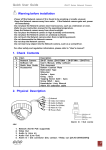
2. Physical Description
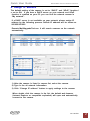
Alarm In / Out connector
1.
2.
3.
4.
Network (RJ-45 PoE supported)
Audio In (Line in)
Audio Out (Line Out)
Alarm In / Out connector
(Dry contact / Relay out [0.5A:AC125V/1A:DC30V])
5. Power (DC12V / AC24V)
6. Video output for service monitor
7. Status LED
8. Control Button
3. Making Connection
1. If you have external devices such as sensor or alarms, make connection from
connectors.
2. Connect Ethernet cable to make connection to the network hub.
3. Connect power cable to the camera.
When you use PoE function, you don’t need to connect power.
Ver1.20 EN
2