1
WARRANTY: the manufacturer warrants
this product to be free from any construction
defects for one year from the date of purchase. During that period any malfunctioning
units will be repaired, serviced and calibrated
with0ut customer covering the appropriate
transit fees · warranty does not cover any
problems resulting from the incorrect installation or power supplied, abusive treatment or
any other obvious user-inflicted fault · we are
still happy to help after the warranty period,
however we reserve the right to charge for
labor, replacement parts and transit where applicable · IN CASE OF ANY PROBLEM PLEASE CONTACT
US IMMEDIATELY: [email protected].
EUROPEAN UNION: SCHNEIDERS LADEN, ESCAPE
FROM NOISE, POST MODULAR, LONDON MODULAR,
FUNKY JUNK, MODULAR SQUARE, NOISE KITCHEN,
KNOB SHOP, ANALOGUE ZONE, HIEBER LINDBERG,
MODE.M MODULAR, ERROR INSTRUMENTS. UNITED
STATES: ANALOGUE HAVEN, MUFF WIGGLER STORE,
CONTROL MODULAR, IO MUSIC TECHNOLOGY, PERFECT
CIRCUIT AUDIO. AUSTRALIA: EQUINOXOZ MUSIC
SOLUTIONS, RHYTHM ACTIVE. ASIA: CLOCK FACE
MODULAR · ASIA MODULAR.
RADA
WZAJEMNEJ POMOCY
GOSPODARCZEJ
XAOCDEVICES.COM
AKOUT
E
R
B
I
BATUM ER MODULE
EXPANDOF 1974
MODEL
1
2
SALUT
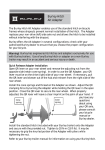
Poti is a simple but very useful breakout expander for the
Batumi quadruple LFO module by Xaoc Devices.
Its panel provides an immediate access to the Batumi
functions originally selected by the cluster of jumpers on
the back of the module:
MINI USB
CONNECTOR
[RTFM]
WAVEFORM SELECTION
• reset/sync mode option
• selection of the assignable waveform (asgn)
TAP TEMPO MODE
UPDATE
–12V
3
SAW UP
SAW DOWN
TRIANGLE
INSTALLATION
1. Please find the cluster of jumper pins 1 on the back
of Batumi. Remove all the jumpers.
SYNC
TRAPEZOID
+12V
POWER
CONNECTOR
2. Plug the Poti ribbon connector 2 to the jumper pins in
such a way that the red stripe points down.
Connecting the cable in a wrong way will not cause any
damage, but of course the switches will not be operating
as intended. Do not plug the power connector instead
of the Poti cable!
4
The upper switch 3 selects between the reset and taptempo function of the reset/sync inputs on the panel.
The combination of the two switches 4 below selects the
waveform delivered to the saw/asgn outputs, according
to the markings printed on the Poti panel.
For more information on the reset/sync and saw/asgn
modes, please refer to the Batumi manual.
BATUMI
1974 QUAD LOW FREQUENCY OSCILLATOR
REV. 09–2014
Operation