1
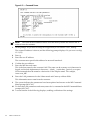
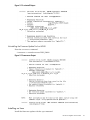
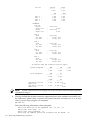
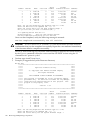
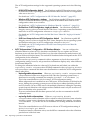
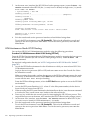
Are you sure that you want to continue(Y/N): y
**** Updating device SFW 0A ****
Erasing Flash(es).
This may take several minutes.
DFW has completed successfully for all entities
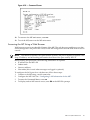
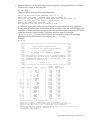
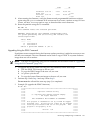
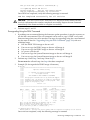
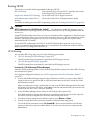
Once DFW has completed, verify the following message is returned:
DFW has completed successfully for all entities
CAUTION: DO NOT RESET or AC POWER CYCLE the cell or server unless you have
received confirmation that DFW has completed successfully. Repeat the DFW command
immediately if the firmware failed to complete successfully.
6.
Perform steps 11 and 12.
Downgrading Using the DFW Command
1.
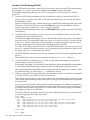
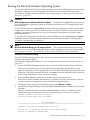
If problems are encountered during the firmware update procedure, it may be necessary to
use the MP DFW command. The DFW command can be used to copy a PDHC or a System
firmware image from one cell to another. The steps for upgrading using the DFW command
are the same as listed in “Upgrading Using the DFW Command” (page 139) with two
additional steps:
1. OSP the PDHC FPGA image to the new cell.
2. Use DFW to copy the PDHC image to the new cell image A.
3. Use DFW to copy the PDHC image to the new cell image B.
4. AC power cycle the cell.
5. Use DFW to copy the System Firmware image to the new cell image A.
6. Use DFW to copy the System Firmware image to the new cell image B.
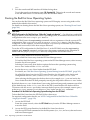
2.
Perform step 1 from Step 1 and step 2 from Step 2.
Do not reset the cell until step 4 on Step 4 has been completed.
3.
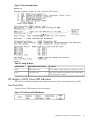
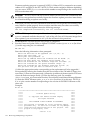
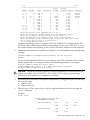
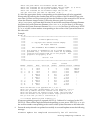
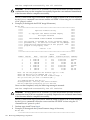
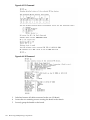
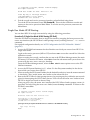
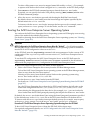
Example (To downgrade the PDHC image A firmware)
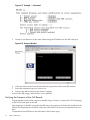
MP:CM> dfw
*********************************************************************
*****
*****
*****
Duplicate Firmware Utility
*****
*****
*****
*****
(C) Copyright 2001 Hewlett-Packard Company
*****
*****
All Rights Reserved
*****
*****
*****
*****
THIS PROGRAM IS NOT LICENSED TO CUSTOMERS
*****
*****
*****
***** This program is intended for use by trained HP support
*****
***** personnel only. HP shall not be liable for any damages *****
***** resulting from unauthorized use of this program. This
*****
***** program is the property of HP.
*****
*****
*****
*****
Version 1.04
*****
*****
*****
*********************************************************************
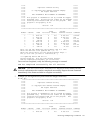
Flash
Current
Number Cabinet
Name
Partition Handle
Firmware Version Comments
------ --------- -------- --------- -------- ------------------ -------1
0
PDHC 0A
0
256
A.003.034
Current
2
0
PDHC 0B
0
264
A.003.034
Old
3
0
SFW 0A
0
320
22.002
Pri PA
4
0
SFW 0B
0
328
22.002
Sec PA
5
0
PDHC 1A
0
257
A.003.023
Current
6
0
PDHC 1B
0
265
A.003.023
Old
7
0
SFW 1A
0
321
21.001
Pri PA
8
0
SFW 1B
0
329
21.001
Sec PA
Note: You can only duplicate one firmware type at a time.
Enter the Entities to be updated (EX: 7,8) : 1
Enter the source entity for the PDHC firmware image: 5
Are you sure that you want to continue(Y/N): y
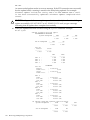
**** Updating device PDHC 0A ****
Erasing Flash(es). This may take several minutes.DFW has completed successfully for all entities
Once DFW has completed, verify the following message is returned:
Removing and Replacing a Cell Board
141