1
Troubleshooting
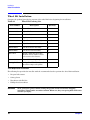
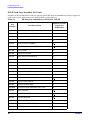
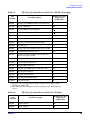
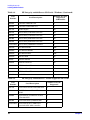
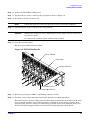
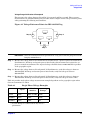
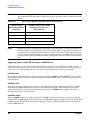
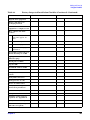
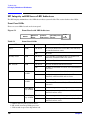
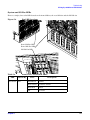
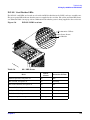
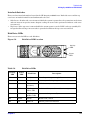
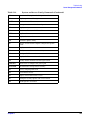
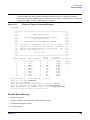
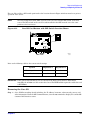
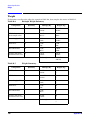
HP Integrity rx8620 Server LED Indicators
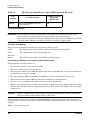
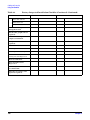
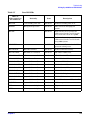
Table 5-7
LED (as
silk-screened on
the bulkhead)
Core I/O LEDs
Driven by
State
Description
MP PWR
3.3 V standby power rail
On Green
Indicates standby power is on.
ACTIVE
Management processor
On Green
This core I/O is managing the
system.
On Green
Both switches are in position F1
(silk-screened on the core I/O board)
for systems other than the rp8400.
Off
Both switches are in position F0
(silk-screened on the core I/O board)
for rp8400 systems.
On Yellow
Core I/O not fully seated or the MP
processor is being reset.
MP SEL
MP FAULT
MP LAN ACT
MP LAN controller
On Green
Indicates MP LAN activity.
MP LAN 10 BT
MP firmware controlled
On Green
MP LAN in 10 BT mode
MP LAN 100 BT
MP firmware controlled
On Green
MP LAN in 100 BT mode
MP LAN LINK
MP LAN controller
On Green
MP LAN link is OK
SYS LAN ACT
System LAN controller
On Green
Indicates SYS LAN activity
SYS LAN 10 BT
System LAN controller
On Green
SYS LAN in 10 BT mode
SYS LAN 100 BT
System LAN controller
On Green
SYS LAN in 100 BT mode
SYS LAN 1Gb
System LAN controller
On Green
SYS LAN in 1Gb mode
SYS LAN FDUP
System LAN controller
On Green
SYS LAN full duplex activity
SYS LAN LINK
System LAN controller
On Green
SYS LAN link is ok
SCSI LVD
System SCSI controller
On Green
SCSI LVD mode (on = LVD, off = SE)
SCSI TRM
System SCSI controller
On Green
SCSI termpower is on
PWR
LBA on system backplane
On Green
I/O power on
ATTN
LBA on system backplane
On Yellow
PCI attention
Chapter 5
115