1
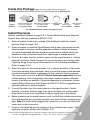
Inside this Package Note: Kits may contain different accessories
To purchase Expansion Kits call Wilson Electronics Sales Department at: 800-501-3153
Signal
Booster
Wide Band Directional
Antenna 75’ LMR400
Cable (314411-40075)
AC/DC
Lightning Surge
Wide Band Panel Antenna 2’ LMR400 Cable
Power Supply
(952302)
Protector
60’ LMR400 Cable
12V/3A (859900)
(859902)
(311135-40060)
For additional antenna options see pages 14 & 15.
Install Overview
Refer to Installation Diagram on page 3 & 4. Contact Wilson Electronics Technical
Support Team with any questions at 800-501-3153.
1. Select a location on the roof or outside of the building to install the outside
antenna. Refer to pages 3 & 5.
2. Select a location to install the Signal Booster that is away from excessive heat,
direct sunlight or moisture, and has adequate ventilation. Airtight enclosures
are not recommended. Booster should be as close to the outside antenna as
possible in order to minimize losses from cable length to outside antenna.
3. Connect the cable from the outside antenna to the signal booster’s “outside
antenna” connector. Refer to page 6 for more information on running cable.
Lightning Surge Protection is recommended for all in-building installations.
Refer to pages 3 & 6.
4. Select a location for the inside antenna. Try to choose a position in the center
of the area needing improved signal. Keep in mind that proper inside antenna
to outside antenna isolation is necessary for the system to function properly.
This may require as much as 50 to 75 feet of horizontal separation from the
outside antenna. Vertical separation also helps increase isolation. Alternate
means of isolation are possible. If physical separation is not possible, please
contact Wilson Electronics Tech Support at 800-501-3153 for suggestions on
alternate methods to achieve isolation.
5. Connect the cable from the inside antenna to the signal booster’s “inside
antenna” connector. Refer to page 6 for more information on running cable.
Keep cable runs as short as possible to reduce signal loss in the system.
6. Before powering up the signal booster, verify that both the outside antenna and
the inside antenna are connected correctly, and check that all connections are
tight. Note: Be careful when plugging the connectors in so as not to bend the
center pins on the connectors.
7. Power on the signal booster by plugging in the included power supply. If the
lights are not green, please refer to pages 10-11.
Contact CellPhoneSignalBooster.us Customer Support Team with any questions at 800-501-3153
or email: [email protected] Mon.- Fri. Hours: 7 am to 6 pm MST.
2