1
Page 11 of 15
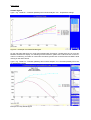
This is the maximum flexibility you can get. Please be aware you first have to choose whether you
want to show the emission pathways per sector, per gas, per region or per scenario (at the bottom of
the figure).
If you choose to show the figure by region, all contributions will be shown per region. However, if you
choose to select the gases CH4 and CO2 at the same time, these will be shown together as a sum, instead of separated. So if you want to show the gases separately, you have to choose to show the figure by gases, instead of by regions (option buttons below the figure).
Another flexibility in this figure is to show the emission pathways “relative to 1990” and “relative to
2000”, where in this figure the user chose “absolute values”.
5.2
Create tables
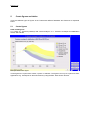
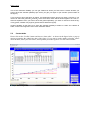
Please click on the “Toolkit” button and choose “show table”. As shown in the figure below, a pop-up
appears presenting the underlying data of the figure. If you want to make another selection, please
close the table, select your new choice, and repeat the procedure again to view the renewed table.
Example of creating a table.