1
MAINTENANCE AND USE MANUAL
EN
To prevent accidents always observe the instructions in this manual. Should
you have any doubts at all please contact the Manufacturer or your Authorised
Servicing Centre.
Equipment safety devices/guards must never be removed except for repair and
maintenance purposes.
Such items must be replaced as soon as the situation which led to their removal
no longer exists and in any case before the equipment is used again.
DATA PROGRAMMING
7.3
1.
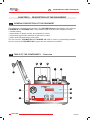
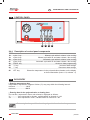
The polymerization unit is OFF, as shown on the display (10).
2.
Press PROG. (22):
• “Pro 01” appears on the display (10) to inform the user that data will now be entered for
program 01.
3.
Press PROG. (22) again:
• the “C” symbol appears on the display (10) to indicate temperature in degrees Celsius.
4.
Set the desired temperature by pressing:
• the “+” key (23) to increase the value of the data item on the display (10) or the “-” key
(24) to reduce it.
5.
Press PROG. (22) again:
• the symbols “t” and “H”, indicating the time in minutes hours respectively, appear on the
display (10).
To switch from the minute setting to the hour setting press the LET key (25).
The time parameter must be set during data programming.
6.
Set the desired polymerization time by pressing “+” (23) or “-” (24) to increase or decrease
the values shown on the display (10).
7.
Press PROG. (22) again:
• the word OFF appears on the display (10).
At this point all the Program 01 data has been entered.
8.
To insert the data for program 02 proceed as follows:
• press PROG. (22). The legend “Pro 01” appears on the display (10), indicating program
01 in which the data has already been entered.
9.
Press the “+” key (23): “Pro 02” now appears on the display (10), indicating that the user
can now start entering programming data for program 02.
10. Repeat the above procedure as describe din points 3, 4, 5, 6 and 7.
To complete the remaining eight programs proceed as per Program 02.
polimer
143 of 200