1
Ambient Light Sensor Set-up and Operation
To turn the sensor on, follow these steps:
1. Go to the Setups screen in Swimming
2. Select “Hardware” on the left pane
3. Press “0” to set the intensity
4. Select “2” as the intensity value
5. Press “Save Settings” if you want the ambient light sensor turned on each time
you enter swimming.
The board will now begin to control the intensity automatically based on the intensity of
the light hitting the board.
To turn the sensor off, follow steps above, 1-4 selecting anything above a 2 for the
intensity value and press “Save Settings” if you do not want the ambient light sensor on
each time you enter swimming.
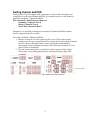
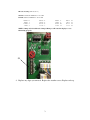
There are multiple sensors to compensate for shadows across the board. The number of
sensors will vary depending on the size of board.
The top sensor is to the right of lane 1, and controls lanes 1, 2, 3 and Event/Heat.
The sensor next to lane 4 controls lanes 4, 5, 6
The sensor next to lane 7 controls lanes 7, 8, 9
The sensor next to lane 10 controls lanes 10, 11, 12
5