1
With the unit properly recognized and liste in the NKHM main screen, we can perform a quick “Stress Test”
which can confirm the communication with the unit. Please follow the steps below:
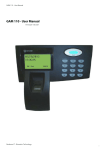
1 – Identify the device in the list. This can be done checking the product number in the external label tag in
the GAM 110 enclosure; (fig. 36). Figure 37 shows the correspondent number in the NKHM devices list.
Fig. 36 – If too many devices are present in the list, the data on the back
of GAM 110 can help. Take a note of the final digits on the “Product No”
information. The number...
2 - Double click the product designation in the list. If you prefer, maintain the selection and click on “Tests”
Fig. 37 – ...must match with the one in the “Product” column in the NKHM devices list. Double click on the indication.
button. The action also can be done pressing the Ctrl + T shortcut keys. This will invoke the screen shown in
the figure 38.
3 - Open the “Information” tab.
Fig. 38 – The “Hardware tests” screen
can be invoked by a double click on the
device name, by “Ctrl + T” shortcut keys
or by the “Tests...” button in the NKHM
main screen.
30