1
Problems & Troubleshooting:
Problems
The charge LED indicator doesn’t light in
green when sunlight gets the PV panel.
The charge LED indicator flash quickly .
The load LED indicator light but there is no
power output.
The load LED indicator flash quickly and
there is no power output .
The load LED indicator light slowly and
there is no power output.
System state LED indicator flash in red
color and there is no power output.
Troubleshooting
Check if the cable of solar panel connects properly.
Check output circuit .If the load short or over load
occurs, remove the load and push the button and the
controller will resume its work after 30 minutes.
Overload occurs, remove some loads and push the
button again and the controller will resume its work
after 30 minutes.
Over discharge of the battery. The controller will
resume its work after finishing charge of the
battery.
Specifications:
Type
JN5I
JN10I
JN15I
JN20I
Rated charge current
5A
10A
15A
20A
Rated load current
5A
10A
15A
20A
Work voltage
Over load, short circuit
protection
□12v; □12/24V Auto
1.25 rated load current 60sec, 1.5 rated loads current 5sec, over load protection action.
≥3 Rated load current short circuit protection action.
No load current
Charging circuit voltage
drop
Load circuit voltage drop
≤6mA
≤0.26 V
≤0.15 V
Over voltage protection
Work temperature
17V; ×2/24V
-
Industry stage: 35℃ to +55℃;
Boost charge voltage
14.6V;×2/24V; (keep 10min)
Direct charge voltage
14.4V; ×2/24V; (keep 10min)
Float charge voltage
13.6V; ×2/24V;
charge return voltage
13.2v;×2/24V;
Temperature compensation
Lower voltage indicate
Over discharge voltage
Over
discharge
return
voltage
Control mode
SOLAR POWER CONTROLLER
System over voltage or open circuit of the battery.
check if the battery connects to the system cable
properly or the charging circuit damaged.
Check if the load connects to the system properly.
-5mv/℃/cell (Boost charge, Direct charge, Float charge, charge return voltage);
12.0V; ×2/24V;
USER MANUAL
Characteristics:
Control circuit: use MCU and professional software as the control center to fulfill intelligent
system control.
Charging mode: use PWM high efficiency charging way. Boost, recovery and float charging auto
work for battery long-life. Use temperature compensation.
High accuracy over discharging control by the discharging rate: Over-discharging control
voltage modified by the battery discharging rate curve.
Self protection: protection to overload, outside and inside short circuit, reverse connection,
thunder and lightning, PV panel reverse current, over charging and discharging etc. during the
short circuit and overload protection, no any component will be damaged and need change, include
fuse.
LED indication on system condition: LED indicating the system of charging, overcharge, power
full, power low, over-discharge, over load, out short circuit, load on/off, etc.
Industry level production standard: wide temperature running area -35℃ to +50℃
No adjustable hardware part: use flash memory to save all work control point instead of
adjustable resistance, to protect the control work point from going off as the adjustable resistance
value is easily changed by temperature and vibration, in order to make sure the control accuracy
and reliability.
Operation: easy to operate, robust in design.
Two output modes: direct current output mode and 1HZ output mode. The1HZ output
mode is very suitable for traffic caution light.
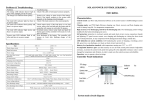
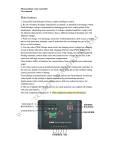
Controller Panel Indications
PV charge
Work mode
LED(1)
Digit set key
11.1V(no load)- real-time modified voltage by the discharge rate; ×2/24V;
12.6V; ×2/24V
PWM charge mode; modified discharge voltage by the discharge rate
System state
ON/OFF
LED(2)
Button
Short circuit
LED(3)
+-+-+-
PV Bat
Page 2 of 4
Load
Page 3 of 4
System main circuit diagram
System state LED will get in red color, and turns off the output at the same time, until the battery
voltage recovers to over discharge return voltage, the system will work again automatically.
Load indication: the load LED lights when the load works. If the load current is 1.25 times higher
for 60 seconds or 1.5 times higher for 5 seconds than rated current of the controller, the trouble
LED flash slowly in red to show overload happened, and the controller will shut down output.
When load short circuit happens, the trouble LED will flash quickly, then the controller will shut
down its output. When it happens, please check if the load is properly connected. Disconnect the
load at fault and press the button, it will resume its work in 30 seconds or in another day.
Load switching operation: the controller power output is open after the default load, under
133.5
Installation:
a. fix the controller in a certain place .
size of the installing hole :
normal circumstances, every time you press the button, load the output that is a switch to change
state. When the load output is open, the load indicator(4) Always; When the load is off, the load
indicator(4) often destroyed; when the load overload fault indictor light(3) Slow blinking, when
70
the load short-circuit, the fault set indicator(3)flash. Overload or short circuit load controller will
shut down output. The first occurrence of the load short-circuit output resumes automatically after
Size: 140 ×90.5(mm)
30 seconds if not discharged only manually restore output short-circuit fault. If reset overload,
Length between installing holes:133.5×70(mm)
b. Prepare wire. Choose the plastic Copper wire. Current density no more than 4A/mm2. Cut the
short circuit protection, load short circuit or discharge overload failure, according to a key, which
suitable length of wire and make it as shout as possible. Peel off 5mm the plastic at the end of
returned to normal output.
wire.
Forced to return control over release: release occurred after the battery voltage rises to put the
c. Connect the wire to the battery port on the controller to the battery. Pay attention to the +, - pole
of the connection. If the pole is reverse, it does not work. It has the function of self protection, and
there is no any part will be damaged during this step, but should correct this mistake.
d. Connect the wire to the PV port on the controller to PV panel. If the connection is correct and
the PV panel gets the sunlight, charging indicator will be light.
e. Connect the load to the load port on the controller. Attention the +, - pole should be correct.
!! Attention: during the installation, if the voltage of the system is 24V, you can not use the
hands to touch any conductor in the system circuit in order to protect from electric shock.
return value over 13.1V(12V system), the load automatically restore power. However, after the
release occurred, the battery voltage rises to over-discharge return value 12.5V(12V system) above,
of the time press button switch, you can restore the load power by force, to protect emergency user,
pay attention to the more than just voltage 12.5V(12 system) works.
Using:
Charge & overpressure indication:If the system is properly connected ,when sunlight shines on
the PV panel ,the charge LED lights in green,indicating the system is working in a good order.
PWM mode is applied in charging. During the charging, if over discharge has happened, firstly the
voltage for charging battery will be up to boost voltage and keep 10 mins, then returns to direct
voltage and keep 10 mins to activate battery, lastly to float voltage and keep this state for the best
state of battery. These process is benefit to battery full charging and its life -span.
Battery state: when the battery voltage is in normal condition, the state LED lights in green; state
LED flashes slowly in green when battery finishes its charge; When the voltage of the battery is
lower, it will get in yellow color. When the voltage goes down continuously to over discharge, the
Page 2 of 4
Page 3 of 4