1
AJA HD10AVA Converter
Introduction
The HD10AVA is a miniature, high-quality, audio/video, HD/SD A/D converter.
The HD10AVA automatically detects the video input format and embeds the
audio inputs in the SDI/HD-SDI outputs. The HD10AVA is useful for adding an
SDI/HD-SDI audio/video output to tape decks or any professional video
equipment with analog outputs. The HD10AVA is especially useful for adding
HD-SDI outputs to most HDV cameras or decks by using the component
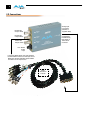
outputs of such devices. The HD10AVA uses a breakout cable for audio/video
inputs and provides 3 SDI-HD-SDI on BNCs.
Features
1
• High-Quality SD/HD Audio/Video A/D Converter
• SD Component, Composite or Y/C Video Input
• HD Analog Component Video Input
• Four Channel Balanced Analog Audio Input
• 3 SDI/HD-SDI w/embedded Audio Outputs
• 12 Bit Video, 24 Bit Audio A/Ds
• Automatic Multi-Standard
• External Dip Switch Configuration
• LOCK LED indicates type of input source (SD-Green or HD-Red)
• 5-18V Power
Video
SD Input Modes Supported
• 525i 29.97 and 625i 25
HD Input Modes Supported
• 1080p component 23.98psf/24psf
• 1080i component 50/59.94/60
• 720p component 50/59.94/60
Audio
The HD10AVA supports 4 analog audio input channels (2 stereo pairs) at 48
KHz. These inputs are connected via a supplied cable that attaches to a Dconnector on the converter. Connections are made via high quality XLRs.
Block Diagram
Embedder
Control
Audio in1
Audio ADC
Channel 1&2
Audio in2
Audio
Process
Audio in3
Audio ADC
Audio in4
Channel 3&4
Analog
Input Connectors
Composite,
S-Video,
Component
Video ADC
Dejitter
Embed
Audio
Serializer
Line
Drivers
SDI_out1
SDI_out2
HD10AVA, Block Diagram
SDI_out3
3