1
PRECAUTIONS
Never expose this device to rain, moisture, smoke, dusty, or extreme hot
and cold environments.
Clean the exterior with a soft dry cloth. Do not use abrasive cleaners that
may harm the surface and finish of the unit.
Never use hard or sharp objects on the touch pad, as this may damage
the component. For normal operation, use only the pad of your finger.
POWER
A 9V DC universal power supply is provided, and can be used in any
country by selecting the correct AC outlet pin type for your country.
Never use AC output power supplies to power the Zillion!
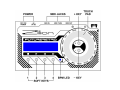
Insert the power supply into the wall outlet. Connect the DC output plug
to the power jack located on the back panel of the Zillion.
Slide the power switch to the ON position to turn the unit on. Slide the
power switch to the OFF position to turn the unit off.