1
Introduction
The PICO ADC-16 is a self contained high accuracy data logger for use with PCs and compatibles. It is connected
to the RS232 serial port, requiring no external power, and taking up no expansion slots.
You should have the following items supplied with the package:
• ADC16 high resolution serial port logger
• Serial cable
• Diskettes or CD containing the software
• Installation manual
Connecting to a PC
To use the ADC-16 you should connect the 9-pin connector on the ADC-16 to a spare serial port on your computer using the cable
provided. If you have a 25-way serial port, use the 9 to 25 way adapter supplied.
To check that the unit is working:
1. start up PicoLog for Windows
2. Select File
3. Select New Settings
4. At the Recording dialog, press OK
5. At the Sampling dialog, press OK
6. Set the converter type to ADC-16
7. Select the COM port that you have connected the to ADC-16
8. Press OK
9. At the ADC-16 channels dialog, double-click on CH1 Unused
10. At the Edit ADC-16 channel dialog press OK
11. Back to the ADC-16 channels dialog, press OK
12. The recorder view should now display the voltage on channel 1 (near 0mV if nothing connected)
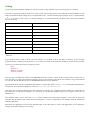
13. Next connect a suitable voltage (eg from a 1.5V battery to the channel). Pin connections are marked on the ADC-16 and also
listed here.
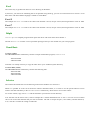
Specification
Resolution
Sampling rate
Inputs
Reference output
Linearity
Input range
Overvoltage protection
Input impedance :
Operating temperature range :
Temperature coefficient :
Input connector :
Output connector :
between 8 and 16 bits plus sign
(software programmable)
See Conversion times
8 Single ended or 4 differential
1 (5V)
0.003% (Max)
+-2.5V
+-30V
1M Ohm
0 to 70oC
33ppm/oC
25 Way female D type
9 Way female D type to PC serial port