1
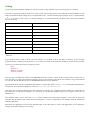
The following table specifies the function of each of the routines in the driver:
Routine
Function
adc16_open_unit
adc16_close_unit
adc16_set_channel
Open the driver to use a specified serial
port(s)
Close the port (ALWAYS DO THIS!)
adc16_get_filtered_value
Specify the resolution, singleended/differential and filterning for a channel
Get the most recent adc reading from a
channel
Get the filtered ADC value for this channel
adc16_get_version
Get the ADC-16 version number
adc16_get_value
adc16_open_unit
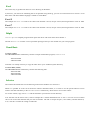
DOS version:
short int adc16_open_unit (short int port, short int base, short int irq);
Windows version:
short int adc16_open_unit (short int port);
This routine specifies the serial port number with an ADC-16 unit. If you wish to use more than one ADC-16, you should
call the routine once for each ADC-16.
The port must be 1 for COM1, 2 for COM2, etc.
Under DOS, this routine has extra parameters to specify the base address an interrupt number for the COM port. For
COM1 through COM4, these can be set to zero for the default base address and IRQ. It is only necessary to use a nonzero value for these parameters if:
you are using COM ports above COM4
you are using COM1..COM4 with a non-standard base address or IRQ.
Under Windows, this information is defined in your WIN.INI file, so it is not necessary to specify a value.
This routine returns TRUE if the driver successfully opens the ADC-16.
adc16_close_unit
void adc16_close_unit (unsigned short int port);
This routine disconnects the driver from the specified serial port.
If you successfully open any serial ports, you MUST call adc16_close _unit for each port before you exit from your
program. If you do not, your computer may misbehave until you next reboot it.