1
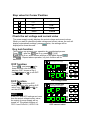
Key sound (BEEP)
ITECH
Press C to enter the BEEP setting
Interface after finished the OCP setting,
select the ON/OFF state with the knob
.
ON indicates there is key sound,
OFF means no.
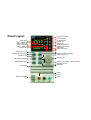
IT6721 60V/8A/180W
Auto Range DC Power Supply
V
A
B
C
D
A
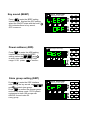
Power address (ADD)
ITECH
CV
CC
OVP
OCP
Lock
Prog
OFF
Shift
CV
CC
OVP
OCP
Lock
Prog
OFF
Shift
CV
CC
OVP
OCP
Lock
Prog
OFF
Shift
IT6721 60V/8A/180W
Auto Range DC Power Supply
C
Press
to enter the ADD setting
interface after finishing the BEEP
B
setting, select the A
and
to enter store address setting. ADD
range: 0~30,press C to confirm。
V
A
C
B
D
A
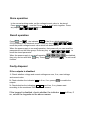
Store group setting (GRP)
Press C
to enter the GRP interface
B
after setting the key sound, use A
and
to select store group.
C
Press
to confirm the chosen group
and end the setup mode. IT6721 allows
customers to store 100 groups with
A/B/C/D four set value for
every group.
ITECH
IT6721 60V/8A/180W
Auto Range DC Power Supply
V
A
B
C
D
A