1
4
CONTROL BOARD OPERATION
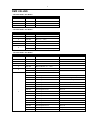
Press the Menu until one of the following displayed:
Display
Function
1.DMX Address
To set DMX
address
To set DMX channel modes:
2.DMX Channel
4x4 Model - CH 04, CH 06, CH 09, CH64
4x1 Models - CH 04, CH 06, CH 09, CH16
3.Dimmer Curve
To set dimmer speeds: 01, 02, 03, 04
4.Sound
To set sound active mode and the sensitivity (Speed 000 ~ Speed 100)
Mode
5.Static Color
To set static colors: Static Color R, G, B, GB, RG, RB, RGB
6.Manual Color
To set user mode intensity of R, G, B separately for color mixing and strobe rate
7.Auto Program
To set built-in automatic programs: Pr 01 ~ Pr 10 and speeds 000 ~100
8.Master/Slave
To set Master/Slave modes
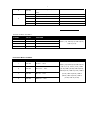
Use Up and Down button to select your desired operation, then press Enter to confirm.
DMX Addressing:
After select the "DMX Address" and press Enter, then use Up and Down to set the desired DMX address
(001~512), press "Enter" again to confirm.
DMX Modes
After select the "DMX Channel" and press Enter, then use Up and Down to set the desired DMX mode
(4x4 Model - CH 04, CH 06, CH 09, CH64
4x1 Model - CH 04, CH 06, CH 09, CH16
, press "Enter" again to confirm.
Dimmer Speed Setting:
After select the "Dimmer Curve" and press Enter, then use Up and Down to set the desired dimmer speed
(01, 02, 03, 04), press "Enter" again to confirm.
Sound Mode
Entered "Sound mode", use <UP> and <DOWN> to set the sensitivity Sen 000 ~ Sen 100, press Enter to confirm.
User Mode
This mode allows the user set intensity of R, G, B separately to get endless color mixing from the control
board without DMX controller to set the device to run strobe desired.
Entered user mode "Manual color", use <UP> and <DOWN> to select the “R / G / B" for Colors intensity or "S" for strobe.
Use <UP> and <DOWN> to set the colors intensity values " 0 ~ 255" or Strobe speed values "000 ~ 100"
(Freeze, Slow ~ Fast), then press "Enter" to confirm.