1
Removing the Heatsink
5.
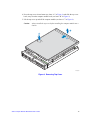
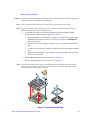
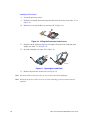
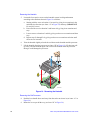
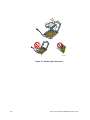
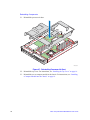
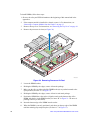
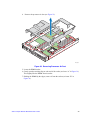
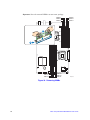
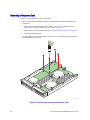
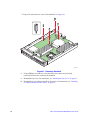
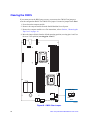
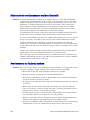
Loosen the four captive screws on the heatsink corners in a diagonal manner
according to the numbers shown in Figure 19 as follows:
a. Starting with the screw at location 1, loosen it by giving it two rotations in the
anticlockwise direction (see letter “A” in Figure 19) and stop. (IMPORTANT:
Do not fully loosen.)
b. Proceed to the screw at location 2 and loosen it by giving it two rotations and
stop.
c. Loosen screws at locations 3 and 4 by giving each screw two rotations and then
stop.
d. Repeat steps 5a through 5c by giving each screw two rotations each time until
all screws are loosened.
6.
Twist the heatsink slightly to break the seal between the heatsink and the processor.
7.
Lift the heatsink from the processor (see letter “B” in Figure 19). If it does not pull
up easily, twist the heatsink again. Do not force the heatsink from the processor.
Doing so could damage the processor.
B
3
A
w
lo
rF
Ai
2
1
4
TIM
AF003123
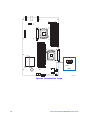
Figure 19. Removing the Heatsink
Removing the Old Processor
26
8.
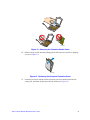
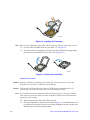
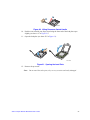
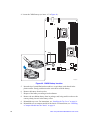
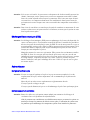
Push the lever handle down and away from the socket to release it (see letter “A” in
Figure 20).
9.
Rotate the lever open all the way (see letter “B” in Figure 20).
Intel® Compute Module MFS5520VI User Guide