1
✎✎ NOTE
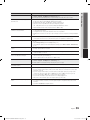
xx All deleted channels will be shown on the All
Channels menu.
xx A gray-colored channel indicates the channel
has been deleted.
xx The Add menu only appears for deleted
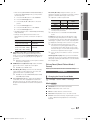
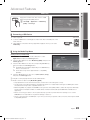
■■ Information: Display a show you have reserved
to watch. (You can also change the reservation
Information.)
✎✎ Alternatively, you can view Information by
highlighting a program and pressing the ENTER
E button
■■ Select All / Deselect All: Select or deselect all reserved
programs.
03 Basic Features
■■ Add / Delete: Delete or add a channel to display the
channels you want.
channels.
xx Delete a channel from the Added Channels or
Favorite menu in the same manner.
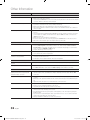
■■ Timer Viewing: You can set a desired channel to be
displayed automatically at the reserved time. Set the
current time first to use this function.
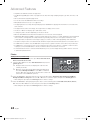
1. Press the ◄ / ► / ▲ / ▼ buttons to select the
desired channel in Channel List.
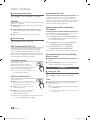
Fine Tune
(analog channels only)
If the reception is clear, you do not have to fine tune the
channel, as this is done automatically during the search and
store operation. If the signal is weak or distorted, fine tune
the channel manually. Scroll to the left or right until the image
is clear.
2. Press the TOOLS button, then select Timer
Viewing.
✎✎Settings are applied to the channel you’re currently
3. Scroll up or down to adjust the settings in the box,
or use the numeric buttons on your remote to enter
the date and time.
✎✎Fine tuned channels that have been saved are marked
✎✎ If you selected Once, Everyday, Every Week,
Mon~Fri, Mon~Tue, Wed~Thu, or Sat~Sun in
Repeat, you can enter the date you want.
4. Select OK, then press the ENTERE button when
done.
✎✎ NOTE
watching.
with an asterisk “*” on the right-hand side of the
channel number in the channel banner.
✎✎To reset the fine-tuning, select Reset.
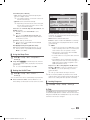
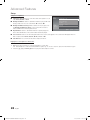
Picture Menu
¦¦ Changing the Preset Picture Mode
xx Only memorized channels can be reserved.
xx Reserved programs will be displayed in the
OO MENUm → Picture → Mode → ENTERE
xx When a digital channel is selected, press the ►
Mode t
Programmed menu.
button to view the digital program.
■■ Select All: Select all the channels in the channel list.
■■ Deselect All: Deselect all the selected channels.
✎✎ You can only select Deselect All when one or
more channels are selected.
■■ Auto Program: Scans for a channel automatically and
stores in the TV. (P.14)
Programmed
(in Channel List)
You can view, modify or delete a show you have reserved
to watch. Programmed timer viewing is displayed here.
Highlight a program and press the TOOLS button to display
Options.
■■ Change Info: Change a show you have reserved to
watch. Begin with step 3 of “Timer Viewing,” above.
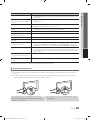
Select your preferred picture type.
■■ Dynamic: Suitable for a bright room.
■■ Standard: Suitable for a normal environment.
■■ Movie: Suitable for watching movies in a dark room.
¦¦ Adjusting Picture Settings
OO MENUm → Picture → ENTERE
Cell Light / Contrast / Brightness /
Sharpness / Color / Tint (G/R)
Your television has several setting options for picture quality
control.
■■ Cancel Schedules: Cancel a show you have reserved
to watch.
✎✎ This deletes the highlighted or selected
program(s).
English
[PD530-ZA]BN68-03689A-01Eng.indb 15
15
2011-06-30 오후 1:19:02