1
Section 3 Server Configuration
3.2.1 Generate an Isco Flowlink
Configuration File
After completing the preceding steps, generate the file
that Flowlink Pro users will need to open the database.
This encrypted file contains the connection properties for
all databases in the List of Server Databases. To generate
the file:
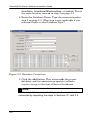
1. Click the Generate File button.
2. Browse for the destination folder. Preferably, you
should save this configuration file in a folder that all
Flowlink Pro users can view. Flowlink Pro users can
then reference this common file when opening the
database. You may also save this file locally and
distribute copies as needed.
3. Select a folder and click the OK button. Flowlink
Server saves a file named FLDBConn.cfg in the selected
folder.
Flowlink Pro users select this file when using Flowlink
Pro’s Database>Open… command. Refer to Section 4 of this
guide and Flowlink Pro’s Help for more information on
opening a server database.
3.3 IP Listener
Configure the IP Listener feature when using the “pushed
data” feature of any Isco modem. The IP Listener bridges
the connection from the modem to a selected server
database.
New Flowlink Server installations will not have any
listeners installed. To configure an IP Listener:
1. Create a database (Section 3.1) and configure a
Database Connection (Section 3.2).
3-5