1
FX-PCS/WIN-E Software Manual
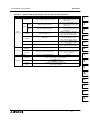
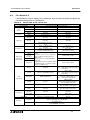
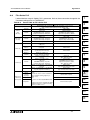
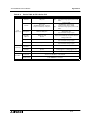
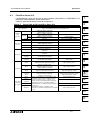
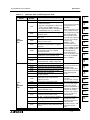
B-3:
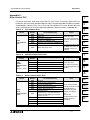
Appendix B:
Applied Instruction Table
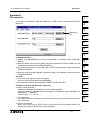
Note
Some instructions is supported differently by CPU version of an PLC.
For further information about instruction of the FX0, FX0S, FX0N, FX and FX2C Series PLC
can be found in FX Programming Manual (Manual number: JY992D48301), about the FX1S,
FX1N, FX2N and FX2NC Series PLC can be found in FX Programming Manual II (Manual
number: JY992D88101).
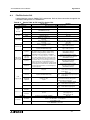
✔:
Supports from first product
✔(❐.❐):
The instruction is supported from “(❐.❐)” or later. “(❐.❐)” is CPU version of
PLC on the Table A-3.
✗(❐.❐):
The instruction is not supported from “(❐.❐)" or later. “(❐.❐)” is CPU version of
PLC on the Table A-3.
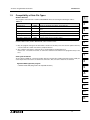
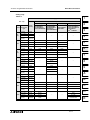
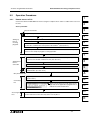
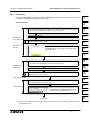
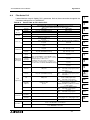
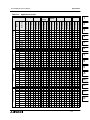
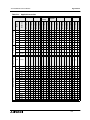
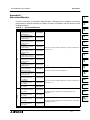
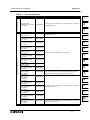
Applied Instructions
Move And Compare
16bit Operation
Pulse Operation
16bit Operation
✔
✔
✔
✔
✔
✔
✔
✔
✔
✔
✔
✔
✔
✔
✔
✔
✔
✔
✔
✔
✔
✔
✔
✔
✔
✔
✔
✔
✔
✔
✔
✔
✔
✔
✔
32bit Operation
Pulse Operation
✔
✔
32bit Operation
16bit Operation
✔
✔
32bit Operation
✔
✔
✔
32bit Operation
✔
✔
32bit Operation
✔
16bit Operation
Pulse Operation
FX2N/FX2NC
16bit Operation
FX1N
Pulse Operation
FX1S
32bit Operation
FX(V3.07 or
later)/FX2C
16bit Operation
✔
FX
(V2.30 or
earlier)
FX0N
Pulse Operation
32bit Operation
16bit Operation
Mnemonic
FX0/FX0S
Pulse Operation
Program Flow
FNC No.
Instruction
Pulse Operation
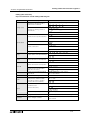
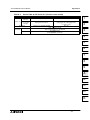
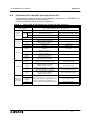
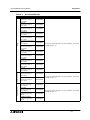
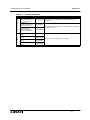
Table B-3:
000
CJ
001
CALL
002
SRET
003
IRET
✔
✔
004
EI
✔
005
DI
✔
006
FEND
✔
✔
007
WDT
✔
✔
008
FOR
✔
✔
✔
✔
✔
✔
✔
009
NEXT
✔
✔
✔
✔
✔
✔
✔
010
CMP
✔
✔
✔
✔
✔
✔
✔
✔
✔
✔
✔
✔
✔
✔
✔
✔
✔
✔
✔
011
ZCP
✔
✔
✔
✔
✔
✔
✔
✔
✔
✔
✔
✔
✔
✔
✔
✔
✔
✔
✔
012
MOV
✔
✔
✔
✔
✔
✔
✔
✔
✔
✔
✔
✔
✔
✔
✔
✔
✔
✔
✔
013
SMOV
✔
✔
✔
✔
✔
✔
✔
✔
✔
✔
✔
✔
✔
✔
✔
✔
✔
✔
✔
✔
✔
✔
✔
✔
✔
✔
✔
✔
✔
✔
✔
✔
✔
✔
✔
✔
✔
014
CML
015
BMOV
016
FMOV
✔
✔
✔
✔
✔
✔
✔
✔
017
XCH
✔
✔
✔
✔
✔
✔
✔
✔
✔
018
BCD
✔
✔
✔
✔
✔
✔
✔
✔
✔
✔
✔
✔
✔
✔
✔
✔
✔
✔
✔
019
BIN
✔
✔
✔
✔
✔
✔
✔
✔
✔
✔
✔
✔
✔
✔
✔
✔
✔
✔
✔
✔
✔
✔
✔
✔
B-2