1
8.6
Other Settings
8.6.1
Setting the Date-and-Time
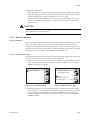
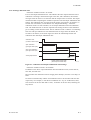
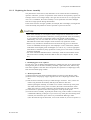
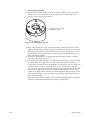
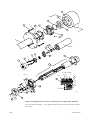
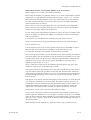
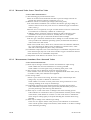
The following describe how to set the date-and-time. Automatic calibration or blowback
works following this setting.
Proceed as follows:
(1) Press the Setup key in the Basic panel display to display the Execution/Setup
display.
(2) Select Setup in the Execution/Setup display to display the “Commissioning” (Setup)
display.
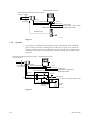
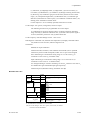
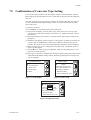
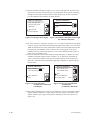
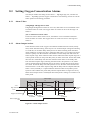
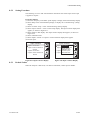
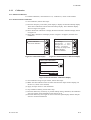
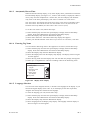
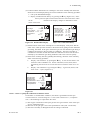
(3) Select Others in the “Commissioning” (Setup) display. The Others display then
appears, as shown in Figure 8.13.
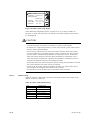
(4) Select Clock. The Clock display then appears, as shown in Figure 8.14.
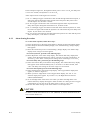
(5) Select Set date to display the numeric-data entry display. To set the date June 21,
2000, enter 2106000 and press the [Enter] key. The display then returns to the one
shown in Figure 8.14.
(5) Select Set time. Enter the time on a 24-hour basis. To enter 2:30 p.m., type in 1430
in the numeric-data entry display. Press the [Enter] key, and the time starts at 00
second.
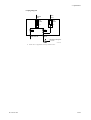
Clock
Others
r
r
r
r
r
r
Clock
Averaging
Fuel setup
Purging
Unit setup
Passwords
Defaults
Set date: 1 3 / 0 7 / 0 0
r Set time: 1 4 : 3 9
1 3 J ul. 2 0 0 0
14:39:55
Enter
Enter
F8.14E.EPS
F8.13E.EPS
Figure 8.13 Other Settings
8.6.2
Figure 8.14 Clock Display
Setting Periods over which Average Values Are Calculated and Periods over
which Maximum and Minimum Values Are Monitored
The equipment enables the display of oxygen concentration average values and maximum and minimum values under measurement (see Section 10.1.1, later in this manual).
The following section describes how to set the periods over which oxygen concentration
average values are calculated and maximum and minimum values are monitored.
8.6.2.1Procedure
(1) Press the Setup key in the Basic panel display to display the Execution/Setup
display.
(2) Select Setup in the Execution/Setup display to display the Commissioning” (Setup)
display.
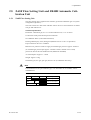
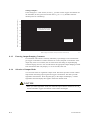
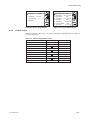
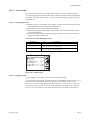
(3) Select Others in that display and then select Averaging in the Others display. The
averaging display shown in Figure 8.15 then appears.
(4) Choose “Set period over which average is calculated” and enter the desired numeric
value from the numeric-data entry display. To enter three hours, type in 003. The
period over which average values can be calculated ranges from 1 to 255 hours.
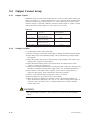
(5) Choose “Set period over which maximum and minimum is stored” and enter the
desired numeric value from the numeric-data entry display. To enter 48 hours, type
in 048. The allowable input ranges from 1 to 255 hours.
8-16
IM 11M12A01-02E