1
3. Plug and Play Function
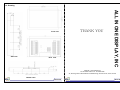
0. Connection To the Monitor
AOD420PG can be installed and connected automatically to any computer systems
without driver CD or software programs. Monitor will recognize the optimized value of
Video mode by DDC(Display Data Channel) method that makes the graphic card of
computer
①
②
③
④
⑤
⑥
⑦
⑧
⑨
to communicate with the monitor.
AOD420PG supports VESA DDC 1/2B.
① COMPOSITE
4. Safety Precaution
② S-VIDEO : video signal input ( S-VHS CABLE )
We strongly recommend that you carefully read this User’s Manual before operating
your LCD monitor. FOLLOW INSTRUCTIONS in this manual.
Please read and comprehend all using directives before use this machine.
③ AUDIO IN : VIDEO/DVD Sound input ( L )
④ AUDIO IN : VIDEO/DVD Sound input ( R )
⑤ AUDIO IN : PC Sound input
⑥ AUDIO OUT : Connect your speaker
⑦ D-SUB : Connect the VGA cable
⑧ DVI
⑨ Adaptor : Power cable connection (12V DC, 100V ~ 220V AC )
1. Installation
• Connect the signal(VGA) cable to the VGA port of computer. Tighten the
two thumbscrews by turning clockwise.
• You can adjust the connection for your PC environment.
• Plug the DC cord of the AC adapter to the power connector and the plug
the end of AC adapter to and electrical outlet socket(110V/220V)
• Connect DC cord of adapter (12V DC) to the monitor..
2. Features
• AOD420PG is 42.0” WXGA LCD monitor and support up to 75Hz.
• You can adjust brightness, contrast, horizontal & vertical positions by OSD
menus and use auto adjust function for instant adjustment.
• High-qualified LCD Controller inside
• Compact space saving design and power saving mode
• 100% compatible with Windows PC environment without the installation of
driver CD or software program.
All In One
● Power
— Use the type of power indicated on the marking label.
● Adapter
— Only use an adapter designed of the LCD monitor.
● Plug
— Do not remove any of the prongs of the monitor's three-pronged power plug.
— Disconnect the power plug from the AC outlet if you will not use it for an indefinite
period of time.
● Power and extension cord
— Use the proper power cord with ground conductor
— Do not overload wall outlets or power cords. Ensure that the total of all units plugged
into the wall outlet does not exceed 7 amperes.
— Do not allow anything to rest on the power cord. Do not locate this product where
persons will walk on the cord.
● Care and maintenance
— Slots and openings in the cabinet are provided for ventilation. Do not block or cover
these openings.
— Do not push objects of any kind into cabinet slots or openings. The screen surface
is easily scratched.
— Do not use paper towels to clean the display. Avoid touching it with your fingers,
pens, or pencils.
— Turn off the AC adapter and the monitor over long periods when not in use.
All In One