1
Universal PCI Board User’s Manual
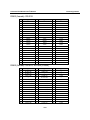
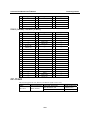
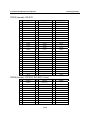
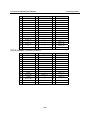
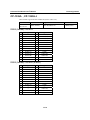
Pin Assignments
Overview
This chapter provides the pin assignments for each Moxa UPCI multiport serial board, as well as the
pin assignments for the optional accessories. Moxa UPCI boards do not have built-in serial port
connectors. The only exception is the CP-102U, which is built with two DB9 (male) serial
connectors. For all other models, you will need a cable or other accessory with standard serial
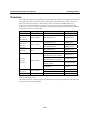
connectors in order to connect serial devices to the board. The following chart shows the available
cables and accessories for each model.
Model
CP-102U
CP-102UL
CP-132UL
CP-132UL-I
CP-104UL
CP-114UL
CP-134U
CP-134U-I
CP-104JU
CP-118U
CP-138U
CP-168U
Board Connector
2×DB9 (male)
Supported Accessories
---
Serial Connectors
---
DB25 (female)
CBL-M25M9x2-50
2×DB9 (male)
CBL-M44M9x4-50
4×DB9 (male)
CBL-M44M25x4-50
4×DB25 (male)
CBL-RJ45M9-150
CBL-RJ45M25-150
OPT8-M9
CBL-M62M9x8-100 (OPT8D)
OPT8B
CBL-M62M25x8-100 (OPT8C)
4×DB9 (male)
4×DB25 (male)
DB44 (female)
RJ45
DB62 (female)
8×DB9 (male)
8×DB25 (male)
OPT8A, OPT8S, OPT8F, OPT8Z,
8×DB25 (female)
OPT8K, OPT8I
OPT8-RJ45*
8×RJ45
CP-118U-I
CBL-M78M9x8-100
8×DB9 (male)
DB78 (female)
CP-138U-I
CBL-M78M25x8-100
8×DB25 (male)
POS-104UL
DB44 (female)
CBL-M44M9x4-50(POS)
4×DB9 (male)
* The OPT8-RJ45 is designed for RS-232 only. It should only be used with the CP-118U in RS-232
mode or with the CP-168U .
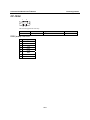
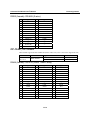
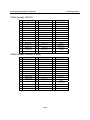
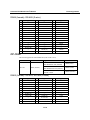
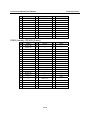
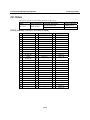
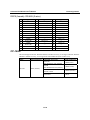
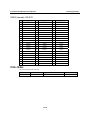
The serial connectors on each accessory use standard serial port pin assignments. Please refer to the
Serial Connectors section for details.
11-2