1
Installation
4.3
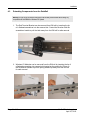
Detaching Components from the DataRail
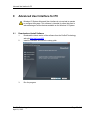
Warning: All live wiring connections and power must be safely disconnected before taking any
components off the DataRail or Wireless I/O System!
1. The End Terminal Bracket can be removed from DIN rail by inserting the tip
of a flathead screwdriver into the removal slot. Control the direction with the
screwdriver handle to pull the latch away from the DIN rail for safe removal.
2. Wireless I/O Modules can be removed from the DIN rail by inserting the tip of
a flathead screwdriver into removal slot located on the metal clip. Lift-up on
the screwdriver handle to pull the spring-loaded clip away from the DIN rail
for safe removal.
Page 24 of 48
ProSoft Technology, Inc.
April 21, 2015