1
Section 4: Deploying and Operating SBE 35
Deployment with SBE 9plus CTD, SBE 11plus Deck Unit,
and SBE 32 Carousel Water Sampler
Note:
For details on wiring, setup, and
operation of the entire system, see
the SBE 11plus manual. Only details
relating to the use of the SBE 35 are
covered here.
1.
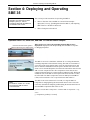
Mount the SBE 35 (without tip bushing, with sensor guard) in a secure area
on the water sampler frame, where the water flushes freely and there is
minimal contamination from the passive thermal mass of the metal frame
or active thermal dissipation from electronic instruments.
2.
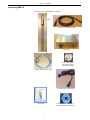
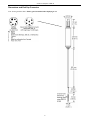
Connect the SBE 35 to the SBE 9plus JT7 and SBE 32 Carousel Water
Sampler JB2 using the Sea-Bird Y-cable (cable 171220 - drawing 32208 for standard connector on the SBE 35). The three arms of the cable are
labeled SBE 9, SBE 32, and SBE 35. Connect each arm to the proper device.
See Connector Mating and Maintenance in Section 5: Routine Maintenance
and Calibration for information on lubricating and burping the connectors.
3.
Turn on power to the SBE 11plus Deck Unit.
4.
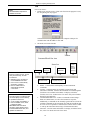
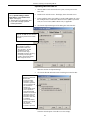
Double click on Seaterm.exe to verify communications and setup:
A. In the Configure menu, select SBE 35. Select the Com port that is
connected to Modem Channel on the back of the SBE 11plus Deck Unit
(the SBE 35 uses the modem channel for communications). Click OK.
B. Click Status on the Toolbar (DS command) to verify communication
with the SBE 35 and check setup parameters. Change any parameters if
desired (see Command Descriptions in Section 3: Preparing for
Deployment), and resend the status command to verify the changes.
C. Ensure all data has been uploaded, and then type SampleNum=0 and
press the Enter key to make the entire memory available for
recording. If SampleNum is not reset to zero, data will be stored after
the last recorded sample.
D. Click Disconnect on the Toolbar to free the computer Com port.
E. Close SEATERM.
5.
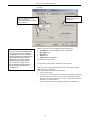
Double click on Seasave.exe to acquire the CTD cast:
A. Set up the system and display windows.
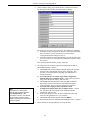
B. In the Real-Time Data menu, select Start. Make the desired selections
in the Start Real-Time Data Acquisition dialog box, and then click the
Start button.
C. Fire bottles as desired. Each time it receives a bottle confirmation,
the SBE 35 takes a sample and stores the data in EEPROM.
If the next bottle is fired before the SBE 35 finishes sampling
(time required / sample = 1.1 * NCycles + 2.7 seconds), the SBE 35
ignores the next bottle confirmation.
D. When the cast is complete, in the Real-Time Data menu select Stop.
Turn off power to the SBE 11plus Deck Unit.
21