1
Guide to Importing Contributions
collection system, it might be the unique key that they use to identify the contact. If this is a one-time
import, you can also assign an arbitrary unique value to the contact external ID. For example, use
today’s date combined with a sequence number. Using the date as part of the external ID will help
ensure it doesn’t overlap with anyone else’s contact external ID.
If the contacts are already in PowerBase, what data will you use to link the contribution
to the contact?
As noted above, a reliable method for linking a contribution to a contact is to use a contact external
ID. Equally reliable is to use the internal contact ID aka CiviCRM ID aka Contact ID but that
can only be obtained from PowerBase, either by transcribing it into your file one by one, or by
exporting the contacts and finding a way to match the contacts to the appropriate contribution
records though some other means, such as your spreadsheet program. If you are setting up a monthly
bank transfer file, and if you don’t have a contact external ID available from the bank or credit union,
then it will definitely be worth the effort to save and reuse the CiviCRM ID in your contribution
import file.
If you don’t have a contact external ID or the CiviCRM ID in your data, you will need the individual’s
first name and last name (in separate fields) or, if it’s an organizational contribution, the organization
name. As an alternative, you can use an email address. Since sometimes first names, last names or
email addresses are not unique in your PowerBase, you can use combinations of them to achieve the
match that you require. This assumes, of course, that you have these fields in your contribution
import file. If you don’t have these fields, or if names are combined into one field, you’ll need to edit
your import file before you try to import.
Are all the contributions from people that you can identify or was it cash that was
collected at an event?
If your import file includes cash donations where the donor was not tracked, you’ll have to use a
dummy contact to use to store this contribution history.
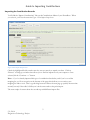
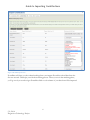
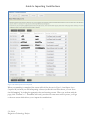
Importing Contributions
First – make sure the contact is already in your system. If the contact is not already in your database,
you can’t import their contributions. This document won’t cover importing contacts in detail. See the
references above for details.
Getting Started
Your contribution file must be in a Comma Separated Values (.csv) format, not in the default
spreadsheet format.
5/1/2014
Progressive Technology Project
2