1
MIXING AMPLIFIERS
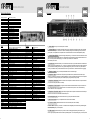
MA200R Tuner controls
MIXING AMPLIFIERS
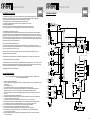
Inside Settings
Inside settings should only be done by persons familiar to electrical equipment!
Phantom Power
MIC1 : JP3
MIC2 : JP4
MIC3 : JP5
MIC4 : JP11
1
100.90
fm
MHz
JP3
JP4
JP5
JP11
Phantom on / off jumper
The MA200R has been shipped with these jumpers in the OFF position. For each microphone input a jumper is
available. When you put a jumper to the ON position, phantom power will be supplied to the microphone input
involved so you can use condenser microphones. In this case NO unbalanced jacks should be used! Phantom power
does not damage dynamic balanced microphones.
Power supply fuse (inside the housing)
When this fuse blows, replace it by the same type: 20A quick blow. When this happens frequently, contact your
nearest dealer.
AM / FM mode switch
Each time you press this button, the tuner will switch from FM to AM and the other way round. The actual radio band
will be displayed at the left.
Now you are ready to build your solid sound system and our extra features will be of great help.
Note: In our policy of continuous improvement, changes can appear without prior notice, including the user manual.
Scan up / down
By pressing “UP” or “DOWN” a few seconds, the tuner will start to search the next/previous radio station with sufficient
signal (auto scanning). By just pressing “UP” or “DOWN” you work in manual mode. Each time you press, you change
the frequency by 50 kHz for FM and 9 kHz for AM.
Memory scan
By pressing this button the tuner will start to scan across the memory presets. Each preset will be heard for about
three seconds, starting from the next preset, till you reach the preset you where listening to again. To stop this
feature, press “SCAN” again.
Memory set
After you have found a radio station you like, you can save it in a memory. Press “MEMORY SET” and “MEMORY”
will appear at the upper right corner. Then select one of the 10 memory locations at the bottom of the front panel. You
don't have to reconfirm. The code of the memory will appear in bigger characters at the right of the display. The first
memory locations can be selected directly. To select memory 6-0, first press shift followed by 1, 2, 3, 4 or 5. A total of
10 locations are available for FM mode and 10 for AM mode.
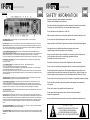
Troubleshooting
No power: Check whether the “on/off” switch is in the on position and whether the power cord has been inserted
properly. If these two have been checked and still the MA200R remains off, the fuse might be blown.
No sound: Check all the wires and loudspeaker selectors.
At least the master and one source should be turned clockwise.
Check whether the pre amp out is connected to the power amp in.
In the worst case your MA200R is in protective mode.
Please check your loudspeaker wiring and loads.
Operate your MA200R within normal conditions.
Distorted sound: Your input signal is too high.
Haven't you a line level source connected to a microphone input?
You might also be drawing too much power from your MA200R and the loudspeaker load
might be too low (minimum 50 ohm for 100V use).
Check the speaker wiring and load with an impedance tester. Turn down the master level.
Hum and buzz: Please check your wiring and grounding, maybe you created a ground loop.
See that all equipment linked are drawing power from the same power supply.
Your radio might get its signal from the cable radio. In this case you have created a
ground loop and a ground loop isolator between the cable signal and your
radio antenna input will be the solution.
5
6