1
TACMET Weather Station
MAWS201M
USER'S GUIDE
M010082EN-B
January 2004
PUBLISHED BY
Vaisala Oyj
Phone (int.):
+358 9 8949 1
P.O. Box 26
Fax:
+358 9 8949 2227
FIN-00421 Helsinki
Finland
Visit our Internet pages at http://www.vaisala.com/
© Vaisala 2004
No part of this manual may be reproduced in any form or by any means,
electronic or mechanical (including photocopying), nor may its contents
be communicated to a third party without prior written permission of the
copyright holder.
The contents are subject to change without prior notice.
Please observe that this manual does not create any legally binding
obligations for Vaisala towards the customer or end user. All legally
binding commitments and agreements are included exclusively in the
applicable supply contract or Conditions of Sale.
________________________________________________________________________________
Table of Contents
CHAPTER 1
GENERAL INFORMATION . . . . . . . . . . . . . . . . . . . . . . . . . . . . . . . . . . . . . . 7
About This Manual . . . . . . . . . . . . . . . . . . . . . . . . . . . . . . . . . 7
Contents of This Manual . . . . . . . . . . . . . . . . . . . . . . . . . . . 7
Feedback . . . . . . . . . . . . . . . . . . . . . . . . . . . . . . . . . . . . . . . 8
Safety . . . . . . . . . . . . . . . . . . . . . . . . . . . . . . . . . . . . . . . . . . . . 8
General Safety Considerations . . . . . . . . . . . . . . . . . . . . . . 8
Product Related Safety Precautions . . . . . . . . . . . . . . . . . . 9
ESD Protection . . . . . . . . . . . . . . . . . . . . . . . . . . . . . . . . . 10
Trademarks . . . . . . . . . . . . . . . . . . . . . . . . . . . . . . . . . . . . . . 11
License Agreement . . . . . . . . . . . . . . . . . . . . . . . . . . . . . . . . 11
Warranty . . . . . . . . . . . . . . . . . . . . . . . . . . . . . . . . . . . . . . . . 11
CHAPTER 2
PRODUCT OVERVIEW . . . . . . . . . . . . . . . . . . . . . . . . . . . . . . . . . . . . . . . 13
Overview of TACMET MAWS . . . . . . . . . . . . . . . . . . . . . . . . 13
Basic System . . . . . . . . . . . . . . . . . . . . . . . . . . . . . . . . . . . . . 15
Enhanced System . . . . . . . . . . . . . . . . . . . . . . . . . . . . . . . . . 16
MAWS Operating Software . . . . . . . . . . . . . . . . . . . . . . . . . . 17
AWS Logger QML102T . . . . . . . . . . . . . . . . . . . . . . . . . . . . . 17
Internal Battery QMB101 . . . . . . . . . . . . . . . . . . . . . . . . . . 18
Solar/Mains Power Supply Unit QMP201 with Solar Panel 18
Power Supply and Connection Unit QMP202 . . . . . . . . . . . 19
Mains Power Supply Module QMP211 . . . . . . . . . . . . . . . . 20
Power Strip QPS101 . . . . . . . . . . . . . . . . . . . . . . . . . . . . . . . 20
Handheld Terminal QMD101M . . . . . . . . . . . . . . . . . . . . . . . 21
Workstation with MIDAS IV Software . . . . . . . . . . . . . . . . . 21
Radio Modem . . . . . . . . . . . . . . . . . . . . . . . . . . . . . . . . . . . . . 22
UHF Antennas . . . . . . . . . . . . . . . . . . . . . . . . . . . . . . . . . . . . 23
Combined Wind Speed and Direction Sensor WMS302M . 24
Rain Gauge QMR101M . . . . . . . . . . . . . . . . . . . . . . . . . . . . . 25
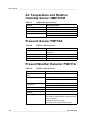
Air Temperature and Relative Humidity Sensor
QMH101M . . . . . . . . . . . . . . . . . . . . . . . . . . . . . . . . . . . . . . . . 25
Pressure Sensor PMT16A . . . . . . . . . . . . . . . . . . . . . . . . . . 26
Present Weather Detector PWD11A . . . . . . . . . . . . . . . . . . 27
Ceilometer CT25KAM . . . . . . . . . . . . . . . . . . . . . . . . . . . . . . 28
Lightning Detector SA20M . . . . . . . . . . . . . . . . . . . . . . . . . . 29
Equipment Nomenclature . . . . . . . . . . . . . . . . . . . . . . . . . . . 30
VAISALA ________________________________________________________________________ 1
User’s Guide ______________________________________________________________________
TACMET MAWS Serial Number Record . . . . . . . . . . . . . . .34
CHAPTER 3
INSTALLATION . . . . . . . . . . . . . . . . . . . . . . . . . . . . . . . . . . . . . . . . . . . . .35
Preparing Installation . . . . . . . . . . . . . . . . . . . . . . . . . . . . . .35
Unpacking Instructions . . . . . . . . . . . . . . . . . . . . . . . . . . . .36
Siting the Station . . . . . . . . . . . . . . . . . . . . . . . . . . . . . . . . . .36
Using the Compass . . . . . . . . . . . . . . . . . . . . . . . . . . . . . .36
Solar Radiation . . . . . . . . . . . . . . . . . . . . . . . . . . . . . . . . . .38
Wind Measurement . . . . . . . . . . . . . . . . . . . . . . . . . . . . . .38
Rain Gauge . . . . . . . . . . . . . . . . . . . . . . . . . . . . . . . . . . . .39
Air Temperature and Humidity Measurement . . . . . . . . . .39
Present Weather Detector . . . . . . . . . . . . . . . . . . . . . . . . .40
Cloud Ceilometer . . . . . . . . . . . . . . . . . . . . . . . . . . . . . . . .40
Lightning Detector . . . . . . . . . . . . . . . . . . . . . . . . . . . . . . .40
Power Supply Unit . . . . . . . . . . . . . . . . . . . . . . . . . . . . . . .41
Basic System . . . . . . . . . . . . . . . . . . . . . . . . . . . . . . . . . . . . .42
Weather Station Structure . . . . . . . . . . . . . . . . . . . . . . . . .44
Installing Tripod, Sensors, and Optional Antennas . . . . . .45
Aligning the Wind Vane . . . . . . . . . . . . . . . . . . . . . . . . . . .52
Operating the Solar Panel . . . . . . . . . . . . . . . . . . . . . . . . .53
Operating TACMET MAWS from the AC Power Source . .55
Configuring Radio Modems . . . . . . . . . . . . . . . . . . . . . . . .55
Connecting MIDAS IV PC to TACMET MAWS . . . . . . . . .56
Direct Hard Wire Connection . . . . . . . . . . . . . . . . . . . . 56
Radio Frequency Connection. . . . . . . . . . . . . . . . . . . . 56
Connecting the Handheld Terminal to TACMET MAWS . .58
Direct Hard Wire Connection . . . . . . . . . . . . . . . . . . . . 59
Radio Frequency Connection. . . . . . . . . . . . . . . . . . . . 59
Enhancement . . . . . . . . . . . . . . . . . . . . . . . . . . . . . . . . . . . . .62
Setting up PWD11A . . . . . . . . . . . . . . . . . . . . . . . . . . . . . .64
Setting up CT25KAM . . . . . . . . . . . . . . . . . . . . . . . . . . . . .65
Setting up SA20M . . . . . . . . . . . . . . . . . . . . . . . . . . . . . . .67
Disassembly for Transportation . . . . . . . . . . . . . . . . . . . . .70
Enhancement . . . . . . . . . . . . . . . . . . . . . . . . . . . . . . . . . . .70
Basic System . . . . . . . . . . . . . . . . . . . . . . . . . . . . . . . . . . .71
CHAPTER 4
OPERATION . . . . . . . . . . . . . . . . . . . . . . . . . . . . . . . . . . . . . . . . . . . . . . . .73
Communication Connections . . . . . . . . . . . . . . . . . . . . . . .73
Handheld Terminal . . . . . . . . . . . . . . . . . . . . . . . . . . . . . . . .75
Turning the Terminal On/Off . . . . . . . . . . . . . . . . . . . . . . .75
Keypad . . . . . . . . . . . . . . . . . . . . . . . . . . . . . . . . . . . . . . . .76
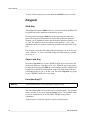
Shift Key. . . . . . . . . . . . . . . . . . . . . . . . . . . . . . . . . . . . 76
Caps Lock Key . . . . . . . . . . . . . . . . . . . . . . . . . . . . . . . 76
Function Key F1 . . . . . . . . . . . . . . . . . . . . . . . . . . . . . . 76
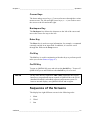
Cursor Keys . . . . . . . . . . . . . . . . . . . . . . . . . . . . . . . . . 77
Backspace Key . . . . . . . . . . . . . . . . . . . . . . . . . . . . . . 77
Enter Key . . . . . . . . . . . . . . . . . . . . . . . . . . . . . . . . . . . 77
2 ____________________________________________________________________M010082EN-B
________________________________________________________________________________
Ctrl Key . . . . . . . . . . . . . . . . . . . . . . . . . . . . . . . . . . . . 77
On/Off Key . . . . . . . . . . . . . . . . . . . . . . . . . . . . . . . . . . 77
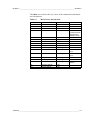
Sequence of the Screens . . . . . . . . . . . . . . . . . . . . . . . . . . 77
Accessing the Screens . . . . . . . . . . . . . . . . . . . . . . . . . . . 78
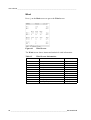
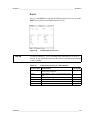
Main . . . . . . . . . . . . . . . . . . . . . . . . . . . . . . . . . . . . . . . 78
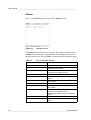
Wind. . . . . . . . . . . . . . . . . . . . . . . . . . . . . . . . . . . . . . . 80
Statistics . . . . . . . . . . . . . . . . . . . . . . . . . . . . . . . . . . . 81
Enh/1 . . . . . . . . . . . . . . . . . . . . . . . . . . . . . . . . . . . . . . 82
Enh/2 . . . . . . . . . . . . . . . . . . . . . . . . . . . . . . . . . . . . . . 85
Alarms . . . . . . . . . . . . . . . . . . . . . . . . . . . . . . . . . . . . . 86
Status. . . . . . . . . . . . . . . . . . . . . . . . . . . . . . . . . . . . . . 87
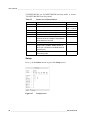
Setup . . . . . . . . . . . . . . . . . . . . . . . . . . . . . . . . . . . . . . 88
Terminal Mode . . . . . . . . . . . . . . . . . . . . . . . . . . . . . . . . . . 90
MIDAS IV Software . . . . . . . . . . . . . . . . . . . . . . . . . . . . . . . . 91
MIDAS IV TACMET Installation . . . . . . . . . . . . . . . . . . . . . 91
Disabling/Enabling MIDAS IV . . . . . . . . . . . . . . . . . . . 92
Uninstalling MIDAS IV . . . . . . . . . . . . . . . . . . . . . . . . . 93
MIDAS IV TACMET Configuration Wizard . . . . . . . . . . . . . 93
System Parameters Tab . . . . . . . . . . . . . . . . . . . . . . . 95
Weather View Tab . . . . . . . . . . . . . . . . . . . . . . . . . . . . 95
Weather View . . . . . . . . . . . . . . . . . . . . . . . . . . . . . . . . . . . 96
Basic System Data . . . . . . . . . . . . . . . . . . . . . . . . . . . 96
Enhancement System Data . . . . . . . . . . . . . . . . . . . . . 98
Graphic Display . . . . . . . . . . . . . . . . . . . . . . . . . . . . . 101
Changing Graphic Scales . . . . . . . . . . . . . . . . . . . . . 103
Menu Options . . . . . . . . . . . . . . . . . . . . . . . . . . . . . . 103
Toolbar. . . . . . . . . . . . . . . . . . . . . . . . . . . . . . . . . . . . 104
Status Bar . . . . . . . . . . . . . . . . . . . . . . . . . . . . . . . . . 105
METAR/SPECI Template . . . . . . . . . . . . . . . . . . . . . . . . . 105
METAR/MET REPORT Manager. . . . . . . . . . . . . . . . 109
METAR/SPECI Editing Procedure . . . . . . . . . . . . . . . 110
Checking and Editing Data Fields. . . . . . . . . . . . . 110
Adding Remarks . . . . . . . . . . . . . . . . . . . . . . . . . . 112
Building the Report . . . . . . . . . . . . . . . . . . . . . . . . 112
Sending the Report. . . . . . . . . . . . . . . . . . . . . . . . 113
ASCII Log View . . . . . . . . . . . . . . . . . . . . . . . . . . . . . . . . 113
Event Monitor . . . . . . . . . . . . . . . . . . . . . . . . . . . . . . . . . . 116
Menu Options . . . . . . . . . . . . . . . . . . . . . . . . . . . . . . 116
Toolbar. . . . . . . . . . . . . . . . . . . . . . . . . . . . . . . . . . . . 118
Display Modes . . . . . . . . . . . . . . . . . . . . . . . . . . . . . . 118
Viewing Events . . . . . . . . . . . . . . . . . . . . . . . . . . . . . 119
Acknowledging Events. . . . . . . . . . . . . . . . . . . . . . . . 120
Checking New Events . . . . . . . . . . . . . . . . . . . . . . . . 120
Event Messages . . . . . . . . . . . . . . . . . . . . . . . . . . . . 120
Diagnostic Monitor . . . . . . . . . . . . . . . . . . . . . . . . . . . . . . 121
Statuses Tab . . . . . . . . . . . . . . . . . . . . . . . . . . . . . . . 122
ROA Object . . . . . . . . . . . . . . . . . . . . . . . . . . . . . . . . 123
Data Item Window . . . . . . . . . . . . . . . . . . . . . . . . . . . 126
ROA User . . . . . . . . . . . . . . . . . . . . . . . . . . . . . . . . . 128
SensorIO Monitor . . . . . . . . . . . . . . . . . . . . . . . . . . . . . . . 130
Sensor Status Monitor Window . . . . . . . . . . . . . . . . . 131
Event Log Window . . . . . . . . . . . . . . . . . . . . . . . . . . . 133
VAISALA ________________________________________________________________________ 3
User’s Guide ______________________________________________________________________
CHAPTER 5
MAINTENANCE . . . . . . . . . . . . . . . . . . . . . . . . . . . . . . . . . . . . . . . . . . . .135
Periodic Maintenance . . . . . . . . . . . . . . . . . . . . . . . . . . . . .135
Logger Enclosure QME101M . . . . . . . . . . . . . . . . . . . . . .135
Mains Power Supply QMP201 . . . . . . . . . . . . . . . . . . . . .135
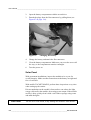
Solar Panel . . . . . . . . . . . . . . . . . . . . . . . . . . . . . . . . 136
Power Supply and Connection Unit QMP202 . . . . . . . . .137
Mains Power Supply QMP211 . . . . . . . . . . . . . . . . . . . . .137
Handheld Terminal QMD101M . . . . . . . . . . . . . . . . . . . .137
Radio Modem . . . . . . . . . . . . . . . . . . . . . . . . . . . . . . . . . .137
Antenna . . . . . . . . . . . . . . . . . . . . . . . . . . . . . . . . . . . . . .137
Global Compass MC-2G . . . . . . . . . . . . . . . . . . . . . . . . .138
Cable Maintenance . . . . . . . . . . . . . . . . . . . . . . . . . . . . .138
Combined Wind Sensor WMS302M . . . . . . . . . . . . . . . .138
Rain Gauge QMR101M . . . . . . . . . . . . . . . . . . . . . . . . . .138
Air Temperature and Relative Humidity Probe
QMH101M . . . . . . . . . . . . . . . . . . . . . . . . . . . . . . . . . . . .139
Pressure Sensor PMT16A . . . . . . . . . . . . . . . . . . . . . . . .139
Present Weather Detector PWD11A . . . . . . . . . . . . . . . .139
Cleaning of the Transmitter and Receiver Lenses
and Hoods . . . . . . . . . . . . . . . . . . . . . . . . . . . . . . . . . 140
Cleaning DRD Rain Detector . . . . . . . . . . . . . . . . . . . 140
Storage . . . . . . . . . . . . . . . . . . . . . . . . . . . . . . . . . . . 141
Ceilometer CT25KAM . . . . . . . . . . . . . . . . . . . . . . . . . . .141
Window Cleaning . . . . . . . . . . . . . . . . . . . . . . . . . . . . 141
Storage . . . . . . . . . . . . . . . . . . . . . . . . . . . . . . . . . . . 142
Lightning Detector SA20M . . . . . . . . . . . . . . . . . . . . . . . .142
Advanced Maintenance . . . . . . . . . . . . . . . . . . . . . . . . . . .142
Replacing Anemometer Bearings in WMS302M . . . . . . .142
Replacing Air Temperature and Relative Humidity
Probe QMH101M . . . . . . . . . . . . . . . . . . . . . . . . . . . . . . .144
Calibrating Pressure Sensor PMT16A . . . . . . . . . . . . . .145
CHAPTER 6
TROUBLESHOOTING . . . . . . . . . . . . . . . . . . . . . . . . . . . . . . . . . . . . . . .147
Software Operation . . . . . . . . . . . . . . . . . . . . . . . . . . . . . . .147
Solar Panel . . . . . . . . . . . . . . . . . . . . . . . . . . . . . . . . . . . . . .148
Handheld Terminal . . . . . . . . . . . . . . . . . . . . . . . . . . . . . . .148
PWD11A . . . . . . . . . . . . . . . . . . . . . . . . . . . . . . . . . . . . . . . .149
CT25KAM . . . . . . . . . . . . . . . . . . . . . . . . . . . . . . . . . . . . . . .150
Warnings . . . . . . . . . . . . . . . . . . . . . . . . . . . . . . . . . . . . .150
Failure Diagnosis . . . . . . . . . . . . . . . . . . . . . . . . . . . . . . .150
SA20M . . . . . . . . . . . . . . . . . . . . . . . . . . . . . . . . . . . . . . . . .151
Technical Support . . . . . . . . . . . . . . . . . . . . . . . . . . . . . . . .151
Return Instructions . . . . . . . . . . . . . . . . . . . . . . . . . . . . . . .152
4 ____________________________________________________________________M010082EN-B
________________________________________________________________________________
CHAPTER 7
TECHNICAL DATA . . . . . . . . . . . . . . . . . . . . . . . . . . . . . . . . . . . . . . . . . . 153
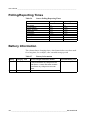
Polling/Reporting Times . . . . . . . . . . . . . . . . . . . . . . . . . . . 154
Battery Information . . . . . . . . . . . . . . . . . . . . . . . . . . . . . . . 154
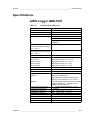
Specifications . . . . . . . . . . . . . . . . . . . . . . . . . . . . . . . . . . . 155
AWS Logger QML102T . . . . . . . . . . . . . . . . . . . . . . . . . . 155
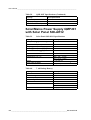
Solar/Mains Power Supply QMP201 with Solar Panel
SOLAR12 . . . . . . . . . . . . . . . . . . . . . . . . . . . . . . . . . . . . . 156
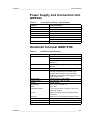
Power Supply and Connection Unit QMP202 . . . . . . . . . 157
Handheld Terminal QMD101M . . . . . . . . . . . . . . . . . . . . 157
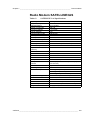
Radio Modem SATELLINE3AS . . . . . . . . . . . . . . . . . . . . 159
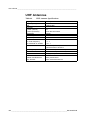
UHF Antennas . . . . . . . . . . . . . . . . . . . . . . . . . . . . . . . . . 160
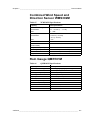
Combined Wind Speed and Direction Sensor
WMS302M . . . . . . . . . . . . . . . . . . . . . . . . . . . . . . . . . . . . 161
Rain Gauge QMR101M . . . . . . . . . . . . . . . . . . . . . . . . . . 161
Air Temperature and Relative Humidity Sensor
QMH101M . . . . . . . . . . . . . . . . . . . . . . . . . . . . . . . . . . . . 162
Pressure Sensor PMT16A . . . . . . . . . . . . . . . . . . . . . . . . 162
Present Weather Detector PWD11A . . . . . . . . . . . . . . . . 162
Ceilometer CT25KAM . . . . . . . . . . . . . . . . . . . . . . . . . . . 164
Lightning Detector SA20M . . . . . . . . . . . . . . . . . . . . . . . . 165
VAISALA ________________________________________________________________________ 5
User’s Guide ______________________________________________________________________
6 ____________________________________________________________________M010082EN-B
Chapter 1 ________________________________________________________ General Information
CHAPTER 1
GENERAL INFORMATION
This chapter provides general information about this manual and
important safety information you should know before installing and
operating TACMET Weather Station.
About This Manual
This manual provides information for installing, operating, and
maintaining the TACMET MAWS (later referred to as TACMET
MAWS).
Contents of This Manual
This manual consists of the following chapters:
-
Chapter 1, General Information: This chapter provides general
information about this manual and important safety information
you should know before installing and operating TACMET
Weather Station.
-
Chapter 2, Product Overview: This chapter introduces TACMET
MAWS features, advantages, and the product nomenclature.
-
Chapter 3, Installation: This chapter provides information about
preparing the installation and siting the station. It also contains
detailed information on installing the tripod and all the sensors.
VAISALA ________________________________________________________________________ 7
User’s Guide ______________________________________________________________________
-
Chapter 4, Operation: This chapter contains information that is
needed to operate TACMET MAWS with the handheld terminal
and MIDAS IV software.
-
Chapter 5, Maintenance: This chapter provides information that is
needed in the basic maintenance of TACMET MAWS.
-
Chapter 6, Troubleshooting: This chapter lists the possible
problems that may occur during the operation and possible
solutions to these problems.
-
Chapter 7, Technical Data: This chapter provides technical data of
the TACMET Weather Station.
Feedback
Vaisala Customer Documentation Team welcomes your comments and
suggestions on the quality and usefulness of this publication. If you find
errors or have other suggestions for improvement, please indicate the
chapter, section, and page number. You can send comments to us by email: [email protected].
Safety
General Safety Considerations
Throughout the manual, important safety considerations are highlighted
as follows:
WARNING
Warning alerts you to a serious hazard. If you do not read and follow
instructions very carefully at this point, there is a risk of injury or even
death.
CAUTION
Caution warns you of a potential hazard. If you do not read and follow
instructions carefully at this point, the product could be damaged or
important data could be lost.
NOTE
Note highlights important information on using the product.
8 ____________________________________________________________________M010082EN-B
Chapter 1 ________________________________________________________ General Information
Product Related Safety Precautions
The following are general safety precautions that are not related to any
specific procedures and therefore do not appear elsewhere in this
publication. They are recommended precautions that personnel must
understand and apply during many phases of installations, operations
and maintenance.
WARNING
Be careful when touching and moving TACMET MAWS. See that
there are no power lines or other obstacles above the mast.
WARNING
Secure the TACMET MAWS properly with the help of the pegs and/
or sandbag to prevent it from falling. Tighten all the adjustment screws
well.
WARNING
Do not operate in an explosive atmosphere. Do not operate the
equipment in the presence of flammable gases or fumes. Operation of
any electrical instrument in such an environment constitutes a serious
safety hazard.
WARNING
Do not attempt to service the product or make any internal adjustment
unless another person, capable of rendering first aid and resuscitation,
is present.
WARNING
Operating personnel must not remove instrument covers. Component
replacement or internal adjustments must be made by qualified
maintenance personnel. Do not replace components with the power
cable connected. Under certain conditions, dangerous voltages may
exist for some time even with the power cable disconnected. To avoid
injuries, disconnect power and discharge circuits before touching
them.
WARNING
Do not service a live system outdoors. Do not open the units outdoors
when the enclosure contains line voltage levels.
VAISALA ________________________________________________________________________ 9
User’s Guide ______________________________________________________________________
CAUTION
Be careful when moving the mast. To prevent damage to the sensors,
remove them (and the sensor arms) before moving the station.
CAUTION
Do not install substitute parts or modify the unit. Improper
modification can damage the product or lead to malfunction. Contact
Vaisala for repairs to ensure that safety features are maintained.
NOTE
Send old batteries to secondary lead smelter for recycling. Place
neutralized slurry into sealed containers and handle in accordance to
local, state, and federal regulations. Large water-diluted spills, after
neutralization and testing, should be managed in accordance with
approved local, state, and federal requirements. Consult state
environmental agency and/or federal EPA (Environmental Protection
Agency).
ESD Protection
Electrostatic Discharge (ESD) can cause immediate or latent damage to
electronic circuits. Vaisala products are adequately protected against
ESD for their intended use. However, it is possible to damage the
product by delivering electrostatic discharges when touching,
removing, or inserting any objects inside the equipment housing.
To make sure you are not delivering high static voltages yourself:
-
Handle ESD sensitive components on a properly grounded and
protected ESD workbench. When this is not possible, ground
yourself with a wrist strap and a resistive connection cord to the
equipment chassis before touching the boards. When neither of the
above is possible, at least touch a conductive part of the equipment
chassis with your other hand before touching the boards.
-
Always hold the boards by the edges and avoid touching the
component contacts.
10 ___________________________________________________________________M010082EN-B
Chapter 1 ________________________________________________________ General Information
Trademarks
Microsoft®, Windows®, and Windows® 2000 are registered
trademarks of Microsoft Corporation in the United States and/or other
countries.
License Agreement
All rights to any software are held by Vaisala or third parties. The
customer is allowed to use the software only to the extent that is
provided by the applicable supply contract or Software License
Agreement.
Warranty
For certain products Vaisala normally gives a limited one-year
warranty. Please observe that any such warranty may not be valid in
case of damage due to normal wear and tear, exceptional operating
conditions, negligent handling or installation, or unauthorized
modifications. Please see the applicable supply contract or Conditions
of Sale for details of the warranty for each product.
VAISALA _______________________________________________________________________ 11
User’s Guide ______________________________________________________________________
12 ___________________________________________________________________M010082EN-B
Chapter 2 __________________________________________________________ Product Overview
CHAPTER 2
PRODUCT OVERVIEW
This chapter introduces TACMET MAWS features, advantages, and
the product nomenclature.
Overview of TACMET MAWS
TACMET MAWS is an automatic weather observation system suited
for demanding tactical military needs. TACMET MAWS is a compact
weather station that accesses and processes data from its sensors,
performs data quality control, as well as formats data for output in
application specific formats. The system is designed to be portable,
capable of quick deployment worldwide, and operative in tactical
situations under various environments.
VAISALA _______________________________________________________________________ 13
User’s Guide ______________________________________________________________________
RF connection up to 9 km
line of sight
QMX UHF
Antenna
QMX UHF
Antenna
SATEL
SATEL
Radio modem
Radio modem
QMP211
Hard wire - 70 m cable provided
Figure 1
0311-163
Windows
Software
Block Diagram of the Basic System and
Enhancement
14 ___________________________________________________________________M010082EN-B
Chapter 2 __________________________________________________________ Product Overview
Figure 2
0310-011
Complete TACMET MAWS Can Be Installed and
Operated by One Person
Basic System
The TACMET MAWS Basic System offers high performance in a very
compact package, integrated upon a steady tripod design. The system is
powered either by AC (mains) power or by an integrated solar panel
when no AC power is available. Backup battery of 7 Ah is available,
providing a minimum of 7 days of operation without recharging.
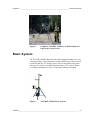
Figure 3
0005-002
TACMET MAWS Basic System
VAISALA _______________________________________________________________________ 15
User’s Guide ______________________________________________________________________
TACMET MAWS basic system interfaces with the basic sensor set of
wind speed and direction, barometric pressure, air temperature, relative
humidity, and precipitation. In addition to the basic functions of
powering and measuring the sensors, the logger also processes
statistical calculations, performs data quality control and formats data
for output in application-specific formats.
Enhanced System
The Basic System is easily enhanced with the sensors needed to support
aviation; cloud height and coverage, visibility, present weather, and
lightning detection. The additional sensors are all powered by AC
(mains) power. In case of AC (mains) power loss, the backup battery
supply (with an in-built charger) will support operation in limited mode
for 24 hours.
Figure 4
0005-001
TACMET MAWS Enhanced System
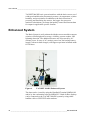
The data can be viewed by using the Handheld Terminal QMD101M
and/or by the workstation software MIDAS IV. Both of these displays
can be connected to the TACMET MAWS system by using either
landline cable or UHF/VHF radio modems.
16 ___________________________________________________________________M010082EN-B
Chapter 2 __________________________________________________________ Product Overview
MAWS Operating Software
The embedded operating software runs in the AWS logger QML102T.
Access to the limited set of commands can be gained using the
Handheld Terminal QMD101M or using MIDAS IV PC.
AWS Logger QML102T
Figure 5
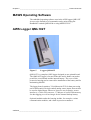
0306-010
Logger QML102T
QML102T is a complete AWS logger designed on one printed board.
The QML102T logger is located in the tube and is further encased to
protect the circuit board and the internal battery. The cover of this
protective housing can be removed for installation of the battery and for
maintaining MAWS.
The logger board contains a 32 bit Motorola CPU for data processing
and 10 differential (20 single ended) analog sensor inputs, that can also
be used as digital inputs. Moreover, there are two frequency sensor
interfaces, a 16 bit A/D converter, 1.7 Mbytes of secure Flash memory
for data logging, as well as charger for the internal backup battery.
Optional modules under the housing include, for example, various
communication modules, and a built-in pressure transducer.
VAISALA _______________________________________________________________________ 17
User’s Guide ______________________________________________________________________
Internal Battery QMB101
The TACMET MAWS system has an internal battery QMB101 placed
on top of the circuit board, under the logger cover. Backup capacity with
average power consumption of 10 mA (basic set of 5 sensors, 10 minute
measuring interval) is 130 hours. The battery can be charged with the
QML102T logger. For temporary storage periods the QML102T logger
can be commanded into the sleep mode to prevent the battery from deep
discharge.
Solar/Mains Power Supply Unit QMP201 with
Solar Panel
Figure 6
0311-136
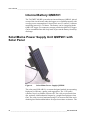
Solar/Mains Power Supply QMP201
The solar panel SOLAR12 is a custom-designed module incorporating
high power efficiency, quality, and ruggedness. The 12 W panel
contains 36 poly crystalline silicon cells. The cells are protected from
dirt, moisture, and mechanical impact by a tough fluoropolymer front
film. The solar circuit is laminated using EVA between this film and a
durable glass fiberboard backsheet for superior moisture resistance. The
18 ___________________________________________________________________M010082EN-B
Chapter 2 __________________________________________________________ Product Overview
angle of the solar panel is adjustable to optimize charging at all
latitudes.
QMP201 houses a sealed and maintenance free 7 Ah battery. The
battery is charged by solar panel using Battery Regulator QBR101. In
addition, the backup battery is also charged through the AC (mains)
power supply when the AC (mains) power is available.
Power Supply and Connection Unit QMP202
Figure 7
0311-138
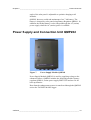
Power Supply Module QMP202
Power Supply Module QMP202 is used for supplying voltage to the
enhanced sensors. QMP202 includes the following modules: battery
regulator QBR101, mains power supply BWT15SX and two 24 Ah
back-up batteries.
Data from the enhancement sensors is transferred through the QMP202
unit to the TACMET MAWS logger.
VAISALA _______________________________________________________________________ 19
User’s Guide ______________________________________________________________________
Mains Power Supply Module QMP211
Figure 8
0306-026
Mains Power Supply Module QMP211
The AC (mains) power supply module QMP211 is a switching power
supply, which operates from the universal AC input of 100 to 240 VAC
and 50/60 Hz. The output voltage is 12 VDC (2500 mA), which is used
for powering the radio modem when it is connected to the MIDAS IV
PC for configuring or for powering the Handheld Terminal indoors.
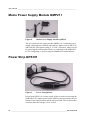
Power Strip QPS101
Figure 9
0306-011
Power Strip QPS101
Power Strip QPS101 is a safety switch, which is used in connecting the
QMP202 to AC (mains) power outlet. QPS101 has two buttons: the test
button for the circuit breaker and the current switch. The circuit breaker
activates when the leakage is over 30 mA.
20 ___________________________________________________________________M010082EN-B
Chapter 2 __________________________________________________________ Product Overview
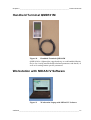
Handheld Terminal QMD101M
Figure 10
0311-132
Handheld Terminal QMD101M
QMD101M is a lightweight, rugged and easy-to-read handheld display
device for viewing measured and calculated parameters and alarms, as
well as for setting station-specific parameters
Workstation with MIDAS IV Software
Figure 11
0311-133
Workstation Laptop with MIDAS IV Software
VAISALA _______________________________________________________________________ 21
User’s Guide ______________________________________________________________________
The workstation software MIDAS IV is installed onto a laptop PC. The
MIDAS IV software operates in the Microsoft® Windows®2000
operating system, providing multi-tasking operation and connectivity.
The workstation displays numerical and graphical data, codes METAR/
SPECI aviation weather reports, as well as archives and transmits data
for further processing. The Windows®2000 environment is userfriendly and provides great flexibility. MIDAS IV uses the standard
Windows® user interface and features, and is therefore straightforward
and easy to learn.
The workstation software facilitates editing METAR/SPECI reports by
easy-to-use templates. Aviation special weather reports (SPECI) are
generated automatically whenever selected criteria are met, or at any
time initiated by the operator. Report transmission can also be fully
automated, if necessary.
In addition, the software provides real-time graphical data display in
multiple windows. Stored data can be viewed in ASCII format. The
operator can monitor system performance and sensor alarms with Event
Monitor.
Data is archived for 30 days on hard disk and sent to other systems via
serial port or as an FTP transfer via LAN.
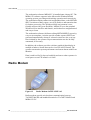
Radio Modem
Figure 12
0311-167
Radio Modem SATELLINE 3AS
Radio modems provide wireless data communication between
TACMET MAWS and handheld terminal or TACMET MAWS and
MIDAS IV PC.
22 ___________________________________________________________________M010082EN-B
Chapter 2 __________________________________________________________ Product Overview
The SATELLINE 3AS half-duplex UHF radio modem is suitable for
high-speed data applications. It provides data speeds 19200 bps at 25
kHz and 9600 bps at 12.5 kHz in the air. RS interface data speed is user
selectable from 300 to 38400 bps. The radio modem comes with a
ready-made cable and a special weatherproof enclosure.
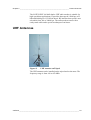
UHF Antennas
Figure 13
0310-066
UHF Antenna on Tripod
The UHF antenna can be installed on the tripod and on the mast. The
frequency range is from 410 to 470 MHz.
VAISALA _______________________________________________________________________ 23
User’s Guide ______________________________________________________________________
Combined Wind Speed and Direction Sensor
WMS302M
Figure 14
0311-135
Combined Wind Speed and Direction Sensor
WMS302M
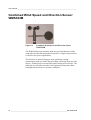
The WMS302M sensor monitors both the speed and direction of the
wind with excellent linearity and fast response. A single compact sensor
is ideal for low-power applications.
The direction is detected using an axial symmetric rotating
potentiometer with two slides, thus providing a full range from 0 to 360
degrees. Wind speed is converted into pulses using two reed relays. The
materials are carefully selected for the optimum performance under
both light winds and severe weather conditions.
24 ___________________________________________________________________M010082EN-B
Chapter 2 __________________________________________________________ Product Overview
Rain Gauge QMR101M
Figure 15
0306-019
Rain Gauge QMR101M
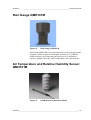
Rain Gauge QMR101M is an economical and accurate rain gauge made
of plastic, which is frostproof and highly resistant to UV-radiation.
QMR101M has a self-emptying tipping spoon of 0.2 millimeters
capacity. QMR101M comes with a ready-made cable and connector.
Air Temperature and Relative Humidity Sensor
QMH101M
Figure 16
0105-015
QMH101M with Radiation Shield
VAISALA _______________________________________________________________________ 25
User’s Guide ______________________________________________________________________
Air Temperature and Relative Humidity Sensor QMH101 is based on
Vaisala's field-proven HMP45D probe and comes with a special cable
and connector. For humidity measurements, the HUMICAP® sensor is
highly accurate and offers excellent long-term stability in a wide range
of environments. Temperature measurements are taken by an accurate
Pt-100 IEC751, 1/3 Class B.
Replacement is simple; the probe head containing the electronics can be
quickly removed from the probe body, while a replacement is installed
and the measurement continues. Meanwhile the other probe head can be
calibrated.
The probe is installed in a naturally aspirated shield made of injection
molded UV stabilized plastic. The shield has a multiplate design
providing the necessary shielding from solar radiation and precipitation.
Pressure Sensor PMT16A
Figure 17
9901-020
Pressure Sensor PMT16A
The silicon capacitive pressure sensor PMT16A has excellent accuracy,
repeatability, and long-term stability over a wide range of operating
temperatures. It maintains its accuracy and calibration for long periods
of time, thus reducing the need for field calibrations.
The fine adjustment and calibration of the sensor at the factory are
handled according to the electronic working standards, which are based
on international standards.
26 ___________________________________________________________________M010082EN-B
Chapter 2 __________________________________________________________ Product Overview
Present Weather Detector PWD11A
Figure 18
0311-137
Present Weather Detector PWD11A
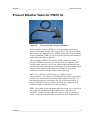
Present Weather Detector PWD11A is an intelligent multivariable
sensor for automatic weather observing systems. The sensor combines
the functions of a forward scatter visibility meter and a present weather
sensor. In addition, PWD11A can measure the intensity and amount of
both liquid and solid precipitation.
The versatility of PWD11A is achieved with a unique operating
principle. PWD11A measures an estimate of the precipitation water
content with a capacitive device and combines this information with
optical scatter and temperature measurements. These three independent
measurements together sufficiently provide data for an accurate
evaluation of the prevailing visibility and weather type.
PWD11A is calibrated with reference to a highly accurate
transmissometer. An extensive self-diagnostic procedure continuously
monitors the sensor status. Dirt and foreign particles on the lens are
detected automatically, minimizing the risk of false high values. A
special calibration kit is provided as an option for conducting field
calibration under practically all weather conditions.
PWD11A is small in size and lightweight, thus being easy to install on
the sensor arm. In addition to the standard sensor operation, the
TACMET MAWS software adds extra features such as reporting of
coded weather type identifications as plain text in the output reports.
VAISALA _______________________________________________________________________ 27
User’s Guide ______________________________________________________________________
Ceilometer CT25KAM
Figure 19
0311-134
Ceilometer CT25KAM
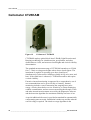
CT25KAM employs pulsed diode laser LIDAR (Light Detection and
Ranging) technology for cloud detection, precipitation, and other
obstructions to vision, and accurate cloud heights and vertical visibility
determination.
The standard measurement range of CT25KAM extends up to 25 000
feet (7.5 km) covering most heights where dense clouds appear. The
instrument is capable of reporting up to three cloud layers
simultaneously. It detects the cloud base reliably in fog, rain, snow, and
haze. If the cloud base is obscured, CT25KAM measures and reports
vertical visibility.
Extensive internal monitoring is supported by a comprehensive set of
user commands that can be given locally or remotely. Internal
monitoring includes a sensor measuring the outgoing laser pulse
energy, circuitry that checks receiver sensitivity, a sensor monitoring
window contamination, and two sensors measuring the tilt angle. These
and other internal measurements are used by the diagnostics software
and the detection algorithm for maximum reliability and ease of use.
A special additional tilt sensor is provided as standard for automatically
compensating uneven terrain. Installation is made easy and fast when no
exact leveling is required. The cloud coverage algorithm in the
28 ___________________________________________________________________M010082EN-B
Chapter 2 __________________________________________________________ Product Overview
CT25KAM is a further development of the algorithm specified by FAA.
Cloud coverage (amount) is reported in 0 to 8 octas, according to WMO
regulations.
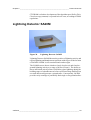
Lightning Detector SA20M
Figure 20
0306-022
Lightning Detector SA20M
Lightning Detector SA20M detects the position of lightning activity and
reports lightning and thunderstorm positions with respect to the location
of SA20M. SA20M is self-contained and weather-tight.
The SA20M sensor detects cloud-to-cloud, cloud-to-air and cloud-toground lightning activity to a range of 90 km (50 nmi.). The ability to
detect intercloud activity allows SA20M to report lightning during the
building stages of a thunderstorm, before sufficient charge build-up has
occurred that would generate a ground strike. Consequently, SA20M
provides early warnings of potentially fatal single-event ground strikes.
VAISALA _______________________________________________________________________ 29
User’s Guide ______________________________________________________________________
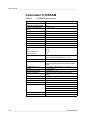
Equipment Nomenclature
Table 1
Code
Basic system
Enhancement
TACMET MAWS Nomenclature (Refer to Figure 21
on page 32)
Common Name
QML102T
PMT16A
WMS302M
QMH101M
QMA102M
QMR101M
Tripod
QM30154
QMY103M
QMP201
QMD101M
TacLap PC
MIDAS IV
MC-2G
QPS101
QPS102
QTR101
QTR102
QTR103
CT25KAM
QM40142
PWD11A
SA20M
SAT111
QM40287
QMP202
QTR104
QTR105
Logger (inside enclosure)
Pressure sensor (inside logger)
Combined wind direction and speed sensor
Air temperature and relative humidity probe
Sensor arm with radiation shield
Rain gauge
Tripod with the enclosure and accessories
Telescopic wind sensor mast
Set of ground and foot pegs for tripod
Solar/mains power supply with solar panel and battery
back-up
Handheld terminal
MIDAS IV PC
Software for the MIDAS IV PC
Hand bearing global compass
Outdoor power strip
Indoor power strip
Transit case for sensors
Transit case for tripod and mast
Transit case for tools and spares
Ceilometer
Ground pegs for CT25KAM
Present weather detector
Lightning detector
Tripod for SA20M
Grounding net and ground pegs for SA20M
Power supply module and battery back-up
Transit case for CT25KAM and SA20M
Transit case for PWD11A, QMP202, and SAT111
Number in
Figure
10
4
2
3
15
12
16
14
8
17
13
6
7
18
30 ___________________________________________________________________M010082EN-B
Chapter 2 __________________________________________________________ Product Overview
Table 2
Communication Options (Refer to Figure 21 on page
32)
Code
Common Name
Number in
Figure
SATELLINE3AS
QMX101M-x
QM30185
Radio modem
UHF antenna 410 ... 470 MHz
Antenna arm for TACMET MAWS
tripod
Antenna tripod for PC end
Mains power supply for radio modem
or handheld terminal
5
1
11
QM30176
QMP211
9
VAISALA _______________________________________________________________________ 31
User’s Guide ______________________________________________________________________
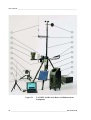
Figure 21
0310-012
TACMET MAWS with Basic and Enhancement
Equipment
32 ___________________________________________________________________M010082EN-B
Chapter 2 __________________________________________________________ Product Overview
NOTE
The appearance of the antenna and the solar panel on your TACMET
MAWS may differ from the one on the figures.
Table 3
Standard Nomenclature
Basic system
Common Name
ZZ45202
ZZ45114
ZZ45121
DRW011179
DRW011180
Enhancement
Cables Provided
CT45300
CT45298
ZZ45215
ZZ45121
ZZ45123
Table 4
PC cable with DC connector, 5 m (15 ft.)
3 landline cables for PC or handheld terminal, 22.5 m (75
ft.) each
Mains cable with US std. plug, 5 m (15 ft.)
Radio - TACMET MAWS connection cable, mounted to
the modem, 1 m (3 ft.)
Radio - PC connection cable, mounted to the modem, 1 m
(3 ft.)
AC supply cable for CT25KAM
DC / data cable for CT25KAM
SA20M connection cable
Mains cable with US std. plug, 5 m (15 ft.)
Enhanced Sensor Set Connection Cable to TACMET
MAWS, 5 m (15 ft.)
Tools and Spare Parts
Standard
Nomenclature
Common Name
16139
19558
25925
25926
26073
2622
26271
4017
4185
CD
QMD101M
QTR103
WMS302M
Battery case (QMP202) key
Velcro belts, set of 10, length = 10 in (250 mm)
Allen wrench, 4 mm
Hammer, 2 lb. (0.9 kg)
UHF antenna without cable
International adapter kit
Screwdriver, 5.5 mm, length = 1 in (25 mm)
Back-up battery 12 V, 7 Ah
Allen wrench, 3 mm
Midas IV Software on CD
Handheld display with tripod fixture
Transit case for tools and spares
Wind sensor
VAISALA _______________________________________________________________________ 33
User’s Guide ______________________________________________________________________
TACMET MAWS Serial Number Record
Table 5
Basic System Serial Number Record
Part number
Serial number
TACMET MAWS (system)
HMP45DX (air temperature/relative
humidity sensor probe head)
DTR502
QMP201 (power supply)
QMR101M (rain gauge)
QMD101M (handheld terminal)
QMD101M (spare handheld terminal)
WMS302M (wind)
WMS302M (spare wind)
SATEL3AS (radio modem)
SATEL3AS (radio modem)
Table 6
Enhancement Serial Number Record
Part number
Serial number
CT25KAM (ceilometer)
PWD11A (present weather)
QMP202 (enh. power supply)
SA20M (lightning detector)
34 ___________________________________________________________________M010082EN-B
Chapter 3 _______________________________________________________________ Installation
CHAPTER 3
INSTALLATION
This chapter provides information about preparing the installation and
siting the station. It also contains detailed information on installing the
tripod and all the sensors.
Preparing Installation
All the required tools are supplied in the QTR101 or QTR103 transit
cases.
Tools needed:
-
MC-2G compass to establish the system orientation
-
Ground pegs for securing the tripod
-
Hammer for hitting the ground pegs into ground
-
Allen wrenches
-
Screwdriver.
One person can complete the whole installation. Depending on the set
of sensors, the installation should not take more than half an hour.
VAISALA _______________________________________________________________________ 35
User’s Guide ______________________________________________________________________
Unpacking Instructions
When you have received the delivery, check the sensors, make an
inventory against the packing list, and check that sensors have not been
damaged during transportation.
NOTE
Store all the sensors and other devices in their transit cases.
The logger electronics are attached to the railing inside the tube. The
tripod is already assembled, but needs to be attached to the telescopic
mast.
Siting the Station
Finding a suitable site for the weather station is important for getting
representative ambient measurements. The site should represent the
general area of interest.
Using the Compass
When aligning the station, it is essential to use the compass correctly.
The Global Compass MC-2G works reliably everywhere in the world.
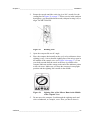
Figure 22
0011-025
Global Compass MC-2G
When you are in the northern hemisphere, you should determine south
to align TACMET MAWS. With the compass, do the following:
1.
Open the compass lid completely.
36 ___________________________________________________________________M010082EN-B
Chapter 3 _______________________________________________________________ Installation
2.
Rotate the capsule until the scale ring is at 180° (south). See the
reading line on Figure 23 on page 37. When you are in the southern
hemisphere, you should determine north (compass bearing is 0°) to
align TACMET MAWS.
Figure 23
9911-003
Reading Line
3.
Open the compass lid at a 60° angle.
4.
Place the compass horizontally at the eye level at a distance where
sighting is easy. Aim so that the sighting line of the mirror runs in
the middle of the capsule view (see Figure 24 on page 37). Turn
your body around until the arrow at the base is parallel to the
compass indicator and the orange north end of the indicator points
to the red arrow. Make sure you keep the compass in an upright
position and the sighting line remains in the middle.
Figure 24
0011-026
5.
Sighting Line of the Mirror Runs in the Middle
of the Capsule View
Do not move the compass. Look through the sighting notch and
select a landmark, or example, a tree. Now you know where is
VAISALA _______________________________________________________________________ 37
User’s Guide ______________________________________________________________________
south and you can align the station so that the solar panel faces
south.
NOTE
It is important that there are no magnetic objects nearby when using a
compass. Objects such as knives, belt buckles, metallic cans, tools,
audio equipment, and glasses with metal frames can cause an
erroneous reading if kept close to the compass.
NOTE
The luminous marks on the north needle and at the base plate gradually
lose their luminous effect in the dark. You can restore the luminous
effect by illuminating the compass briefly, for example, with a
flashlight.
Solar Radiation
When aligning TACMET MAWS in the northern hemisphere, the solar
panel should face south, and the temperature and humidity sensor be on
the western side of TACMET MAWS. When aligning the weather
station in the southern hemisphere, the solar panel should face north,
and the temperature and humidity sensor be on the eastern side of
TACMET MAWS. Make sure that no building or object will shadow
the station (especially the solar panel) during the day (see Figure 25 on
page 39).
Wind Measurement
Allow sufficient clearance for the wind sensors, that is, the station
should not be located next to a building or any other object that might
affect the airflow.
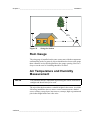
In general, any object of height (h) will not remarkably disturb the wind
measurement at a minimum distance of 10 × h. For example, locate the
weather station at least 100 feet away from a 10-foot-high tree. See
Figure 25 on page 39.
38 ___________________________________________________________________M010082EN-B
Chapter 3 _______________________________________________________________ Installation
Figure 25
0201-015
Siting the Station
Rain Gauge
The rain gauge is installed on the same sensor arm with the temperature
and humidity probe. In general, objects should not be closer to the gauge
than a distance twice their height above the gauge opening. Sites on a
slope or on the roof of a building should be avoided.
Air Temperature and Humidity
Measurement
NOTE
The radiation shield is important in protecting the sensor from direct
sunlight and should always be used.
The tripod already determines a suitable height for the sensor. Avoid the
following installation sites to ensure correct measurements: shaded
areas, rooftops, steep slopes, heat sources, swamps, high vegetation and
places that might hold water after rains.
VAISALA _______________________________________________________________________ 39
User’s Guide ______________________________________________________________________
Present Weather Detector
The Present Weather Detector PWD11A is installed on the short arm of
the TACMET MAWS tripod. Avoid setting the system up near high
brush or grass, because foreign objects in the sample volume may cause
sudden changes in the scatter signal.
Cloud Ceilometer
Align the ceilometer with the optical window pointing away from the
sun (north in the northern hemisphere, whereas south in the southern
hemisphere) to keep excess sunlight from out of the sensor.
Make sure that the ceilometer stands firmly on the terrain. The unit does
not have to be mounted vertically straight, because the unit is equipped
with two tilt-angle sensors.
Lightning Detector
The main siting consideration for Lightning Detector SA20M is
interference from local obstructions. Any conducting object that
presents a profile of approximately 30 degrees, or more, above the
horizon of the antenna ground plane is an obstruction (see Figure 26 on
page 40).
Figure 26
9904-024
SA20M Vertical Obstruction (Side View)
The horizontal angle obstructed by an object should not be greater than
5 degrees; larger angles than this will affect accurate reporting of strike
bearing in the direction of the object as shown in Figure 27 on page 41.
The size of the obstruction dictates the degree of the inaccuracy.
40 ___________________________________________________________________M010082EN-B
Chapter 3 _______________________________________________________________ Installation
However, obstructions do not greatly effect the detection efficiency of
SA20M. In general, it is desirable to have no obstructions to the sensor.
Figure 27
9903-051
SA20M Horizontal Obstruction (Top View)
For a metal building (very wide, solid metallic wall) that is 9 m (30 feet)
taller than the mounted height of SA20M, the sensor should be placed
at least 18 m (60 feet) away as shown in Figure 26 on page 40.
Siting of the lightning detector also depends on the location of buried
electrical cables and electrical transformers. Site the lightning detector
away from emitters of electromagnetic interference, such as buried
electrical cables and electrical transformers. SA20M will send a
message to the handheld terminal and/or to MIDAS IV if the siting is
unsuccessful.
NOTE
SA20M can not be installed in a closed-in structure. It must be
installed outdoors facing the magnetic north.
Power Supply Unit
When siting the Power Supply Unit QMP202, place it in a dry location,
that is, do not place it in a depression where water might accumulate.
VAISALA _______________________________________________________________________ 41
User’s Guide ______________________________________________________________________
Basic System
The basic system is packed into two transit cases. The third transit case
is the Spares and Tool Kit.
Table 7
Contents of Basic System Cases
Transit case
Contents
Dimensions (w × h × l) and
weight
QTR101
Sensor arm with rain gauge and temperature
and humidity probe, wind sensor, handheld
terminal with cable, compass, mains cable for
QMP201, 1 power supply, and when
included: 2 radio modems, 2 antennas, 2
radio modem cables, 2 rubber antennas
Tripod with the enclosure and solar panel +
accessories, telescopic mast, ground peg
bag, landline cables, PC cable, outdoor
power strip, manual, and when included:
antenna accessory bag
Hammer, allen wrench, screwdriver, key for
QMP202, Velcro belts, wind sensor,
handheld terminal, back-up battery, adapter
kit, CD, indoor power strip, and spare
antennas when included
650 × 450 × 250 mm
(25.8 × 17.7 × 9.8 in.)
8.2 kg (18 lb.)
QTR102
QTR103
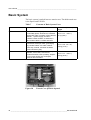
Figure 28
0011-028
1340 × 370 × 340 mm
(52.8 × 14.6 ×13.4 in.)
33.6 kg (74 lb.)
650 × 450 × 250 mm
(25.8 × 17.7 × 9.8 in.)
10.0 kg (22 lb.)
Transit Case QTR101 Opened
42 ___________________________________________________________________M010082EN-B
Chapter 3 _______________________________________________________________ Installation
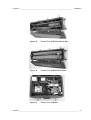
0011-029
Figure 29
Transit Case QTR102 without Mast
0011-030
Figure 30
Transit Case QTR102 with Mast
Figure 31
Transit Case QTR103
0011-031
VAISALA _______________________________________________________________________ 43
User’s Guide ______________________________________________________________________
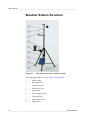
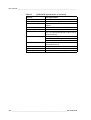
Weather Station Structure
Figure 32
0310-021
Mechanical Structure of Basic System
The following numbers refer to Figure 32 on page 44:
1
=
Plastic collar
2
=
Mounting piece
3
=
Telescopic mast
4
=
Protective cover
5
=
Sensor arm
6
=
Tube (logger inside)
7
=
Telescopic leg
8
=
Adjustment screw
9
=
Support bar
44 ___________________________________________________________________M010082EN-B
Chapter 3 _______________________________________________________________ Installation
Installing Tripod, Sensors, and
Optional Antennas
When installing the sensors to the tripod, see Figure 32 on page 44 for
correct places for the sensors.
1.
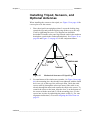
Place the tripod in an upright position. Loosen the locking ring,
spread the legs and push the locking ring all the way to the stop.
Lock by tightening the screw. The support bars should be
horizontal. Point the solar panel leg towards south in the northern
hemisphere (north in the southern hemisphere). See Figure 32 on
page 44 and Figure 33 on page 45 for the component names.
Figure 33
9905-044
2.
Mechanical Structure of Tripod Legs
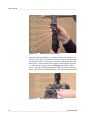
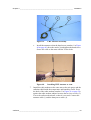
For attachment of the wind sensor (number 1 in Figure 34 on page
46), the mounting piece has already been tightened with the small
hex screw (6) on the top of the telescopic mast. Guide the wind
sensor cable (4) through the telescopic mast (if the cable is not
already through the mast) and connect the cable to the sensor. To
connect the sensor to the mast, align the slot (3) on the bottom of
the sensor with the metal tab (5) on the mounting piece. Fix the
sensor into its place by tightening the plastic collar (2). For vane
alignment instructions, see section Aligning the Wind Vane on
page 52.
VAISALA _______________________________________________________________________ 45
User’s Guide ______________________________________________________________________
Figure 34
0311-042
3.
Wind Sensor Attachment
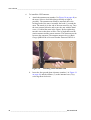
Attach the mast to the base. Loosen the hand screw (number 3 in
Figure 35 on page 46). Guide the mast into its place with the notch
(2) facing the screw. Press the mast in place and hand tighten the
hand screw. Take the wind sensor cable out through the opening
(1) and connect it to the connector Wind marked with a white
arrow. Align the marks and gently but firmly press the connector
down. The connector will snap in place. Do not turn the connector!
Figure 35
0311-043
Attaching the Telescopic Mast
46 ___________________________________________________________________M010082EN-B
Chapter 3 _______________________________________________________________ Installation
4.
Fully extend the telescopic mast. Open the latch (1) by lifting it up.
Lift the inner mast (2) to the upper position. Close the latch by
pushing it down.
Figure 36
0311-044
5.
Extending the Telescopic Mast
The temperature and relative humidity probe (with radiation
shield) and the rain gauge are already assembled to the sensor arm
which is in case QTR101. Install the arm to the tripod. Push the arm
in place and tighten the two hand screws (number 1 in Figure 37 on
page 47).
Figure 37
0311-045
Sensor Arm Attachment
VAISALA _______________________________________________________________________ 47
User’s Guide ______________________________________________________________________
6.
To install the UHF antenna:
a.
0311-047
b.
Attach the antenna arm (number 3 in Figure 38 on page 48) to
the mast. Select a desired height (preferably as high as
possible). The antenna arm cannot be attached above the
locking latch of the mast. Assemble the hook (1) around the
mast. The notch (4) in the end of the arm must face up. Turn
the arm counterclockwise and secure the arm with the hand
screw (2, behind the mast in the figure). Before tightening,
turn the arm so that there will be a line of sight between the
station antenna and the remote antenna. The mast must not be
between the antennas! The antenna must not be over Rain
Gauge QMR101M or Present Weather Detector PWD11A.
Figure 38
Installing UHF Antenna Arm
Insert the four ground plane elements (number 1 in Figure 39
on page 49) and the radiator (3) to the antenna base (2) by
screwing them clockwise.
48 ___________________________________________________________________M010082EN-B
Chapter 3 _______________________________________________________________ Installation
0310-062
c.
0311-048
7.
Figure 39
UHF Antenna Assembly
Install the antenna so that the hand screw (number 1 in Figure
40 on page 49) faces the notch (2) and tighten the hand screw.
Secure the cable to the mast with the Velcro belts.
Figure 40
Installing UHF Antenna to Arm
Install the radio modem on the same arm as the rain gauge and the
radiation shield with the temperature and humidity sensor. Press
the back of the radio modem (number 3 in Figure 41 on page 50)
against the radio modem adapter between the two hex screws (2).
Lower the radio modem down so that it is secured. Connect the
antenna cable (1) and the data/power cable (4).
VAISALA _______________________________________________________________________ 49
User’s Guide ______________________________________________________________________
Figure 41
0311-168
8.
Installing Radio Modem
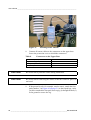
Connect all sensor cables to the connectors on the upper base.
Lower the protection cover to shield the connectors.
Table 8
Connectors on the Upper Base
Connector (color)
Sensor
Temp./humidity (red)
Wind (white)
Rain (blue)
QMH101M
WMS302M
QMR101M
CAUTION
Be careful not to pinch the cables during installation.
CAUTION
Be careful when connecting the cables so that the connector pins will
not bend.
9.
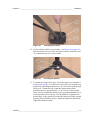
If the ground is soft (for example, sand or snow), attach the foot
pads (number 3 in Figure 42 on page 51) to the tripod legs. After
you have attached the foot pad, insert a peg (1) through the hole (3)
to the ground to secure the leg.
50 ___________________________________________________________________M010082EN-B
Chapter 3 _______________________________________________________________ Installation
Figure 42
0311-049
Attaching Foot Pads
10. Check with the bubble level (number 1 on Figure 43 on page 51)
that the station is leveled. The air bubble must be inside the circle
(2). Adjust the legs to level the station.
Figure 43
0311-051
Leveling the Station
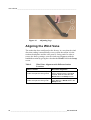
11. To adjust the length of the legs, loosen the hand screw (number 1
in Figure 44 on page 52) at the lower end of the leg. Extend the leg
and lock by tightening the hand screw. If you do not extend the legs
all the way, extend the legs so that the temperature/relative
humidity sensor is approximately 1.5 m (5 feet) off the ground.
After you have aligned the station, insert a peg through the hole (2)
to the ground to secure the leg. Use the hammer to pound in the
ground pegs. If the ground is too hard for the pegs, fill the ground
peg bag with sand and/or stones. Attach the bag to the horizontal
support bar with the straps.
VAISALA _______________________________________________________________________ 51
User’s Guide ______________________________________________________________________
Figure 44
0311-050
Adjusting Legs
Aligning the Wind Vane
The station has been configured at the factory, in a way that the wind
direction reading is automatically correct, when the station is in the
northern hemisphere and the solar panel is facing south. In order to
restore the factory settings, reset the wind vane alignment with the
handheld terminal by giving the value 0 to the WindC field in the Setup
screen.
Table 9
Wind Vane Alignment with Different Station
Locations
Station Location
Wind Vane Alignment
Station is in the northern hemisphere Alignment is not needed. Restore the
and the solar panel is facing south.
factory settings with the handheld
terminal. Give the value 0 to the
WindC field in the Setup screen.
Station is in the southern hemisphere With the handheld terminal, give the
and the solar panel is facing north.
value 180 to the WindC field in the
Setup screen.
52 ___________________________________________________________________M010082EN-B
Chapter 3 _______________________________________________________________ Installation
Operating the Solar Panel
WARNING
Photo voltaic modules generate direct current (DC) when exposed to
sunlight or other sources of light. Although single modules produce
low voltage and current, shocks and burns can still result from contact
with the module output wiring. Photo voltaic modules do not have to
be connected, that is, powering a load, to generate electricity.
CAUTION
Handle the solar panel with care: impact on the front or rear surface
can damage the panel. Do not bend the panel.
NOTE
Do not concentrate light on the panel in an attempt to increase its
power output.
The Solar Power Supply QMP201 has been installed on a tripod leg at
the factory. Follow the instructions below to operate the solar panel:
1.
Connect the power cable to the DC Power Input connector (green
arrow) on the upper base of the logger tube.
2.
To maximize the annual energy output, tilt the panel at an angle
shown in Table 10 on page 53. At some installations, it may be
effective to adjust the tilt seasonally. At most latitudes,
performance can be improved during the summer by using an angle
smaller than the recommendation on the table. Conversely, a larger
angle can improve winter performance. The panel must face south
in the northern hemisphere and north in the southern hemisphere.
Tilt the panel towards the sun: tilt angle should be more vertical the
further you are from the equator.
Table 10
Recommended Tilt Angle for the Solar Panel
Latitude of Site
Tilt Angle
0 ...10°
10 ... 50°
> 50°
20°
Add 10° to the local latitude
60°
VAISALA _______________________________________________________________________ 53
User’s Guide ______________________________________________________________________
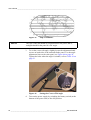
Figure 45
NOTE
Map of Latitudes
The rays of the sun should be perpendicular to the panel, that is,
sunlight should hit the panel at a 90° angle.
3.
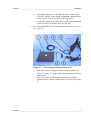
To set the correct tilt angle, slightly loosen the adjustment hand
screws on both sides of the unit and tilt the panel. Use the angle
adjustment lines on the solar panel, see Figure 46 on page 54.
Tighten the bolts when the angle is suitable, refer to Table 10 on
page 53.
Figure 46
0311-052
4.
Setting the Correct Tilt Angle
Turn on the power supply by switching the battery switch (at the
bottom of the power unit) to the ON position.
54 ___________________________________________________________________M010082EN-B
Chapter 3 _______________________________________________________________ Installation
5.
Press the Status LED button to check the battery status (green =
OK, orange = battery voltage low, red = battery empty).
Operating TACMET MAWS from the
AC Power Source
TACMET MAWS can also be operated, and/or the batteries charged,
using the AC (mains) power. Connect the AC power cable to the Mains
Input connector at the bottom of the QMP201 power unit. Secure the
cable to the leg with the Velcro belt.
Configuring Radio Modems
Radio modems provide wireless data communication between
TACMET MAWS and handheld terminal or between TACMET
MAWS and MIDAS IV PC.
You do not need to configure the radio modems, just check that the
frequency is correct before installing the radio modem to the sensor
arm. The exact UHF frequency of the radio modems is specified in the
order phase.
Table 11 on page 55 helps selecting a correct antenna to be used with
the radio modem.
Table 11
Antennas to Be Used with the Radio Modem
Frequency
MAWS End
Antenna
PC/Handheld End
Antenna
UHF 410 ... 430 MHz
UHF 430 ... 450 MHz
UHF 450 ... 470 MHz
QMX101M-1
QMX101M-2
QMX101M-3
QMX101M-1
QMX101M-2
QMX101M-3
WARNING
Do not operate the radio modem near electrical blasting caps or in an
explosive atmosphere.
CAUTION
Do not operate the radio modem unless all RF connectors are secure
and any open connectors are properly terminated.
VAISALA _______________________________________________________________________ 55
User’s Guide ______________________________________________________________________
Connecting MIDAS IV PC to
TACMET MAWS
Depending on your configuration you have either one or two
alternatives for connecting the MIDAS IV PC to TACMET MAWS:
1.
Direct hard wire connection
2.
Radio frequency (RF) connection, using the optional radio
modems
Direct Hard Wire Connection
Connect the landline cable(s) to the PC Connector connector on the
lower base of the logger tube. The connector is marked with a yellow
arrow. Place the MIDAS IV PC in a dry place at the distance defined by
the length of the landline cable(s).
Radio Frequency Connection
To enable the radio frequency connection between TACMET MAWS
and MIDAS IV PC, you need to connect similarly configured radio
modems to TACMET MAWS and to MIDAS IV PC.
NOTE
The radio modem in your system may differ from the one shown in the
figures of this section.
1.
NOTE
For connecting a radio modem to TACMET MAWS, see detailed
installation information in section Installing Tripod, Sensors, and
Optional Antennas on page 45.
The antenna must be mounted vertically and placed so that there is a
line of sight between antennas.
a.
Install the antenna antenna to the mast of the tripod. For
information on which antenna to choose, see Table 11 on page
55.
b.
Install the radio modem to its adapter on the sensor arm.
c.
Connect the antenna cable to the antenna connector on the
radio modem.
56 ___________________________________________________________________M010082EN-B
Chapter 3 _______________________________________________________________ Installation
2.
d.
Connect the data/power cable from the radio modem to the
TACMET MAWS connector PC Connector (marked with a
yellow arrow) on the lower base of the logger tube.
e.
Confirm by checking the LEDs on the modem that the modem
is powered and it is sending and receiving data.
For connecting MIDAS IV PC to the radio modem, refer to Figure
47 on page 57.
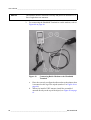
Figure 47
0310-064
Connecting the Radio Modem to PC
a.
Place the correctly configured radio modem (number 4 in
Figure 47 on page 57) to the adapter that is mounted on the leg
of the tripod.
b.
When you install a UHF antenna, install the assembled
antenna directly on the top of the tripod, see Figure 48 on page
58.
VAISALA _______________________________________________________________________ 57
User’s Guide ______________________________________________________________________
0311-177
Figure 48
UHF Antenna on Tripod
c.
Connect the antenna cable to the radio modem.
d.
Connect the data/power cable (number 3 in Figure 47 on page
57) to the radio modem (4) and the other end to the PC cable
(2).
e.
Connect the Power Supply Module QMP211 (6) to the power
connector (5) of the PC cable and to an AC (mains) outlet.
f.
Place the tripod antenna in such a way that there is a line of
sight between the antennas.
g.
Confirm by checking the LEDs on the bottom of the modem
that the modem is powered and it is sending and receiving
data.
Connecting the Handheld Terminal
to TACMET MAWS
Depending on your configuration you have either one or two
alternatives for connecting the handheld terminal to TACMET MAWS:
1.
Direct hard wire connection
2.
Radio frequency (RF) connection, using optional radio modems
58 ___________________________________________________________________M010082EN-B
Chapter 3 _______________________________________________________________ Installation
Direct Hard Wire Connection
Connect the handheld terminal cable to the Hand Terminal connector
on the upper base of the logger tube. The connector is marked with a
yellow arrow. When not using the handheld terminal, place the
handheld terminal to the leg of the tripod.
NOTE
To ensure faultless operation of the handheld terminal, you should
remove the handheld terminal from the leg of the tripod and store it
indoors in the harsh weather conditions, for example, in cold climate.
Radio Frequency Connection
To enable the radio frequency connection between TACMET MAWS
and the Handheld Terminal, you need to connect similarly configured
radio modems to TACMET MAWS and to the Handheld Terminal.
NOTE
The radio modem in your system may differ from the one shown in the
figures of this section.
1.
NOTE
For connecting a radio modem to TACMET MAWS, see detailed
installation information in section Installing Tripod, Sensors, and
Optional Antennas on page 45.
a.
Install the antenna to the mast of the tripod. For information
on which antenna to choose, see Table 11 on page 55.
b.
Install the radio modem to its adapter on the sensor arm.
c.
Connect the antenna cable to the antenna connector on the
radio modem.
d.
Connect the data/power cable from the radio modem to the
TACMET MAWS connector Hand terminal (marked with a
yellow arrow) on the upper base.
e.
Confirm by checking the LEDs on the modem that the modem
is powered and it is sending and receiving data.
Lower the protection cover to shield the connectors after you have
made all connections.
VAISALA _______________________________________________________________________ 59
User’s Guide ______________________________________________________________________
NOTE
The antenna must be mounted vertically and placed so that there is a
line of sight between antennas.
2.
For connecting the Handheld Terminal to a radio modem, refer to
Figure 49 on page 60.
Figure 49
0311-075
Connecting Radio Modem to the Handheld
Terminal
a.
Place the correctly configured radio modem to the adapter that
is mounted on the leg of the tripod (number 2 in Figure 49 on
page 60).
b.
When you install a UHF antenna, install the assembled
antenna directly on the top of the tripod, see Figure 50 on page
61.
60 ___________________________________________________________________M010082EN-B
Chapter 3 _______________________________________________________________ Installation
0311-177
Figure 50
UHF Antenna on Tripod
c.
Connect the antenna cable to the radio modem.
d.
Connect the data/power cable (4) from the handheld terminal
(1) to the radio modem cable (5).
e.
Connect the Power Supply Module QMP211 to the power
connector on the bottom of the handheld terminal and to an
AC outlet (3).
f.
Place the tripod antenna in such a way that there is a line of
sight between the antennas.
g.
Confirm by checking the LEDs on the modem that the modem
is powered and it is sending and receiving data.
VAISALA _______________________________________________________________________ 61
User’s Guide ______________________________________________________________________
Enhancement
The Enhancement is packed in two transit cases. Both cases require two
persons to lift. Table 12 on page 62 lists the contents of the transit cases
for enhancement.
Table 12
Contents of Enhancement Cases
Enhancement
Contents
Dimensions (w × h × l) and
weight
QTR104
Ceilometer CT25KAM, ground pegs for
CT25KAM, AC and DC cable for CT25KAM,
Lightning Detector SA20M, grounding net
with pegs for SA20M, SA20M cable
Present Weather Detector PWD11A, Tripod
SAT111, Power Supply QMP202, AC (mains)
cable for QMP202, enhancement cable
990 × 450 × 400 mm
(39.0 × 18.2 × 17.6 in)
30.5 kg (67 lb.)
QTR105
Figure 51
0011-052
990 × 450 × 400 mm)
(39.0 × 18.2 × 17.6 in)
40.9 kg (90 lb.)
Transit Case QTR104 Opened
62 ___________________________________________________________________M010082EN-B
Chapter 3 _______________________________________________________________ Installation
Figure 52
0011-051
Transit Case QTR105 Opened
The basic system must be set up before the enhancement. See section
Basic System on page 42 for instructions on setting up the basic system.
After that continue as follows:
NOTE
1.
Select the site for the enhancement sensors.
2.
Bring the Mains Power Supply QMP202 to the selected site.
QMP202 supplies +12 VDC operating voltage for the TACMET
MAWS enhancement sensors.
Do not connect the power until the installation is completed.
When AC power (85 ... 264 VAC) is available, connect AC power
cable to the Mains Input connector on QMP202 and the other end
to an AC outlet. In this case, the AC output (AC TO CT25KAM)
can be used to power the ceilometer. Check the battery status with
the BTRY Status LED ON button (see Figure 53 on page 64).
Status LEDs can be seen through the window on the cover.
VAISALA _______________________________________________________________________ 63
User’s Guide ______________________________________________________________________
Figure 53
0311-005
Connectors on the Mains Power Supply
QMP202
3.
Connect the data cable to the connector Enhancement (marked
with a green arrow) on the lower base of TACMET MAWS and to
the Connection to MAWS connector on QMP202.
4.
Connect the cables for the enhancement sensors Present Weather
Detector PWD11A, Lightning Detector SA20M and Ceilometer
CT25KAM and set them up as instructed in the following sections.
Setting up PWD11A
Install the Present Weather Detector PWD11A to the short arm of the
TACMET MAWS tripod.
CAUTION
Do not touch the rain detector plate (see arrow on Figure 54 on page
65). Take special care to prevent it from being hit. It is fragile!
NOTE
If the short arm gets loose, use the allen wrench to tighten it.
64 ___________________________________________________________________M010082EN-B
Chapter 3 _______________________________________________________________ Installation
Figure 54
0311-006
Installing PWD11A (Arrow Pointing to Rain
Detector Plate)
1.
Remove the protective lens caps and take PWD11A from the
transit case.
2.
Hold the sensor in a way that the hand screw is facing down.
3.
With the hand screw facing the notch, push the sensor in place and
tighten the hand screw.
4.
Connect the DC power/signal cable to the connector PWD11A on
the Mains Power Supply QMP202 (see Figure 53 on page 64).
5.
Attach the cable to the leg of the tripod with the Velcro belt.
Setting up CT25KAM
CAUTION
1.
Open the transit case QTR104. Lift the ceilometer using the handle
of the unit and place it horizontally on the transit case as shown in
Figure 55 on page 66.
VAISALA _______________________________________________________________________ 65
User’s Guide ______________________________________________________________________
Figure 55
0311-009
CT25KAM on the Transit Case
2.
Open the hand screws (number 2 in Figure 55 on page 66). Widen
the legs (1) of the ceilometer. Close the hand screws.
3.
Place the ceilometer on the ground in a way that the optical window
is directed off the sun. Make sure that the ceilometer stands firmly
on the terrain. If not, adjust the vertical adjustment screws of the
legs. The unit does not have to be mounted vertically straight,
because the unit is equipped with two tilt-angle sensors.
NOTE
Ensure the ceilometer is placed in a location so that the data and power
connection cables will reach QMP202 before you secure the system
with ground pegs.
NOTE
Align the ceilometer with the optical window pointing away from the
sun (north in the northern hemisphere) to keep excess sunlight from
out of the sensor.
4.
To secure the ceilometer: insert the pegs next to the legs, and turn
the pegs so that the loops are over the legs.
5.
Connect the DC/DATA cable to the J1 connector (number 1 in
Figure 56 on page 67) on the ceilometer and the other end to the
CT25KAM connector on the Mains Power Supply QMP202 (see
Figure 53 on page 64).
66 ___________________________________________________________________M010082EN-B
Chapter 3 _______________________________________________________________ Installation
Figure 56
0311-010
Connectors on Ceilometer CT25KAM
6.
Connect the AC cable to the J2 connector (number 3 in Figure 56
on page 67) on the ceilometer and the other end to the AC TO
CT25KAM connector on the Mains Power Supply QMP202 (see
Figure 53 on page 64).
7.
Verify the operation of CT25KAM with the status LED (number 2
in Figure 56 on page 67). For the states of the status LED, see Table
13 on page 67.
Table 13
States of the Status LED
State
Explanation
Red
Green
Blinking from
green to red
Red
Only the AC cable is connected.
Only the DATA&DC cable is connected.
Both cables are connected, indicating that the operating
voltage and mains power are available.
Both cables are connected and the internal heating is on
(likely after start up).
Setting up SA20M
To ensure faultless operation of the lightning detector, place it as far
away as possible from other sensors. To gain correct direction
information, face the arrow (with N) on the sensor plate to the north
with the help of the compass.
1.
Connect the DC power/signal cable to the connector (number 1 in
Figure 57 on page 68) on SA20M and the other end to the SA20M
connector on the Mains Power Supply QMP202 (see Figure 53 on
page 64).
VAISALA _______________________________________________________________________ 67
User’s Guide ______________________________________________________________________
Figure 57
0311-007
SA20M Unit (Bottom View)
The following numbers refer to Figure 57 on page 68:
1
=
DC power/signal cable connector
2
=
Grounding net connector
3
=
Breather
2.
Connect the grounding net cable (number 6 in Figure 58 on page
69) to the earth screw (number 2 in Figure 57 on page 68) on the
bottom of SA20M and secure with the finger screw.
3.
Open the locking screw (number 3 in Figure 58 on page 69), spread
the legs of the tripod and push the support bars (5) all the way
down. The support bars should be horizontal. Close the locking
screw (3).
68 ___________________________________________________________________M010082EN-B
Chapter 3 _______________________________________________________________ Installation
Figure 58
0311-008
NOTE
Lightning Detector SA20M with Grounding Net
4.
Open the hand screw (2) on the tripod (9).
5.
Attach the sensor (7) to the tripod and close the hand screw.
6.
Open the hand screws on tripod legs (4) and extend the legs.
7.
Place the tripod with the lightning detector as far away as possible
from TACMET MAWS.
8.
Face the arrow (with N) on the sensor plate to the north with the
help of the compass.
Do not place the compass on top of the unit while aligning, as this will
cause erroneous readings.
9.
Check with the bubble level (10) that the sensor is leveled.
10. Install the ground pegs (11) through the holes. Using of the ground
pegs with the grounding net (6) is essential for getting correct
lightning reports.
VAISALA _______________________________________________________________________ 69
User’s Guide ______________________________________________________________________
Disassembly for Transportation
WARNING
Be careful when closing the tripod legs. See that there are no power
lines or other obstacles above the mast and wind sensor.
Enhancement
1.
Disconnect AC (mains) power from QMP202.
2.
Disconnect the mains cable from the Mains Input connector of the
QMP202.
3.
Disconnect all cables from QMP202 and place them in transit cases
(see Table 12 on page 62).
4.
Replace all protective caps on the QMP202 connectors and other
Enhancement connectors.
5.
Remove the ground pegs of the tripod SAT111.
6.
Disassemble SA20M. Loosen the hand screws on the SAT111
tripod. Place SA20M in the transit case QTR104.
7.
Disconnect the SA20M connection cable and place in QTR104.
8.
Loosen the locking screw on the support bar and close the tripod.
Slide the legs inward and retighten the hand screws. Place tripod in
transit case QTR105.
9.
Disconnect the data cable from the TACMET MAWS
Enhancement connector. Place this cable and the QMP202 AC
(mains) cable to available openings in QTR105. Place the foam
over the tripod and the cables.
10. Loosen the hand screw on the bottom of PWD11A. Pull PWD11A
straight out. Place PWD11A in QTR105. Place protective caps on
the lenses.
11. Disconnect the cable from the J1 DATA & DC connector.
12. Disconnect the cable from the J2 AC connector.
13. Lay the ceilometer down with the lens facing away from wind.
Retract the legs by loosening the hand screws. Slide the legs
inward and tighten the screws. Place ceilometer in QTR104. Store
the two ceilometer cables on either side of the ceilometer.
NOTE
Fold handle over on the ceilometer or transit case lid will not close.
70 ___________________________________________________________________M010082EN-B
Chapter 3 _______________________________________________________________ Installation
Basic System
1.
Unplug AC power, if connected. Loosen the hand screws on the
solar power supply, turn the solar panel down, and tighten the hand
screws. Remove the mains cable from the solar power supply.
2.
Raise the protective cover and disconnect the DC Power Input
connector from TACMET MAWS.
3.
Disconnect Rain and Temp./Humidity connectors. Loosen the
two hand screws on the arm. Remove the arm with the rain gauge
and the temp./humidity sensor. Place them in transit case QTR101.
4.
Depending on your connection method, disconnect handheld
display, radio modems, and cables and store them in QTR101.
Disconnect antennas and cables. Store UHF antennas in transit
case QTR102. Place VHF antennas in transit case QTR101 so that
the hook of the bottom antenna is facing down and left and the
hook of the upper antenna is facing right and up.
5.
Disconnect the Wind connector from TACMET MAWS. Release
the latch on the telescopic mast. Lower the mast and tighten the
latch again.
6.
Loosen the telescopic mast locking screw at the base and remove
the telescopic mast from the base.
7.
Unscrew the plastic collar on the wind sensor.
8.
Disconnect the wind sensor cable from the wind sensor. Store the
wind sensor in QTR101.
9.
Remove the ground pegs.
10. Loosen the hand screw on the bottom of the tripod. Close the tripod
and tighten the hand screw. Replace the protective covers on the
connectors located on the top and the base of the tube.
11. First, place the tripod to QTR102 with the solar panel facing down.
Then place landline cable, antenna, and ground peg bags beside the
tripod. Place foam over the tripod. Place the telescopic mast on the
foam and close the transit case.
VAISALA _______________________________________________________________________ 71
User’s Guide ______________________________________________________________________
72 ___________________________________________________________________M010082EN-B
Chapter 4 ________________________________________________________________ Operation
CHAPTER 4
OPERATION
This chapter contains information that is needed to operate TACMET
MAWS with the handheld terminal and MIDAS IV software.
Communication Connections
NOTE
Lower the protection cover on top of the tube to shield the connectors
after you have made all connections.
There are several options for communication connections:
1.
Hard wire connection between TACMET MAWS and the
handheld terminal.
-
2.
Connect the handheld terminal cable to the Hand Terminal
connector (marked with a yellow arrow) on the upper base of
TACMET MAWS. See section Handheld Terminal on page
75 for information on using the handheld terminal.
Hard wire connection between TACMET MAWS and the MIDAS
IV PC.
-
Connect the landline cable(s) between the PC Connector
connector (marked with a yellow arrow) on the lower base of
TACMET MAWS and the MIDAS IV PC. See section
MIDAS IV Software on page 91 for information on using the
MIDAS IV software.
VAISALA _______________________________________________________________________ 73
User’s Guide ______________________________________________________________________
3.
RF connection between TACMET MAWS and the MIDAS IV PC.
-
Connect the PC cable to the radio modem cable. Connect the
antenna to the radio modem. Connect the Mains Power Supply
QMP211 to the PC cable (on PC end) and to an AC outlet.
Connect the TACMET MAWS radio modem to the PC
connector connector on the lower base of TACMET MAWS.
The radio modem is powered by TACMET MAWS. Connect
the antenna to the radio modem.
For information on connecting the radio modem and the
antenna to TACMET MAWS, see section Installing Tripod,
Sensors, and Optional Antennas on page 45.
4.
RF connection between TACMET MAWS and the handheld
terminal.
-
Connect the handheld terminal cable to the radio modem
cable. Connect the antenna to the radio modem. Connect the
Mains Power Supply QMP211 to the handheld terminal and to
an AC outlet. Connect the radio modem on TACMET MAWS
to the Hand Terminal connector on the upper base of the
logger tube. The radio modem is powered by TACMET
MAWS. Connect the antenna to the radio modem.
For information on connecting the radio modem and the
antenna to TACMET MAWS, see section Installing Tripod,
Sensors, and Optional Antennas on page 45.
74 ___________________________________________________________________M010082EN-B
Chapter 4 ________________________________________________________________ Operation
Handheld Terminal
This section contains information that is needed for using the Handheld
Terminal QMD101M.
The handheld terminal provides the following main functions:
-
Paged screens for measurement and calculation results produced
by the TACMET MAWS logger.
-
Alarm screen, that shows active alarms.
-
Setup screen for setting up variables such as time and station
altitude.
Figure 59
9906-009
Handheld Terminal
Turning the Terminal On/Off
The terminal is powered by TACMET MAWS. To turn on the terminal,
press and release the On/Off key. After a few seconds, the terminal
shows the Status screen. After startup, there might be some error
messages. Ignore all of the error messages that come within the first five
minutes.
VAISALA _______________________________________________________________________ 75
User’s Guide ______________________________________________________________________
To turn off the terminal, press and hold the On/Off key for a second.
Keypad
Shift Key
The alphabetic/numeric Shift mode key is used to shift the QMD101M
keypad between the alphabetic and numeric modes.
Pressing and releasing the Shift key before pressing any other key,
places the keypad in either numeric mode (the shift mode indicator
displays ↓a) or alphabetic mode (the shift mode indicator displays ←a
or →a). Use numeric mode for numbers and symbols (- and .), and
alphabetic mode for symbols and letters located in the upper half of the
keys.
For example, when the shift mode indicator displays ←a, press key 1 to
write a letter C. To write a letter D, change the shift mode to →a and
press key 1.
Caps Lock Key
Press the Caps lock key to place QMD101M in upper case mode (the
shift mode indicator is an upper case "A"). While in upper case mode,
pressing and releasing the Shift key will continue to place QMD101M
in and out of alphabetic and numeric modes (the shift mode indicator
will change between ↓A, ←A and →A). Press the Caps lock key again
to place QMD101M in lower case mode.
Function Key F1
NOTE
The terminal mode is for maintenance purposes only.
The function key F1 can be used to access terminal mode. The terminal
mode can only be accessed from the Setup screen. The terminal mode
is used to communicate with TACMET MAWS using written
commands.
Turn the power off and on again to exit the terminal mode.
76 ___________________________________________________________________M010082EN-B
Chapter 4 ________________________________________________________________ Operation
Cursor Keys
The down and up cursor keys (↓↑) are used to move through the various
menu screens. The left and right cursor keys (← →) are used to move
the cursor to the left and to the right.
Backspace Key
The Backspace key deletes the character to the left of the cursor and
moves the cursor one step to the left.
Enter Key
The Enter key is used to accept information, for example, a command
currently entered in an input field. In addition, it is used to scroll
through the fields on the Setup screen.
Ctrl Key
The Ctrl key is used in conjunction with other keys to perform special
tasks (see section Status on page 87).
On/Off Key
To turn on QMD101M, press and release the On/Off key. To turn off
QMD101M, press and hold down the On/Off key for a second.
NOTE
At any time, the key sequence CTRL+ESC terminates the current
function or program and returns control of QMD101M to the FLOS
(handheld terminal's embedded software) main menu system. To
return to normal display, turn QMD101M off and on again.
Sequence of the Screens
The display has eight different screens in the following order:
1.
Main
2.
Wind
3.
Stat
VAISALA _______________________________________________________________________ 77
User’s Guide ______________________________________________________________________
4.
Enh/1
5.
Enh/2
6.
Alarms
7.
Status
8.
Setup
Accessing the Screens
The screens are organized in a sequential manner, in the order explained
in section Sequence of the Screens on page 77.
The following keys are used for accessing the screens:
-
Down arrow ↓ (load next screen)
-
Up arrow ↑ (load previous screen)
When you turn the QMD101M power on you will see the Status screen
(after the Welcome screen). Press the ↑ key six times to get the Main
screen.
Main
Figure 60
0311-105
Main Screen
78 ___________________________________________________________________M010082EN-B
Chapter 4 ________________________________________________________________ Operation
The Main screen shows the key values of the standard measurements
and calculations.
Table 14
Main Screen Information
Screen text
Measurement
Unit SI (US)
MAWS1
Main
13:10
*
Note
Station name
Screen name
Current time
The handheld
terminal receives
data when the
asterisk is seen.
WD
WS
T
RH
DT
P
a
Wind direction
Wind speed
Air temperature
Relative humidity
Dew point
Barometric pressure
Pressure tendency
Deg
m/s (kt)
°C (°F)
%
°C (°F)
hPa (inHg)
code 0 ... 8
p
Pressure trend (3 h)
hPa (inHg)
QFE
QFF
QNH
Field pressure
Sea-level pressure
Altimeter setting
hPa (inHg)
hPa (inHg)
hPa (inHg)
PA
DA
Pressure altitude
Density altitude
m (ft.)
m (ft.)
Available after 3
hours
Available after 3
hours
Available after 5
minutes
VAISALA _______________________________________________________________________ 79
User’s Guide ______________________________________________________________________
Wind
Press ↓ on the Main screen to get to the Wind screen.
Figure 61
0311-106
Wind Screen
The Wind screen shows instant and statistical wind information.
Table 15
Wind Screen Information
Screen label
Measurement
Unit SI (US)
WD
WS
Min
Avg
Max
WD2
WS2
WD10
WS10
Gust
SQ
Wind direction
Wind speed
Minimum values
Average values
Maximum values
Wind direction, 2-minute values
Wind speed, 2-minute values
Wind direction, 10-minute values
Wind speed, 10-minute values
Wind gust speed
Wind squall speed
Deg
m/s (kt)
Deg
m/s (kt)
Deg
m/s (kt)
m/s (kt)
m/s (kt)
80 ___________________________________________________________________M010082EN-B
Chapter 4 ________________________________________________________________ Operation
Statistics
Press ↓ on the Wind screen to get to the Statistics screen.
Figure 62
0311-107
Statistics Screen
The Statistics screen shows statistic values of liquid and solid
precipitation.
Table 16
Statistics Screen Information
Screen label
Measurement
Unit SI (US)
Rain 1h
Last one-hour floating precipitation sum
from QMR101M
Last three-hour precipitation sum from
QMR101M
Last six-hour precipitation sum from
QMR101M
24-hour precipitation sum from QMR101M
(starting at 00:00 am)
Last one-hour precipitation sum from
PWD11A
Last three-hour precipitation sum from
PWD11A
Last six-hour precipitation sum from
PWD11A
Last 24-hour precipitation sum from
PWD11A
Last one-hour snow sum from PWD11A
Last three-hour snow sum from PWD11A
Last six-hour snow sum from PWD11A
Last 24-hour snow sum from PWD11A
mm (in)
Rain 3h
Rain 6h
Rain 24h
Prec 1h
Prec 3h
Prec 6h
Prec 24h
Snow 1h
Snow 3h
Snow 6h
Snow 24h
mm (in)
mm (in)
mm (in)
mm (in)
mm (in)
mm (in)
mm (in)
mm (in)
mm (in)
mm (in)
mm (in)
VAISALA _______________________________________________________________________ 81
User’s Guide ______________________________________________________________________
Precipitation statistics (water and snow sums) are synchronized to UTC.
Reset times for statistics are shown in Table 17 on page 82.
Table 17
NOTE
Reset Times for Precipitation Statistics
Statistic
Reset Times
3h
6h
24h
02:55, 05:55, 08:55, 11:55, 14:55, 17:55, 20:55, and 23:55
05:55, 11:55, 17:55, and 23:55
11:55
If precipitation is snow, Prec 1h to 24h values show the liquid
equivalent and Snow 1h to 24h values show the snow thickness. The
values are updated once per hour.
Enh/1
Press ↓ on the Statistics screen to get to the Enh/1 screen (the first
Enhancement screen).
Figure 63
0311-108
Enhancement Screen 1
82 ___________________________________________________________________M010082EN-B
Chapter 4 ________________________________________________________________ Operation
Table 18
Enhancement Screen 1 Information
Screen Label
Measurement
Unit SI (US)
Condition
Textual representation of the present
weather code from PWD11A. Table 19 on
page 83 lists present weather codes.
METAR message present weather code
(see Table 29 on page 100 and Table 30
on page 101).
Precipitation intensity from PWD11A
Last 15 min lightning values
Number of lightning strikes in 15 minutes
Distance to nearest lightning strike
Direction to nearest lightning strike
SA20M skinmap information: N (None), L
(Low), M (Medium), and H (High).
mm/h (in/h)
METAR PW
Prec. Int.
Lightning 15 min
Count
Nearest
Bearing
RfNoise
Table 19
/min
km (sm)
deg
SYNOP Codes Used by PWD11A (Number Codes
Not Seen on QMD101M)
PW Code Textual Representation
00
04
05
10
20
Clear
Haze or smoke (vis ≥ 1 km)
Haze or smoke (vis < 1 km)
Mist
21
Precipitation
23
Rain (not freezing) 1
24
Snow 1
Freezing rain or freezing drizzle
25
30
Fog 1
1
Fog 2
31
Fog or ice fog, in patches 2
32
Fog or ice fog, has become thinner during past hour 2
33
Fog or ice fog, no appreciable change during past hour 2
34
Fog or ice fog, has begun or become thicker during past hour 2
Precipitation
Precipitation, slight or moderate
Precipitation, heavy
Drizzle
Drizzle, not freezing, light
Drizzle, not freezing, moderate
Drizzle, not freezing, heavy
Drizzle, freezing, light
Drizzle, freezing, moderate
40
41
42
50
51
52
53
54
55
VAISALA _______________________________________________________________________ 83
User’s Guide ______________________________________________________________________
Table 19
SYNOP Codes Used by PWD11A (Number Codes
Not Seen on QMD101M) (Continued)
PW Code Textual Representation
56
60
61
62
63
64
65
66
67
68
70
71
72
73
74
75
76
80
81
82
83
84
85
86
87
90
91
92
94
95
Drizzle, freezing, heavy
Rain
Rain, light
Rain, moderate
Rain, heavy
Rain, freezing, light
Rain, freezing, moderate
Rain, freezing, heavy
Rain (or drizzle) and snow, light
Rain (or drizzle) and snow, moderate or heavy
Snow
Snow, light
Snow, moderate
Snow, heavy
Ice pellets, light
Ice pellets, moderate
Ice pellets, heavy
Showers or intermittent precipitation
Rain showers, light
Rain showers, moderate
Rain showers, heavy
Rain showers, violent
Snow showers, light
Snow showers, moderate
Snow showers, heavy
Thunderstorm
Thunderstorm, slight or moderate, no precipitation
Thunderstorm, slight or moderate, rain/snow
Thunderstorm, heavy, no precipitation
Thunderstorm, heavy, rain/snow
1. Codes are used if precipitation or fog was observed during the preceding
hour but not at the time of observation.
2. Codes are used if precipitation or fog is observed at the time of
observation.
84 ___________________________________________________________________M010082EN-B
Chapter 4 ________________________________________________________________ Operation
Enh/2
Press ↓ on the Enh/1 screen (the first Enhancement screen) to get to the
Enh/2 screen (the second Enhancement screen):
Figure 64
0311-109
NOTE
Enhancement Screen 2
Vertical visibility (V Vis) is available only when the sky is clear of
clouds. If any clouds are detected, the vertical visibility measurement
is not available.
Table 20
Enhancement Screen 2 Information
Screen Label Measurement
Unit SI (US)
H Vis 10A
m (sm)
Cloud
Octas
Height
/////
V Vis
10-minute average horizontal visibility
measured by PWD11A
Cloud bases L1 to L5. L1 is the lowest cloud
base.
Sky condition categories.
Height of the cloud base.
The cloud base does not exist.
Vertical visibility measured by CT25KAM.
1 to 8 octas
m (ft.)
m (ft.)
VAISALA _______________________________________________________________________ 85
User’s Guide ______________________________________________________________________
Alarms
Press ↓ on the Enh/2 screen to get to the Alarms screen:
Figure 65
0311-110
Alarms Screen
The Alarms screen shows active alarms. If an alarm is triggered, the
Alarms screen will appear automatically. Press ESC key to return to
the previous screen, or press Enter to acknowledge the alarm message.
Table 21
List of Possible Alarms
Alarm
Explanation and Possible Remedy
AC (mains): Off
BASIC: Battery low
QMP202MP is not connected to AC outlet.
QMP201 battery low. Connect TACMET
MAWS to an AC outlet.
CT25KAM: Comm. failure
Communication failure. Verify correct cable
connections or replace sensor.
CT25KAM: HW alarm/warning Hardware error on CT25KAM.
CT25KAM: Optics contamin.
CT25KAM optics contaminated. Clean the
optics.
ENH: Battery low
QMP202 battery low. Connect QMP202 to
an AC outlet.
MAINS: Off
QMP201 is not connected to an AC outlet.
PMT16: Air press. misg.
Air pressure value missing. Not user
serviceable.
PWD11A: Comm. failure
Communication failure. Verify correct cable
connections or replace sensor.
QMP202(MP) battery empty or hardware
failure.
PWD11A: HW alarm/warning Hardware error on PWD11A.
PWD11A: Optics contamin.
PWD11A optics contaminated. Clean the
optics.
86 ___________________________________________________________________M010082EN-B
Chapter 4 ________________________________________________________________ Operation
Table 21
List of Possible Alarms (Continued)
Alarm
Explanation and Possible Remedy
QMD101M: Comm. failure
Communication failure. Verify correct cable
connections or replace handheld terminal.
Air temperature value missing. Verify
correct cable connections or replace
sensor.
Humidity value missing. Verify correct cable
connections or replace sensor.
QMP202MP battery low. Connect
QMP202MP to an AC outlet.
Rain gauge missing. Verify cable
connections.
Communication failure. Verify correct cable
connections or replace sensor.
Hardware error on SA20M.
Too much electrical interference. Remove
interfering equipment.
Wind direction value missing. Verify correct
cable connections or replace sensor.
Wind direction value missing. Verify correct
cable connections or replace sensor.
QMH101M: Air temp. misg.
QMH101M: Humidity misg.
QMP202MP: Battery low
QMR101M: Rain gauge misg.
SA-20: Comm. failure
SA-20: HW alarm/warning
SA-20: Skinmap rate high
WMS302M: Wind dir. misg.
WS425: Wind dir. misg.
Status
Press ↓ on Alarms screen to get to the Status screen:
Figure 66
0311-161
Status Screen
The Status screen shows voltage information and internal temperature
of the TACMET MAWS logger. In the Status screen you may also reset
VAISALA _______________________________________________________________________ 87
User’s Guide ______________________________________________________________________
TACMET MAWS, set TACMET MAWS into sleep mode, or restart
TACMET MAWS from sleep mode.
Table 22
Status Screen Information
Screen label
Explanation
Limit value
Int. Batt
Int. Temp
Internal battery voltage of MAWS (V)
Internal temperature of MAWS (°C or °F)
Basic
Enh
Mains
Al. Limit
Battery voltage of QMP201 (V)
Battery voltage of QMP202 (V)
AC power to MAWS (On/Off)
MAWS sends an alarm to the handheld
terminal when the voltage of the batteries
drops below the set limit.
Press CTRL+1 to reset TACMET MAWS
Press CTRL+2 to put TACMET MAWS into
sleep mode. TACMET MAWS wakes up
when you connect the handheld terminal
and turn it on.
Press CTRL+3 to restart TACMET MAWS
from sleep mode.
5.5 ... 7.6 V
-40 ... +80 °C
-40 ... +176 °F
10 ... 16 V
10 ... 16 V
CTRL 1
CTRL 2
CTRL 3
Setup
Press ↓ on the Status screen to get to the Setup screen.
Figure 67
0311-162
Setup Screen
88 ___________________________________________________________________M010082EN-B
Chapter 4 ________________________________________________________________ Operation
NOTE
When taking TACMET MAWS into use for the first time or upon
connecting the battery, the station dependent settings must be checked.
All the settings (excluding Name) are mandatory.
NOTE
When changing the station dependent settings, connect the handheld
terminal to TACMET MAWS with a hard wire.
To change the station dependent settings do as follows:
NOTE
1.
Press Enter to move to the desired field.
2.
When the cursor is on the desired field, press Space to open the
input field.
3.
Wait until the square brackets appear and type a value (use shift
modes as explained in section Shift Key on page 76).
4.
After typing a value, press Enter to accept the new value. If you do
not type a new value and you press Enter the value remains
unchanged.
5.
Reset the station (see section Status on page 87) after you have
changed station dependent settings.
If you are not able to get the input field, it means that there is a
communication problem between TACMET MAWS and the handheld
terminal. See section troubleshooting the Handheld Terminal on page
75.
Table 23
Station Dependent Settings
Screen label
Setting
Name
Enter a desired station name (max. 8 characters). The
station name is a static parameter and will remain after
power off.
Time and date. Set the time according to the example. To
set only the time, type for example 13 15 00 (hh mm ss).
Time zone sets the time difference from UTC. For example,
enter -5 in the eastern USA (New York, for example). For
details, see Figure 68 on page 90.
Station altitude from sea level. Use the same unit as
selected in the Units field.
Pressure sensor altitude from the ground (station level).
Use the same unit as selected in the Units field.
Time
Timez
Alt
Pslev
VAISALA _______________________________________________________________________ 89
User’s Guide ______________________________________________________________________
Table 23
Station Dependent Settings (Continued)
Screen label
Setting
WindC
Wind direction calibration to align the wind vane
(360=north). The value on the screen is the offset.
Not applicable, leave as is.
Not applicable, leave as is.
Should always be set to 0.
Enhancement sensors included in configuration. 0 = Not
included, 1 = Included.
Display unit: 0 = SI units, 1 = US units. Display unit will
change when a value is logged the next time.
Rf-HT
Rf-PC
Enh.1
Enh.2
Units
Figure 68
9908-001
Time Zones
Terminal Mode
NOTE
The terminal mode is for maintenance purposes only.
When you are on the Setup screen, press F1 to start a terminal
connection.
To close the terminal connection, turn the power off and on again.
90 ___________________________________________________________________M010082EN-B
Chapter 4 ________________________________________________________________ Operation
MIDAS IV Software
This section includes detailed information on operating TACMET
MAWS with the MIDAS IV software.
The MIDAS IV software collects measured and calculated data from
the TACMET MAWS systems. In addition, it automatically generates
METAR reports, archives data for 30 days on the hard disk or any other
selected storage media, and distributes data further to other systems.
MIDAS IV allows the user to edit the METAR reports with easy-to-use
templates. Moreover, MIDAS IV provides Event Monitor option, with
with which the operator can monitor the system and sensor alarms.
The MIDAS IV data can be accessed through four workstation
applications. These applications are:
-
Weather View for data display
-
US METAR Template for sending a METAR/SPECI message
-
Event Monitor for viewing and acknowledging events
-
ASCII Log View for viewing stored history data
MIDAS IV TACMET Installation
Minimum system requirements for the MIDAS IV PC are listed in
Table 24 on page 91.
Table 24
Minimum System Requirements
Component
Minimum Requirement
PC
Operating system
500 MHz
Memory
Hard disk space
File system
Drives
Serial ports
System time
Windows® 20001
128 MB RAM
200 MB2
NTFS
CD-ROM drive
1 to 3 free serial ports
GMT/UTC time
1. Microsoft® Windows® 2000 Professional operating system with service
pack 4.
2. Minimum installation requires 50 MB hard disk space.
VAISALA _______________________________________________________________________ 91
User’s Guide ______________________________________________________________________
NOTE
Usually you do not need to install the MIDAS IV software, as it is
already installed at Vaisala. When the MIDAS IV software is launched
in the Windows startup automatically, you can proceed to section
MIDAS IV TACMET Configuration Wizard on page 93.
To install MIDAS IV Software and all the necessary accessories, follow
the procedure below:
1.
Start the MIDAS IV PC and log in as Administrator, or with the
profile having equivalent rights.
2.
Check that the system uses GMT/UTC time. You can set the time
in Start - Settings - Control Panel - Date/Time - Time Zone by
selecting (GMT) Casablanca, Monrovia.
3.
Check that the file system of the C:\ drive is NTFS with Start Settings - Control Panel -Administrative Tools - Computer
Management - Storage - Disk Management. If it is FAT file
system, you will need to convert it to NTFS. In the Start menu,
click Run and type convert c: /FS:NTFS.
4.
Check with Start - Settings - Control Panel - Administrative
Tools - Services and Applications - Services that your computer
has TCP/IP protocol installed. The MIDAS IV software will not
function without TCP/IP.
5.
Turn off the Plug and Play service. Go to Start - Settings - Control
Panel - Administrative Tools - Services and Applications Services. Select Plug and Play, right-click it and select
Properties. In Startup type, select Disabled, and click the OK
button.
6.
Run the Installation Wizard from a CD drive (e: is assumed as a CD
drive) e:\setup.exe. Double-click the file to run it. Follow the
instructions on the screen and click Next in all prompts.
7.
Click Finish to complete the setup and restart the computer. After
the installation is finished, you will have new shortcuts on the
desktop: Configuration Wizard, Weather View, Event
Monitor, MIDAS IV Tacmet, and METAR Template. These
will also be located under Start - Programs - MIDASIV Tacmet.
Disabling/Enabling MIDAS IV
By default MIDAS IV is automatically started in reboot of the computer
after installation.
92 ___________________________________________________________________M010082EN-B
Chapter 4 ________________________________________________________________ Operation
To disable MIDAS IV, that is, to stop the services and to prevent the
automatic startup at reboot, select Start - Programs - Midas IV
Tacmet - Disable MIDAS IV.
To enable automatic startup of MIDAS IV again, select Start Programs - Midas IV Tacmet - Enable MIDAS IV.
Uninstalling MIDAS IV
In case you need to uninstall MIDAS IV, select Start - Programs Midas IV Tacmet - Uninstall MIDAS IV.
MIDAS IV TACMET Configuration
Wizard
Double-click the Configuration Wizard icon on the desktop to open
the Configuration Wizard application.
Figure 69
0310-032
Configuration Wizard
VAISALA _______________________________________________________________________ 93
User’s Guide ______________________________________________________________________
The Configuration Wizard includes two menus: File and Settings.
From the File menu, you can browse log files, exit Configuration
Wizard, or read the version information. The Settings menu has two
menu items: Radio modem and Dial-up.
The Radio modem sub-menu has three items: Use radio modem,
Radio modem channel, and Configuration software. Use radio
modem -item is used to enable/disable radio modem. Radio modem
channel -item is used to select the pre-configured radio channel.
Configuration software -item is used to select an application for
configuring the radio modem.
The optional Dial-up sub-menu has two items: Use Dial-up and
Configuration software. Use Dial-up-item is used to enable/disable
dial-up connection, for example, satellite connection. Configuration
software -item is used to select an application for configuration of the
dial-up connection.
Table 25 on page 94 lists the Configuration Wizard buttons.
Table 25
Configuration Wizard Buttons
Button
Explanation
Radio Modem
Dial-up
Silence MAWS
Enable MAWS
Opens the Radio Modem Configuration program
Opens optional Dial-up Manager
Silences MAWS
Asks which radio channel to use and then
enables MAWS
Opens Sensor Terminal application, NOTE! Only
for advanced use!
Opens MIDAS IV Service Manager, NOTE! Only
for advanced use!
Opens Diagnostics Monitor (see section
Diagnostic Monitor on page 121)
Starts MIDAS IV applications
Stops MIDAS IV applications
Accepts configuration changes
Cancels configuration changes
Opens METAR/MET REPORT Manager
application (see section METAR/MET REPORT
Manager on page 109)
Sensor Terminal
M4 Services
M4 Diagnostics
Start M4
Stop M4
Apply
Cancel
Locations...
94 ___________________________________________________________________M010082EN-B
Chapter 4 ________________________________________________________________ Operation
System Parameters Tab
From the System Parameters tab (see Figure 69 on page 93), you can
configure the parameters described in Table 26 on page 95.
Table 26
Description of System Parameters Tab
Item
Description
Configuration
Select your system configuration: 1 Basic station, 1 Enhancement station,
Basic and Basic stations, Enhancement and Basic stations, Enhancement
and Enhancement stations, or Fixed Station (mast installation).
Select the units you want to use: SI or US
The unique ICAO identifier with 4 characters when the METAR message is
sent to AFTN. Otherwise, give the station ID, for example, airfield name.
Give the Runway direction in degrees, for example, 20
Give the difference between magnetic north and true north
Check only if you want the system to generate METAR/SPECI messages
Check only if you want to enable automatic METAR/SPECI sending feature
Check only if you want the AUTO text to appear in the header of METAR/
SPECI message
Select METAR/SPECI type: US or ICAO
Select METAR/SPECI sending interval in minutes: 30 or 60
Select METAR/SPECI editing start time: 00, 05, 10, 15, 20, 25, 30, 35, 40,
45, 50, or 55 minutes past the hour
Select the desired METAR/SPECI editing time in minutes, for example 3.
Units
Station identifier
Runway direction
Magnetic correction
Enable METAR
Enable AUTOMETAR
Show AUTO text
METAR type
METAR interval
METAR observation
time
METAR edit time
Weather View Tab
Figure 70
0311-158
Weather View Tab
VAISALA _______________________________________________________________________ 95
User’s Guide ______________________________________________________________________
With the Weather View tab, you can configure the amount and the
order of the displays in the Weather View application.
NOTE
Normally there is no need to modify the display settings.
Weather View
Weather View is an application for graphical and numerical
presentation of the TACMET MAWS values. The application updates
real-time values constantly as the system receives new data from the
sensors.
NOTE
The number, content, and order of the screens depends on the
configuration of your system and may differ from the ones presented
in this manual. The order of the screens can be configured with the
Configuration Wizard.
Basic System Data
The Weather View application is composed of several screens. When
one TACMET MAWS is connected to MIDAS IV PC, the screen 1
shows basic system data. When two stations are connected, screen 1
shows basic system data from TACMET MAWS 1 and screen 2 from
TACMET MAWS 2. The screens 1 and 2 are similar.
NOTE
The values marked with a red color after a startup are updated after 10
minutes.
96 ___________________________________________________________________M010082EN-B
Chapter 4 ________________________________________________________________ Operation
Figure 71
0311-164
Weather View Screen: Basic System Data
The following numbers refer to Figure 71 on page 97:
1
=
Menu bar
2
=
Toolbar
3
=
Title of the screen
4
=
Wind rose: Runway direction
5
=
Last sent METAR/SPECI report
6
=
Graphical display
Table 27
Parameters in Basic Screen
Field
Description
MAWS 1 (Basic), or
TACMET MAST
Mains ON/OFF
MAWS Btry
Basic Btry, or
DC Voltage
DATE
TIME
Runway direction
Instant Wind direction
Weather station identification
AC power to MAWS (ON [1] / OFF [0])
Internal battery voltage of MAWS (V)
Battery voltage of QMP201 (V)
Battery voltage of QMP202MP (V)
Current date
Current time
Black line shows runway direction
Blue arrow shows instant wind direction
VAISALA _______________________________________________________________________ 97
User’s Guide ______________________________________________________________________
Table 27
Parameters in Basic Screen (Continued)
Field
Description
2-minute variation
10-minute variation
WD 10Max
WS 10Max
Rectangle in the middle
of wind rose
WD 10Mnm
WS 10Mnm
T
RH
Td
Rain 1h
Rain 24h
Max
Avg
Mnm
WD
WS
QNH
QFE
QFF
PA
DA
3h App
Type
Gusts
Squall
Light green area shows 2-minute variation
Dark green area shows 10-minute variation
Shows 10-minute wind direction maximum
Shows 10-minute wind speed maximum
Shows instant wind speed value
Shows 10-minute wind direction minimum
Shows 10-minute wind speed minimum
Air temperature
Relative humidity
Dew point
1-hour precipitation value (QMR101M)
24-hour precipitation value (QMR101M)
Maximum wind values (2-min)
Average wind values (2-min)
Minimum wind values (2-min)
Wind direction
Wind speed
Altimeter setting
Station pressure
Sea-level pressure
Pressure altitude
Density altitude
Pressure trend (3-hour difference)
Pressure type 0 ... 8
Shows gusts speed
Shows squall speed
Follow the instructions in section Changing Graphic Scales on page 103
to change the scales of the temperature diagram.
Enhancement System Data
Data screen for Enhancement shows data from the enhancement sensors
of TACMET MAWS.
98 ___________________________________________________________________M010082EN-B
Chapter 4 ________________________________________________________________ Operation
Figure 72
0311-165
Weather View Screen: Enhancement Data
The following numbers refer to Figure 72 on page 99:
NOTE
1
=
Menu bar
2
=
Toolbar
3
=
Title of the screen
4
=
Values of the cloud, rain, snow, and lightning data
5
=
Visibility values
6
=
Graphical display of the visibility
If lightning values show slashes (/////), check the cable connections of
the Lightning Detector SA20M.
VAISALA _______________________________________________________________________ 99
User’s Guide ______________________________________________________________________
Table 28
Parameters in Enhancement Data Screen
Field
Description
MAWS 1 (Enhancement), Weather station identification
or
TACMET MAST
Enh Btry
Battery voltage of QMP202 (V). Not available in
all configurations.
DATE
Current date
TIME
Current time
Cloud Cover and Base
Cloud covers CL1 to CL5 and cloud bases CB1
to CB5.
CL1 ... CL5
CL1 is the lowest cloud base (unit is Octa).
CB1 ... CB5
Height of the cloud base.
Ins1 ... Ins3
Instant cloud hits measured by CT25KAM. Not
available in all configurations.
Rain
Precipitation values from PWD11A
1h ... 24h
Last 1 (and 3, 6, 24) -hour precipitation sum
Rate
Rain intensity
Snow
SNOW values from PWD11A
1h ... 24 h
Last 1 (and 3, 6, 24) -hour snow sum
PW
Present weather code (see Table 29 on page
100 and Table 30 on page 101)
Lightning (15 min)
Lightning values (last 15 minutes)
Distance
Distance to nearest lightning strike
Direction º
Direction to nearest lightning strike
Count
Number of lightning strikes in 15 minutes
RfNoise
SA20M skinmap information: N (None), L (Low),
M (Medium), and H (High)
Visibility 1A
1-minute average visibility values
Visibility 10A
10-minute average visibility values
Vertical Vis.
Vertical visibility measured by CT25KAM. Not
available in all configurations.
Table 29
Present Weather Codes (Qualifiers)
Intensity
Descriptor
Light (-) 1
BC Patches 1
Moderate (no qualifier) 1
SH Showers 1
Heavy (+)1
TS Thunderstorm 2
VC In the vicinity 2
FZ Freezing 1
1. Codes from the PWD11A sensor
2. Codes generated by TACMET MAWS using data also from other sensors
than PWD11A
100 __________________________________________________________________M010082EN-B
Chapter 4 ________________________________________________________________ Operation
Table 30
Present Weather Codes (Phenomena)
Precipitation 1
Obscuration
Other
DZ Drizzle
BR Mist 1
SQ Squalls 2
RA Rain
FG Fog 1
SN Snow
DU Widespread dust 1
IC Ice crystals
HZ Haze or dust 3
PL Ice pellets
1. Codes from the PWD11A sensor
2. Codes generated by TACMET MAWS using data also from other sensors
than PWD11A
3. Codes generated using PWD11A and TACMET MAWS data
If present weather information does not exist, this group is omitted.
Example
-RA:
"Light rain"
Follow the instructions in section Changing Graphic Scales on page 103
to change the scale of the diagram.
Graphic Display
Graphic display shows pressure, cloud base, and wind speed data.
VAISALA ______________________________________________________________________ 101
User’s Guide ______________________________________________________________________
Figure 73
0311-166
Weather View Screen: Graphic Display
The following numbers refer to Figure 73 on page 102:
1
=
Menu bar
2
=
Toolbar
3
=
Title of the screen
4
=
QNH (altimeter setting) graph
5
=
Cloud base graph
6
=
Wind speed 2-minute average graph
Table 31
Parameters in Graphic Display
Field
Description
MAWS 1, or
TACMET MAST
DATE
TIME
QNH
CB
WS 2A
Weather station identification
Current date
Current time
Altimeter setting
Cloud base
Wind speed 2-minute average
102 __________________________________________________________________M010082EN-B
Chapter 4 ________________________________________________________________ Operation
Follow the instructions in section Changing Graphic Scales on page 103
to change the scales of the diagrams.
Changing Graphic Scales
To change the scale of a diagram (for example temperature diagram in
screen 1), do the following:
1.
Move the cursor over the temperature diagram.
2.
Click the right mouse button.
3.
Change the scales as desired (see Figure 74 on page 103) and click
OK.
Figure 74
0311-120
Changing the Scales
Menu Options
The Weather View application contains five menus: Display, Edit,
View, Window, and Help.
1.
The Display menu contains the following options:
-
Screen 1 to 3 displays a Weather View screen
-
Refresh updates all display items
VAISALA ______________________________________________________________________ 103
User’s Guide ______________________________________________________________________
2.
-
Open displays the screen description files
-
Close shuts the active window
-
Print prints the data shown on the active display
-
Print Setup displays printer and connection options
The Edit menu contains the following command:
-
3.
4.
5.
Copy As Bitmap copies the current display to the clipboard
as bitmap picture
The View menu contains the following commands:
-
Toolbar shows/hides the toolbar
-
Status Bar shows/hides the status bar
The Window menu contains the following commands:
-
Arrange Icons arranges icons of minimized windows
-
Close All closes all open windows
-
Screen 1 to 3 displays a Weather View screen
The Help menu includes the following command:
-
About Weather View shows version and copyright
information.
Toolbar
The toolbar contains shortcut icons for the most frequently used menu
options. See Table 32 on page 104.
Table 32
Button
Event Monitor Toolbar Buttons
Name and Description
Screen 1 opens the first Weather View screen (Basic data)
Screen 2 opens the second Weather View screen
(Enhancement data)
Screen 3 opens the third Weather View screen (Graphical view)
Print prints the active screen.
104 __________________________________________________________________M010082EN-B
Chapter 4 ________________________________________________________________ Operation
Status Bar
The status bar (at the bottom of the screen) displays information on the
current state of the application.
METAR/SPECI Template
The METAR/SPECI template (referred to as US METAR Template or
generally as METAR Template) generates a METAR observation
report at the intervals specified in the system configuration. Sensor data
is automatically updated onto the template. The observation follows the
format specified by WMO. The observations can be edited or
augmented by the operator and are not distributed until approved by the
operator. Special observations are generated when weather parameters
reach the threshold specified in the system configuration and as
required by ICAO Annex III. There is also support for corrected and
retarded messages.
The template window (see Figure 75 on page 106) appears on your
screen when it is time to send a METAR/SPECI report. This window is
also displayed when you open the application yourself. The template is
similar for both METAR and SPECI reports; the only difference is the
TYPE field.
METAR/SPECI service starts automatically at system startup. When
you do not need to use the application, you can minimize the window.
NOTE
The thresholds listed in Table 33 on page 106 are country specific and
must be confirmed.
VAISALA ______________________________________________________________________ 105
User’s Guide ______________________________________________________________________
Table 33
Thresholds That Initiate Automatic SPECI Report
Measured Parameter
Threshold
Wind direction
Wind speed
Gust
Air pressure
60 deg
5 m/s (9.7 kt)
5 m/s (9.7 kt)
Changes by 0.3 hPa (0.01 inHg) from the
previous METAR
When a cloud layer with an octa of 5 ... 8
(BKN/OVC) goes below 100 ft. (30.48 m)
200 ft. (61 m), 300 ft. (91 m)
500 ft. (152 m), 700 ft. (213 m)
1000 ft. (305 m), 1500 ft. (457 m), or 3000 ft.
(914 m)
When the visibility goes below:
100 ft. (30 m), 200 ft. (61 m)
300 ft. (91 m), 500 ft. (152 m)
700 ft. (213 m), 1000 ft. (305 m), or
1500 ft. (457 m)
Cloud layer
Vertical visibility
Figure 75
0311-178
METAR (SPECI) Template
The following numbers refer to Figure 75 on page 106:
1
=
Menu bar
106 __________________________________________________________________M010082EN-B
Chapter 4 ________________________________________________________________ Operation
2
=
Toolbar
3
=
Report identification data
4
=
Data fields
5
=
Buttons for building and sending the report
6
=
CODE field for the coded report
The buttons in the METAR template are described in Table 34 on page
107.
Table 34
Buttons in METAR Template
Button
Description
BUILD
SEND
Builds and validates the report
Saves the report to hard disk, or sends the report to the
external interface
Opens the Wind Shear Data window for selecting the
runways with wind shear
Enters the previous TREND in the TREND field
WIND SHEAR
Old
The METAR Template functions can be selected from the menu bar.
The typical menus and menu commands are presented in the following
tables. Depending on the system configuration, all options may not be
available.
Table 35
METAR Template: Report Menu
Command
Description
BUILD
TREND
SEND
Builds and validates the report
Sends a TREND request to Forecaster
Saves the report to hard disk, or sends the report to the
external interface
Displays a template for a corrected METAR with the
data from the previously sent METAR report filled in.
Displays a new SPECI template for editing
Prints the template screenshot
Displays the preview of the print
Opens a window for changing the printer and paper
settings
CORR
SPECI
Print
Print Preview
Print Setup
VAISALA ______________________________________________________________________ 107
User’s Guide ______________________________________________________________________
Table 36
METAR Template: Edit Menu
Command
Description
Undo
Cut
Copy
Paste
Copy to Clipboard
Cancels the last action
Removes the selected text
Copies the selected text
Adds the copied or cut text at the cursor location
Copies the template as a bitmap image to the
Clipboard
Table 37
METAR Template: View Menu
Command
Description
Toolbar
Status bar
Shows/hides the toolbar
Shows/hides the status bar
Table 38
Command
METAR Template: Settings Menu
Description
Automated METAR Turns the automated METAR function on: the system
sends the METAR report without user intervention.
Automated SPECI Turns the automated SPECI function on; the system
sends the SPECI reports without user intervention.
Minimize After
Minimizes the template to the task bar after the report
Send
has been sent.
No consistency
Turns the consistency check off. When selected, the
check
system does not display validation error messages
when building the report.
Trend field from
Defines that observer provides the TREND forecast.
observer
METAR/MET
Opens the METAR/MET REPORT Manager
REPORT Manager application.
Select font
Opens a window for changing the font used in data
fields.
Table 39
METAR Template: Help Menu
Command
Description
About METAR/
MET REPORT
Template
Displays software version and copyright information
108 __________________________________________________________________M010082EN-B
Chapter 4 ________________________________________________________________ Operation
The METAR/MET REPORT toolbar typically contains the buttons
described in Table 40 on page 109. Depending on the system
configuration, some options may not be available.
Table 40
Button
METAR Template: Toolbar Buttons
Name and Description
CORRECTED displays a template for a corrected METAR
with the data from the previously sent METAR filled in.
SPECI displays a new SPECI template for editing.
Request TREND sends a TREND request to Forecaster.
Cut removes the selected text.
Copy copies the selected text.
Paste adds the copied or cut text at the cursor location.
Print prints the template.
No consistency check, turns the consistency check off.
When selected, the system does not display validation error
messages when building the report.
Trend field from observer, defines that observer provides
the TREND report.
Automated METAR, turns the automated METAR function
on; the system sends the METAR reports without user
intervention.
Automated SPECI, turns the automated SPECI function on;
the system sends the SPECI reports without user
intervention.
METAR/MET REPORT Manager, opens the application for
defining the source of data in the data fields.
METAR/MET REPORT Manager
With the METAR/MET REPORT Manager, you can define the
measurement site from which US METAR template data comes. If you
choose, for example, MAWS1, the data comes automatically from
MAWS1 to the US METAR template. If you choose manual, you have
to add the value manually to the US METAR template.
VAISALA ______________________________________________________________________ 109
User’s Guide ______________________________________________________________________
Figure 76
0310-035
METAR/MET REPORT Manager
METAR/SPECI Editing Procedure
The steps of producing a METAR/SPECI report are:
-
Checking and editing data fields
-
Adding remarks
-
Building the report
-
Sending the report.
Checking and Editing Data Fields
When the METAR template window appears on your screen, several
fields are already filled with sensor data. These fields are called
automatic data fields, because the system automatically fills them in for
you.
The template also includes manual data fields. They are called manual
because they are not filled in automatically. You need to fill them
yourself by clicking the field and entering the value. When the template
appears, the manual fields have slashes (////) in them or they are empty.
110 __________________________________________________________________M010082EN-B
Chapter 4 ________________________________________________________________ Operation
To be able to notice a problem situation in the system, it is important to
understand which fields are automatic and which are manual. Table 41
on page 111 lists automatic and manual fields and the special conditions
related to them.
Table 41
Parameter
Fields in METAR/SPECI Template
Automatic/ Manual
Comment
WIND, 1 field
Automatic
Wind direction in degrees.
WIND, 2nd field
GUST
Automatic
Wind speed in m/s or knots.
field
Automatic
Automatic
VRB, 2nd field
Automatic
VIS, value
VIS, direction code
VIS 2, value
VIS 2, direction code
RVR fields
Automatic
Manual
Manual
Manual
Manual
RVR 2 fields
Manual
PRESENT WEATHER,
1st field
PRESENT WEATHER,
2nd field
PRESENT WEATHER,
3rd field
Automatic
Maximum wind speed during the last 10 minutes.
Lower limit of wind direction variation in degrees
during the last 10 minutes
Upper limit of wind direction variation in degrees
during the last 10 minutes
Visibility, 10-minute average from the selected site
Direction of visibility (N, NE, E, SE, S, SW, W, NW, /)
Visibility, 10-minute average from the selected site
Direction of visibility (N, NE, E, SE, S, SW, W, NW, /)
Runway Visual Range: minimum, average,
maximum, tendency.
Runway Visual Range: minimum, average,
maximum, tendency.
Automatic value from PWD11A.
Manual
Second present weather code
Manual
Third present weather code
CLOUDS, 1st row, 1st
field
SKC and VV
automatic, other
values manual.
Automatic
Cloud amount (VV, SKC, FEW, SCT, BKN, OVC).
st
VRB,
1st
CLOUDS, 1st row, 2nd
field
Manual
CLOUDS, 1st row, 3rd
field
CLOUDS, all other rows Manual
T
DP
QNH
Automatic
Automatic
Automatic
REWX
Manual
Cloud height in meters, feet, or hundreds of feet.
Cloud type (CB, TCU)
Like the fields in the first row of the Clouds group,
except the cloud amount options are: FEW, SCT,
BKN, OVC. The 1st row is for the lowest cloud layer,
the last row for the highest layer.
Temperature in Celsius degrees.
Dew point in Celsius degrees.
Pressure reduced to the mean sea level in
hectopascals or inHg.
Recent weather code.
VAISALA ______________________________________________________________________ 111
User’s Guide ______________________________________________________________________
Table 41
Fields in METAR/SPECI Template (Continued)
Parameter
Automatic/ Manual
Comment
WIND SHEAR
Manual
TREND
REMARK
CODE
Automatic
Manual
Automatic
Wind shear alerting system is not a standard part of
the system, so this is a manual field.
The field is a special data field.
The field is for additional information.
Shows the data to be sent
NOTE
Slashes in manual fields are normal. When you see slashes in manual
fields, enter data in the field.
Adding Remarks
You can add remarks to the METAR report whenever necessary. A
remark is any comment you consider important; it could be related, for
example, to runway conditions.
Building the Report
Build the report by clicking the BUILD button. The system validates
the report. If the system displays error messages, do one of the
following:
-
If you click Yes, the report is built. Some data may be marked with
slashes.
-
If you click No, the system does not continue building the report.
You can correct the values in the data fields and click the BUILD
button again.
When you click the BUILD button, the system performs a set of
validations, depending on the configuration. The system checks that
certain values, for example, temperature, dew point, and pressure fall
within the normal range.
The system also checks that present weather codes and numeric data are
consistent and that you have entered cloud amount data together with
the cloud height data.
If the values are valid, the system builds the report and you can send it.
If the system finds invalid values, it informs you about them with error
messages.
112 __________________________________________________________________M010082EN-B
Chapter 4 ________________________________________________________________ Operation
CAUTION
If the No consistency check option in the Settings menu is selected,
the system does not display the error messages. Instead, it replaces the
incorrect values by slashes in the final report code.
The system displays the final report text in the CODE field. Check the
report code. If there are errors in the code, correct the values in the
template data fields and click BUILD again.
Sending the Report
When you have built the report and made sure that the text in the CODE
field is OK, you can send the report by clicking the SEND button. The
system adds the abbreviated header lines automatically in the beginning
of the report and sends it. If the Minimize after send option is selected
from the Settings menu, the system automatically minimizes the
template window.
ASCII Log View
MIDAS IV stores METAR history files for a period of 30 days. After
that, they are automatically erased from the folder. The files are stored
in the C:\MIDASIV\HISTORY\.
You can open the history files with the ASCII Log View application as
follows:
1.
Open the MIDAS IV Tacmet folder on the desktop.
2.
Double-click the ASCII Log View icon.
3.
To open the history files, select Open in the File menu, and browse
to C:\MIDASIV\HISTORY\. For the history file names, refer to
Table 42 on page 114.
VAISALA ______________________________________________________________________ 113
User’s Guide ______________________________________________________________________
0311-141
Figure 77
ASCII Log View
Table 42
History File Names and Content
Stored data
File name
Explanation
Weather parameters
Data from all MAWS x (1 or 2) sensors.
Data from SA20M sensors
Events
x_SENSOR_date
x_THUNDER_date
EVENTS_1.HIS
METAR/SPECI reports
REPORTS_1.HIS
Data from reports sent in the 1st day of the month.
Table 43
Data from the 1st day of the month.
History File Column Indicators
Column
Explanation [unit]
BASE1 ... BASE5
1st ... 5th cloud base [m]
CH1INS
1st cloud height [m]
Lightning count within last 15 or 60 min.
Date and time when the data is logged.
Density altitude [m]
Nearest lightning direction [Deg]
Dew point [°C]
COUNT15, COUNT60
CREATEDATE
DA
DIRNEAREST
DP
OCTA1 ...OCTA5
MOR_10A
MOR_10M
MOR_10X
PA
PAINS
PTEND
PTREND
PW1
PW2
1st ... 5th octa [Octa]
10 minute average visibility
10 minute minimum visibility
10 minute maximum visibility
Pressure altitude [m]
1-minute barometric pressure average [hPa].
Pressure tendency [hPa]
Pressure trend (3-hour difference) [hPa]
METAR present weather code 1 by PWD11A
METAR present weather code 2 by PWD11A
114 __________________________________________________________________M010082EN-B
Chapter 4 ________________________________________________________________ Operation
Table 43
History File Column Indicators (Continued)
Column
Explanation [unit]
PW3
PWTXT
QFE
QFF
QNH
RAIN_SUM1H
RAIN_SUM3H
RAIN_SUM6H
RAIN_SUM24H
RANGENEAREST
RATE
RAW_MESSAGE
RH
SKINMAP
SNOW_SUM1H
SNOW_SUM3H
SNOW_SUM6H
SNOW_SUM24H
TAINS
THUNDER_REMARK
VERVIS
VISINS
WATER_SUM1H
WATER_SUM3H
WATER_SUM6H
WATER_SUM24H
WD2A
WD10M
WD10A
WD10X
WIND_SQUALL
WS2A
WS10A
WS10M
WS10X
WSGUST
METAR present weather code 3 by PWD11A
METAR present weather text by PWD11A and SA20M
Field level pressure [hPa]
Sea level pressure [hPa]
Altimeter setting [hPa]
1-hour rain sum [mm] by QMR101M
3-hour rain sum [mm] by QMR101M
6-hour rain sum [mm] by QMR101M
24-hour rain sum [mm] by QMR101M
Nearest lightning range [km]
Precipitation rate
SA20M raw message
1-minute relative humidity average [%].
Electrical interference
1-hour snow sum [mm]
3-hour snow sum [mm]
6-hour snow sum [mm]
24-hour snow sum [mm]
1-minute temperature average [°C].
METAR present weather code by SA20M
Vertical visibility
Instant visibility [m]
1-hour water sum [mm] by PWD11A
3-hour water sum [mm] by PWD11A
6-hour water sum [mm] by PWD11A
24-hour water sum [mm] by PWD11A
2-minute wind direction average [Deg]
10-minute wind direction minimum [Deg]
10-minute wind direction average [Deg]
10-minute wind direction maximum [Deg]
Wind squall
2-minute wind speed average [m/s]
10-minute wind speed average [m/s]
10-minute wind speed minimum [m/s]
10-minute wind speed maximum [m/s]
Wind gust
VAISALA ______________________________________________________________________ 115
User’s Guide ______________________________________________________________________
Event Monitor
Event Monitor is an application for viewing and acknowledging events,
warnings, and alarms in the system.
Events are divided into three categories: operational, technical, and
internal events. Operational events are notifications about changed
meteorological conditions. Technical events are related to the
functioning of the sensors and to the communication between the
sensors and MIDAS IV Computer. Internal Events concern the internal
operation of the system, normally the operation of the system services.
The system creates an event when technical or meteorological
conditions change.
Double-click the Event Monitor icon on the desktop to open the Event
Monitor.
Figure 78
0310-036
Event Monitor
Menu Options
The Event Monitor application contains three menus: Event, View, and
Help.
1.
The Event menu contains the following options:
-
Save As saves the Event Monitor screen to a file with a name
specified by the user.
-
Acknowledge marks the active event as noticed.
116 __________________________________________________________________M010082EN-B
Chapter 4 ________________________________________________________________ Operation
2.
-
Voice activates the optional Midas IV voice alarm function.
This application is not available with the TACMET system.
-
Print prints the active window.
-
Print Setup displays printer and connection options.
The View menu contains the following options:
-
Bottom Line minimizes the Event Monitor application into a
single line that displays only the first unacknowledged event
at the bottom of the screen. Double-click the event line to
restore Full Event Monitor window.
-
All Events displays active events, that is, events that have not
yet been acknowledged.
-
Internal Events displays internal events.
-
Technical Events displays technical events.
-
Operational Events displays operational events.
-
Ice Detection Events. This application is not available with
the TACMET system.
-
Message Notifications displays information related to
weather reports.
-
Toolbar shows/hides the toolbar.
-
Status Bar shows/hides the status bar.
-
Hide when minimized removes the Event Monitor window
button (program icon and name) from the Windows taskbar
(on the bottom of the screen) when the window is minimized.
The application window can be returned by double-clicking
the Event Monitor icon ( ) on the Windows status area (on
the right corner of the taskbar).
3.
The Help menu includes the following command:
-
About Event Monitor shows version and release
information.
VAISALA ______________________________________________________________________ 117
User’s Guide ______________________________________________________________________
Toolbar
The toolbar contains shortcut icons for the most frequently used menu
options. See Table 44 on page 118.
Table 44
Button
Event Monitor Toolbar Buttons
Name and Description
Save As saves the active screen to a file.
Copy copies the active screen to the Clipboard.
Acknowledge marks the first unacknowledged event from the
top of the list as acknowledged.
Bottom Line displays a single event at the bottom of the screen.
Voice turns the voice alarm function on and off. This application
is not available with the TACMET system.
Print prints the active screen.
NOTE
It is recommended to leave Event Monitor running whenever you use
the system. This is indicated by the Event Monitor icon ( ) on the
Windows status area (on the right corner of the taskbar, see Figure 79
on page 119).
Display Modes
Normally the Event Monitor application opens in a full-size window.
You can also display the application as a single event line on the bottom
of the screen by selecting Bottom Line from the View menu. In the
single-line display mode, only the first unacknowledged event is shown.
You can restore the Event Monitor to a full-size window by doubleclicking the Event Line.
NOTE
Do not use the Auto hide option (Windows Taskbar Settings) with the
Bottom Line command.
When the application is minimized, the window button (program icon
and name) is displayed on the Windows taskbar. Additionally, an
indicator of current event status is displayed on the status area (on the
right corner of the taskbar). The color of the indicator changes
depending on the current state of events. Yellow indicates that all events
are acknowledged; red color reminds you of unacknowledged events.
118 __________________________________________________________________M010082EN-B
Chapter 4 ________________________________________________________________ Operation
Figure 79
Event Monitor Status Icon
0109-009
You can hide the Event Monitor window button from the taskbar by
selecting Hide when minimized from the View menu. You can restore
the application icon by double-clicking the Event Monitor icon on the
status area.
Viewing Events
In the View menu, you can select different event categories for viewing.
For each message, the following information is displayed:
-
Time stamp (Time). The time stamp is updated when the message
is acknowledged. The time stamp column also includes an alarm
status icon. The color of the icon changes from red to yellow when
the event is acknowledged.
-
Message text (Message)
-
Location of the event (Site)
-
Category of the event (Type)
-
Status of the event (Status).
Each event can have one of the following statuses:
OVER
=
The event is not currently active. This status never
exists in the active event view.
ACKED
=
Operator has acknowledged the event.
ALARM
=
A serious condition exists (for example, one of the
sensors is not responding).
WARNING =
A warning condition exists (for example, one of the
sensors requires service).
INFO
Connection to event server is not correctly
established. The alarm monitor locally generates this
alarm.
=
VAISALA ______________________________________________________________________ 119
User’s Guide ______________________________________________________________________
Acknowledging Events
You can acknowledge the first unacknowledged event with the toolbar
icon
or by selecting the Acknowledge option from the Event menu.
When you acknowledge an event, the icon of that event changes from
red to yellow. When all events are acknowledged, the Event Monitor
icon on the taskbar changes from red to yellow.
Checking New Events
To check new events, do the following:
1.
In the Windows status area, double-click the Event Monitor icon
. The Event Monitor window opens.
2.
In the View menu, select the event types you want to see.
3.
Check the latest unacknowledged event in the list (the topmost
with red icon).
4.
When you have checked the latest unacknowledged event, click
toolbar icon
5.
. The event is now acknowledged.
Minimize the application window. You can also use the Bottom
Line command to minimize the window to a line showing the latest
event. Double-click the event line to restore the full application
window.
Event Messages
The event messages are explained in Table 43 on page 114.
Table 45
Event Messages
Event Message
Explanation
1_MAWS_SENSOR_MISSING_DATA
The system has received no PTU data (Pressure Sensor
PMT16A or Air Temperature and Relative Humidity
Sensor QMH101M) within a specified time.
The system has received no data from Rain Gauge
QMR101M within a specified time.
Lightning Detector SA20M cannot provide all the needed
data for METAR.
The system has received no data from Lightning
Detector SA20M within a specified time.
1_RAIN_SENSOR_MISSING_DATA
1_SA20_METAR DATA MISSING
1_TB_SENSOR_MISSING_DATA
120 __________________________________________________________________M010082EN-B
Chapter 4 ________________________________________________________________ Operation
Table 45
Event Messages (Continued)
Event Message
Explanation
CEILO DATA MISSING
The system has received no data from Ceilometer
CT25KAM within a specified time.
The system has received no data from Visibility and
Present Weather Sensor PWD11A within a specified
time.
MOR = Meteorological Optical Range = visibility. The
system reports you between which SPECI limit values
the 10-minute average is changing. Limits used are 0 ...
800, 800 ... 1500, 1500 ... 3000, 3000 ... 5000, and 5000
... 8000.
MSG_SRV service is ready to handle METAR requests.
FD_MISSING_DATA
MOR_LEVEL_DOWN
MOR_LEVEL_UP
MSG_SRV METAR: METAR delegator
started
MSG_SRV METAR: SENT TO AFTN
MSG_SRV SPECI: Observer Triggered
MSG_SRV SPECI: Temperature changing
OBJECT INFORMATION CONFLICT
DETECTED BY SERVER A
RVR_BACKGROUND_LUM
WAD DATA MISSING
WIND SPEED -999.0
WIND DIRECTION -999
METAR report was sent to the output line.
SPECI report was triggered by the observer.
Temperature has risen 2 °C or more compared to the
last sent METAR. MIDAS IV METAR service notices the
temperature difference and proposes SPECI.
The system has detected an incorrect number of ROA
objects. One of the following has occurred:
1) A service is not running.
2) End user has closed an obligatory application.
3) METAR/SPECI template has not been opened.
To be ignored.
The system has received no data from the wind sensor
within a specified time.
Instant wind speed data missing.
Instant wind direction data missing.
Diagnostic Monitor
The Diagnostic Monitor (ROA Diagnostics) application is a tool for
monitoring the status of the MIDAS IV system. In Diagnostic Monitor,
you can view the status of a CDU (Central Data Unit), ROA (Remote
Object Architecture) objects and ROA users. You can also check the
location of a sensor.
When you get an Internal Event message in Event Monitor, there may
be a problem with the CDU. In such a situation, you need to use
Diagnostic Monitor to view the system status more closely. When there
is a Technical Event message in Event Monitor, you need to use
Diagnostic Monitor to look up the location of the sensor causing the
event.
VAISALA ______________________________________________________________________ 121
User’s Guide ______________________________________________________________________
CAUTION
Diagnostic Monitor is also an installation tool used by Vaisala
personnel. For this reason, it contains some functions you must not
use. Incorrect use of these functions can result in serious system
problems. This manual includes instructions only for those functions
that you can safely use in your troubleshooting tasks. Do not use
functions that are not covered in this manual.
When starting troubleshooting with Diagnostic Monitor, you need to
connect to the system in question.
1.
Select System - Connect.
2.
The Connect window appears.
3.
Select the CDU (for example MIDAS IV TACMET) and click OK.
4.
The Statuses tab appears.
Statuses Tab
Figure 80 on page 122 shows the Diagnostic Monitor main window/
Statuses tab for a duplicated system.
Figure 80
0311-143
Diagnostic Monitor Statuses Tab
The Statuses tab is the most important tab for troubleshooting tasks.
NOTE
The System, Servers, and Database tabs are mainly intended for
Vaisala internal use.
122 __________________________________________________________________M010082EN-B
Chapter 4 ________________________________________________________________ Operation
In single-CDU systems, the Cluster B column in the Statuses tab is not
used. Cluster A column shows when the CDU is working properly
(OnLine) and when it is out of order (Missing).
In a single-CDU system, the Statuses tab includes three icons:
Server
=
Shows the status of the primary CDU.
Objects =
Shows the status of the ROA data objects in the system.
Users
Shows the status of the ROA users in the system.
=
The color of the Server icon indicates the status of a CDU.
-
Green color indicates that the CDU is running correctly.
-
Red and yellow colors indicate problems in physical connections,
network configuration, or ROA core services.
ROA Object
A ROA object is a runtime data container used by the remote object
architecture. The data set it contains can be one of the following:
-
Measured weather parameter values produced by a sensor
-
Calculated values produced by meteorological services
-
Alarm messages produced by the Alarm Service
-
Weather report data.
The status of ROA objects in your system is indicated in the Statuses
tab by the color of the Objects icon. In a normal situation, the Objects
icon is green. If it is red or yellow, you need to open the Objects
window by selecting View - Objects. In the Objects window, you can
see the name, status, and value of the problem object and open a data
item window for it.
Figure 81 on page 124 shows the Objects window. The window is
similar for all system types. You can display the Objects window by
selecting Objects from the View menu.
VAISALA ______________________________________________________________________ 123
User’s Guide ______________________________________________________________________
Figure 81
0311-144
Objects Window in Diagnostic Monitor
The columns in Figure 81 on page 124 are explained below:
Name
= The Name column shows the ROA object name. By
double-clicking the name (of objects having Access type
Application), you can open a data item window for this
object and view data items belonging to it.
Existence= In the Existence column, the system shows the status of
the ROA object in question. In single-CDU systems, the
normal status is Obligatory.
In error situations, the status can be either Missing or
Unknown. A Missing status is also shown by the red
object status icon.
When the existence of a ROA object is Missing, the
system sends an Internal message Object information
conflict to Event Monitor. A Missing object status means
that the object is not running properly in the system or, in
rare situations, that the object is missing from the system
altogether.
If the existence of a ROA object is Unknown (yellow), it
usually means that there is an application running for
which you do not have a proper license. See also Table 46
on page 125.
124 __________________________________________________________________M010082EN-B
Chapter 4 ________________________________________________________________ Operation
Access
= Objects are divided into two groups by their access type:
Application and System. If an object has the access type
Application, you can open a data item window for that
object by double-clicking its name. Objects with the
access type System are internal system objects, and you
cannot open a data item window for them; they are only
intended for system internal use.
Types
= The Types column contains programming information
intended for Vaisala internal use.
Table 46
Existence Column in Objects Window
Existence
Explanation
Obligatory (green icon)
Unknown (yellow icon)
A system program running in the CDU.
An unlicensed application. Close the application
and contact Vaisala for more licenses if
necessary.
The object is missing. You may need to reboot
the system.
Missing (red icon)
The object status icon is in the leftmost column. This icon shows the
status of the ROA object. The icon can be green, red, or yellow. The
green icon indicates normal status.
Red and yellow colors indicate missing objects, license violations, or
other irregularities related to ROA objects. When the Objects icon is red
or yellow, you need to view further object details in the data item
window related to each object.
Table 47 on page 126 explains the meaning of the status icon colors in
the Objects window and gives troubleshooting instructions.
VAISALA ______________________________________________________________________ 125
User’s Guide ______________________________________________________________________
Table 47
Color of Object Status Icon Explained
Color of Object
Status Icon
Explanation
Action
Green
Yellow
Object is running correctly.
There is a non-configured
program running in the
system (usually a Vaisala
internal tool).
An object is missing, or a
non-licensed application is
running in the system.
No action needed.
Stop the non-configured
program in Windows Control
Panel.
Red
Restart the missing object in
Windows Control Panel, or
close the non-licensed
application in the program
and contact Vaisala for more
licenses if necessary.
Data Item Window
Figure 82 on page 127 shows the data item window. You can display
the data item window by double-clicking the icon of an object in the
Objects window. The data item window can be displayed for objects
that have Application access type.
Figure 82 on page 127 shows the data item window for ROA object
1_PWD_SENSOR.
126 __________________________________________________________________M010082EN-B
Chapter 4 ________________________________________________________________ Operation
Figure 82
9909-007
Data Item Window for 1_PWD_SENSOR
The columns in Figure 82 on page 127 are explained below:
Name
= The Name column shows the data item name. One ROA
object includes several data items. The data item named
Location shows the location code of the object.
Type
= The Type column contains programming information
intended for Vaisala internal use.
Statuses = The Statuses column is important for ensuring the quality
of data in the system and in end-user applications.
The information in the Statuses column is updated
several times a minute. When the connection between a
sensor and the CDU is broken, the information is no
longer updated, and the status changes to Old and finally
Missing. If the line is working properly, but the value
measured by the sensor is out of the defined validity
range, the status is Invalid. These statuses correspond
with the ones used in end user applications, for example
Weather View.
Value
= The Value column shows the data item value.
VAISALA ______________________________________________________________________ 127
User’s Guide ______________________________________________________________________
ROA User
A ROA user is a program running in the MIDAS IV system. The term
"user" should be understood from the system’s point of view: ROA
users are applications and programs that are using the CDU’s services.
NOTE
In this context, the word user does not refer to the end user of MIDAS
IV PC.
A ROA user is one of the following:
-
Workstation application, for example, Weather View, METAR/
SPECI Template
-
System program.
The status of ROA users in your system is indicated in the Statuses tab
by the color of the Users icon. In a normal situation, the Users icon is
green. If it is red or yellow, you need to open the Users window by
selecting View - Users. In the Users window, you can see the name,
address, port, and status of the problem ROA user.
128 __________________________________________________________________M010082EN-B
Chapter 4 ________________________________________________________________ Operation
Figure 83
0311-145
Users Window in Diagnostic Monitor
The columns in Figure 83 on page 129 are explained below:
Software = The Software column shows the name of the ROA user.
Address = The Address column shows the IP address of the
computer running the software in question.
Port
= The Port column shows the TCP/IP port of the computer
running the software in question.
Host
= The Host column contains information intended for
Vaisala internal use.
Network = The Network column shows the version number of the
ROA network library used in the application. The version
number consists of three groups separated by a dot, for
example, 1.43.03. The first two groups should be the
same for each ROA user. If they are not, an old version of
the ROA user in question is running in the system.
VAISALA ______________________________________________________________________ 129
User’s Guide ______________________________________________________________________
Existence= The Existence column shows the status of the ROA user.
A ROA user can be Obligatory, Violation/Unknown, or
Missing.
The normal status is Obligatory. If the system cannot
find a ROA user, the status turns Missing. This means
that a system program has stopped running, or that an end
user has inadvertently closed an application that needs to
be constantly open in a workstation (METAR/SPECI).
If the ROA user status is Violation/Unknown, it means
that there is a non-licensed or non-configured ROA user
running in the system.
You might also see the statuses Floating and Inactive in
the Existence column. These statuses are mainly intended
for Vaisala internal use.
SensorIO Monitor
SensorIO Monitor is a remote maintenance application. It is used for
monitoring the communication port, the field devices, and the field
device network communication.
SensorIO Monitor contains two windows: the Sensor Status Monitor
window for showing the status of field devices, and the Event Log
window for monitoring the communication from field devices.
CAUTION
SensorIO Monitor is also an installation tool used by Vaisala
personnel. For this reason, it contains some functions you must not
use. Incorrect use of these functions can result in serious system
problems. This manual includes instructions only for the functions that
you can safely use in your troubleshooting tasks. Do not use functions
that are not covered in this manual.
You can hide and show the toolbar and status bar by selecting the
corresponding View menu options. Toolbar and status bar are shown on
the screen by default.
130 __________________________________________________________________M010082EN-B
Chapter 4 ________________________________________________________________ Operation
Sensor Status Monitor Window
In SensorIO Monitor, you can monitor the status of sensor
communication in the Sensor Status Monitor window.
The window shown in Figure 84 on page 131 appears by default when
you open the SensorIO Monitor application. You can also display it by
selecting View - Status View.
The Sensor Status Monitor window shows a list of all sensors
configured in your TACMET MAWS system.
Figure 84
0310-040
Sensor Status Monitor Window
The columns in Figure 84 on page 131 are explained below:
Icon
= The connection status icon is the leftmost column on the
window. The LED icons in the column display the status
of each field device configured in the system. The status
information is updated several times a minute. See Table
48 on page 132 for details.
Port
= The Port column shows the number of the port to which
the sensor is connected.
Status
= The Status column shows the sensor status. See Table 49
on page 132 for details.
VAISALA ______________________________________________________________________ 131
User’s Guide ______________________________________________________________________
The colors and text in the connection status icon are explained in Table
48 on page 132.
Table 48
Explanation of Connection Status Icon
Icon color and text Explanation
Green ON
Yellow
Yellow TMIT
Red ER
Normal situation. Connection OK.
Active connection.
A lengthy data transfer is on the process.
Problems in communication between sensors and
CDU.
Sensor is not in use.
Sensor is in maintenance mode.
Gray OFF
Blue CMD
Table 49 on page 132 explains the different statuses.
Table 49
Explanation of Status Column
Status
Explanation
OK
Communication between sensors and CDU is running
correctly.
Problems in communication between sensors and
CDU.
Sensor is in maintenance mode.
Error
Command Mode
When you right-click a sensor name, you can view more information on
the sensor by selecting Sensor Details from the context menu. The
Field Device Status window appears, see Figure 85 on page 133.
132 __________________________________________________________________M010082EN-B
Chapter 4 ________________________________________________________________ Operation
Figure 85
0311-150
Sensor Details in Field Device Status Window
Event Log Window
The Event Log window contains detailed information on sensor
communications. It displays the latest sensor events received from the
system.
Figure 86
0310-041
Event Log Window
The Event Log window shows the time of the event, the name of the
sensor, the event number, and the sensor message text, for example,
message missing!.
VAISALA ______________________________________________________________________ 133
User’s Guide ______________________________________________________________________
You can adjust the amount of details displayed in the Event Log
window with the Trace Level buttons. The higher the trace level is, the
more details are shown in the Event Log. You can select a trace level
from two to nine.
When you click the Toggle Logging icon on the toolbar, the contents of
the event log are stored in a log file on your hard disk.
134 __________________________________________________________________M010082EN-B
Chapter 5 ______________________________________________________________ Maintenance
CHAPTER 5
MAINTENANCE
This chapter provides information that is needed in the basic
maintenance of TACMET MAWS.
Periodic Maintenance
Under normal conditions, TACMET MAWS weather station needs only
a minimal amount of maintenance. In general, it is not advisable to
repair sensors in the field.
Logger Enclosure QME101M
Logger tube QME101M requires a minimal amount of maintenance.
Field repairs are accomplished by replacing the complete module.
Mains Power Supply QMP201
QMP201 requires a minimal amount of maintenance. Field repairs are
accomplished by changing the battery or the complete module. The
expected battery life expectancy is 3 to 5 years.
To change the battery (the spare battery is in transit case QTR103):
1.
Turn the power off (the switch is on the bottom of the QMP201
unit).
VAISALA ______________________________________________________________________ 135
User’s Guide ______________________________________________________________________
2.
Open the battery compartment with the screwdriver.
3.
Detach the plugs from the flat connectors by pulling them (see
Figure 87 on page 136).
Figure 87
0011-056
Changing the Battery
4.
Change the battery and attach the flat connectors.
5.
Close the battery compartment. Make sure you screw the screws all
the way, so the compartment remains watertight.
6.
Turn the power on.
Solar Panel
With permanent installations, inspect the module twice a year for
overall integrity. Make sure that connections to the battery are tight and
free of corrosion.
With mobile TACMET MAWS, perform these inspections every time
when setting up the station.
Dirt accumulation on the module's front surface can reduce the light
energy collected by the module, decreasing power output. If the module
surface is dirty, gently clean it with a soft cloth or sponge using water
and mild detergent.
CAUTION
Do not use a scrub brush; it may damage the module's front surface.
136 __________________________________________________________________M010082EN-B
Chapter 5 ______________________________________________________________ Maintenance
Power Supply and Connection Unit
QMP202
QMP202 requires a minimal amount of maintenance. Field repairs are
accomplished by replacing the complete module. The expected battery
life expectancy is 3 ... 5 years.
Mains Power Supply QMP211
QMP211 requires a minimal amount of maintenance. Field repairs are
accomplished by changing the complete module.
NOTE
Do not open the mains power supply unit.
Handheld Terminal QMD101M
Under normal conditions, QMD101M needs only a minimal amount of
maintenance. In general, it is not advisable to repair QMD101M in the
field. Field preventive maintenance is limited to cleaning the display
periodically, if necessary. Field repairs are accomplished by changing
the complete terminal.
Radio Modem
The radio modem requires no field maintenance. Field repairs are
accomplished by changing the complete unit. Only a qualified radio
technician should service the equipment. Do not open the enclosure or
attempt to adjust or repair your units.
Antenna
Antennas require a minimal amount of maintenance. Field repairs are
accomplished by changing the complete antenna.
VAISALA ______________________________________________________________________ 137
User’s Guide ______________________________________________________________________
Global Compass MC-2G
If the compass gets dirty, clean it with water and mild soap only.
CAUTION
Do not use detergents or solvents of any kind as they might cause
damage to the compass.
Cable Maintenance
Inspect cables for breaks, cracks in the protective coating or cable
connectors, and bent, damaged, or misaligned pins. Also wipe off or
remove excess dirt, dust, sand, and leaves.
Combined Wind Sensor WMS302M
It is recommended to check the ball bearings of the anemometer and the
vane quarterly. If the anemometer or the vane is not rotating smoothly
or creates detectable noise, replace the wind sensor with the spare in the
transit case QTR103 and notify the Helpdesk.
Rain Gauge QMR101M
To ensure reliable and accurate measurements, we recommend that the
following checks be carried out at each visit to the rain gauge.
NOTE
If the gauge is still connected to the data logger and logger is operating,
be careful not to tip the spoon/bucket when carrying out the following
operations.
1.
Inspect the funnel for any damage or blockage. At certain times of
year, leaves may have accumulated into the funnel. Dirt and dust
can also block the grille preventing or reducing the flow rate to a
slow drip to the buckets beneath. Remove all obstacles from the
funnel.
2.
Check that the gauge is still level. It is surprisingly easy for an
apparently immovable gauge to become tilted as a result of small
ground movements, vandalism, or just an inquisitive finger.
138 __________________________________________________________________M010082EN-B
Chapter 5 ______________________________________________________________ Maintenance
3.
Clean the spoon from dust and dirt once or twice a year to ensure a
precise measuring.
Air Temperature and Relative
Humidity Probe QMH101M
Calibration and maintenance of the air temperature and relative
humidity probe should be performed at regular intervals, depending on
the conditions of use and desired accuracy. The validity of the readings
should be checked once a year.
Pressure Sensor PMT16A
PMT16A requires no periodic maintenance.
Present Weather Detector PWD11A
PWD11A is designed to operate continuously for several years without
maintenance other than cleaning of the lenses and the DRD sensing
surface (see Figure 88 on page 140). No initial calibration of PWD11A
is needed, because the sensor has been calibrated at the factory. Periodic
maintenance of the PWD11A Present Weather Detector includes:
-
Cleaning of the transmitter and receiver lenses and hoods
-
Cleaning of the DRD Rain Detector.
VAISALA ______________________________________________________________________ 139
User’s Guide ______________________________________________________________________
Figure 88
0311-033
NOTE
Present Weather Detector (Arrow Pointing to DRD)
Some erroneous data may be generated due to cleaning the sensor.
Cleaning of the Transmitter and Receiver Lenses
and Hoods
The lenses of the PWD11A transmitter and receiver units should be
relatively clean to get reliable results. With dirty lenses, the shown
visibility values are not reliable. Cleaning should be done every six
months or more often depending on the conditions (for example, if there
are roads nearby, more cleaning will be necessary).
1.
Clean the lenses with a lens cleaning wipe. Be careful not to scratch
the lens surfaces. Lenses should dry up indicating that the lens
heating is functioning.
2.
Check that the hoods and lenses are free of condensed water or ice
and snow deposits.
3.
Wipe the dust from the inner and outer surfaces of the hoods.
Cleaning DRD Rain Detector
The capacitive rain detector DRD should be cleaned every six months
or more often depending on the conditions.
140 __________________________________________________________________M010082EN-B
Chapter 5 ______________________________________________________________ Maintenance
CAUTION
The measuring principle does not allow for proper ESD protection of
the DRD electronics, so you must follow the instructions below:
1.
Ground your hand by touching grounded metallic parts of the
installation to remove excessive static charges from your body.
2.
Clean the DRD rain detector carefully with a soft, lint-free cloth
moistened with mild detergent. Be careful not to scratch the
surface.
3.
Check that the detector is free of ice and snow deposits.
Storage
Store PWD11A in its transit case in dry conditions, not in the open air.
Storage conditions are:
-
Temperature -40 to +70 °C (-40 to +158 °F)
-
Relative humidity up to 95 %
Ceilometer CT25KAM
Periodic maintenance is normally limited to window cleaning. In
addition, alarms should be checked regularly with the handheld
terminal.
CAUTION
Ceilometer should never be opened by unauthorized personnel.
Opening it will void the warranty.
Window Cleaning
The ceilometer lens and window should always be clean of any dirt or
particles during operation. Data messages include a warning if the
window is contaminated.
After the system has detected contamination, it starts the blower, which
removes contamination.
In case of the Optics Contamin alarm (see Table 21 on page 86) the
window has to be cleaned.
VAISALA ______________________________________________________________________ 141
User’s Guide ______________________________________________________________________
CAUTION
Particles between the towel and the window will damage the antireflection coating in the long run. Therefore, instead of circular
rubbing, the window should be wiped once across the window. If
additional wiping is needed, a clean part of the towel should be used.
To clean the window:
1.
Flush the window with water to remove coarse grains.
2.
Clean the window with a lens cleaning wipe.
Storage
Place caps on all external connectors if stored unpacked for extended
periods of time in an unconditioned area. Also, maintain a dust cover on
the window during long periods of storage.
Lightning Detector SA20M
There are no customer serviceable components in SA20M. If the sensor
fails, replace it with a known good unit.
Advanced Maintenance
The maintenance procedures described in this section should be
accomplished only by a trained technician. The procedures are not
meant to be accomplished outdoors on the field.
Replacing Anemometer Bearings in
WMS302M
It is recommended to check the ball bearings of the anemometer
quarterly. If the cup wheel is not rotating smoothly or it creates a
detectable noise, the bearings must be replaced.
To replace the anemometer bearings, perform the following steps (refer
to Figure 89 on page 143):
142 __________________________________________________________________M010082EN-B
Chapter 5 ______________________________________________________________ Maintenance
1.
Loosen the hubnut (1) with your fingers or a 10-mm tool and
remove the cup wheel (2).
Figure 89
0311-034
WMS302M Sensor Assembly
2.
Remove the ball bearing assembly (3) by unscrewing it
counterclockwise (with a 10-mm tool).
3.
Insert a new bearing assembly (3). Tighten gently.
4.
Fasten the cup wheel to the sensor. Tighten gently.
VAISALA ______________________________________________________________________ 143
User’s Guide ______________________________________________________________________
Replacing Air Temperature and
Relative Humidity Probe QMH101M
To replace the QMH101M probe with a calibrated probe, perform the
following steps:
1.
Disconnect the Temp/Humidity cable (red-coded) from the
TACMET MAWS.
2.
Remove the sensor from the radiation shield by pulling gently.
3.
After the sensor is detached from the radiation shield, pull the
probe head out of the handle (see Figure 90 on page 144).
Figure 90
0201-055
QMH101M Probe Maintenance
The following numbers refer to Figure 90 on page 144:
1
=
Handle with cable
2
=
Probe head
4.
Attach the calibrated probe into the handle.
5.
Push the sensor carefully back into the radiation shield.
6.
Reconnect the cable.
144 __________________________________________________________________M010082EN-B
Chapter 5 ______________________________________________________________ Maintenance
Calibrating Pressure Sensor
PMT16A
The TACMET MAWS software provides a means for one-point
calibration of Pressure Sensor PMT16A.
Required equipment:
-
Laptop PC with a terminal software (for example, HyperTerminal)
-
Reference pressure sensor
-
TACMET MAWS PC cable ZZ45202
Calibration procedure of PMT16A is the following:
1.
NOTE
Place the reference pressure sensor at the same level with PMT16A
(located inside the tripod enclosure).
Make sure the wind does not interfere with the reading of the reference
barometer.
2.
Connect the MIDAS IV PC to TACMET MAWS with the
ZZ45202 cable.
3.
If the MIDAS IV software is running, shut it down using TACMET
Wizard.
4.
Establish terminal connection to TACMET MAWS by launching
the terminal software. The correct communication parameters are:
-
4800 bps
-
8 data bits
-
1 stop bit
-
No parity
-
No handshaking
5.
When data messages appear in the terminal software, type open
and press ENTER.
6.
Read the reference barometer reading.
7.
Give the reference reading to TACMET MAWS. Type
PMT16CAL 1003.7 (where 1003.7 hPa is the reference reading)
and press ENTER.
VAISALA ______________________________________________________________________ 145
User’s Guide ______________________________________________________________________
8.
9.
Check the readings given by TACMET MAWS:
-
Value = reference reading
-
Measured value = measured by TACMET MAWS
-
Offset = measured value - reference reading
Wait for a couple of minutes.
10. Check the pressure reading with the handheld terminal. It should be
the same as the reference reading.
11. Repeat the calibration, if necessary.
12. Type close and press ENTER to close the terminal connection.
13. Shut down the terminal software.
14. Restart MIDAS IV using TACMET Configuration Wizard.
146 __________________________________________________________________M010082EN-B
Chapter 6 ___________________________________________________________ Troubleshooting
CHAPTER 6
TROUBLESHOOTING
This chapter lists the possible problems that may occur during the
operation and possible solutions to these problems.
Software Operation
Table 50
Problem
Troubleshooting the Software
Probable Cause
TACMET MAWS will not open for The terminal connection is not
commands.
open.
MAWS is not receiving power.
MAWS is not sending anything
(nothing is seen on the handheld
terminal or PC screen).
MIDAS IV shows slashes (/////)
Cable connection problem.
instead of measured values.
Remedy
Check the cable connection.
Check connections and power
supply.
Reset MAWS.
Check the cable connections
and the condition of the cables
(see section Cable Maintenance
on page 138).
For additional information on possible Microsoft® Windows® 2000
related software problems, launch Event Viewer from Start - Settings
- Control Panel - Administrative Tools.
VAISALA ______________________________________________________________________ 147
User’s Guide ______________________________________________________________________
Solar Panel
Table 51
Troubleshooting the Solar Panel
Problem
Probable Cause
Remedy
The power output has
decreased.
The module surface is
dirty
Gently clean it with a
soft cloth or sponge
using water and mild
detergent.
Table 52
QMP201 Battery LEDs
LED
Color
Explanation
Battery status LED
Green
Blank
Green
Orange
Red
Charging
Not charging
OK
Low
DC out off
Charge LED
Handheld Terminal
Table 53
Problem
The handheld terminal does not
power up normally.
The backlight is not on.
Troubleshooting the Handheld Terminal
Probable Cause
The handheld terminal is not
connected to a power outlet.
After a certain time, the lights will
go off to maintain low power
consumption.
The "Not Available" text appears Your system does not have the
on the screen.
Enhancement sensors
connected.
You are trying to change station A communication problem
dependent settings, but you
between TACMET MAWS and
cannot access the input field.
the handheld terminal.
Remedy
Check the cable connections.
Press any key on the keypad.
Connect the sensors. If you have
the Basic system, ignore the
text.
Check the cable connections.
The handheld terminal must be
connected to TACMET MAWS
with a hard wire, when changing
the station dependent settings.
148 __________________________________________________________________M010082EN-B
Chapter 6 ___________________________________________________________ Troubleshooting
PWD11A
CAUTION
Servicing the equipment must be performed by qualified personnel.
If PWD11A is not working properly:
1.
The lenses may be excessively contaminated. Alarm is received.
-
2.
One of the hoods has been filled with snow, leaves, or other things.
Alarm is received.
-
3.
Clean the lenses.
Clean the hoods.
Check that there are no foreign objects in the sample volume.
-
Tree branches, loose cables, or any other moving objects in
the sample volume may cause sudden changes in the scatter
signal.
4.
Check the power supply voltage and cable connections.
5.
Check that all the connectors are properly inserted.
6.
Check that there are no flashing lights close to PWD11A.
-
Flashing lights may cause PWD11A to detect peaks in the
optical signal.
VAISALA ______________________________________________________________________ 149
User’s Guide ______________________________________________________________________
CT25KAM
Warnings
Table 54
Status Message Info
Troubleshooting Ceilometer
Probable Cause
Optics contaminated warning (on Bird droppings, leaves, dust, or
handheld terminal).
the like has contaminated the
window.
Remedy
Clean the window.
Failure Diagnosis
In case of malfunction, do the following:
1.
Check the cable connections.
2.
Check the presence and correctness of line voltage.
3.
Check the operational states of the LEDs in the unit.
4.
At the data line, check that the connection is correct.
The diagnosis is made based on the information given in the status
message.
150 __________________________________________________________________M010082EN-B
Chapter 6 ___________________________________________________________ Troubleshooting
SA20M
Table 55
Troubleshooting SA20M
Problem
Probable Cause
No data transfer from SA20M
Bad connection.
SA20M appears to be reporting
lightning data in the opposite
direction of the expected location
(180 degrees off).
Remedy
Check that all cables are
properly connected to SA20M.
Cable failure.
Check cable integrity.
No power.
Restore power to SA20M.
Poor siting of SA20M. Too close Remove any obstructions.
to obstruction (such as metal
fences) that is causing signal
degradation.
The sensor is not properly
Check the grounding connection
grounded.
wire.
Technical Support
For technical questions, contact the Vaisala technical support:
E-mail
[email protected]
Phone (int.)
+358 9 8949 2789
Fax
+358 9 8949 2790
VAISALA ______________________________________________________________________ 151
User’s Guide ______________________________________________________________________
Return Instructions
If the product needs repair, please follow the instructions below to
speed up the process and avoid extra costs.
1.
Read the warranty information.
2.
Write a Problem Report with the name and contact information of
a technically competent person who can provide further
information on the problem.
3.
On the Problem Report, please explain:
-
What failed (what worked / did not work)?
-
Where did it fail (location and environment)?
-
When did it fail (date, immediately / after a while /
periodically / randomly)?
-
How many failed (only one defect / other same or similar
defects / several failures in one unit)?
-
What was connected to the product and to which connectors?
-
Input power source type, voltage and list of other items
(lighting, heaters, motors etc.) that were connected to the same
power output.
-
What was done when the failure was noticed?
4.
Include a detailed return address with your preferred shipping
method on the Problem Report.
5.
Pack the faulty product using an ESD protection bag of good
quality with proper cushioning material in a strong box of adequate
size. Please include the Problem Report in the same box.
6.
Send the box to:.
Vaisala Oyj
VSO Service
Vanha Nurmijärventie 21
FIN-01670 Vantaa
Finland
152 __________________________________________________________________M010082EN-B
Chapter 7 ____________________________________________________________ Technical Data
CHAPTER 7
TECHNICAL DATA
This chapter provides technical data of the TACMET Weather Station.
VAISALA ______________________________________________________________________ 153
User’s Guide ______________________________________________________________________
Polling/Reporting Times
Table 56
Sensor Polling/Reporting Times
Parameter
Polling
Reporting
Wind direction
Wind speed
Air temperature
Relative humidity
Air pressure
Precipitation
Lightning
Sky condition
Present weather
1s
1s
10 s
10 s
10 s
1 min
5s
30 s
30 s
5s
5s
1 min
1 min
1 min
1 min
5s
30 s
30 s
Battery Information
The column shows charging times, when batteries have not been used
for a long time, for example, after extended storage period
Table 57
Battery Information
Battery
Charging Time
Service Length without AC Power
Expected Battery Life
QMP201
12 h max.
QMP202
24 h max.
7 days with landline use (no radio modems Usually 3 to 5 years.
in use) and without any charge from the
solar panel. 1.5 days with radio modems
and without any charge from the solar
panel.
24 hours.
154 __________________________________________________________________M010082EN-B
Chapter 7 ____________________________________________________________ Technical Data
Specifications
AWS Logger QML102T
Table 58
QML102T Specifications
Property
Description/Value
Processor
A/D conversion
Data logging memory
Sensor inputs
32-bit Motorola
16-bit
1.7 Mbytes internal Flash memory
10 Analog inputs (20 single ended inputs)
2 counter / frequency inputs
Internal channel for PMT16A pressure
transducer
Better than ± 0.06 °C
Typical accuracy across
measured temperature range
-50 ... +80 °C
Maximum error across
measured temperature range
-35 ... +50 °C
Maximum error at 0 °C
Voltage measurement
±2.5V range
±250 mV range
±25 mV range
±6.5 mV range
Frequency measurements
Common mode range
Real-time clock
Serial communication
Standard
Optional
Voltage (external powering)
Standard internal battery
Temperature (operating)
Temperature (storage)
Humidity
Emissions
ESD immunity
RF field immunity
Less than ± 0.12 °C
Less than ± 0.06 °C
Better than 0.08 % F.S. ± 150 µV
Better than 0.18 % F.S. ± 15 µV
Better than 0.18 % F.S. ± 3 µV
Better than 0.18 % F.S. ± 3 µV
0.003 % + resolution 241 ns (up to 2 kHz)
+5 V / -4 V
Better than 20 sec./month
RS-232 for maintenance
2 pcs RS-232 for handheld display and
laptop PC (max. distance 70 m, 230 ft.)
2 pcs RS-485 for smart sensors and remote
displays, speed 300 ... 4800 bps (max.
distance 2.5 km, 8200 ft.)
8 ... 14 VDC recommended (30 V max)
1.2 Ah/6 V
-40 ... +55 °C (-31 ... +131 °F)
-50 ... +70 °C (-58 ... +158 °F)
0 ... 100 %RH
CISPR 22 class B (EN55022)
IEC 61000-4-2
IEC 61000-4-3
VAISALA ______________________________________________________________________ 155
User’s Guide ______________________________________________________________________
Table 58
QML102T Specifications (Continued)
Property
Description/Value
EFT immunity
Surge (lightning pulse)
Conducted RF immunity
IEC 61000-4-4
IEC 61000-4-5
IEC 61000-4-6
Solar/Mains Power Supply QMP201
with Solar Panel SOLAR12
Table 59
Solar Panel SOLAR12 Specifications
Property
Description/Value
Peak power (Pp) @ 1 kW/m2 @ +25 °C 12 W
Guaranteed min. peak power
Voltage @ peak power (Vpp), typical
10.8 W
16.7 V
Current @ peak power (Ipp), typical
0.72 A
Short-circuit current (Isc), typical
0.8 A
Temperature coefficient of current
Temperature (operating)
Dimensions w × h × d
0.25 mA/°C
-40 ... +85 °C (-40 ... +185 °F)
268 × 540 × 15 mm
10.6 × 21.3 × 0.6 in
1.5 kg (53 oz.)
Weight
Output cable included
Table 60
6 m (20 ft.), 2 × 1.55 mm2
7 Ah Backup Battery
Property
Description/Value
Type
Nominal voltage
Nominal capacity
Self discharge
Expected lifetime
Dimensions w × d × h
Sealed. Lead-acid
12 V
7Ah
3 %/month
4 … 5 years
151 × 65 × 97.5 mm
5.9 × 2.6 × 3.8 in
2.8 kg (99 oz.)
Weight
156 __________________________________________________________________M010082EN-B
Chapter 7 ____________________________________________________________ Technical Data
Power Supply and Connection Unit
QMP202
Table 61
24 Ah Back-up Battery Specifications
Property
Description/Value
Type
Nominal voltage
Nominal capacity
Self discharge
Expected lifetime
Dimensions w × d × h
Sealed. Lead-acid
12 V
24 Ah
3 %/month
4 … 5 years
166 × 175 × 125 mm
6.5 × 6.9 × 4.9 in
8.7 kg (19.2 lb.)
Weight
Handheld Terminal QMD101M
Table 62
QMD101M Specifications
Property
Description/Value
CPU
MC68EC000
24-Bit external and 32-Bit internal address
16-Bit on-chip bus for MC68EC000 bus
operations
Static Design allows processor clock to be
stopped
16.54 MHz
16 programmable peripheral chip selects.
Interrupt controller with 13 flexible inputs.
Programmable interrupt vector generator.
Hardware and software watchdog timer. Lower
power mode control.
256 Kilobytes or 1 MB SRAM
512 Kilobytes, 1 MB, or 2 MB
Graphics LCD
89 x 91 mm (3.5 x 3.57 in)
160 x 160
8 x 16 (10 rows x 20 columns) or 6 x 10 (16
rows x 26 columns
256 PC character set & 16 programmable
characters
Reflective LCD with programmable contrast
EL Backlight
25 keys (5 columns x 5 rows)
Elastomer (Rubber Dome)
Power management
Clock speed
System integration
System RAM
FLASH storage
Display
Physical size
Pixels
Character cell size
CG set
LCD type
Option for display
Keyboard
Type
VAISALA ______________________________________________________________________ 157
User’s Guide ______________________________________________________________________
Table 62
QMD101M Specifications (Continued)
Property
Description/Value
Feedback
Real time clock
Interface
Audio speaker
24 Hour plus battery backed Month/Day/Year
14 pin quick connect micro connector or
internal
Programmable to 38.4 kb/s
RTS/CTS, Xon/Xoff by the processor
5 ... 14 VDC unregulated, via RS-232 interface
(Pin 1 on 9 pin RS-232 D-Sub via pins 13 & 14
Micro Connector).
17 mA @ 6 VDC typical
80 mA worst case during FLASH write
0.6 mA sleep mode
191 x 102 x 33 mm (7.5 x 4.0 x 1.3 in) without
case expansion ring
450 g (16 oz.)
-20 ... +70 °C (-4 ... +158 °F)
Max. 90 %RH non-condensing
Data transfer rate
Handshaking
External power
Current
Size h × w × d
Weight
Operating temperature
Operating humidity
158 __________________________________________________________________M010082EN-B
Chapter 7 ____________________________________________________________ Technical Data
Radio Modem SATELLINE3AS
Table 63
SATELLINE 3AS Specifications
Property
Description/Value
Frequency range
Channel spacing
Number of channels
Frequency stability
Type of emission
Communication mode
Carrier power
Carrier power stability
Adjacent channel power
Spurious radiations
Sensitivity
Co-channel rejection
Adjacent channel
selectivity
Intermodulation attenuation
Spurious radiations
Interface
Interface connector
Data speed of RS interface
Data speed of radio
interface
Data formats
Operating voltage
Power consumption
380 ... 470 MHz
12.5 / 25 kHz
160 / 80
< ± 1.5 kHz
F1D
Half-Duplex
10 mW ... 1 W / 50 Ω
+2 dB / -3 dB
Acc. to EN 300 220-1 / ETS 300 113
Acc. to EN 300 220-1 / ETS 300 113
-116 ... -110 dBm (BER < 10 E-3)
> -12 dB
> 60 dB / > 70 dB
Temperature range
Antenna connector
Construction
Dimensions h × w × d
Installation plate
Weight
> 65 dB
< 2 nW
RS-232 or RS-422, RS-485
D 15, female
300 ... 38 400 bps
19 200 bps (25 kHz channel) 9600 bps (12,5
kHz channel)
Asynchronous data
9 ... 30 VDC
1.8 VA typical (receive)
6.0 VA typical (transmit)
0.05 VA typical (when DTR is 0)
-25 ... +55 °C (-13 ... +131 °F)
TNC, 50 Ω, female
Aluminum enclosure
137 x 67 x 29 mm (5.4 x 2.6 x 1.1 in.)
130 x 63 x 1 mm (5.1 x 2.5 x 5/128 in.)
250 g (8.8 oz.)
VAISALA ______________________________________________________________________ 159
User’s Guide ______________________________________________________________________
UHF Antennas
Table 64
UHF Antenna Specifications
Property
Description/Value
Frequency range
Gain
Directivity:
E-plane (vertical)
H-plane (horizontal)
Polarization
Maximum power
Nominal impedance
VSWR:
On center frequency
For bandwidth of 20 MHz
Connection
410 … 470 MHz
4 dBd (6 dBi)
Operating temperature
Dimensions w × h
Weight
Material:
Radiator and Reflectors
Base element
35º
Omni-directional 360º
Vertical
50 W
50 Ω
1.1 : 1
1.25 : 1
Connector (N-female) mounted underneath of
cylindrical base of antenna
-40 ... +55 °C (-40 ... +131 °F)
440 × 650 mm (17.3 × 25.6 in.)
430 g (15 oz.)
Black painted steel
Black anodized aluminum
160 __________________________________________________________________M010082EN-B
Chapter 7 ____________________________________________________________ Technical Data
Combined Wind Speed and
Direction Sensor WMS302M
Table 65
WMS302M Specifications
Property
Description/Value
Measurement range
Anemometer
Vane
Accuracy
Anemometer
Vane
Threshold
Distance constant
(anemometer)
Delay distance (vane)
Operating temperature
Dimensions h × w
Weight
0.5 ... 60 m/s (1 ... 117 kt)
0 ... 360 °
± 0.3 m/s (< 10 m/s)
< 2 % (> 10 m/s)
<±3°
< 1.0 m/s
1.6 m
1m
-40 ... +55 °C (-40 ... +122 °F)
265 × 360 mm (10.4 × 14.2 in)
360 g (12.7 oz.)
Rain Gauge QMR101M
Table 66
QMR101M Specifications
Property
Description/Value
Sensor/transducer type
Funnel diameter
Orifice (opening area)
Self-emptying tipping spoon/magnet
160 mm (6.3 in)
Sensitivity
Capacity
Accuracy
< 24 mm/h (0.9 in/h)
< 120 mm/h (4.7 in/h)
Material
Cable
Weight
200 cm2 (31 in2)
0.2 mm (1/128 in)
144 mm/h (5.7 in/h)
<±5%
< ± 10 %
UV stabilized plastic
Included
380 g (13.4 oz.)
VAISALA ______________________________________________________________________ 161
User’s Guide ______________________________________________________________________
Air Temperature and Relative
Humidity Sensor QMH101M
Table 67
QMH101M Specifications
Property
Description/Value
Range (Temperature)
Range (RH)
Accuracy (Temperature)
Accuracy (RH)
-40 ... +60 °C (-40 ... +140 °F)
0 ... 100 %
Better than ± 0.2 °C (± 0.36 °F)
± 2 %, 0 ... 90 %
± 3 %, 90 ... 100 %
Pressure Sensor PMT16A
Table 68
PMT16A Specifications
Property
Description/Value
Accuracy
± 0.3 hPa incl. one year drift (with factory
calibration)
600 ... 1100 hPa
0.1 hPa
-40 ... +60 °C (-40 ... +140 °F)
Pressure range
Resolution
Operating temperature
Present Weather Detector PWD11A
Table 69
PWD11A Specifications
Property
Description/Value
Measurement range of
MOR
Accuracy
10 ... 20 000 m (32 ... 65 600 ft.)
Maximum power
consumption
Time constant
Update interval
Precipitation detection
sensitivity
Weather type identification
± 10 %, range 10 ... 10 000 m (< 32 800 ft.)
± 15 %, range 10 ... 20 km (32 800 ... 65 600
ft.)
15 W without heating
Max 20 W (10 ... 50 VDC)
60 seconds
15 seconds
0.05 mm/h or less, within 10 minutes
7 different types of precipitation (rain, freezing
rain, drizzle, freezing drizzle, mixed rain/snow,
snow, ice pellets)
Precipitation (unknown type)
Fog (mist), haze (smoke, sand) or clear
162 __________________________________________________________________M010082EN-B
Chapter 7 ____________________________________________________________ Technical Data
Table 69
PWD11A Specifications (Continued)
Property
Description/Value
Weather type reporting
WMO code table 4680
Code letters for precipitation, NWS (National
Weather Service, USA)
Range 0.00 ... 999 mm/h
Accuracy ± 30 % (range 0.5 ... 20 mm/h, liquid
precipitation)
Sunlight into the light receiver must be avoided
Anodized aluminum, black
Up to 60 m/s (116 knots)
-40 ... +55 °C (-40 ... +131 °F)
Precipitation intensity
measurement
Sun orientation
Material
Wind speed
Operating temperature
range
Operating humidity range
Dimensions w × d × h
Weight
Up to 100 %RH
720 × 320 × 220 mm (28.3 × 12.6 × 8.7 in)
2.8 kg (99 oz.)
VAISALA ______________________________________________________________________ 163
User’s Guide ______________________________________________________________________
Ceilometer CT25KAM
Table 70
CT25KAM Specifications
Property
Description/Value
Measurement range
25 000 ft. acquisition time
Accuracy (against hard
target)
Resolution
Number of layers
Range gates
Laser
Wavelength
Eye safety
Measurement cycle
Microprocessor
DC power consumption
Total
Measurement unit
Window blower
AC power
0 ... 25 000 ft. (0 ... 7.5 km)
15 s
± 2 % ± 25 ft.
Interfaces
Data messages
Dimensions w × d × h
Weight
Tilt correction sensor
Window conditioner
Temperature range
Humidity
Protection class
Vibration during operation
EMC/EMI
Static
Electrical safety
50 ft.
Up to 5
500
Pulsed diode, InGaAs MOCVD
905 nm ± 5 nm at 25 °C (77°F)
In compliance with IEC825 and 21CFR1040
Programmable 15 ... 120 s
Intel 16-bit CMOS 80C188EB
20 W
15 W
5W
115 or 230 VAC, 45 ... 65 Hz
Max. 240 W including heating, ± 15 %
RS-485
Cloud hits and status only. Cloud hits, status,
internal monitoring data, and full backscatter
profile.
316 × 256 × 710 mm (12 × 10 × 28 in)
14.5 kg (32 lb.)
Correction 0 ... 60°
Automatic window blower and protection
shield.
-50 ... +60 °C (-58 ... +140 °F)
0 ... 100 % RH
IP65
0.5 G, 10 ... 500 Hz (IEC68-2-6 FC)
CISPR 22B/FCC 15 Part J or
IEC801-5 (2 kV), 3 V/m 14 kHz-1 GHz
IEC801-3
IEC 801-4 Level 3
8 kV (IEC801-2 Level 4)
EN60950
164 __________________________________________________________________M010082EN-B
Chapter 7 ____________________________________________________________ Technical Data
Lightning Detector SA20M
Table 71
SA20M Specifications
Parameter
Description/Value
Types of strikes detected
Cloud-to-cloud
Cloud-to-ground
5 000 strikes per minute
Maximum processing rate
Operational Limits:
Range
Bearing
Resolution:
Range
Bearing
Ranging accuracy
0 ... 28 km (0 ... 15 nmi.)
28 ... 55 km (15 ... 30 nmi.)
Directional accuracy
Power
Transient voltage surge
protection
Weight
Dimensions w × d × h
Temperature
Humidity
Standards
0 ... 90 km (0 ... 50 nmi.)
0 ... 360º
2 km (1 nmi.)
1 degree
± 1 km (± 0.5 nmi.)
± 2.4 km (± 1.3 nmi.)
± 5º
10 ... 18 VDC, 7 W, 0.5 A (typ) @ 13.8 VDC
All lines
3.6 kg (8 lb.)
310 x 310 x 130 mm (16 x 16 x 5 in)
-35 ... +55 °C (-30 ... +130 °F)
5 ... 100 %RH condensing
FAA Advisory Circular 150/5220-16
RTCA/DO-191
TSO-C110a
VAISALA ______________________________________________________________________ 165