1
BlueWave ~ Intelligent Energy Control
Installation and User Manual
for BW2/C and BW3/C versions
Quick Guide
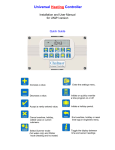
Press button to override or activate Channel 1
Press button to override or activate Channel 2
Indicators show the status of each channel:
SYMBOL
DESCRIPTION
STATUS
Red (solid)
Red (flashing evenly)
Red (short off flash)
Automatic off
Override off
Off - lux high
Blue (solid)
Blue (flashing evenly)
Blue (short off flash)
Automatic on
Override on
On - Lux override
Red and blue (flashing evenly)
Remote Override on
Red and blue (all on)
Test Mode on
BlueWave ~ Intelligent Energy Control
Installation and User Manual
CONTENTS
Introduction .............................................................................3
1 Technical Specifications .............…..............................….. 3
1.1 Operating Environment .................................................….. 3
1.2 Performance Specifications .……………............................. 3
1.3 BW2/C Version Electrical Specifications ........…………...... 4
1.4 BW3/C Version Electrical Specifications .…………. ........... 4
2 Installation Instructions ........................................……....... 4
2.1 Mounting the Control Assembly .................. ………….........4
2.2 General Wiring Specifications ........................………………6
2.3 BW2/C Version Wiring Connections ........... ..........…………7
2.4 BW3/C Version Wiring Connections.............……..………... 8
2.5 Occupancy Sensor Wiring Connections…………..…………9
2.6 Light Level Sensor Wiring Connections …..…………………9
2.7 Remote Switch Wiring Connections ……… ………………..10
3 Operating Instructions ....................….......................……...11
3.1 The buttons .......................................................…………... 11
3.2 The indicators .........................................................………. 12
3.3 Remote equipment……….. ................................................ 12
4 Engineer Functions ..................................................…....... 13
4.1 Channel 1 & 2 settings ……… ................…………………...13
4.2 Mode settings ……………………..................……………….14
4.3 Example settings ...................................…………………….15
4.4 Commissioning settings……………………………………….17
4.5 Timer setting ….. ...................................…………………….17
4.6 Light Level setting..................................…………………….17
4.7 Test facility……………………………………………………...18
2
BlueWave ~ Intelligent Energy Control
Installation and User Manual
INTRODUCTION
This manual describes the Installation and Operation of the BlueWave ~
Intelligent Energy Control.
This control must be installed according to the current IEE Wiring Regulations
and should include full disconnection means and fusing appropriate to the
connected loads.
1 TECHNICAL SPECIFICATIONS
1.1 Operating Environment
1.2 Performance Specifications
Operating temperature range:
0º C to 40º C
An independently mounted
electronic control for surface
mounting.
Operating humidity range:
0 to 90% RH.
Control IP rating:
IP30
Operation is by Class A software
and Type 1A action.
The mains supply to the electronic
circuit is to be protected by a fuse.
Pollution degree:
II environment
Control safety construction:
Class II
Remote switch inputs will be volt
free, 12Vdc/5mA
Mains supply:
230Vac nominal, 200Vac to
265Vac actual, 50Hz.
Occupancy sensor inputs are volt
free, normally closed (contacts
open on detection of occupancy) as
Chalmor BW/MINI, BW/35,
BW/CUR, BW/MW and PIR/CM.
Recommended control supply fuse:
3A
Rated impulse voltage: 2500V
Dimensions: 216mm X 124mm X
62mm
Lux sensor readings are from a
photo-diode, operating at 12V dc
as Chalmor BW/LUX or
BW/LUX/WP.
Maximum sensor rating: 175mA
Timer Range: 10s -60m or
10s-12 hours (selectable)
Light Level Control: Min to Max
Conformities: EMC – 89/336/EEC
LVD – 73/23/EEC
Status Indicators:
Red LED (Channel off)
Blue LED (Channel on)
3
1.3 BW2/C Version Electrical
Specifications
1.4 BW3/C Version Electrical
Specifications
The power supply is isolated,
therefore all remote sensor and
remote switch wiring to the control
does not need to be mains level
rated, but should be insulated to
the highest voltage present where
entering the control box.
The power supply is isolated,
therefore all remote sensor and
remote switch wiring to the control
does not need to be mains level
rated, but should be insulated to
the highest voltage present where
entering the control box.
Channel 1 volt free changeover
relay rating:
16A/240Vac resistive
6A/240Vac inductive / fluorescent
3A/240Vac compact fluorescent
Channel 1 volt free changeover
relay rating:
16A/240Vac resistive
6A/240Vac inductive / fluorescent
3A/240Vac compact fluorescent
Channel 2 volt free changeover
relay rating:
16A/240Vac resistive
6A/240Vac inductive / fluorescent
3A/240Vac compact fluorescent
Channel 2 volt free changeover
relay rating:
16A/240Vac resistive
6A/240Vac inductive / fluorescent
3A/240Vac compact fluorescent
Relay contacts make to the
normally closed (NC) contact
when the channel is ON and to
the normally open (NO) contact
when the channel is OFF. This
provides a fail safe facility in the
event of a controls supply fault.
Channel 3 volt free changeover
relay rating:
16A/240Vac resistive
6A/240Vac inductive / fluorescent
3A/240Vac compact fluorescent
Channel 3 relay replicates
Channel 2 operation
2 INSTALLATION INSTRUCTIONS
2.1 Mounting the Control Assembly
For installations where the integral push buttons are to be used, the controller
should be positioned to allow the user easy access to the push buttons for
Channel 1 & Channel 2 operation.
The controller can be positioned with the cable entry to the bottom or the top
depending on the cable routing.
The controller back box can be rotated through 180 degrees to accommodate
top or bottom cable entry. Allow adequate cabling so that the controller may
be opened freely to allow visibility and adjustment of the control settings.
Do not mount the controller on a warm surface or where it could be affected
by direct sunlight or other heat sources.
The mounting surface should be non-conducting or earth bonded and should
prevent access to the rear of the control.
4
The housing consists of a two
part plastic moulding held
together by four screws.
Plugs are supplied to cover
the screws following
installation.
Knockouts are provided for cable
glands to allow mains and remote
sensor and switch cables to be
fitted to the control assembly.
Knock the plastic out to
fit the glands as required. Never
leave holes that allow finger
access.
NOTE: Some cable knockouts will be restricted when the controller lid is
fitted to the back box. Take care to ensure that only suitable knockouts
are used, which will depend on the orientation of the controller back
box.
5
2.2 General Wiring Specifications
A suitably qualified person must make all wiring connections
.
Please refer to the following wiring connection drawings (see 2.3 and 2.4) and
observe the notes referring to cable type and length. Failure to follow these
guidelines may result in electrical interference or unsatisfactory operation.
When making connections to screw terminals please ensure that no more
than 6mm of insulation is stripped back and that no stray wire strands escape.
0-12V outputs for occupancy and lux sensors and remote switch inputs should
be connected by 0.75mm2 cable of maximum length 100m.
The remote light level sensor(s) may be placed at a distance of up to 10m
from the control unit. If the cable run is long or will be close to mains wiring,
then we recommend using screened 0.75mm2 cable. Connect the screen to a
ground terminal ( - ).
All sensor and signal wiring should be kept separate from mains wiring to
minimise noise pick-up.
Where longer sensor wiring is required, then leaded transient suppressors
should be fitted to the controller. The suppressor should be fitted across the
lux sensor input (- & LUX) and the occupancy input (- & ALM). An appropriate
part is available from RS components, part number 348-6700.
IMPORTANT NOTE
The BlueWave controller is designed to fail safe, so that if the controls
supply or controller power supply fails, then the connected load will fail
to the on condition.
Care should be taken to connect the load appropriately.
For example, if the BlueWave controller is switching lighting circuits,
then the appropriate lighting circuit should be connected to the common
on the channel relay (COM) and the lighting load connected to the
normally closed contact on the channel relay (NC).
Where a volt-free changeover contact is required, the Normally Closed
contact (NC) will be made when the controller output is in the ON
condition, and the Normally Open contact (NO) will be made when the
controller output is in the OFF condition.
6
2.3 BW2/C VERSION WIRING CONNECTIONS
The terminal identification and description are provided below, together with
the maximum terminal capacity in mm2 (shown in brackets). Note that some
terminals may require more than one cable to be terminated, and therefore
cable sizing should be selected accordingly. The 12V dc (+) and 0V dc (-)
terminals for Input 1 and Input 2 may require several cables to be terminated,
according to the number of remote sensors required.
CONTROLS SUPPLY
L
Live supply input
E
Earth termination point
N
Neutral supply input
(2.5)
(2.5)
(2.5)
INPUT-1
+
12V dc output
(1.5)
0V dc output
(1.5)
ALM1 Occupancy input (NC)
(1.5)
LUX3
Light level input
(1.5)
SW1
Remote volt free switch – Chan 1 (1.5)
SW1
Remote volt free switch – Chan 1 (1.5)
RELAY CONNECTIONS (CH1 & CH2)
NO
Normally open relay output (2.5)
COM
Common relay input
(2.5)
NC
Normally closed relay output (2.5)
SEE IMPORTANT NOTE ON PAGE 6
INPUT-2
+
12V dc output
(1.5)
0V dc output
(1.5)
ALM2 Occupancy input (NC)
(1.5)
LUX4
Light level input
(1.5)
SW2
Remote volt free switch – Chan 2 (1.5)
SW2
Remote volt free switch – Chan 2 (1.5)
Figure – BW2/C PCB connections
7
2.4 BW3/C VERSION WIRING CONNECTIONS
The terminal identification and description are provided below, together with
the maximum terminal capacity in mm2 (shown in brackets). Note that some
terminals may require more than one cable to be terminated, and therefore
cable sizing should be selected accordingly. The 12V dc (+) and 0V dc (-)
terminals for Input 1 and Input 2 may require several cables to be terminated,
according to the number of remote sensors required.
CONTROLS SUPPLY
L
Live supply input
E
Earth termination point
N
Neutral supply input
(2.5)
(2.5)
(2.5)
INPUT-1
+
12V dc output
(1.5)
0V dc output
(1.5)
ALM1 Occupancy input (NC)
(1.5)
LUX3
Light level input
(1.5)
SW1
Remote volt free switch – Chan 1 (1.5)
SW1
Remote volt free switch – Chan 1 (1.5)
RELAY CONNECTIONS (CH1, CH2 & CH3)
NO
Normally open relay output (2.5)
COM
Common relay input
(2.5)
NC
Normally closed relay output (2.5)
SEE IMPORTANT NOTE ON PAGE 6
Channel 3 relay replicates Channel 2
INPUT-2
+
12V dc output
(1.5)
0V dc output
(1.5)
ALM2 Occupancy input (NC)
(1.5)
LUX4
Light level input
(1.5)
SW2
Remote volt free switch – Chan 2 (1.5)
SW2
Remote volt free switch – Chan 2 (1.5)
Figure – BW3/C PCB connections
8
2.5 OCCUPANCY SENSOR 12V WIRING CONNECTIONS
Where occupancy detection is required, a range of BlueWave sensors are
designed for use with the BlueWave controller. BW/MINI sensors draw 12mA,
PIR/CM sensors draw 14mA, BW/MW sensors draw 30mA.
Overall the sensors that can be connected should not excced 175mA.
The preferred cable is 4-core stranded and connections will be as follows:
BlueWave Controller
+
ALM
1 or 2
Æ
Æ
Æ
Æ
BlueWave Sensor
+
ALARM
ALARM
Note: Tamper & LED terminals on the BlueWave/PIR sensor(s) are not used.
Where more than one sensor is required for a channel, installation should be
as above with the exception of the wiring. To use two or more sensors
connect + & - in parallel and connect - & ALM contacts (ALARM) in series.
Connections on different versions of sensors may vary slightly to the drawing:
2.6 LIGHT LEVEL SENSOR 12V WIRING CONNECTIONS
Where light level sensing is required, BlueWave Lux sensors are designed for
use with the BlueWave controller. An inside sensor (BW/LUX) is suitable for
wall mounting. An outside sensor (BW/LUX/WP) is suitable for fixing to 20mm
conduit and may be used inside or externally. Both sensors draw 10mA. Up to
two lux sensors may be connected, one to LUX3 and one to LUX4.
Overall the sensors that can be connected should not excced 175mA.
The preferred cable is 3 or 4-core stranded and connections will be as follows:
BlueWave Controller
BlueWave Sensor
+ Æ +
- Æ LUX Æ LUX
3 or 4
Where one sensor is to be shared by two channels, installation should be as
above. To use one sensor for two channels, simply connect a link between
the LUX terminals for Input 1 and Input 2 (LUX 3 and LUX 4).
9
2.7 REMOTE SWITCH 12V WIRING CONNECTIONS
Where remote switching is required, two switch options exist:
a) Momentary push button / retractive switch will replicate the function of
the built in Channel 1 or Channel 2 push buttons to override or activate the
channel when the button is pressed (contact made), as follows:
BlueWave Controller
Momentary switch
SW1 Æ COM
SW1 Æ PRESS TO MAKE (N/O)
BlueWave Controller
Momentary switch
SW2 Æ COM
SW2 Æ PRESS TO MAKE (N/O)
Ranges of suitable push buttons are available from Chalmor, engraved to suit
the application, eg Demand, Override, Lighting etc.
b) Permanent override switch (rocker switch or key switch) overrides the
channel to “Permanent Override On” when the switch is engaged (contact
made). To override both channels with a single switch, use a double pole
switch.
BlueWave Controller
Permanent override switch
SW1 Æ COM
SW1 Æ N/O
BlueWave Controller
Permanent override switch
SW2 Æ COM
SW2 Æ N/O
When the permanent override switch is in the Override position, the red and
blue LED’s will flash evenly for any channel that is in override mode.
Note 1 It is possible to connect both a Momentary push button and a
Permanent override switch to the same channel. However, when the
Permanent override switch is in use, the momentary push button will not
function.
Note 2 It is possible to connect a single Momentary switch or Permanent
override switch to both channels. In this case, simply connect the remote
switch(es) in parallel to the SW1 and SW2 terminals.
BlueWave Controller
SW1
SW1
SW2
SW2
Æ
Æ
Æ
Æ
Override switch
COM
N/O
COM
N/O
Note 3 Where more than one remote switch is required, simply connect
additional switches in parallel.
10
3 OPERATING INSTRUCTIONS
The BlueWave ~ Intelligent Energy Control front panel incorporates a push
button plus one red and one blue LED indicator for each channel.
3.1 The buttons
The built in push buttons (or remote momentary switches) have the following
functions:
Press button to override or activate Channel 1
Press button to override or activate Channel 2
The action of the press button depends on the status of the controller and
operates as follows:
•
•
Off to On (demand mode)
On to Off (demand mode)
•
•
•
•
Off to Override On (auto mode)
On to Override Off (auto mode)
Override On to Off (auto mode)
Override Off to On (auto mode)
•
•
Off (lux high) to On (lux override)
On (lux override) to Off (lux high)
The status of each channel can be ascertained from the LED indicators,
described overleaf.
11
3.2 The indicators
Indicators show the status of each channel:
SYMBOL
DESCRIPTION
STATUS
Red (solid)
Red (flashing evenly)
Red (short off flash)
Automatic off
Override off
Off - lux high
Blue (solid)
Blue (flashing evenly)
Blue (short off flash)
Automatic on
Override on
On - Lux override
Red and blue (flashing evenly)
Remote Override on
Red and blue (all on)
Test Mode on
3.3 Remote equipment
The BlueWave ~ Intelligent Energy Control will often have remote
equipment connected.
Remote equipment can include:
•
•
•
•
Occupancy sensors
Daylight sensors (internal or external)
Momentary switches (push button)
Override switches (rocker or key operated)
The controller will react to the information provided by the switches and
sensors. The function of the controller will depend on the settings selected by
the installer. These are described fully in the Engineer Functions section.
BlueWave
Occupancy Sensor
BlueWave
Light Level Sensor
Inside Sensor
Engraved
Override key switch
External
Sensor
The controller includes an independent adjustable timer for each channel, an
independent light level setting for each light level sensor, and can be set to
operate in a variety of modes to suit the application.
12
4 ENGINEER FUNCTIONS
This section is to be used by the installing / commissioning engineer and will
help with the correct set up of the BlueWave ~ Intelligent Energy Control.
The settings are adjusted using the 3 sets of DIL switches at the top of the
controller PCB.
When the DIL switch is pushed up towards the top of the PCB, the switch is
on. When the DIL switch is pushed down towards the bottom of the PCB, the
switch is off.
ON
OFF
ALM LUX
ALM LUX
CHAN-1
CHAN-2
DEM TEST
TIMERS 0=0-60m 1=0-12h
MODE
Each channel of the BlueWave controller can be set to operate as:
•
Light Switch –
Manual On / Manual Off
•
Occupancy controller –
Auto On / Auto Off
Occupancy and light level
controller – Auto On / Auto Off
Occupancy controller –
Manual On / Auto Off (demand)
Occupancy and light level
controller –
Manual On / Auto Off (demand)
•
•
•
•
•
Light level controller –
Auto On / Auto Off
Light level controller –
Manual On / Auto Off (demand)
•
•
Timer: Resetting 0-60m
Timer: Resetting 0-12h
•
•
Timer: On / Off 0-60m (demand)
Timer: On / Off 0-12h (demand)
4.1 Channel 1 & 2 settings
The DIL switch labeled CHAN-1 sets the functions of Channel 1. The DIL
switch for CHAN-2 sets the functions of Channel 2.
Switch 1 and Switch 2 are used to select the Occupancy Sensor inputs to be
used for each Channel.
Switch 1 = OFF
Switch 1 = ON
Switch 1 = OFF
Switch 1 = ON
Switch 2 = OFF
Switch 2 = OFF
Switch 2 = ON
Switch 2 = ON
Do not use Occupancy inputs
Use Occupancy input 1
Use Occupancy input 2
Use Occupancy inputs 1 & 2
13
Switch 3 and Switch 4 are used to select the Lux Sensor inputs to be used for
each Channel.
Switch 3 = OFF
Switch 3 = ON
Switch 3 = OFF
Switch 3 = ON
Switch 4 = OFF
Switch 4 = OFF
Switch 4 = ON
Switch 4 = ON
ALM LUX
CHAN-1
Do not use Light Level Sensor inputs
Use Light Level Sensor input 1, LUX 3
Use Light Level Sensor input 2, LUX 4
Use Light Level Sensor inputs 1 & 2,
LUX 3 and LUX 4.
ALM LUX
CHAN-2
Example settings are provided in section 4.3
4.2 Mode settings
The DIL switch labelled MODE sets the demand mode and timer range for
both channels plus Auto or Test mode.
Switch 1 = OFF
Switch 1 = ON
Channel 1 operates Automatically (Auto On, Auto Off)
Channel 1 operates in Demand mode (Manual On, Auto Off)
Switch 2 = OFF
Switch 2 = ON
Channel 2 operates Automatically (Auto On, Auto Off)
Channel 2 operates in Demand mode (Manual On, Auto Off)
Switch 3 = OFF
Switch 3 = ON
Timer delay range is 10 seconds to 60 minutes
Timer delay range is 10 seconds to 12 hours
Switch 4 = OFF
Switch 4 = ON
Normal mode
Test mode (see 4.7)
DEM TEST
TIMERS 0=0-60m 1=0-12h
MODE
Example settings are provided in section 4.3
14
4.3 Example settings
Operation
Channel 1
Channel 1 DIL
Switch 1,2,3,4
Mode DIL
Switch 1,2,3,4
Notes
Light Switch (On/Off)
ON OFF OFF OFF
ON OFF OFF OFF
ALM1 input open cct
Occupancy via ALM1
ON OFF OFF OFF
OFF OFF OFF OFF
As above, with demand ON OFF OFF OFF
ON OFF OFF OFF
Occupancy via ALM2
OFF ON OFF OFF
OFF OFF OFF OFF
As above, with demand OFF ON OFF OFF
ON OFF OFF OFF
Use CH1/SW1 input
Resetting 0-12h timer
OFF OFF OFF OFF
OFF OFF ON OFF
Use CH1/SW1 input
On/Off 0 – 60m timer
OFF OFF OFF OFF
ON OFF OFF OFF
Use CH1/SW1 input
Lux Control
OFF OFF ON OFF
OFF OFF OFF OFF
Use LUX3 input
As above, with demand OFF OFF ON OFF
ON OFF OFF OFF
Use LUX3+CH1/SW1
Occ. via ALM1 + LUX3 ON OFF ON OFF
OFF OFF OFF OFF
Use LUX3 input
As above, with demand ON OFF ON OFF
ON OFF OFF OFF
Use LUX3+CH1/SW1
Test
OFF OFF OFF OFF
or or or or
ON ON ON ON
OFF OFF OFF ON
or
or or only
ON ON ON
Operation
Channel 2
Channel 2 DIL
Switch 1,2,3,4
Mode DIL
Switch 1,2,3,4
Notes
Light Switch (On/Off)
OFF ON OFF OFF
OFF ON OFF OFF
ALM2 input open cct
Occupancy via ALM1
ON OFF OFF OFF
OFF OFF OFF OFF
As above, with demand ON OFF OFF OFF
OFF ON OFF OFF
Occupancy via ALM2
OFF ON OFF OFF
OFF OFF OFF OFF
As above, with demand OFF ON OFF OFF
OFF ON OFF OFF
Use CH2/SW2 input
Resetting 0-12h timer
OFF OFF OFF OFF
OFF OFF ON OFF
Use CH2/SW2 input
On/Off 0 – 60m timer
OFF OFF OFF OFF
OFF ON OFF OFF
Use CH2/SW2 input
Lux Control
OFF OFF OFF ON
OFF OFF OFF OFF
Use LUX4 input
As above, with demand OFF OFF OFF ON
OFF ON OFF OFF
Use LUX4+CH2/SW2
Occ. via ALM1 + LUX4 ON OFF OFF ON
OFF OFF OFF OFF
Use LUX4 input
As above, with demand ON OFF OFF ON
OFF ON OFF OFF
Use LUX4+CH2/SW2
Test
OFF OFF OFF ON
or
or or only
ON ON ON
OFF OFF OFF OFF
or or or or
ON ON ON ON
Use CH1/SW1 input
Use CH2/SW2 input
15
CHAN-2
Switch 1 Off
Switch 2 On
Switch 3 Off
Switch 4 On
Occupancy control according to
ALM Occupancy Input 2
Light Level Control according to LUX 4
Light Level Sensor Input 2
CHAN-2
Switch 1 Off
Switch 2 Off
Switch 3 Off
Switch 4 On
No Occupancy control
Light Level Control according to LUX 4
Light Level Sensor Input 2
CHAN-2
Switch 1 Off
Switch 2 On
Switch 3 Off
Switch 4 Off
Occupancy control according to
ALM Occupancy Input 2
No Light Level Control
16
4.4 Commissioning settings
Four potentiometers are provided to set the time delays and light level setting.
4.5 Timer setting
Once the time range has been set (using switch 3 of the mode switch block –
see 4.2) then the Time-1 or Time-2 potentiometer may be used to set the time
delay for Channel 1 and Channel 2.
At minimum position, the timer will operate at approximately 10 seconds. At
maximum position, the timer will operate at 60 minutes or 12 hours,
depending on the timer range setting.
To facilitate easy testing, it is recommended to set the timer using the
0 to 60-minute range. For example, setting the timer potentiometer to half
way, the timer should run and test to approximately 30 minutes. Adjusting the
timer range to 0 to 12 hours will then increase the setting to 6 hours.
4.6 Light Level setting
Once the light level sensor has been selected (using switch 3 or 4 of the
Channel 1 / 2 switch block – see 4.1) then the LUX-1 potentiometer sets the
light level for the sensor connected to Input 1 (LUX 3) and the LUX-2
potentiometer sets the light level for the sensor connected to Input 2 (LUX 4).
At minimum position, the light level is set low so it has to be very dark before
the channel will operate. At maximum, the light level is set high so the channel
will operate in relatively bright conditions. The setting can be adjusted to suit
the application between these two points using the appropriate potentiometer.
By starting with the potentiometer in the moon position, the setting can be
increased by rotating the potentiometer clockwise. The channel relay will
switch when the current light level reading has been reached. Using this
position as a reference point, the setting may be adjusted as described.
Ideally, set the lux setting when the light level is at the point where lighting is
required to switch on.
17
4.7 Test mode
A test mode is provided through DIL switch 4 of the mode switch block (see
4.2). When the switch is on, all control functions are bypassed and all LED
indicators will be on. All channel relays will operate to the Channel ON
condition.
This facility may be used when the BlueWave is first installed and awaiting
commissioning, or to test that the control relays switch on, regardless of the
sensor conditions.
When the switch is moved to the OFF position, the BlueWave will behave as if
it has been powered up for the first time and will respond to any new sensor
or switch inputs when detected.
18
19
Document reference: BlueWave Instructions - Issue 4 – 29th August 2007
Chalmor Ltd, Unit 1, Albert Road Industrial Estate, Luton, , LU1 3QF
www.chalmor.co.uk Tel: 01582 748700 Fax: 01582 748748
20