1
typing in
editing, 3-4
insert mode, 3-3
long queries, 3-4
recording, 3-4
rules for, 3-3
typeover mode, 3-3
Quiz Query Answers
answer to #1 E-1
answer to #2 E-1
answer to #3 E-1
answer to #4 E-2
answer to #5 E-2
answer to #6 E-3
answer to #7 E-4
answer to #8 E-4
R
Reserved Words, list of, 2-4, B-1
S
Saving a Query, 3-11
Screens,
main screen, command keys, 3-2
wide screen terminals, 3-10
Scrolling, horizontal, 3-9
“Select” Clause
function, 5-2
syntax diagram, C-1
“Set” Clause
description, 12-2
formatting printed output
adding default title, 12-4
adding your own title, 12-4
bottom margin, 12-3
default lines values, 12-4
delete default heading, 12-4
deleting the title, 12-4
page length, 12-3
multiple “set” clauses, 12-5
querying qualified files, 12-5
redirecting output, 12-2
to file, 12-3
I-3
INDEX
to printer, spooler, 12-2
to screen, 12-2
with query statement, 12-3
Sorting Sequence, “order by” clause, 10-2
SQL, description, 2-2
Starting FPSQL, 1-3
Style Conventions
keys and commands
described in text 1-4
shown on screen 1-5
prompts and messages, 1-5
text to be entered, 1-5
Subqueries
description, 9-2
multiple levels of nesting, 9-3
Sum (Aggregate Function), 7-2
Syntax Diagrams, C-1
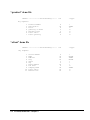
“sclient” Demo File, 4-3
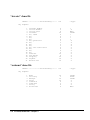
“sinvoice” Demo File, 4-4
“sproduct” Demo File, 4-3
“ssatesman” Demo File, 4-4
T
Termcap, for wide-screen terminals, 3-10
Terminals, wide screen, 3-10
Typing in a Query, 3-3
V
Variable Queries, description, examples, 9-5
Viewing
field headings, lengths, edits, 3-15
query file directory, 3-13
query output, 3-9
W
“Where” Clause
description, 6-2
syntax diagram, C-2
Wide-Screen Terminals, 3-10