1
1.2.6 HOUSINGS
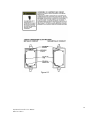
• *General purpose panel mount weighing 7 lbs and including hardware for 19” rack
mounting (Figure 6.1).
• *NEMA 4X wall mount in fiberglass enclosure weighing 17 lbs (Figure 6.2).
1.2.6a NON-INTRUSIVE MAGNETIC KEYPAD
The SafeGuard Controller’s operator interface includes five front panel touch keys. A
magnetic keypad option offers these five keys with adjacent magnetic keys. This option
is included as a standard feature. It is useful in applications where it may be inconvenient
to open the enclosure’s door to access the touch keypad.
1.2.7 APPROVALS
CSA C22.2 No 1010.1 and ISA S82.02; CSA C22.2 No 152 for combustibles; UL 1604 /
C22.2 No 213 (Div 2 Groups A,B,C,D); EN55011 & EN61000 (CE Mark). CSA File # =
219995 and may be seen at: CSA-International.org.
SECTION 2
2.0 BASIC OPERATION
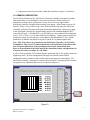
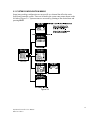
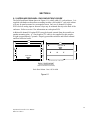
The SafeGuard Controller offers 3 graphic screens for viewing monitored data and a SetUp menu screen for operator interface to configuration menus. They are shown below in
Figure 2.0. The Bar Graphs screen allows viewing of all active channels simultaneously.
The Trend screen displays a 24 hour trend one channel at a time. The Combination
screen displays a bar graph, large engineering units and a 30 minute trend one channel at
a time. Input channels may be displayed in sequence with the UP/DOWN keys. The
NEXT key switches between the 3 graphic data screens. When SafeGuard power is
applied, the graphic LCD returns to the screen active when power was last removed.
Setup menus are entered by pressing EDIT from any data screen, and scrolling to the
desired menu using the UP/DOWN keys. Pressing EDIT again enters the selected
menu’s tree of variables. This Setup mode may be exited manually by pressing NEXT,
or automatically when no keys are pressed for 5 minutes. Alarm relays and front panel
alarm LED indicators remain active during the Setup mode. An AUTHORIZE menu
offers a password feature to prevent tampering with the SafeGuard Controller’s
parameters.
5
SafeGuard Controller User Manual
MAN-0115 Rev 0