1
spreadtab
3.2
3
FEATURES FOR FORMATTING THE TABLE
Number formatting and the fp package
All calculations are made by the \FPeval macro7 of the fp package. This package provides all necessary
arithmetical functions along with various scientific and trigonometric functions. Calculations are made with 18
decimal digits of precision, and fp displays all the decimals!
The number of digits displayed can be controlled in various ways:
• the numprint package can be used in order to properly display numbers;
• fp can round or truncate numbers with round(number,integer) or trunc(number,integer) but the
syntax makes this tedious to write if this is needed for many cells;
• spreadtab can round all the numbers in the table with the macro \STautoround whose argument is
number of digits in the decimal part. If the argument is empty, no rounding is done. If the starred macro
\STautoround* is used, the decimal part is filled with 0 as necessary.
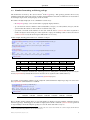
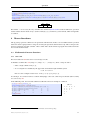
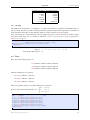
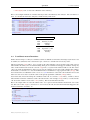
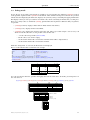
In this example, floating point numbers are rounded to 6 digits:
1
2
3
4
5
6
\STautoround{6}
\begin{spreadtab}{{tabular}{|l|*7{>{\centering\arraybackslash}m{1.35cm}|}}}
\hline
@$x$
& 1
& 2
& 3
& 4
& 5
& 6
& 7
\\\hline
@$x^{-1}$& 1/b1 & 1/c1 & 1/d1 & 1/e1 & 1/f1 & 1/g1 & 1/h1\\\hline
\end{spreadtab}\medskip
7
8
9
10
11
12
13
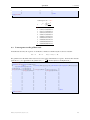
\STautoround*{6}
\begin{spreadtab}{{tabular}{|l|*7{>{\centering\arraybackslash}m{1.35cm}|}}}
\hline
@$x$
& 1
& 2
& 3
& 4
& 5
& 6
& 7
\\\hline
@$x^{-1}$& 1/b1 & 1/c1 & 1/d1 & 1/e1 & 1/f1 & 1/g1 & 1/h1\\\hline
\end{spreadtab}
x
x−1
1
1
2
0.5
3
0.333333
4
0.25
5
0.2
6
0.166667
7
0.142857
x
x−1
1.000000
1.000000
2.000000
0.500000
3.000000
0.333333
4.000000
0.250000
5.000000
0.200000
6.000000
0.166667
7.000000
0.142857
All the numbers contained in the final table, either typed as is or coming from a calculation are processed by the
macro\STprintnum. By default, this macro has no effect on its argument and is defined this way:
\newcommand\STprintnum[1]{#1}
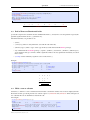
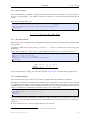
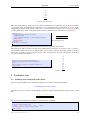
It is possible to round all the numbers via the \numprint command from the numprint package. To achieve this,
the \STprintnum command must be redefined:
1
2
3
4
5
6
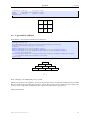
\renewcommand\STprintnum[1]{\numprint{#1}}
\nprounddigits{6}
\begin{spreadtab}{{tabular}{cccccccc}}
@$x$
& 1 & 2 & 3 & 4 & 5 & 6 &7
\\\hline
@$1/x$ &1/b1&1/c1&1/d1&1/e1&1/f1&1/g1&1/h1
\end{spreadtab}
x
1/x
1.000,000
1.000,000
2.000,000
0.500,000
3.000,000
0.333,333
4.000,000
0.250,000
5.000,000
0.200,000
6.000,000
0.166,667
7.000,000
0.142,857
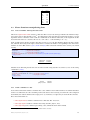
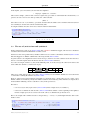
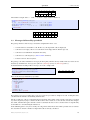
Here is another similar example where we test if the number to display is negative with the command \FPifneg
from the fp package. If this happens, the number is displayed in red. The command \STautoround was preferred
to \nprounddigits from the numprint package because the latter adds unnecessary 0’s.
7 This
macro accepts infix or postfix notation. Consequently, both can be used to write formulas in a cell. For example the infix formula
‘a1+b1’ is equivalent to the postfix ones ‘a1 b1 add’ or ‘a1 b1 +’.
LATEXed by Christian Tellechea, the November 6, 2014.
8