1
Grapholas 7.5
3.6.5
3.6.6
3.6.7
3.6.8
3.6.9
3.6.10
3.6.11
3.6.12
3.6.13
3.6.14
3.7
3 / 35
Selecting the Plate .......................................................................................................................... 19
Creating a New Plate ...................................................................................................................... 19
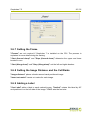
Setting the Frame............................................................................................................................ 20
Setting the Image Distance and the Cut Marks .............................................................................. 20
Adding a Label ................................................................................................................................ 20
Defining the Image Position ............................................................................................................ 21
Overlaying Images .......................................................................................................................... 21
Entering the Grid and the Angle Manually ..................................................................................... 21
Arranging Images ("Step & Repeat") .............................................................................................. 22
Gapless Sleeves ............................................................................................................................... 22
TEMPLATES .................................................................................................................................................... 23
3.7.1
Changing Templates ....................................................................................................................... 24
3.8
JOB INFORMATION .......................................................................................................................................... 24
3.9
LOADING IMAGES VIA "DRAG & DROP"............................................................................................................... 25
3.10
BASIC MERGER SETTINGS ................................................................................................................................. 25
4
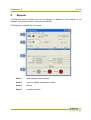
EXPOSER ....................................................................................................................................................27
4.1
STATUS DISPLAYS AND CONTROLS ...................................................................................................................... 28
4.2
VACUUM DISPLAY AND POSITION CONTROL ......................................................................................................... 28
4.3
JOB LIST ........................................................................................................................................................ 28
4.4
MACHINE CONTROLS ....................................................................................................................................... 29
4.5
STARTING A JOB .............................................................................................................................................. 29
4.6
FOCUS SEARCH ............................................................................................................................................... 29
4.7
ZERO POINT SEARCH FOR "SLEEVES"................................................................................................................... 30
4.8
UV EXPOSURE "UV INLINE" (OPTION)................................................................................................................ 30
4.9
UV BACK EXPOSURE (OPTION FOR AUTOMATON)................................................................................................. 31
4.10
CONTROL AND STATUS DISPLAY OF THE AUTOMATON ............................................................................................ 31
4.11
INTERLOCKS AND ERRORS ................................................................................................................................. 32
5
HOT KEYS...................................................................................................................................................33
6
HOTLINES ..................................................................................................................................................34