1
1.3 Example Program
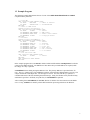
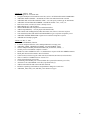
The following example demonstrates the use of some of the SMTP/POP3/IMAP Email for COBOL
component library functions:
*> attach SEE
CALL "seeAttach" WITH STDCALL USING
BY VALUE
NBR-CHANS
*> number of channels
BY VALUE
SEE-KEY-CODE *> See KEYCODE.CBI
END-CALL.
*> connect to SMTP server
DISPLAY "Calling seeConnectTo()..."
CALL "seeConnectTo" WITH STDCALL USING
BY VALUE
IS-ZERO
*> channel
BY REFERENCE SMTP-SERVER
*> SMTP server
BY REFERENCE EMAIL-FROM
*> sender's email address
BY REFERENCE IS-ZERO
*> no Reply-To header
END-CALL.
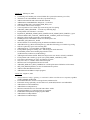
*> send email
DISPLAY "Calling seeSendEmail()..."
CALL "seeSendEmail" WITH STDCALL USING
BY VALUE
IS-ZERO
*> channel
BY REFERENCE EMAIL-TO
*> recipient
BY REFERENCE IS-ZERO
*> no CC list
BY REFERENCE IS-ZERO
*> no BCC list
BY REFERENCE EMAIL-SUBJ
*> email subject
BY REFERENCE EMAIL-MSG
*> text of message
BY REFERENCE IS-ZERO
*> no attachment
END-CALL.
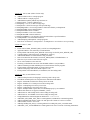
*> close and release SEE
CALL "seeClose" WITH STDCALL USING
BY VALUE
IS-ZERO
*> channel
END-CALL.
CALL "seeRelease" WITH STDCALL
END-CALL.
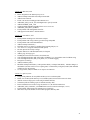
In the example program above, seeAttach is called to initialize SEE and then seeSmtpConnect is called to
connect to the SMTP mail host. The SMTP server host name and your email address are required, while
the "Reply-To" entry is optional.
seeSendEmail is then called, passing the addressee lists. The primary addressee is provided in the "To
List". The CC ("Carbon Copy") lists additional recipients, as does the BCC (Blind Carbon Copy) list. The
subject contains the email subject line. The message text is next. If it starts with the '@' symbol, it is
considered the name of the file containing the email message. Lastly, the filename of any ASCII or binary
attachment is specified. All fields, except the first, in seeSendEmail are optional.
After returning from seeSendEmail, the seeClose function is called to close the connection to the SMTP
server. Lastly, seeRelease is called to perform SEE termination processing and release the Winsock.
7