1
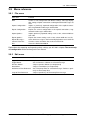
3.9. Menu reference
3.9
Menu reference
3.9.1
File menu
Menu item
Function
New
Creates a new configuration with default settings: Message display,
filter settings, Explicit Connections and fragmented I/O Messages are
reset
Imports a previously exported configuration of the explicit connections, fragmented I/O Messages and the filter
Exports the current configuration of the explicit connections, fragmented I/O Messages and the filter
Imports previously exported settings such as font, column width etc.
from a file
Exports the current settings such as font, column width etc. in a file
Saves all the messages in the internal display buffers to an ASCII file
Converts a trace and writes the result to an ASCII file
Closes the DeviceNet-Module
Import Configuration...
Export Configuration...
Import Options...
Export Options...
Export Messages...
Convert Trace File...
Exit
Explanations for exporting and importing solely settings you will find in chapter The term analysis configuration of the canAnalyser3 user manual.
3.9.2
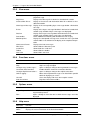
Edit menu
Menu item
Function
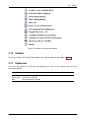
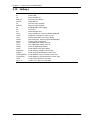
Copy CSV
Toggle Marker
Previous Marker
Next Marker
Set/Release Time Reference
Copies marked lines CSV formatted to clipboard
Sets or Removes a Marker for selected message
Jumps to previous Marker (no wraparound)
Jumps to next Marker (no wraparound)
Sets Timestamp Zero for selected message / Releases previously set Timestamp Zero
Jumps to previously set Timestamp Zero message
Jump to Time Reference
DeviceNet Module for canAnalyser3
17
Copyright HMS Technology Center Ravensburg