1
Veilux VDIP-2L316 / VDIP-2L316DN / VDIP-2L316DNIR Owner ’s Manual
3
1
2
9
10
5
4
7
6
8
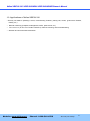
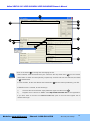
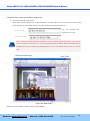
Click on the field in ③for sorting and rearranging the list.
Select network mode that best suits your case from the drop down list in ⑤. You can choose
either Static or ADSL and Auto (DHCP), respectively. If ADSL and Auto are selected, the fields
in ⑥is deactivated.
In case of ADSL, fill the User Name and Password in ⑧with the values provided by your ISP.
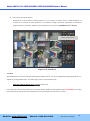
If DDNS service is needed, do the followings:
i)
Check at the box and fill the empty field with mgmt.net-video.net in ⑦.
ii)
Register the IP camera on DDNS. Visit http://www.net-video.net for the registration.
If you don’t have an account on www.net-video.net, open an account and register the IP
camera after login.
Website: www.Veilux.net
Phone# 1-800-510-6528
Rev.1.0 (Jan. 2010)
21