1
Table of Contents
Preface .......................................................................................................................................... 4
Important notice ............................................................................................................................. 5
1. Introduction ............................................................................................................................... 6
1.1. Characteristics ................................................................................................................. 6
1.2. Specifications .................................................................................................................. 7
1.3. Minimum system requirements ........................................................................................... 7
2. Equipment interface .................................................................................................................... 8
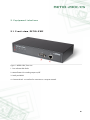
2.1. Front view, NETIO-230C .................................................................................................. 8
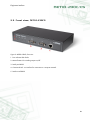
2.2. Front view, NETIO-230CS ................................................................................................ 9
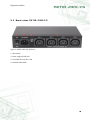
2.3. Back view, NETIO-230C/CS ........................................................................................... 10
3. Installation ............................................................................................................................... 11
3.1. Connection of the device ................................................................................................ 11
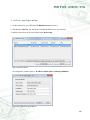
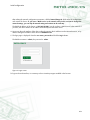
4. Initial configuration ................................................................................................................... 12
5. Control and configuration ......................................................................................................... 14
5.1. Outlets ......................................................................................................................... 14
5.1.1. Manual outlet control .......................................................................................... 14
5.1.2. General outlet settings ......................................................................................... 15
5.1.3. Watchdog ......................................................................................................... 16
5.1.4. Timer ................................................................................................................ 17
5.2. Device configuration ...................................................................................................... 18
5.2.1. Time settings ...................................................................................................... 18
5.2.2. E-mail configuration ............................................................................................ 19
5.2.3. Network settings ................................................................................................. 20
5.2.4. Serial Tunnel (NETIO-230CS only) ........................................................................ 21
5.2.5. User account management ................................................................................... 22
5.2.6. Firmware upgrade .............................................................................................. 24
5.2.7. System settings ................................................................................................... 26
5.3. Control of the device via Telnet, CGI or serial link ............................................................. 27
5.3.1. Encrypted login .................................................................................................. 27
5.3.2. Communication via KSHELL interface ..................................................................... 27
5.3.3. CGI control ........................................................................................................ 28
5.3.4. Using kshell.cgi interface to control the device ........................................................ 29
5.3.5. Communication via a serial link ........................................................................... 29
5.3.6. List of telnet, kshell.cgi and serial link commands .................................................... 29
5.3.7. Return values ..................................................................................................... 36
5.4. Manual control ............................................................................................................. 37
5.5. Status LED diodes .......................................................................................................... 37
5.6. Troubleshooting ............................................................................................................. 38
5.6.1. Forgotten password. Reset to factory settings .......................................................... 38
5.6.2. Problem with update of firmware .......................................................................... 38
5.6.3. Changing the fuse .............................................................................................. 38
Conclusion ................................................................................................................................... 39
2