1
2. The Patient Entry Menu
The patient menu includes functions for the entry and review of
patient-related information:
• adding new patients,
• searching for existing patient,
• adding test results,
• interpreting patient reports,
• recording outcome data,
• creating and working with test load lists and
• creating provisional reports.
2.1.
ADD NEW PATIENT
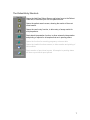
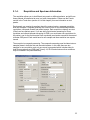
To add a new patient, choose Add New Patient from the Patient menu or click
the Add New Patient button on the Patient Entry shortcut bar. The Add/View
screen will appear.
5