1
TABLE OF CONTENTS
SAFETY INFORMATION
FCC Declaimers .................................................................................................................................................... v
TCO ...................................................................................................................................................................... v
WEEE...................................................................................................................................................................vii
PRECAUTIONS
Notice...................................................................................................................................................................vii
Cautions When Setting Up ...................................................................................................................................vii
Cautions When Using.......................................................................................................................................... viii
Cleaning and Maintenance .................................................................................................................................. viii
Notice for the LCD Display ....................................................................................................................................ix
Transporting the LCD Display................................................................................................................................ x
CHAPTER 1: PRODUCT DESCRIPTION
1.1 Package Contents ......................................................................................................................................... 11
1.2 Installation ..................................................................................................................................................... 12
1.2.1 Installing the Stand ................................................................................................................................ 12
1.2.2 Adjusting the Tilt .................................................................................................................................... 12
1.2.3 Wall Mounting........................................................................................................................................ 13
1.3 Control Buttons.............................................................................................................................................. 14
1.4 Overview ....................................................................................................................................................... 15
1.4.1 Front View ............................................................................................................................................. 15
1.4.2 Side View .............................................................................................................................................. 15
1.4.3 Rear View.............................................................................................................................................. 16
CHAPTER 2: MAKING CONNECTIONS
2.1 Connecting the AC Power.............................................................................................................................. 17
2.2 Connecting Input Source Signals................................................................................................................... 18
2.3 Connecting Audio Devices ............................................................................................................................. 19
2.4 Connecting USB Devices............................................................................................................................... 19
CHAPTER 3: ON SCREEN DISPLAY (OSD) MENU
3.1 Using the OSD............................................................................................................................................... 20
3.2 OSD Menu Tree............................................................................................................................................. 21
CHAPTER 4: ADJUSTING THE LCD DISPLAY
4.1 Brightness Setting.......................................................................................................................................... 22
4.2 Colour Setting................................................................................................................................................ 23
4.3 Image Setting ................................................................................................................................................ 24
4.3.1 Image Setting (VGA) ............................................................................................................................. 24
4.3.2 Image Setting (HDMI with InfoFrame).................................................................................................... 25
4.4 OSD Setting .................................................................................................................................................. 26
4.5 Audio Setting ................................................................................................................................................. 27
iii
4.6 Other Setting ................................................................................................................................................. 28
4.7 OSD Lock ...................................................................................................................................................... 29
CHAPTER 5: WARNINGS AND TROUBLESHOOTING
5.1 Warning Messages ........................................................................................................................................ 30
5.2 Troubleshooting ............................................................................................................................................. 31
CHAPTER 6: SPECIFICATIONS
6.1 Display Specification...................................................................................................................................... 32
6.2 Display Dimensions ....................................................................................................................................... 33
iv
SAFETY INFORMATION
This FCC Class-B compliant digital device complies with the Interference-Causing
Equipment Regulations of Canada.
Regulations
FCC Declaimers
This device complies with Section 15 of the FCC listing. The operation procedures must meet the following conditions:
(1) this device must not cause any damaging interference; and (2) this device must accept any received interference,
including any unpredictable interference that may possibly occur.
Dear users,
This device has passed the Class B digital device regulations and complies with Section 15 of the FCC listing; these
are intended to provide reasonable warranty against damaging interference for home use. This device will produce,
use and emit radio frequency energy; therefore, installation or use without following the instructions given may cause
damaging interference to radio communication. Nonetheless, it is not possible to state with certainty that interference
will occur from specific installations. If this device has caused damaging interference to radio or TV signals (simply turn
the device on and off to check if such interference is caused by the device), we recommend that you fix the
interference using the following methods:
•
Readjust the direction or location of the antenna.
•
Increase the distance between this device and the receiver.
•
Use a different power source other than the power source used by the receiver.
•
Consult your local dealer or an experienced radio/TV technician.
Making changes or modifications to the device without the permission from an authorized dealer may
void the warranty of this device.
Warning:
TCO
For displays with glossy bezels, the user should consider the placement of the display as the bezel may cause
disturbing reflections from surrounding light and bright surfaces.
v
PRECAUTIONS
SAFETY INFORMATION
WEEE
Information for users applicable in European Union countries
The symbol on the product or its packaging signifies that this product has to be disposed separately
from ordinary household wastes at its end of life. Please kindly be aware that this is your
responsibility to dispose electronic equipment at recycling centers so as to help conserve natural
resources. Each country in the European Union should have its collection centers for electrical and
electronic equipment recycling. For information about your recycling drop off area, please contact
your local related electrical and electronic equipment waste management authority or the retailer
where you bought the product.
vi
PRECAUTIONS
PRECAUTIONS
Symbols used in this manual
This icon indicates the existence of a potential hazard that could result in personal injury or damage
to the product.
This icon indicates important operating and servicing information.
Notice
•
Read this User Manual carefully before using the LCD display and keep it for future reference.
•
The product specifications and other information provided in this User Manual are for reference only. All
information is subject to change without notice. Updated content can be downloaded from our web site at
http://www.agneovo.com.
•
To register online, go to http://www.agneovo.com.
•
To protect your rights as a consumer, do not remove any stickers from the LCD display. Doing so may affect
the determination of the warranty period.
Cautions When Setting Up
Do not place the LCD display near heat sources, such as a heater, exhaust vents, or in direct
sunlight.
Do not cover or block the ventilation holes in the housing.
Place the LCD display on a stable area. Do not place the LCD display where it may subject to
vibration or shock.
Place the LCD display in a well-ventilated area.
Do not place the LCD display outdoors.
Do not place the LCD display in a dusty or humid environment.
Do not spill liquid or insert sharp objects into the LCD display through the ventilation holes. Doing so
may cause accidental fire, electric shock or damage the LCD display.
vii
PRECAUTIONS
PRECAUTIONS
Cautions When Using
Use only the power cord supplied with the LCD display.
The power outlet should be installed near the LCD display and be easily accessible.
If an extension cord is used with the LCD display, ensure that the total current consumption plugged
into the power outlet does not exceed the ampere rating.
Do not allow anything to rest on the power cord. Do not place the LCD display where the power cord
may be stepped on.
If the LCD display will not be used for an indefinite period of time, unplug the power cord from the
power outlet.
To disconnect the power cord, grasp and pull by the plug head. Do not tug on the cord; doing so may
cause fire or electric shock.
Do not unplug or touch the power cord with wet hands.
WARNING:
Unplug the power cord from the power outlet and refer to qualified service personnel under the
following conditions:
•
When the power cord is damaged.
•
If the LCD display has been dropped or the housing has been damaged.
•
If the LCD display emits smoke or a distinct odor.
Cleaning and Maintenance
The LCD display comes with NeoV™ Optical Glass. Use a soft cloth lightly moistened with a mild
detergent solution to clean the glass surface and the housing.
Do not rub or tap the surface of the glass with sharp or abrasive items such as a pen or screwdriver.
This may result in scratching the surface of the glass.
Do not attempt to service the LCD display yourself, refer to qualified service personnel. Opening or
removing the covers may expose you to dangerous voltage or other risks.
viii
PRECAUTIONS
PRECAUTIONS
Notice for the LCD Display
In order to maintain the stable luminous performance, it is recommended to use low brightness setting.
Due to the lifespan of the lamp, it is normal that the brightness quality of the LCD display may decrease with time.
When static images are displayed for long periods of time, the image may cause an imprint on the LCD display. This is
called image retention or burn-in.
To prevent image retention, do any of the following:
•
Set the LCD display to turn off after a few minutes of being idle.
•
Use a screen saver that has moving graphics or a blank white image.
•
Switch desktop backgrounds regularly.
•
Adjust the LCD display to low brightness settings.
•
Turn off the LCD display when the system is not in use.
Things to do when the LCD display shows image retention:
•
Turn off the monitor for extended periods of time. It can be several hours or several days.
•
Use a screen saver and run it for extended periods of time.
•
Use a black and white image and run it for extended periods of time.
When the LCD display is moved from one room to another or there is a sudden change from low to high ambient
temperature, dew condensation may form on or inside the glass surface. When this happens, do not turn on the LCD
display until the dew disappears.
Due to humid weather conditions, it is normal for mist to form inside the glass surface of the LCD display. The mist will
disappear after a few days or as soon as the weather stabilizes.
There are millions of micro transistors inside the LCD display. It is normal for a few transistors to be damaged and to
produce spots. This is acceptable and is not considered a failure.
ix
PRECAUTIONS
PRECAUTIONS
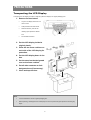
Transporting the LCD Display
To transport the LCD display for repair or shipment, place the display in its original packaging box.
1. Remove the base stand.
•
Lay the LCD display face down on a
towel or cloth.
•
Grasp the stand with both hands.
•
With both thumbs, push the two
retaining clips upwards to release
lock.
•
Pull to detach the stand.
2. Put the LCD display inside its
original plastic.
3. Place the two foam cushions on
each side of the LCD display for
protection.
4. Put the LCD display down in the
box.
5. Put the stand on the designated
vent on the foam cushion.
6. Put all other contents on their
designated area (if necessary).
7. Close and tape the box.
Note:
•
It is recommended to use the original packaging box.
•
When repacking, carefully place the LCD display in its box and protect the glass panel from touching any
object.
x
CHAPTER 1: PRODUCT DESCRIPTION
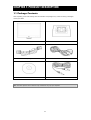
1.1 Package Contents
When unpacking, check if the following items are included in the package. If any of them is missing or damaged,
contact your dealer.
LCD display
Stand
D-Sub 15-pin signal cable
Power cord
CD-ROM
Audio cable
Note: The above pictures are for reference only. Actual items may vary upon shipment.
11
PRECAUTIONS
PRODUCT DESCRIPTION
1.2 Installation
1.2.1 Installing the Stand
1.
Place the stand on an even surface.
2.
Attach the LCD display to the stand.
•
Grasp the LCD display by the sides.
•
Install the LCD display by securing the 3-sided retaining clips to the stand.
•
Lower down to align the LCD display to the stand until all other retaining clips click into place.
1.2.2 Adjusting the Tilt
0° - 20°
For comfort viewing, tilt the LCD display up to an angle of 20°.
Hold the stand with one hand and use the other to adjust the LCD
display to the desired angle.
12
PRECAUTIONS
PRODUCT DESCRIPTION
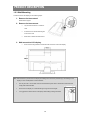
1.2.3 Wall Mounting
To wall mount the LCD display, do the following steps:
1. Remove the base stand.
Please refer to page x.
2. Remove the base mount.
•
Lay the LCD face down on a towel or
cloth.
•
Unscrew the two screws fastening the
mount to the LCD.
•
Slide down to detach the base mount.
3. Wall mount the LCD display.
•
Screw the mounting bracket to the VESA holes at the rear of the LCD display.
Note: Take measures to prevent the LCD display from falling down and lessen possible injury and damage to the
display in case of earthquakes or other disasters.
•
Use only the 100 x 100 mm wall mount kit recommended by AG Neovo. All AG Neovo wall mount kits
comply with VESA standard.
•
Secure the LCD display on a solid wall strong enough to bear its weight.
•
It is suggested to wall mount the LCD display without tilting it facing downward.
13
PRECAUTIONS
PRODUCT DESCRIPTION
1.3 Control Buttons
Button
LED Indicator
Description
LED lights green during normal operation and lights amber when on standby mode.
Power ON/OFF
•
Touch once to turn the display ON.
•
Touch again to turn the display OFF.
Note: Using the Power button does not turn off power completely. To turn off power
consumption (0 watt), press the power switch at the rear of the LCD display.
Refer to page 16.
▲▼
Up / Down
Buttons
On Screen Display (OSD)
•
Touch to call out the OSD menu
During OSD menu
•
◄►
Left / Right
Buttons
Use to scroll through the menu options.
Volume Bar
•
Touch to call out the volume bar.
Touch ► to increase the volume and ◄ to decrease the volume.
During OSD menu
•
Use to select an option and adjust the settings.
Note: During volume or menu setting adjustment, touch and hold the button to change
the values continuously.
Auto Button
Auto Adjustment (available in VGA input only)
Touch to perform auto adjustment. This function automatically tunes the LCD display to
its optimal setting, including horizontal position, vertical position, clock, and phase.
When auto adjustment is initiated, the message
is displayed on the
screen. When the message disappears, auto adjustment is completed.
NOTE:
•
During auto adjustment, the screen will slightly shake for a few seconds.
•
It is recommended to use the auto adjustment function when using the LCD
display for the first time or after a resolution or frequency change.
During OSD menu
•
Use to close the OSD menu or exit a submenu.
During volume adjustment
•
Use to close the volume bar.
14
PRECAUTIONS
PRODUCT DESCRIPTION
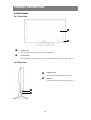
1.4 Overview
1.4.1 Front View
Display screen
The LCD display screen is protected by NeoV™ Optical Glass.
Control buttons
Touch the buttons to perform its function. For more information about each button, refer to page 14.
1.4.2 Side View
Headphone jack
Use to connect a headphone. Refer to page 18.
USB port
Use for pass through connection. Refer to page 18.
15
PRECAUTIONS
PRODUCT DESCRIPTION
1.4.3 Rear View
AC Power Input
Use to connect the power cord.
HDMI connector
Use to connect an HDMI cable for digital input signal.
DVI connector
Use to connect a DVI cable for digital input signal.
VGA connector
Use to connect a VGA cable for analogue input signal.
Audio port
Use to connect an audio cable for audio input.
Mini USB port
Use for pass through connections. Refer to page 19.
Kensington lock socket
Use to physically lock the system to prevent theft.
The locking device is sold separately. To purchase, contact your retailer.
16
CHAPTER 2: MAKING CONNECTIONS
CAUTION:
Make sure that the LCD display is not connected to the power outlet before making any
connections. Connecting cables while the power is ON may cause possible electric shock or
personal injury.
2.1 Connecting the AC Power
1.
Connect the power cord to the AC power input at the rear of the LCD display.
2.
Connect the plug to a power outlet or power supply.
3.
Press the power switch ON.
Note: Before using the LCD display, make sure the power switch is turned on.
CAUTION:
When unplugging the power cord, hold the power cord by the plug head. Never pull by the cord.
17
PRECAUTIONS
MAKING CONNECTIONS
2.2 Connecting Input Source Signals
Input source signals can be connected with either of the following cables:
•
VGA
Connect one end of a D-sub 15-pin cable to the VGA
connector of the LCD display and the other end to the
D-sub connector of the computer.
•
DVI
Connect one end of a DVI cable to the DVI connector of
the LCD display and the other end to the DVI connector of
the computer.
•
HDMI
Connect one end of an HDMI cable to the HDMI connector
of the LCD display and the other end to the HDMI
connector of the device.
18
PRECAUTIONS
MAKING CONNECTIONS
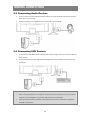
2.3 Connecting Audio Devices
1.
Connect one end of an audio cable to the audio port at the rear of the LCD display and the other end to the
audio out port of the computer.
2.
Connect a headphone to the headphone jack on the left side of the LCD display.
2.4 Connecting USB Devices
1.
Connect the mini USB cable to the mini USB port at the rear of the display and the other end to the USB port
of the computer.
2.
Connect USB devices such as a USB keyboard and digital camera to the USB port on the left side of the
LCD display.
Note:
•
Before connecting USB devices to the USB port on the left side of the LCD display, be sure to connect the
computer to the LCD display first using the mini USB port at the rear of the display.
•
The length of the USB cable, the distance of the connection or the number of extensions may affect the
readability of USB devices.
19
CHAPTER 3: ON SCREEN DISPLAY MENU
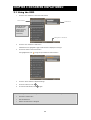
3.1 Using the OSD
1.
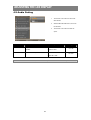
Touch the ▼ or ▲ buttons to call out the OSD window.
Main Menu
Submenu
IMAGE SETTING
is disabled and
grayed out during
DVI input and
HDMI (without
InfroFrame).
Navigation Window
2.
Touch the ▼ or ▲ buttons to select menu.
A selected menu is highlighted in gray and its submenu is displayed on the right.
3.
Touch the ► button to enter the submenu.
The highlighted item with
(orange arrow) indicates the active submenu.
4.
Touch the ◄ or ► buttons to adjust the settings.
5.
To exit the submenu, touch
6.
To close the OSD window, touch
.
again.
Note: When settings are modified, all changes are saved when the user does the following:
•
Proceeds to another menu
•
Exits the OSD menu
•
Waits for the OSD menu to disappear
20
PRECAUTIONS
ON SCREEN DISPLAY MENU
3.2 OSD Menu Tree
Main Menu
Submenu
Reference
Brightness
Brightness
Refer to page 22.
Contrast
Colour Setting
Colour Temperature
Refer to page 23.
Sharpness
Phase
Image Setting *
(for VGA input)
Refer to page 24.
Clock
H. Position
V. Position
Sharpness
Image Setting *
(for HDMI input with
InfoFrame)
Saturation
Refer to page 25.
Tint
Overscan
Transparency
OSD Setting
H. Position
Refer to page 26.
V. Position
OSD Timer
Volume
Audio Setting
Refer to page 27.
Audio
DDC/CI
Refer to page 28.
Mode
Other Setting
**
DCR
Refer to page 28.
Recall all to default setting, except for
Recall
Language. Refer to page 28.
Input Select
VGA
Switch the input source when more than one
DVI
input signals are connected.
HDMI
EN / FR / DE / ES / IT / Py/ RO / PL /
Language
Select OSD language.
CS / NL / 繁中 / 简中
Displays Input, Resolution, Horizontal
Information
Settings Information
Frequency, Vertical Frequency, Timing mode,
and Firmware version.
* Image Setting is available when the input signal is VGA or HDMI with InfoFrame.
** Mode submenu is only available when the resolution is: 640x350, 720x350, 640x400, or 720x400.
21
CHAPTER 4: ADJUSTING THE LCD DISPLAY
4.1 Brightness Setting
Note: As the value of each submenu setting is adjusted, the LCD display changes synchronously.
1.
Touch the ▼ or ▲ buttons to call out the OSD
window.
2.
Select BRIGHTNESS menu, then touch the ►
button.
3.
Item
Brightness
Function
Touch the ▼ or ▲ buttons to select an option.
Operation
Range
Adjusts luminance of the screen
image.
Touch the ◄ or ► buttons to adjust the
Adjusts the difference between black
value.
0 to 100
Contrast
level and white level.
22
PRECAUTIONS
ADJUSTING THE LCD DISPLAY
4.2 Colour Setting
Note:
•
AUTO COLOUR is only available in VGA input. During DVI and HDMI input, AUTO COLOUR is disabled
and grayed out.
•
As the value of each submenu setting is adjusted, the LCD display changes synchronously.
1.
Touch the ▼ or ▲ buttons to call out the
OSD window.
2.
Select COLOUR SETTING menu, then
touch the ► button.
3.
Touch the ▼ or ▲ buttons to select an
option.
Item
Function
Operation
Value
Colour Temperature
Provides several colour adjustment
Touch the ▼ or ▲ buttons to select
6500K, 5400K,
settings.
the setting. Then touch the ►
9300K, AUTO
button to activate the option.
COLOR, USER
Colour temperature can be set to:
•
6500K – The default colour temperature commonly used for normal lighting
conditions.
•
5400K – Applies a reddish tint for warmer colours.
•
9300K – Applies a bluish tint for cooler colours.
•
AUTO COLOR – Operates the white balance and automatically adjusts the colour
settings.
•
USER – This allows users to set the colour temperature by adjusting the R, G, B
settings according to one’s preference.
1.
Select USER, then touch ►.
2.
Touch the ▼ or ▲ buttons to select among R, G, B option.
3.
Touch the ◄ or ► buttons to adjust the values between 0 - 255.
Note: Press Recall to return colour to 6500K default setting.
23
PRECAUTIONS
ADJUSTING THE LCD DISPLAY
4.3 Image Setting
Note:
•
IMAGE SETTING menu is only available in VGA and HDMI (with InfoFrame) input. The parameters vary
depending on the input signal and the type of device connected via HDMI.
•
As the value of each submenu setting is adjusted, the LCD display changes synchronously.
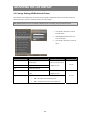
4.3.1 Image Setting (VGA)
1.
Touch the ▼ or ▲ buttons to call out
the OSD window.
2.
Select IMAGE SETTING menu, then
touch the ► button.
3.
Touch the ▼ or ▲ buttons to select an
option.
Item
Sharpness
Function
Operation
Adjusts the clarity and focus of the
Touch the ◄ or ► buttons
screen image.
to adjust the value. Values
Range
increment / decrement by 1.
Phase
Adjusts the phase timing to
synchronise with the video signal.
Clock
0 to 100
Adjusts the frequency timing to
synchronise with the video signal.
Touch the ◄ or ► buttons
H. Position
Moves the screen image to the left or
to adjust the value.
(Horizontal Position)
right.
V. Position
Moves the screen image up or down.
(Vertical Position)
24
PRECAUTIONS
ADJUSTING THE LCD DISPLAY
4.3.2 Image Setting (HDMI with InfoFrame)
Some devices such as DVD players or cameras send out signals via HDMI with InfoFrame. InfoFrame contains the
data of aspect ratio, overscan or underscan modes, and colour settings.
Note: IMAGE SETTING menu is automatically enabled when the LCD display receives data with InfoFrame.
1.
Touch the ▼ or ▲ buttons to call out
the OSD window.
2.
Select IMAGE SETTING menu, then
touch the ► button.
3.
Touch the ▼ or ▲ buttons to select an
option.
Item
Sharpness
Function
Operation
Range
Adjusts the clarity and focus of the
screen image.
Touch the ◄ or ► buttons
Saturation
Adjusts the colour saturation.
to adjust the value.
Tint
Adjusts the colour tint.
Overscan
Adjusts the ratio of the screen
Touch the ◄ or ► buttons
image.
to adjust the value.
0 to 100
ON, OFF
Aspect Ratio can be set to:
ON – The aspect ratio increases by 2.5%.
OFF – The aspect ratio returns to its default size.
25
PRECAUTIONS
ADJUSTING THE LCD DISPLAY
4.4 OSD Setting
The OSD SETTING menu determines how the OSD window is displayed on screen.
Note: As the value of each submenu setting is adjusted, the LCD display changes synchronously.
1.
Touch the ▼ or ▲ buttons to call out
the OSD window.
2.
Select OSD SETTING menu, then
touch the ► button.
3.
Touch the ▼ or ▲ buttons to select an
option.
Item
Transparency
Function
Operation
Range
Adjusts the transparency level of the
OSD window.
H. Position
Moves the OSD window to the left or
Touch the ◄ or ► buttons
(Horizontal Position)
right of the screen.
to adjust the value.
V. Position
Moves the OSD window up or down
(Vertical Position)
of the screen.
OSD Timer
Sets the length of time (in seconds)
Touch the ◄ or ► buttons
the OSD window or the volume bar
to adjust the value. Values
are displayed. When the time
increment and decrement
elapses, the OSD window or the
by 5 seconds.
0 to 100
5 to 100
volume bar is automatically
inactivated.
26
PRECAUTIONS
ADJUSTING THE LCD DISPLAY
4.5 Audio Setting
1.
Touch the ▼ or ▲ buttons to call out the
OSD window.
2.
Select AUDIO SETTING menu, then touch
the ► button.
3.
Touch the ▼ or ▲ buttons to select an
option.
Item
Volume
Function
Operation
Adjusts the volume level of the built-in
Touch the ◄ or ► buttons to
speaker.
adjust the value.
Turns the audio speaker ON or OFF.
Touch the ◄ or ► buttons to
Range
0 to 100
Audio
ON, OFF
select ON or OFF.
Note: Even when AUDIO is set to “OFF”, AUDIO is automatically turned “ON” when VOLUME is adjusted.
27
PRECAUTIONS
ADJUSTING THE LCD DISPLAY
4.6 Other Setting
1.
Touch the ▼ or ▲ buttons to call out the
OSD window.
2.
Select OTHER SETTING menu, then
touch the ► button.
3.
Touch the ▼ or ▲ buttons to select an
option.
Item
DDC / CI
Function
Operation
(Display Data Channel / Command
Touch the ◄ or ► buttons to
Interface)
select ON or OFF.
Range
Use to communicate the LCD display’s
specifications to the video adapter.
ON, OFF
When enabled, it ensures valid
configurations and allows automatic
brightness and colour adjustments.
Mode
Sets the current mode for better image
Touch the ◄ or ► buttons to
display.
select TEXT or GRAPH.
TEXT, GRAPH
For optimal performance, select:
•
TEXT – This mode is suitable for viewing text documents when the resolution is 720
x 400 or 720 x 350.
•
GRAPH – Graphics mode is suitable for viewing images when the resolution is 640 x
350 or 640 x 400.
Note: MODE is only available when the resolution is either of the following:
DCR
√
640 x 350
√
640 x 400
√
720 x 350
√
720 x 400
(Dynamic Contrast Ratio)
Touch the ◄ or ► buttons to
Use to dynamically adjust the back
select ON or OFF.
ON, OFF
lighting to display darker pictures with
better black levels.
Recall
Use to recall all to default settings,
Touch the ► button to restore
except for Language.
the default settings.
28
-
PRECAUTIONS
ADJUSTING THE LCD DISPLAY
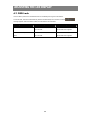
4.7 OSD Lock
Lock the OSD to protect from unauthorised users or accidentally touching the control buttons.
To lock the OSD, touch and hold the buttons (listed on the table below) for 5 seconds or until the
message appears. When the OSD is locked, all control buttons are inactivated.
Type of OSD Lock
Lock Operation
Unlock Operation
Touch and hold the ►, ▲, ▼ buttons
Touch and hold the ►, ▲, ▼ buttons
for 5 seconds.
until the OSD menu appears.
Lock all buttons except the Power
Touch and hold the ◄, ▲, ▼ buttons
Touch and hold the ◄, ▲, ▼ buttons
button
for 5 seconds.
until the OSD menu appears.
Lock all buttons
29
CHAPTER 5: WARNINGS AND TROUBLESHOOTING
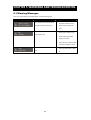
5.1 Warning Messages
When any of these warning messages appear, check the following items.
Warning Message
Cause
The resolution or the refresh rate of
Solution
√
the graphics card is set too high.
Change the resolution or the
refresh rate of the graphics
card.
The LCD display cannot detect the
√
Check if the computer is ON.
√
Check if the signal cable is
input signal source.
properly connected.
√
Check if any pin inside the cable
connector is twisted or broken.
The OSD has been locked by the
user.
√
Unlock the OSD. Refer to page
29.
30
PRECAUTIONS
WARNINGS AND TROUBLESHOOTING
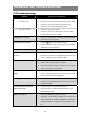
5.2 Troubleshooting
Problems
Possible Cause and Solution
No picture.
•
Check if the LCD display is turned ON.
•
•
Check if the power cord is properly connected to the LCD display.
•
Check if the power cord is plugged into the power outlet.
•
Check if the power switch is ON. Refer to page 17.
•
Check if the computer is turned ON.
•
Check if the computer is in standby mode; move the mouse or
•
Power LED is off.
Power LED is amber.
press any key to wake up the computer.
Image position is incorrect.
•
Adjust the H. POSITION and V. POSITION values under IMAGE
SETTING menu (refer to page 24).
The displayed texts are blurry.
•
Touch the
•
Adjust SHARPNESS, PHASE, and CLOCK values under IMAGE
button to auto-adjust the display.
SETTING menu (refer to page 24).
The OSD menu can’t be called out.
•
The OSD is locked; unlock the OSD (refer to page 29).
Red, blue, green, white dots appear
•
There are millions of micro transistors inside the LCD display. It is
on screen.
normal for a few transistors to be damaged and to produce spots.
This is acceptable and is not considered a failure.
No audio output.
Dew formed on or inside the LCD
•
Check if the volume is set to 0 (refer to page 27).
•
Check if Audio is set to OFF (refer to page 27).
•
Check if the headphone is properly connected to the LCD display.
•
Check the audio setting of the computer.
•
This normally happens when the LCD display is moved from a cold
display.
room to a hot room temperature. Do not turn ON the LCD display,
wait for the dew condensation to disappear.
Mist formed inside the glass surface.
•
This happens due to humid weather conditions. This is a normal
occurrence. The mist will disappear after a few days or as soon as
the weather stabilizes.
Faint shadows from a static image
•
Turn off the monitor for extended periods of time.
appear on the screen.
•
Use a screen saver or a black and white image and run it for
extended periods of time.
USB does not respond.
•
Check if the USB device is properly connected.
•
The length of the USB cable, the distance of the connection or the
number of extensions may affect the readability of USB devices.
For better readability, it is suggested to use the USB port on the
PC.
31
CHAPTER 6: SPECIFICATIONS
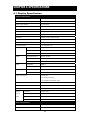
6.1 Display Specification
Electrical Characteristics
Screen size
23.0” (584 mm) diagonal
Resolution
1920 x 1080
Display Colour Number
16.7 M colours
Display Type
a-Si TFT active-matrix
Contrast Ratio
1000:1 typical
Brightness
250cd/m2 typical
Response Time
5 ms typical
Pixel Pitch
0.2655 mm (H) x 0.2655 mm (W)
Backlight
LED light bar
Vertical Viewing
160° typical CR > 10
Horizontal Viewing
170° typical CR > 10
Analogue
Digital
HDMI
Connectors
Horizontal frequency
30 kHz – 83 kHz
Vertical frequency
56 Hz – 75 Hz
Maximum pixel clock
165 MHz
Horizontal frequency
30 kHz – 83 kHz
Vertical frequency
56 Hz – 75 Hz
Maximum pixel clock
165 MHz
Certification
HDMI 1.4
HDCP
HDCP 1.0
AC power
AC 100 ~ 240V ± 10 % 50/60Hz, 3-pin AC power cord
Input connectors
D-SUB 15-pin, DVI-D 24-pin, HDMI 19-pin
Power Consumption
< 35 W (On)
< 0.5 W (Power saving)
< 0.5 W (When power button is off)
Plug and Play
VESA DDC2Bi
Power Saving
DPMS
Input Signal Coutner Tolerance
H ± 1 kHz, V ± 1 Hz
NeoV™
Thickness
3.0 mm (0.18”)
Optical
Reflection
< 2%
Glass
Transmission Ratio
>96%
Anti-glare coating, hardness
≥8H
Physical Characteristics
Weight
Net: 5.8 Kg (12.8 lbs)
Tilt angle
0º ~ 20º
32
PRECAUTIONS
SPECIFICATIONS
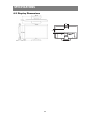
6.2 Display Dimensions
100mm
100mm
HDMI
33