1
Networking
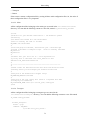
10.2.4. Server Settings
This section explains how to configure basic server settings.
LockFile - The LockFile directive sets the path to the lockfile used when the server is compiled with
either USE_FCNTL_SERIALIZED_ACCEPT or USE_FLOCK_SERIALIZED_ACCEPT. It must be
stored on the local disk. It should be left to the default value unless the logs directory is located on an
NFS share. If this is the case, the default value should be changed to a location on the local disk and to
a directory that is readable only by root.
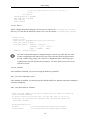
PidFile - The PidFile directive sets the file in which the server records its process ID (pid). This file
should only be readable by root. In most cases, it should be left to the default value.
User - The User directive sets the userid used by the server to answer requests. This setting
determines the server's access. Any files inaccessible to this user will also be inaccessible to your
website's visitors. The default value for User is www-data.
Unless you know exactly what you are doing, do not set the User directive to root. Using
root as the User will create large security holes for your Web server.
The Group directive is similar to the User directive. Group sets the group under which the server will
answer requests. The default group is also www-data.
10.2.5. Apache Modules
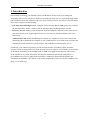
Apache is a modular server. This implies that only the most basic functionality is included in the
core server. Extended features are available through modules which can be loaded into Apache. By
default, a base set of modules is included in the server at compile-time. If the server is compiled to
use dynamically loaded modules, then modules can be compiled separately, and added at any time
using the LoadModule directive. Otherwise, Apache must be recompiled to add or remove modules.
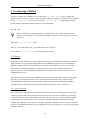
Ubuntu compiles Apache2 to allow the dynamic loading of modules. Configuration directives may
be conditionally included on the presence of a particular module by enclosing them in an <IfModule>
block. You can install additional Apache2 modules and use them with your Web server. You can
install Apache2 modules using the apt-get command. For example, to install the Apache2 module for
MYSQL authentication, you can run the following command from a terminal prompt:
sudo apt-get install libapache2-mod-auth-mysql
Once you install the module, the module will be available in the /etc/apache2/mods-available
directory. You can use the a2enmod command to enable a module. You can use the a2dismod
command to disable a module. Once you enable the module, the module will be available in the the
/etc/apache2/mods-enabled directory.
49