1
HyperView Interfacing
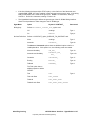
When you select a model or results file, HyperView automatically detects the file type and selects the
proper reader to import the data. If more than one reader claims to support the selected file format, a
dialog listing those readers is displayed. From this dialog, you can select the preferred reader.
To extract only a selected set of results, use the external translator HvTrans to create an h3-D file.
Solver Interface Support
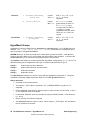
HyperView supports result files created from the LS-DYNA 3D (solver input file is also supported, but
limited to the keyword interface) and LLNL-DYNA d3plot using the .d3plot file format.
Calculating the Supported Result "pressure"
For the supported result "pressure", the pressure is generated by the average of the 3 global
stresses:
Pr = -(StressX + StressY + StressZ) / 3.0
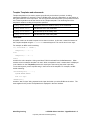
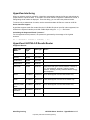
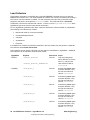
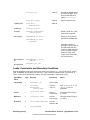
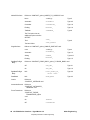
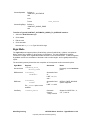
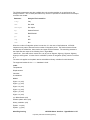
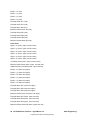
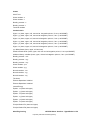
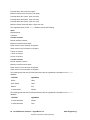
HyperView LS-DYNA 3-D Results Reader
Supported Results
Data Type
Name
Result
Type
Data Type
displacement
NODE
VECTOR
velocity
NODE
VECTOR
acceleration
NODE
VECTOR
temperature
NODE
SCALAR
CFD Data
NODE
SCALAR
Supported CFD types include pressure, vorticity (x,
y, z, and resultant), enstrophy, helicity, stream
function, enthalpy, density, turbulent kinetic energy,
and dissipation.
stress
ELEMENT
TENSOR3D
Thick shell support is for the mid-surface only.
strain
ELEMENT
TENSOR3D
Thick shell support is for the inner surface only.
effective plastic
strain
ELEMENT
SCALAR
Thick shell support is for the mid-surface only.
extra history
variables
ELEMENT
SCALAR
thickness
ELEMENT
SCALAR
Altair Engineering
Notes
LS-DYNA Solver Interface - HyperWorks 8.0 17
Proprietary Information of Altair Engineering