1
3
2
CB Digital-Lock Button Gauge
&
‘Simplex Made Simple’ [P17]
NOW Manipulating other Digital Locks [P16]
[A Guide to Manipulating Simplex Digital Mechanical Locks]
Forward
I liken manipulating the Simplex Mechanical
Digital Lock to that of picking a 5 Lever Mortice
Lock, in that it has 5 Code Gears, each with a
Gate. When picking a 5 Lever Mortice Lock, my
aim is to align each Lever’s Gate with the BoltStump, when all the Lever’s Gates are in
alignment with the Bolt-Stump – the bolt will be
able to move to the open position.
In picking 5 Lever Mortice Locks The Golden
Rule is to only move that Lever which shows
most resistance to moving and it is this
Procedure which I am applying to the Simplex
Mechanical Digital Lock. The Multi-Stump Slide
[Unlocking Slide] is similar to a Multi-Stump Lock,
and when we apply Tension to the Slide, one or
more Stumps will make contact with its own
Code Gear. We are able to detect which Code
Gears are in the Code and which position they
are in within the Code, as well as detecting
when a Code Gears Gate is in alignment with its
Stump.
Chris Belcher
Digital-Lock Button Gauge
Handy Tool to Help Manipulate the Simplex
Digital Locks
Simplex Made Simple
Use a Procedure
Use Logic
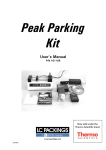
Pack consists of:
1 Button Gauge in Plastic Container
CD with Instructions
2
3