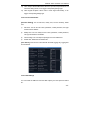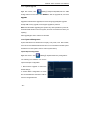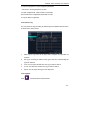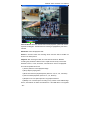
1
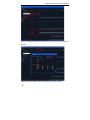
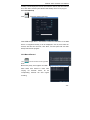
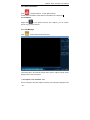
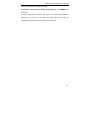
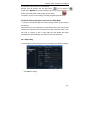
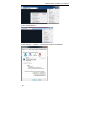
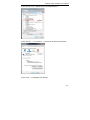
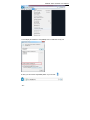
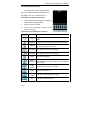
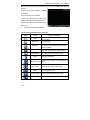
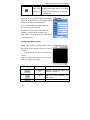
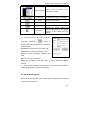
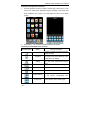
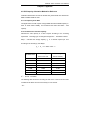
Preface Attentions: Welcome to use our network video recorder. For your secure using, please read this user manual carefully. The following contents are about the proper use of the product, the prevention of danger and loss of property etc. Please be sure to abide. 1. Installation Environment: Please place and use this product in the environment with temperature 0℃ -50℃ ; The device should be placed horizontally when it is being installed and used, avoid lean or inversion; Do not place or install it in the high temperature, wet, dusty and sooty places. Keep the device away from water drop or plash. Don’t put any object with liquid inside like flower vase or any other object on the device. To ensure the normal heat dissipation of the device, there is a fan installed inside the device. The device should be installed in well-ventilated environment; The back of the DVR should be away from other devices or the wall above 6cm in order to release heat; If the device is used in the regions with much thunder, please install lightning protection device to avoid host or hardware breakdown by lightning stroke. 2. Attentions: Do not touch the power switch and the NVR by wet hands or wet objects, in order to avoid electric shock; After installing the host, please make sure that the host and the chassis are connected to the ground in order to avoid video and audio signal interference and damaged by static electricity; Ensure the voltage stability of the power supply of the NVR. Use the power input with stable voltage value and little wave interference rather than shutdown the NVR by disconnecting the main switch directly; Do not drop any liquid or metal on the NVR in case short circuit inside or fire; The device does not include any hard disk, and you need to properly install Network Video Recorder User Manual the hard disk before using it, otherwise, you cannot record and playback the video; The dust on the mainboard will cause short circuit when it is damp. In order to ensure the long-term normal working, you should regularly dedust the mainboard, connectors, chassis, fan and so on by a brush; Do not disconnect the power switch directly when you want to shutdown the NVR. You should use the shutdown button on the panel in order to avoid damage to the hard disk; The device system supports HDD format function. If the HDD has been used, please take note that if it is with FAT 32 format. This NVR only supports HDD with FAT 32 format; Do not open the device when it is connected with electricity;; To ensure the integrity of the recording data, please replace the hard disk when it is damaged (there is disk error record in the log information). 3. Note: The user manual is for reference only. The real object is the standard; The products will be updated at any time. It is subject to update without notice. Please contact our technical department for the latest programs and additional documentation. If there is any doubt or dispute, our company reserves the right of final explanation. This user manual offer references to multi-series products. The specific operation of each product will not be listed one by one. Please contact our technical department when you have any question. -2- Contents Chapter 1: Product Instruction...........................................................................................................5 1.1 Product Summary....................................................................................................................5 1.2 Main Functions of Product.....................................................................................................5 Chapter 2: Installation Instruction.......................................................................................................6 2.1 Open-case Inspection.............................................................................................................6 2.2 HDD Installation.........................................................................................................................6 Chapter 3: Local Operation Guide...................................................................................................7 3.1 Start/Shutdown System..........................................................................................................7 3.2 System Login.............................................................................................................................7 3.3 Menu Operation........................................................................................................................8 3.3.1 Start Setup.........................................................................................................................8 3.3.2 How to connect NVR with IP Camera......................................................................8 3.3.3 Display Setting................................................................................................................14 3.3.4 PTZ Setting......................................................................................................................14 3.3.4.1 PTZ Control............................................................................................................14 3.3.4.2 PTZ Setting.............................................................................................................15 3.3.5 System Setting...............................................................................................................15 3.3.5.1Device Parameters..............................................................................................16 3.3.5.2 Channel Parameters...........................................................................................17 3.3.5.3 Network Parameters...........................................................................................22 3.3.5.4 Alarm & Exception................................................................................................24 3.3.5.5 Account Parameters............................................................................................25 3.3.5.6 HDD Settings.........................................................................................................25 3.3.5.7 System Management.........................................................................................26 3.3.5.8 Device Log..............................................................................................................26 3.3.6 Playback...........................................................................................................................27 3.3.7 Record Backup..............................................................................................................29 3.3.8 Manual Record....................................................................................................................29 3.3.9 Alarm Information................................................................................................................30 3.3.10 Capture...........................................................................................................................30 Network Video Recorder User Manual 3.3.11 File Manager.................................................................................................................30 Chapter 4: Network Operating Instruction....................................................................................32 4.1 WEB Browser Operating Instruction.................................................................................32 4.1.1 Network Connection.....................................................................................................32 4.1.2 AtciveX Control Installation and User Login and Logout....................................32 Chapter 5: Mobile Viewing Operating Instruction.......................................................................45 5.1 Client SoftwareObtaining.....................................................................................................45 5.2 The Parameter Settings of the NVR which Supports Mobile Surveillance...........45 5.3 Android Mobile System.........................................................................................................46 5.4 Blackberry Mobile System...................................................................................................47 5.5 Symbian Mobile System......................................................................................................49 5.6 Windows Mobile System.....................................................................................................50 5.7 iPhone Mobile System..........................................................................................................51 Chapter 6: Appendix..........................................................................................................................54 6.1HDD Capacity Calculation Method for Reference........................................................54 6.2 Remote Control Operation..................................................................................................56 6.3 Technical Data................................................................Error! Bookmark not defined. 6.3.1 1.5U 720P/1080P Economic NVR Series...Error! Bookmark not defined. Chapter 7:Trouble Shooting............................................................................................................62 -4- Network Video Recorder User Manual Chapter 1: Product Instruction 1.1 Product Summary This device is a video coding and recording product specially designed for the video monitoring field, combining with H.264 video compression, large capacity HDD storage, TCP/IP network, embedded Linux operating system and other various advanced electronic information technologies, realizing high-quality image and low bit rate recording features and favourable system stability. The device meets the standard of GB 20815-2006 “Video Security Surveillance Digital Video Device” issued by the government. This device has functions including recording, playback and monitoring simultaneously, realizing synchronous video and audio, with advanced control technology and powerful network data transmission ability. 1.2 Main Functions of Product The following functional characteristics will be different due to the different series of products and their different hardware versions. Real-time Monitoring Compression Processing Function Recording Function Video Playback and Backup Camera Control Alarm Management and Control Communication Port Network Function -5- Network Video Recorder User Manual Chapter 2: Installation Instruction 2.1 Open-case Inspection When you receive the product, please check all the things according to the NVR packing list in the box. 2.2 HDD Installation Installation Preparation: Need one cross screwdriver. This series of HDD NVR can install 2 to 8 pieces of HDD inside, and the capacity of each HDD can be up to 2TB. HDD Installation Steps: Twist off the screws on the side panel of the case and then open the cover of the chassis. Fix the HDD on the HDD screw whole sites of the baseboard with screws. Connect the HDD data cable and power cable. Cover the case, fix it with screws. -6- Network Video Recorder User Manual Chapter 3: Local Operation Guide 3.1 Start/Shutdown System 3.1.1 Start System Plug power cable, press power switch, the power led will be on and the NVR will start. After booting, the video output default to multi-window output mode. If the booting time is within the record setting time period, the system will auto enable the record function. Notice: Please use the NVR matching power supply instead of any other power supply of any other type or brand. 3.1.2 Shutdown System Click → click Shutdown. (Note: this method is suggested when shutdown device in order to avoid damage to the device from electricity cut-off by accident). Long press the power key on the front panel can shutdown the system(the user should have shutdown authority) Notice: Before changing the HDD operation, you should shutdown the device and cut the power supply first and then operate. 3.1.3 Power Failure Recovery When the NVR is under the recording status, if the system power is cut off or the device is shut down forcefully, after reconnected with the power supply, the NVR will auto-save the video before cutting and auto-recover to the previous status and continue to work. 3.2 System Login After normal booting, single-click or press the OK key on the remote control to pop-up the login dialog box, user input the user name: admin and password blank(default to be blank) in the input box. -7- Network Video Recorder User Manual 3.3 Menu Operation 3.3.1 Start Setup Click , and the interface will display: 1) Shutdown: Click “Shutdown” button, the device will shutdown. 2) Reboot: Click “Reboot” button, the device will reboot. 3) Click “Login” button to login the system. User name: admin, password: blank by default; 4) Lock: Click “[ ] Lock”, the menu will be locked. 3.3.2 How to connect NVR with IP Camera At first, set IP camera parameter: This device supports multi-version Onvif protocols, compatible with main brand IP cameras. Take below brands as example: Before connect the IP camera with NVR, please make sure that the IP addresses of the IP camera and the NVR are in a same network section, and the main stream and sub stream are adjusted to be the suggested values (main stream: 2048k, sub stream: 512k), otherwise, these problems may appear: the NVR cannot search the IP camera, the image cannot be connected, the image is not fluent, the image quality is bad and so on. Connect the NVR with the network cable, and the switch in the LAN. After booting, click and enter the system configure interface to set the network parameters including the IP address, subnet mask, network gateway of the NVR. User can run the command ping through the PC in the LAN to ping the IP of the NVR to see if the NVR has connected with the LAN. -8- Network Video Recorder User Manual Notice: IP address might conflict with each other, please set the gateway correctly, or NVR might fail to work. Please ensure all the IP addresses in LAN are unique. Then click the right mouse button and appear the below menu: Device port setting: the default is 5050, if there are several NVRs in the LAN, need to change this port is for login NVR by IE, CMS. Login NVR by mobile, the port should be +3 based on the device port. HTTP port: the default port is 80, suggest modifying it. This port is for login NVR by IE, input NVR IP address or domain name; need to add colon and HTTP port number. Example: show as the above picture, access NVR by IE in LAN, first add 2 forwarding rules in the router, the IP address is 192.168.1.108, the forwarding ports are 5050-5053, 80. Please input http://192.168.1.108:80 at IE browser and download ActiveX, then close the IE before install the ActiveX, after installing it successfully, then reopen IE with http://192.168.1.108:80, it will show login menu, input device port:5050, user name: admin, no password, can access NVR. If access NVR by IE in WAN, please use static IP or dynamic domain name, the operation is same as LAN -9- Network Video Recorder User Manual Click “IP Channel Setting”Manual, will appear below interface: To connect IP camera, click “Search”, NVR will auto search the IP cameras in LAN, then it will appear IP camera list: A –Area is cameras IP address searching area——click Search to get the camera IP addresses in LAN B- Area is camera IP address modification area——double click IP camera in A area, B area will show camera network data, some cameras can change IP address directly in B area C- Area is cameras channel setting area——according to the selection sequence in A zone, to sort the 1-36 channels image order. Select All to add IP cameras to the all channel by one click. D-Area is camera user name and password filling area——this area is camera network parameter - 10 - Network Video Recorder User Manual 2> Automatic Search Right click to select 【IP channel Setting】Auto If the IP camera has private protocol with NVR, NVR will assign IP address to the camera automatically, after finish the searching, will connect the image automatically. Camera IP addresses will be added automatically in the preview channel area. Finish adding IP camera and click Save, then the image of the IP camera will appear in the channel. Below are some main functions of the NVR: The menu consists of display setting, PTZ, setting, playback, record, alarm, capture and file manager etc. - 11 - Network Video Recorder User Manual The device enters the real-time monitoring screen after normal booting. There are superposed date, time, and channel name of every channel. Icons of record, 3D positioning and alarm status will appear in the right upper corner. 3.3.3 Preview 3.3.3.1 Drag and Drop the Image The preview image location can be drag and drop to different place as necessary, but the channel physical address will keep the same(ATTN: channel number in red circle as below) Preview image can randomly drag to adjust according to actual management requirement, which makes surveillance management more systematic and friendly. 3.3.3.2 Drag to Change Channel Sequence - 12 - Network Video Recorder User Manual During real video surveillance, it’s very important to have preview channel position of IPC image.Simple image dragging could not meet the need of multi-channel simultaneous playback and it’s frustrating to match channel position respectively when searching. Dragging channel sequence can better solve this problem. Right Mouse to click 【IP channel setting】, choose【drag to change channel sequence】 . Operation is same as 6.3.1. After dragging channel sequence, users are unnecessary to fill in username, password and IPC will reconnect in its new channel position. When dragging, 2 channels exchanged would lose image for a short while till reconnection. Time for reconnection depends on different IPC, which costs about 1 to 60 second. Zoom In 3.3.3.3 Digital Zooming During image preview and playback, roll mouse roller to do digital zooming, it zoom the image as Zoom Ou mouse pointer as the center. The max can do 15X zooming. Drag the zoomed image by mouse to see image detail - 13 - Network Video Recorder User Manual The channel is recording. Light flashing means frame lost or recording lost. Please adjust the code stream, for details, please refer to 6.5.2; Magnifying glass: digital zooming, the red number in the middle is magnification figures, click this icon, it can change to PTZ control 3.3.4 Display Setting Click , the interface on the right will show: 1) Resolution: select the most appropriate resolution as needed; 2) Language: Different languages for selection (For example: Simplified Chinese, Traditional Chinese and English). 3) Skin: There are original version and blue for selection. 4) Screen mode: there are different screen modes for selection, for example, 1 screen, 4 screens, 9 screens and so on. 5) Rotation Interval: Setup the time interval of rotation. Tick “Enable SEQ” to start rotation. (Note: the rotation function can only be enabled under 1 screen) 3.3.4 PTZ Setting Click will show the below interface: 3.3.4.1 PTZ Control Before starting the PTZ control, please firstly confirm the PTZ parameter settings, PTZ protocol and the correct connection of the 485 control line etc. After setting the parameters, select the channel which you want to control in the preview interface, then control the left-handed rotation, right-handed rotation, up - 14 - Network Video Recorder User Manual regulation, down regulation of the lens; zoom in and zoom out of the focal length; zoom in and zoom out of the focal point; zoom in and zoom out of the iris; setting of the PTZ speed. 3.3.4.2 PTZ Setting 1) Preset setting: first turn the camera to the needed position through the direction buttons of the PTZ control, then select a preset number, and click “Settings” button. “Preset” call: select a preset number which needs to be called, and click “Call” button. 2) Cruise setting: select a cruise number, click “Settings”, as shown in the below interface: In the cruise setup interface, select preset point, cruise time, cruise speed, click “Add” button, then the preset point of the cruise path is added (multi-preset successfully points can be added). Click “Delete” button can delete the preset point of the cruise path. 3) “Cruise” call: select a cruise number click “Call” button. “Cruise” delete: select a cruise number, and click “Delete” button. “Track” setup: select a track number, and click “Set” button, then start the PTZ control operations, and then click “Stop”, and the track is remembered successfully. 4) “Track” call: select a track number, and click “Call” button. 3.3.5 System Setting Click , and the below interface will show: - 15 - Network Video Recorder User Manual 3.3.5.1 Device Parameters [Device Info] Check and modify the basic information of the device. Click 【Setting】DeviceDevice info to check device spec. information and time setting Notice: Attention: select mode according the connected IP camera channels and resolution, after change the model,click save and reboot the device. When the image is good in 9/16/25/26 screen modes, after double click the image to zoom, the image is stuck or become black screen change to 1080 mode can solve it. [System Version] check the system version and time, when do software update, need to check version first to avoid updating failure and damage the device. [RS232] Can set RS232 serial port. [RS485] Can set the RS485 serial port. [DST Setting] Tick “DST” check box, then click the set button to set the start time and end time of DST. - 16 - Network Video Recorder User Manual 3.3.5.2 Channel Parameters [Display Settings] The configuration parameter of every channel can be modified. 1) Camera Name: You can modify the name of the specified channel. 2) Time Format: You can select different time formats for the specified channel. 3) Date Format: You can select different date format for the specified channel. 4) Display Week: Can select different week display status for the specified channel. 5) OSD Position: You can select any position for the OSD of the specified channel. 6) Display Parameters: Can set the brightness, contrast, saturation and hue for the specified channel. 7) Video Format: There are PAL and NTSC for selection. 8) Copy To: Copy the configuration parameters to other channels. [Video Parameters] The setting parameters of every channel can be modified. 1) Encoding Type: Main Stream (Normal), Sub Stream, Main Stream (Event) for selection. Main Stream:double click to show single image or full screens image are main stream, also recording playback is main stream. Sub Stream:9/16/25/36 screens display are using sub stream, IE or mobile reviewing are sub stream also. - 17 - Network Video Recorder User Manual Main Stream (Event):motion detection and alarm trigger recording are using this 2) Stream Type: Video, Video&Audio for selection. 3) 3)Resolution: There are CIF/QCIF/4CIF/2CIF main stream resolution types for selection.. 4) Bitrate Type: Constant and Variable for selection. 5) Frame Rate: Select different value from the drop-down list, the default value is “Full Frame”. 6) Video Quality: Select different image quality as needed, it is default to “Highest”. 7) Copy To: Copy the configuration parameters to other channels. [Schedule Record] You can set different types of record plan for each channel. 1) Enable Recording: Tick the small box before “Enable Recording” will start recording. 2) All Day Recording: Tick the small box before “All Day Recording” to start all day recording, then you can select schedule recording, motion recording, alarm recording, command recording etc. 3) Record Time: You can setup by 8 separate time periods. 4) Advanced Settings: You can set the prerecord time and post record time. 5) Copy To: Copy the configuration parameters to other channels. [Motion Detection] The parameters of each channel can be modified. 1) Area settings: Select the motion detection area, press the left mouse button and drag to the area which you want to set motion detection, click OK. 2) Alarm Schedule: Set the time intervals of alarm. 3) Linkage: Select the linkage way which you need. 4) Copy To: Copy the configuration parameters to other channels. Onvif protocol does not support above function Operation Instruction: 1 Select Motion in the menu of setting - 18 - Network Video Recorder User Manual 2 Select Enable Motion Detection 3 After do Area settings and Arm Schedule, then do Linkage - 19 - Network Video Recorder User Manual 4 Do the setting according your necessary in the pop out screen, like Alarm on Monitor, 5 Select Motion recording, if need can open pre-recording in advance - 20 - Network Video Recorder User Manual [Video Lost] Can modify the parameters of each channel. 1) “Alarm Schedule”: Set the time intervals of alarm. 2) “Linkage”: Select the linkage way which you need. 3) “Copy To”: Copy the configuration parameters to other channels. Onvif protocol does not support above function [Video Tampering] The parameters of each channel can be modified. 1) Area settings: Select the motion detection area, press the left mouse button and drag to the area which you want to set motion detection, click OK. 2) Alarm Schedule: Set the time intervals of alarm. 3) Linkage: Select the linkage way which you need. 4) Copy To: Copy the configuration parameters to other channels. Onvif protocol does not support above function [Video Mask] The parameters of each channel can be modified. 1) Area settings: Select the motion detection area, press the left mouse button and drag to the area which you want to set motion detection, click OK. 2) Copy To: Copy the configuration parameters to other channels. - 21 - Network Video Recorder User Manual Onvif protocol does not support above function 3.3.5.3 Network Parameters [Network Settings] The network basic parameters of the device can be modified. 1) NIC Type: there are different network card types for selections. 2) IP: enter corresponding numbers to modify the IP address. 3) Obtain Auto: Auto search IP function. When open DHCP, the IP/Subnet Mask/Default Gateway cannot be set; If the current DHCP is valid, then the IP/Subnet Mask/ Default Gateway will show the value obtained by DHCP; if the current DHCP is invalid, IP address etc. will show 0. 4) Device Port: Enter the corresponding device port. 5) Subnet Mask: Enter the corresponding IP subnet mask. 6) Default Gateway: Enter the corresponding gateway address. 7) MAC: Display the MAC address current network port. 8) HTTP Port: It is default to 0. 9) Multicast: Enter the corresponding multicast address. [Wi-Fi & 3G setting] 1) Enable Wi-Fi: Tick the box before “Enable Wi-Fi” and click “Wi-Fi”, and enter the following interface: Click “Refresh”, and find the WiFi router and double click. Then input the ip - 22 - Network Video Recorder User Manual address, subnet mask, default gateway, DNS server address1 and DNS server address 2. 2) Enable 3G: Tick the box before “Enable 3G”, click “3G” to enter the following interface: a. The access number of the China Unicom is *99# APN address is: 3GNET. b. The access number of the China Telecom is #777 APN address is blank. c. The access number of the China Mobile is *99***1# APN address is blank. 3) Advance: a) DNS Server Address1: The IP address of the DNS server. b) DNS Server Address2: The standby IP address of the DNS server. c) Alarm Host IP: Enter the IP address of the alarm host. d) Alarm Host Port: Enter the port of the alarm host. e) Enable PPPOE: you can enable the PPPOE service: Input the PPPOE user name. Input the dynamic address of the device. Confirm password. [DDNS Settings] Through the DDNS server, there should be a PC with fixed IP address on the internet and run this DDNS server on this PC. 1) Select DDNS server type (There are IP Server, Dyndns, Peanuthull for selection). 2) Input the server name. 3) Input the port. 4) Input the user name. 5) Input the password. 6) Confirm the password. 7) Input the standby domain name. [NTP Settings] Enable NTP timing. 1) Server Address: Input the IP of the NTP server. 2) NTP Port: This SNTP only supports TCP transmission. It is default to 123. 3) Synchronize every: Input the time interval needed to be adjusted. - 23 - Network Video Recorder User Manual 4) Select Time Zone: Select the time zone of different places. 5) GMT: You can do fine adjustment of time. [Email Settings] Setup E-mail. 1) Email Address: Input the email address. 2) Password: Input the email password. 3) PWD Confirm: Confirm the password. 4) Receiver: Input the email address and user name of the receiver. 5) Interval: Select the interval of sending email. 6) SMTP Server: Input the SMTP server address. 7) Port: Input the SMTP server port. 3.3.5.4 Alarm & Exception [Alarm Input] Setup alarm input. 1) Alarm Schedule: Set the time intervals of alarm. 2) Linkage: Select the way of linkage. PTZ linkage: select the channel number and the action for linkage (preset, patrol, and pattern) to the specified point and click ok. 3) Copy: Copy the configuration to the other channels. 4) [Alarm Output] Setup alarm output. 5) Alarm Schedule: Set the time intervals of alarm. 6) Linkage: Select the way of linkage. 7) [Exception] Setup abnormality 8) HDD Full: When there is no space in the HDD, it can trigger corresponding linkage type. 9) Disk Fault: When there is HDD read and write fault alarm, it can trigger corresponding linkage type. 10) Network Broken: When there is network broken alarm, it can trigger corresponding linkage type. 11) IP Address Conflict: When there is network IP conflict alarm, it can trigger corresponding linkage type. 12) Illegal Access: When there is illegal access alarm, it can trigger corresponding linkage type. - 24 - Network Video Recorder User Manual 13) Video Output Standard Mismatch: When the input and output format do not match the setting format, it can trigger corresponding linkage type. 14) Video Signal Exception: When there is video signal abnormality, it can trigger corresponding linkage type. 3.3.5.5 Account Parameters [Account Setting] You can add user, modify user, set user authority, delete user. 1) Add User: You can set user name, password, confirm password, user type and bind the IP address. 2) Modify User: You can modify the user name, password, confirm password, user type and bind the IP address. 3) User Privilege: You can setup the privilege of the new added user. 4) Delete User: Delete the new added user. [User Online]: View the user connected with the NVR, logging way, logging time and IP address. 3.3.5.6 HDD Settings You can format the HDD and view the HDD capacity, the free space and status etc. - 25 - Network Video Recorder User Manual 3.3.5.7 System Upgrade 【Setting】SystemUpdate,insert the USB Right click mouse, click storage device into the NVR, click Browse to find the upgrade file, and click Upgrade. Upgrade include:firmware upgrade,boot screen image upgrade,patch upgrade. Except USB memory upgrade, it also support upgrade by network. Note:when the NVR is upgrading,don’t perform any other operations or power off, otherwise NVR will fail to enter the system ,and have to send back to factory for repairing. After upgrading,the device need to be rebooted. 3.3.5.8 System Management System maintenance is devided into everyday, every week, once. After enable, users can choose detailed maintenance time. It’s recommended to enable system maintenance to clear system cache to ensure system fluency. Import-Export Configuration Right click mouse,click 【Setting】SystemRecovery Configuration。 The following two situations can use the Import and Export configuration: 1. NVR firmware upgrade or restore the default settings; 2. Several NVRs’ configuration are same but connect different IP cameras in order to save the configuration time - 26 - Network Video Recorder User Manual 【Export Configuration】: Export equipment parameters , and save it in the assigned place of U disc; 【Import configuration】: Open the menu in the NVRs that need the same configuration,import data of U disc to copy the NVR conf iguration. 3.3.5.9 Device Log You can search the logs according to different types and different date and time, as shown in the above picture. 1. Main Type of Log: There are All Type, Alarm, Exception and Operation for selection. 2. Sub Type: According to different main types, there are corresponding sub types for selection. 3. From: You can select the start time of a log you want to search. 4. To: You can select the end time of a log you want to search. 5. Export: You can export the log you have searched. 3.3.6 Playback Click , and will show the below interface: - 27 - Network Video Recorder User Manual Channel Select: select the channels that need do playback, system will find the required recording file. The date that has recording is highlighted by red color in calendar Date Select: select the playback date Search: it will auto search the recording which meet the search condition as shown in the below picture. Playback: after choosing the date, 24 hours color bar will show. Different recording way will show in different color. Adjust the time line by mouse roller between 2 hours, 1 hours, 30 minutes, 5 minutes and 1 minute. The playback time can be specified to second 1) Pause: pause the current playback image. 2) Stop: Stop the playing video. 3) Slow: Slow down the playback speed. (there are: 1/2, 1/4, 1/8, 1/16 times) 4) Fast: Accelerate playback. (there are: 2, 4, 8, 16 times) 5) Snapshot: You can capture picture in any playback channel. 6) Backup: You can backup the recording of any channel. Insert USB storage device, click Refresh to detect the USB device. If the USB device is recognized - 28 - Network Video Recorder User Manual normally, it will be displayed in the list, then select the channel, start time and end time, click “Start”, and the system will auto start backup and show the progress. 3.3.7 Record Backup Click , and below interface will show: Insert USB storage device, click Refresh to detect the USB device. If the USB device is recognized normally, it will be displayed in the list, then select the channel, start time and end time, click “Start”, and the system will auto start backup and show the progress. 3.3.8 Manual Record Click , and the interface on the right will show: Manual: the priority is the highest. No matter which status each channel is under, after carrying out "Manual" corresponding channels button, will start all the regular recording. - 29 - Network Video Recorder User Manual 3.3.9 Alarm Information Click , and the interface on the right will show: All the alarm information of the device is recorded in the “Alarm” list. 3.3.10 Capture Single-click on the preview channel, click “Capture”, you can capture picture on any preview channel. 3.3.11 File Manager Click , and the below interface will show: The backup files in the external storage device and the capture pictures will be displayed in the document list bar. 1) Check photo in the hard disk: select date on calendar, if there was capture in that day ,then it would be displayed in list - 30 - Network Video Recorder User Manual form;if no capture,then no display information. 2) Check the U disk and other mobile storage devices: click Refresh ,then drop-down to select U disk paths, the photos and videos in the disc will be displayed, double-click it to check. You can capture also when you view the video, the captured photos are stored in the hard disc of that very day. - 31 - Network Video Recorder User Manual Chapter 4: Network Operating Instruction 4.1 WEB Browser Operating Instruction 4.1.1 Network Connection Confirm the NVR correct access to the network. Set the IP address, subnet mask and gateway for the computer server and NVR. Please allocate IP address in the same network segment if there is no router device in the network. If there is router device, you just need to set corresponding gateway and subnet mask. For the network setting, please refer to [Settings]>[Network Parameters]. Please make sure that the IP address setting is correct. When the IP address setting is complete, you can use the system own ping tool to check if the NVR is connected to the network correctly. 4.1.2 AtciveX Control Installation and User Login and Logout When the NVR accesses to the network correctly, you can login and visit it through IE browser You can download and install IE ActiveX from NVR through the Internet. Then input the IP address of the NVR in the IE browser, port number 5050, user name and password, then the below interface will pop-up, select the language you need: When Login successfully, then shows: - 32 - Network Video Recorder User Manual The operation of IE is same as in the local NVR. Remark: open the preview, click the right bottom to let it change to or right click to Open All , the red point represent recording , and click to set the stream and switch of main stream and sub stream. This doesn't require for router setting, excluding of registering domain name. 4.2 NVR IE Viewing Operation Instruction for ADSL Mode If customer connects with ADSL and need IE viewing, please do the setting as the following: Equipments: NVR, 1 set computer that connected with LAN, router, internet cable Let NVR and computer both connect with internet cable. Click “Star” button on the left corner of computer Run Input CMD and click ENTER key-Input ipconfig/all and click ENTER key. Then take note for the IP information 4.2.1 NVR setting 1. Start the NVR Click Setting icon to enter the setting menuNetwork Setting Click DDNS for setting. - 33 - Network Video Recorder User Manual 1) The physical address can keep the same; 2) IP address: the IP must be the unique and cannot conflict with other host or workstation Eg:192.168.1.101 3) Default Gateway: be same with the LAN gateway, eg: 192.168.1.1 a) Subnet Mask:255.255.255.0 b) DNS Address: be same with the LAN gateway; c) Device Port: default number is 5050, can change as the necessary; d) http Port: default number is 80, can change as the necessary; e) Cell Phone Port: +3 based on the device port number, eg, if the device port is 5050, then the cell phone port is 5053 4.2.2 Router Setting As the so many different router brands, take the TP-LINK router as the example, please do the operation as the following: 1. Open IE browser and input the gateway, like: http://192.168.1.1 2. Input the User Name and Password to login the router management TP-LINK default user name: admin, password: admin, 3. Click the “Forwarding Rules” of tool bar at the left side, some router named it by Port Mapping, click Virtual Serverclick Adding New Items Add the following NVR IP address to there and save it. HTTP Port: default number 80 - 34 - Network Video Recorder User Manual Device Port: default number 5050 Default Port: default number 5051 Default Port: default number 5052 Cell Phone Port: default number 5053 After finish it and click the item “ All entries effect” Now take 3322 as the example, bound the dynamic IP address www.3322.org to fixed domain name. Enter 3322 website and input the application information. Take note the domain name after applying successfully. Note: domain name, user name and password need to add on the DDNS setting of DVR network setting. Now input the applied domain in the IE browser, you can login the NVR. Note: If you fail to login in, please try again by adding colon + http port number. 4.2.3 IE Login Operations Open IE browser and input the domain name, then it pop out the following information: Downloading activx, please wait or click here. Once the download has completed, please close IE browser first before unzipping the installation package. After installation finished, then open the IE browser and input the domain name, login with port number, user name and password. The default user name is admin and no password. Then you will see the NVR monitoring image. IE Login Setting As computer system safety protection, the activeX might fail to download, do the IE setting as following: 1 Click the “Safety” then, disable the “ActiveX Filtering” - 35 - Network Video Recorder User Manual 2 Click “Internet Options” 3 Click “Security” — “Internet” — Uncheck the “Enable Protected Mode” - 36 - Network Video Recorder User Manual 4 Click “Custom Level”— Disable “Binary and Script Behaviors” 5 Click “Security” — “Local Intranet” — Uncheck the “Enable Protected Mode” 6 Click “Tools” ---“Compatibility View Settings” - 37 - Network Video Recorder User Manual 7 Tick “Display all websites in Compatibility View” or add sites one by one Or also you can tick the compatibility button if you can see “ - 38 - ” Network Video Recorder User Manual 8 For the IE11,if you can’t find option “Display all websites in Compatibility View”, then please tick “display intranet sites in Compatibility View” and add the site one by one. 9 Click” Run” when prompt turns out like below: 10 Click “ Download unsafe file ” - 39 - Network Video Recorder User Manual 11 If you still can’t see the video on the IE View, then please carry out below setting on the PC 1) Go to menu of “Control Panel”, and then click “Accounts and Family Safety” 2) Enter the “User Accounts”, and then click “Change User Account Control Setting” - 40 - Network Video Recorder User Manual 3) Choose the “Never Notify”, and then click “OK”. Now setting up is done. If you still can’t login NVR through IE, please turn off your firewall: - 41 - Network Video Recorder User Manual If you still can’t see the video on the IE View, then please ensure you have made port forwarding with following 5 ports: 5050, 5051, 5052, 5053, 80 on your router if NVR remote port is default 5050. (Here Phone view port is 5053) P.S.: The Principle of NVR port forwarding: NVR must port forwarding 5 ports: (NVR remote port, remote port+1, remote port +2, remote port+3, and Http port). phone view port is (remoter port+3) - 42 - Network Video Recorder User Manual Chapter 5: P2P Cloud Function P2P Cloud, simple and stable, doesn't require for router setting, excluding of registering domain name. Caution: 1: Network Architecture could not have second level router. 2: Make sure NVR has P2P functions and check if it has Icloud protocol (Setting-Network Setting-Management Platform). 5.1 Goolink Mobile Client Setting Open goolink mobile client(Client can be downloaded on different mobile apps platform by searching “goolink”). Click left side “+”, If LAN has WIFI, Click “LAN Search” Normally We choose “Manually Input ”. Like right interface, Click “UID” Record Name: Must be filled but randomly. UID: fill with NVR Serial No. (Setting-Device Parameter-Device info) Password: Default Null, no need to fill, if you have changed password already, be correctly filled following your own password. Channel Number: Followed by NVR true channel number, Minimum 1 channel and Maximum 32ch After added successfully, if the middle line color is blue in the rectangle icon, it means NVR online and can link with video data. - 43 - Network Video Recorder User Manual 5.2 Goolink on IE Setting Open Website: www.goolink.org Click “Register”, Username, password, snapshot save dir and record video save dir setting randomly. After entering into, remember to install activex. Click “Device Management” to add device. Device ID is NVR Serial No. and Device name randomly filled, Device username and password followed your NVR username and password setting, see below. Caution: if it says ID not exists when add it, pls contact our technician. After added successfully, click “Live”. Click NVR name in the left list and click randomly channels for preview. - 44 - Network Video Recorder User Manual Chapter 6: Mobile Viewing Operating Instruction This operation guide is about how to install and use the mobile softwares in the mobile phones with Android, Blackberry, windows mobile, iPhone, Symbian systems. 5.1 Client Software Obtaining You can obtain the mobile surveillance client software from the CD or our technical department. The corresponding client software of each system is as below: MEYE_SB_S60_3rd.sisx: mobile surveillance client of the 3rd version of Symbian S60 system; MEYE_SB_S60_5rd.sisx: mobile surveillance client of the 5th version of Symbian S60 system; MEYE_WM.cab: mobile surveillance client of Window system; MEYE_Android.apk: mobile surveillance client of Android system; MEYE_RIM.rar: mobile surveillance client of BlackBerry system; Note: iPhone uses TMeye+, downloaded from appstore. 5.2 The Parameter Settings of the NVR which Supports Mobile Surveillance Resolution: CIF or QCIF; Frame Rate: 5-10fps; Stream Type: Limited Stream: 64-256Kb/S Note: you can adjust the settings according to the performance and network condition. Mobile phone with higher performance and network condition will display better effect. If the network condition is not good, you can reduce the frame rate to ensure the fluency. - 45 - Network Video Recorder User Manual 5.3 Android Mobile System The mobile client software supports version above 1.5 of Android system, including HTC G1, HTC Magic, HTC Hero, HTC G5 and so on. Installation and Operation Instruction 1. Copy the MEYE_Android.apk to the mobile or download it from Google directly. 2. Click the program to install. 3. Click to run the program as shown in the picture on the right: The functions of the buttons are as below: Function Button Name Function Description Play Program connects the device and start to play the video Snapshot Capture the current image (the pictures are saved in the picture directory of the mobile phone by default) Setting Set IP address of the NVR or DDNS, port, user name, and password and device name. Last Group Can select the channel of last group Next Group Can select the channel of next group About Select Channel Select to play the video of any channel of the device. Coordinating with the ”Next Group”, you can switch to 8ch or 16ch. PTZ Control Control PTZ up, down, left and right. Zoom Zoom in and zoom out Focal Length Increase or decrease the focal length Iris 4. About the information. Increase or decrease the iris Use for the first time, you need to do the following settings: - 46 - Network Video Recorder User Manual Address: The public IP address or DDNS of the NVR; Port: The server port of the NVR; NVR Title: The device name of the NVR, which is used to differentiate different devices; User ID: Same as the user name on IE; Password: Same as the password on IE. : Return button. 5.4 Blackberry Mobile System The mobile client software supports version above 4.6 of blackberry system. The screen resolution should be 480*360 or 480*320, including model 8900, 9000, 9700, 9630 and so on. 5.4.1 Installation and Operation Instruction 1. Install the vMEye.cod and vMEye.alx packages into the Blackberry mobile through the Desktop Manager. Click “option” on the mobile desk, and then click “application” to find the vMEye and then enter. Click “Edit Permission” and set “allow” for all permissions. Some of the permissions cannot be set “allow” (the option is grey and cannot be modified) and can be ignored and click save directly. 2. Click vMEye icon to run the program, then enter the initialized interface through a initialized splash interface, which is shown as below picture: - 47 - Network Video Recorder User Manual Name: The device name of the NVR, which is used to differentiate different devices; Address: The public IP address or DDNS of the NVR; Port: The server port of the NVR; User ID: The same as the user name on IE; Password: The same as the password on IE. Network Type: Select the network type you want to use. 3. Click Login to enter the main interface: The functions of the buttons are as below: Function Name Function Description Button Program connects the device and start to Play play the video Full Screen Snapshot Setting Next Group About Select Channel PTZ Control Zoom Focal Length Iris - 48 - Full screen play Capture the current image (the pictures are saved in the picture directory of the mobile phone by default) Set IP address of the NVR or DDNS, port, user name, password and device name. Can select the channel of next group About the information Select to play the video of any channel of the device Control PTZ up, down, left and right Zoom in and zoom out Increase or decrease the focal length Increase or decrease the iris Network Video Recorder User Manual 5.5 Symbian Mobile System Mobile client supports symbian system version above 9.1 (namely symbian 3rd and 5th version mobile), including all the 3rd version like Nokia 6120c, e71,5800 with 240*320, 320*240 resolution, the 5th version with 360*640, 640*360 resolution. ☆ Installation and Operation Instruction 1. Download and Install the package file(sisx) in the phone and then you will find the program icon and find the vmeye in the specified directory. 2. Click the vmeye program icon. After running the program, the below initialized interface will appear: The functions of the buttons are as below: Function Button Name Function Description Play Program connects the device and start to play the video Snapshot Capture the current image (the pictures are saved in the picture directory of the mobile phone by default) Setting Set IP address of the NVR or DDNS, port, user name, password and device name. Next Group Can select the channel of next group Exit Exit the program Full Screen Full screen view Select Channel PTZ Control Select to play the video of any channel of the device. Coordinating with the ”Next Group”, you can switch to 8ch or 16ch. Control PTZ up, down, left and right - 49 - Network Video Recorder User Manual Zoom in and zoom out, increase and Zoom, Focal decrease focal length and iris. The above Length, Iris prompting bar will prompt the function of the selected button. Use for the first time or need to modify the parameters, please click Setting button to enter the parameter setting interface, which as shown in the below picture: IP: The public IP address or DDNS of the NVR; Port: The server port of the NVR; User Name: The same as the user name on IE; Password: The same as the password on IE. Allias: Give a name to the device and it will appear on the playing page. 5.6 Windows Mobile System Mobile client supports windows system version above 2003. It only supports screen touch version currently. 1. Copy the MEYE_WM.cab to the mobile and install it. Click the corresponding program icon to open as shown in the picture on the right. Function Button Name Function Description Connect and Play Program connects the device and start to play the video Setting Set IP address of the NVR or DDNS, port, user name, password and device name. Disconnect - 50 - Program disconnects the video Network Video Recorder User Manual Select Channel PTZ Control Zoom Focal Length Iris Select to play the video of any channel of the device Control PTZ up, down, left and right Zoom in and zoom out Increase or decrease the focal length Increase or decrease the iris Capture the current image (the pictures are saved in the picture Snapshot directory of the mobile phone by default) The functions of the buttons are as below: 2. Use for the first time or need to modify the parameters, please click button to enter the parameter setting interface, as shown in the below picture: Username: The same as the user name on IE; Password: The same as the password on IE. Server: The public IP address or DDNS of the NVR; Port: The server port of the NVR; Notes: The description of the NVR, which is used to differentiate different devices; 3. After successful setting, press [OK] button to enter the connection interface. The image will appear if connected successfully. 5.7 iPhone Mobile System Mobile client supports iphone system version iOS 3.0 or higher version, including iPhone,iPod touch and so on. - 51 - Network Video Recorder User Manual Installation and Operation Instruction 1. Run the App Store of iPhone, switch to search page, input TMeye+, in the search bar, and find the application program package, click install. After finish installation, the program icons will appear as shown in the below picture: 2. Click TMeye+, icon, the above initialized interface will appear. The functions of the buttons are as below: Function Button Name Function Description Last Group Program connects the device and start to play the video Capture the current image (the pictures are saved in the picture directory of the mobile phone by default) Set IP address of the NVR or DDNS, port, user name, password and device name. Can select the channel of last group Next Group Can select the channel of next group Play Snapshot Setting About About the information Select to play the video of any channel Select Channel PTZ Control - 52 - of the device. Coordinating with the”Next Group”, you can switch to 8ch Control or 16ch.PTZ up, down, left and right Network Video Recorder User Manual Zoom Focal Length Iris 3. Zoom in and zoom out Increase or decrease the focal length Increase or decrease the iris Use for the first time or need to modify the parameters, please click Setting button to enter the parameter setting interface, which as shown in the below picture: Alias: The name of the NVR, which is used to differentiate different devices; Address: The public IP address or DDNS of the NVR; Port: The server port of the NVR; User ID: The same as the user name on IE; Password: The same as the password on IE. : Return button. - 53 - Network Video Recorder User Manual Chapter 6: Appendix 6.1 HDD Capacity Calculation Method for Reference Install the network video recorder for the first time, please make sure whether the HDD is installed inside the host. 6.1.1 The Capacity of the HDD The digital video recorder requires a single HDD with above 500GB capacity. In order to obtain better stability, we recommend the HDD with 500G ~ 2TB capacity. 6.1.2 The Selection of the Total Capacity Calculate the total capacity of a NVR requires according to the recording requirement(recording type, recording file storage time). Calculation method: Step 1:Calculate the storage capacity qi of a channel requires per hour according to the formula(1), Unit: MByte. qi di ÷ 8 × 3600 ÷ 1024(1) The Recording File The Recording File Size in One Hour Size in One Day 256K 112M 2.6G 320K 140M 3.3G 512K 225M 5.3G 768K 337M 7.9G 1.00M 439M 10.3G 1.50M 659M 15.4G 2.00M 878M 20.6G Bit Stream Size di - = bit rate,Unit Kbit/s The following table shows the recording file size of the common bit rate under constant bit rate within one hour and one day for one channel. - 54 - Network Video Recorder User Manual The second step: after confirming the time requirement of recording, calculate the storage capacity i m one channel requires according to formula(2), unit: MByte. mi = qi × hi × Di (2) hi - recording time of each day(Hour) Di - number of days of recording storage For example: the HDD capacity for recording one month for 1 channel 1.50M bit stream. Unit GB. mi = 659×24×31=490296MB= 478GB The third step: the total capacity (accumulating) qT for 16 channels timing recording for a whole day. Unit: GB qt = q16 = mi ×16 =7648GB If select 500G HDD, 16 pieces of HDD will be required to full record. User selects appropriate HDD according to the capacity. The fourth step: calculate the total capacity(accumulating) needed for allchannels alarm recording(including motion detection). Unit: GB qt ×a% a%-alarm occurring rate. Alarm occurring rate: Tn T1 + T2 + T3 +…… Tn )/n T24 (n=1,2,3…) - The alarm time of the Nth day(the time difference of larm end and alarm start) Unit: h qt - T24 - 24h the needed HDD capacity of T channels timing For example: if the alarm occurring rate a% for a month is 50%, then the alarm - 55 - Network Video Recorder User Manual recording capacity of 16 channels in one month is: Unit:GB qt ×a%= q16 ×50%=7648×50%=3.7GB 6.2 Remote Control Operation Numb Icon Description Number Icon er 1 REC Descriptio n Last Record Key 13 I◄◄ 2 Power On/Off 14 ► PLAY Video 3 Key Window 15 I► Frame Playback Frame 4 Devide Key Window 16 Forward ▲ Forward Up Key 17 ▼ Down 18 ◄ Left 19 ► Right Devide Key Auxiliary Section 5 FN 6 STATUS/DEV 7 PTZ 8 II 9 OSD Menu Key 21 ESC Exit Key 10 ►►I Next Section 22 MENU Menu Key 11 ►► 23 1-16 12 ◄◄ Function Key Device Code Key PTZ Control Key Playback Pause Key Fast Forward Key Fast Backward Key - 56 - 20 Enter Key Channel 1-16 Network Video Recorder User Manual 6.3 Technical Data Model Number DNR-329 Operating System Embedded LINUX operating system Image Code Control Image code quality adjustable, variable bitstream and constant bitstream Dual Stream optional Each channel can set main stream and sub stream Video Standard 1080P(1920×1080)30fps/960P/(1280×960)/720P(1280×720)30fps MonitoringImage 1080P(1920×1080) / 960P/(1280×960)/720P(1280×720) ImageMotion Detection Quality Each screen can set mutiple detection areas and set 6-level RecordingPlayback Any 4ch 1080P/720P playback simultaneously sensitivityʢIPC Supportʣ Region Cover Quality Every channel can set 4 cover regions (IPC Support needed) Recording Mode Support manual , auto, dynamic detection, alarm trigger record mode(Partly needs IPC Support) Backup Way Support U disk, USB mobile HDD, USB DVD-RW backup Operation Way Mouse, remote control, front panel Local Login User name and password Recording Storage Local HDD, network 9×(1920*1080) IP camera Video External Ports 4×(2048*1536) 3 mega IP camera Input Audio 9ch network audio input Video Input 1ch VGA+1ch HDMI Output Audio 1ch RCA auxiliary Output Output Network 1 RJ45,10M/100M self-adaptive LAN port RS485 Port Full duplex standard 485 port Port Port USB 1.5U A type: 3 USB 2.0 portsɼ1.5U B type: 2 USB 2.0 ports Alarm 4ch Alarm Input 1ch Output HDD HDD Port 2 SATA HDD Port MAX Each port supports MAX 4TB HDD Mobile Surveillance Capacity Support( iPhone, Windows Mobile, BlackBerry, Symbian, Android) smart Power Supply phone 12V4A Power Consumption ≤25Wʢwithout HDDʣ Working Temperature -10°C ~ + 55°C Working Humidity 10ˋ-90ˋ - 57 - Network Video Recorder User Manual Charpter 7: Trouble Shooting The device fails to start or keeps restarting. Possible causes: 1. NVR is upgraded with wrong program which has caused the damage of system software. 2. The main board is defective; please contact the supplier for maintenance. 3. HDD is defective, please replace the HDD. Fail to operate the device by remote control Possible causes: 1. Check if the batteries in the remote control are installed correctly, especially the positive and negative polarity. 2. Check if the batteries in the remote control have power. 3. Check if the remote control window is covered. 4. Check if the remote address of the NVR matches the address of the remote control. Fail to control PTZ Possible causes: 1. Incorrect cable connection of the RS-485 port, A, B ports are connected oppositely. 2. Incorrect settings of PTZ decoder type, protocol, baud rate and address bit. 3. The quantity of the PTZ connected to the RS-485 bus is relatively big, which causes the signal reflection, and you need to parallel connect a 120Ω electrical resistance in the far-end. 4. The RS-485 port of the main board is defective. NVR playback image is scratched or fail to search the recording. Possible causes: 2. Program error; please try to reboot the NVR. 3. HDD data error caused by bad track and bad clusters, please detect the HDD. If the HDD is defective, please replace the HDD. - 58 - Network Video Recorder User Manual 4. Hardware error of NVR, please contact the supplier. NVR cannot connect network. Possible causes: 1. Please check if the network physical connection is correct. 2. Please check the NVR network parameter configuration. 3. Please check if IP conflict exists in the network. The download or backup recording video fail to play Possible causes: 1. Player is not installed correctly. 2. The file system error of the backup U disk or removable hard disk. 3. Graphics speed up software whose version is above DX8.1 is not installed. How to do NVR firmware Update For access to some functions and requirements, NVR needs to update firmware. Before update, users need to prepare as below: 1) To check Serial No.: Setting→Device→Device info; 2) To check Master Version: Setting→Device→System info; 3) Unplug network cable; 4) Restart NVR; 5) By providing Serial NO., Master Version, PCB and Rear Panel Pictures, users can get the accurate update files; Update Operation: Setting→System→Update, click “Browse”, choose U disk’s .update suffix update file in root catalog, click “update”, during updating, please do not cut off electricity or carry out other operation in case that update failure leads to repairing. Image preview or playback abnormal, 4 kinds of ordinary situations as below, 1) IP Camera IP address can be searched, multi-images sub stream and single image main stream all cannot have image; - 59 - Network Video Recorder User Manual 2) Single image main stream has image, multi-images sub stream is on black screen; 3) Multi-images sub stream has image, single image main stream is on black screen or still image as well as black-screen playback; 4) Image or screen crashes To choose mode is very important when NVR can be access to different brand and different resolution IPC. Above 4 kinds of malfunctions are very common in real utilization and this is all following the steps: Setting→Device→Device info→Stream type. The first 3 numerical values must be matched with IPC’s stream setting. IPC’s main stream, sub stream and reference frame must be equal to or less than the numerical values of NVR’s stream type. Stream type adjustment need to be saved and restart to make it effect. The first numerical value of stream type “main” represents the IPC accessible channel numbers and main stream resolution ratio; The second one “sub” is subs stream’s resolution ratio; The third one “ref” is the reference frame IPC can get access to; The fourth one “play” is the playback channel numbers under this kind of stream type. Solution of 1st situation which IP address can be searched but without any images: 1) Adjustment of stream type, choose stream type with ref value for 4ref. To get access to Ambarella solution IPC needs 4ref; 2) IPC’s username and password should be correctly filled in; 3) This IPC has not been butt joint or version outdated, which needs supplier’s confirmation for butt joint and then update NVR firmware. Solution of 2nd situation which single image main stream has image and multi-images sub stream is on black screen: 1) Adjustment of stream type, choose stream type with sub stream of 720×576, please be aware if main stream resolution ratio and IPC’s are matched; 2) By IPC’s IE(IPC IP address access) or PC Client, users need to adjust - 60 - Network Video Recorder User Manual IPC’s sub stream for resolution ratio of VGA or CIF; 3) To update NVR firmware. Solution of 3rd situation which multi-images sub stream has image and single image main stream is on black screen or still image as well as black-screen playback: 1) Adjustment of stream type to 1080P mode; 2) By IPC’s IE(IPC IP address access) or PC Client, users need to adjust IPC’s main stream with resolution ratio for 960P or 720P; Solution of 4th situation which image is crashed is same as 3rd situation; If the whole screen is crashed, it may be connected with NVR hardware malfunction or lunk. Please check if monitor resolution ratio is matched or exchange of another monitor and lunk. Images cannot be all connected in full channel, image off or image sporadic 1) Stream data access exceeds NVR’s total network resource, 3M for main stream and 512K for sub stream recommended; 2) NVR firmware outdated and needs to be updated with optimized network master version 3) Ethernet switch backplane bandwidth is deficient. NVR of more than 16 channels in number needs to get access to a Gigabit Ethernet switch higher than 48G in Gbps. 4) Carefully check out IP address is conflicted or not. If there is device sharing the same IP address with NVR local IP address in network, it happens to have image flickering every second. Properly it may have such a phenomenon that image occurs in 1st channel and next second in 3rd channel, then next second has no idea in which channel. Audio fails to monitor 1) IP camera audio enable or not: check out and open up audio to see whether IP camera has BYO pick-up via IE or IP camera BYO client app - 61 - Network Video Recorder User Manual on PC; 2) Audio format: adjust audio format to G.711 via IE or IP camera BYO client app on PC; 3) NVR: Setting---Channel---Video Parameter, choose the corresponding channel and change stream type to Video & Audio; 4) Whether Aout port on NVR rear panel gets access to speaker working properly. New HDD added but video still recorded in previous HDDs 1) Formatting all HDDs; 2) Shut down and unplug former HDDs, then only insert new HDD and after half an hour recording, shut down and insert the former ones. IE access: fail to install plug-in without image out NVR: Setting---Network---Network Setting, check out IP address, Remote Port, HTTP Port. First to fix LAN access: 1) WinXP: Please install VC++2008 from Microsoft; 2) Win7 & Win8: Click “Start” to choose current login user as “Administrator”, tick Control Panel---User Accounts and Family Safety---Change User Account Control Setting, then lower down to “Never notify”. Open IE browser and press “Tools” to see “Internet Options”---“Security”---“Custom Level”, adjust ActiveX controls and plugins to “Enable” or “Prompt” and “Disable” “Binary and script behaviors” alone. Follow the same setting step in “Local Intranet” and tick “OK”, restart IE browser. Finally press “Alt” to see “Tools” and tick “Compability View Setting” to check “Display all websites in Compability View” . Click “OK” and reopen IE browser. 3) Check whether PC had installed ActiveX in previous time. Close IE browser and go to “Program Files[WinXP]” folder in C Disk, then delete “dvr_activex” whole folder, while deleting “dvr_activex” folder in “Program Files(x86)[Win7&8]”, then install new activex. 4) - 62 - After successfully installing activex, input NVR IP address on IE Network Video Recorder User Manual browser address bar and login interface appeared. Port for NVR Remote Port as default is 5050 in port, admin in user name and no password. Tick “login” and click right mouse to see “Open All” or tick the × to √ in every screen right corner. WAN Access: Recommend to shut down NVR and close router’s UPNP, then do the port mapping. If open UPNP without NVR shut down, it may have mapping conflict and NVR UPNP is default to be closed. If users have static IP, it needs to map two rules in router, first is 5050-5053, related to NVR IP address; second is 80(Strongly advised to alter), related to NVR IP address, then succeed to finish port mapping. Some Routers can only do the port mapping one by one, which needs to map 4 ports: 5000, 5051, 5052, 5053, plus HTTP port, otherwise it may occurs that user can get access to login interface but fail to get image. For mobile access, user needs to plus 3 based on the remote port. Open IE browser again and it can be access to input static IP address in bar. If you have changed HTTP port from 80 to 88, you must input http://static IP:88 (colon : is English character) If users don’t have static IP address, after port mapping, it needs to do dynamic domain name blinding. Like 3322, Peanut Hull, No-IP, after succeed to register domain name on their websites, tick NVR Setting---Network---DDNS Setting, and fill the username, password and domain name. How to apply P2P cloud surveillance 1) To check whether your NVR has P2P, tick Setting---Network---Management Plat_ and check whether there is Icloud protocol on the column. If not, NVR needs to be updated with firmware; 2) NVR’s network cable should be access to public network; 3) Smartphone is necessary to download software and install “goolink”, which can be found on Android market and App store. For IE end P2P, open IE browser and input http://www.goolink.org on address bar and - 63 - Network Video Recorder User Manual then register an account. After successful registeration, refresh http://www.goolink.org and after activex is successfully loaded, it will have a black screen in the middle of the page. Now users turn to add device in device management and device ID is from users’ NVR Series No. while device user is “admin” with no password. Users can manually set up device name by them self. If users had changed password already, pls fill in the right password. Channel number is according to the nvr users at hand, which max supports 32 channels. After all this, tick “add” and go to see live preview. 4) After software installation, tick the left corner “+” button and choose the adding mode. If LAN has WIFI, users can click “LAN Explore” while “manually input” is common used. Tick the upward side “UID” and “record name”. “record name” can be randomly filled and “UID” is from NVR’s Series No.(NVR---Device---Device info). Username is admin and no password if default. If password changed, please type the right password. Channel number is determined by the actual NVR channel number, which is 1 channel in minimum and 32 channels in maxmum. After adding successfully, there is a line in the middle, if it is blue, it means device online, which can normally output image. How to achieve centralized management? For simple preview, user can use standalone version network video surveillance software, which can be directly installed with compact size and manage NVR. For professional surveillance, user can user system network version CMS centralized surveillance software, which is embedded with several main module like Central Management Server, Platform Client Management Server, Storage Server and Forwarder Server, etc. It can monitor mainstream DVR, NVR and achieve the central monitor management of the different brand machines. For detail, please carefully view it on NVR CD disk. How to decode for TV wall Via CMS central monitor software Client, user can configure decoder, which can decode NVR or ONVIF protocol’s IP cameras. For detail, please carefully view it on Decode CD disk. - 64 -