1
Registrador PINGÜIM
8
WARRANTY
NOVUS Electronics provides the original purchaser of this instrument a
one (1) year warranty against defects in material and workmanship
under the following terms:
•
•
•
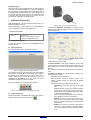
Figura 15 - Tela Recorded Data do Palm
More Info: shows logger identification.
Synchronization: Data synchronization between Palm and PC is
taken care by the conduit that is installed together with LogChart for
PalmOS. The conduit is responsible for converting the data stored in
the Palm to a file format compatible with the LogChart II software.
NOTE: the HotSync Manager must be active. With the mouse on the
HotSync Manager (in the Windows task bar), click the mouse right
button and select Custom. Select Novus LogChart Conduit and click
on Change. The following window will be opened:
•
The one year warranty begins on the day of shipment as stated
on the sales bill.
During the warranty period all costs of material and labor will be
free of charge provided that the instrument does not show any
evidence of misuse.
For maintenance, return the instrument with a copy of the sales
bill to our factory. All transportation and insurance costs should
be covered by the owner of the equipment.
Should any sign of electrical or mechanical shock, abuse, bad
handling or misuse be evident the warranty voids and
maintenance costs will be charged.
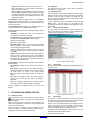
Figure 16 –LogChart Conduit options
Handheld overwrites Desktop: the data read from the Penguin with
LogChart for PalmOS is saved in the PC.
Save at: the user specifies a default directory where the data is to be
saved in the HotSync process.
Leave Data on Palm: if selected, the files with the logging in the Palm
will not be erased.
Do nothing: the logged data is not transferred to the PC in the
HotSync procedure.
7
TROUBLE SHOOTING
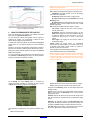
The LED does not blink:
- When in sleep mode (not communicating with the Palm or PC, the
front cover LED will not blink to save battery charge. When active, the
LED blink is made intentionally weak for the same reason, and occurs
once every 4 seconds. Also, in highly illuminated ambient, the LED
becomes inefficient. So, make sure the Penguin is awake and that the
LED is in fact not blinking.
- Check if the battery is not worn out. Resetting the logger (holding the
START button pressed for more than 10 seconds) will cause the LED
to flash intensively for 1 second. If it fails to do so, the battery needs
replacement.
Communication is not possible
- Make sure the communication port is properly selected and that no
other application is sharing the same port.
- Check if the IR beam is free of obstacles.
- Check if the wand cable is well connected to the PC port and that the
port is working properly.
NOVUS PRODUTOS ELETRÔNICOS LTDA. – WEBSITE: www.novus.com.br - FONES: RS: (51) 3323-3600 SP: (11) 3675-0366 PR: (41) 372-8476