1
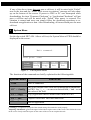
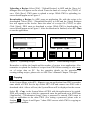
highest privilege and the user’s level 9 has the lowest. Also note that only a user
with the user’s level 1 has the right of access to the Password Table.
Scenario 2: Re-enter a password.
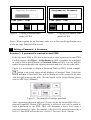
The Object - Action Button in ADP is also available for a designer to create a
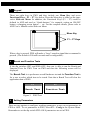
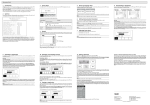
button which asks a user to re-enter a password. For example, select
button and then the password keypad will be displayed asking for a password.
See below. PWS will update a user’s level according to the most recent password which has been entered. Therefore, this button can be applied to raise or
drop one’s privilege while PWS is in operation. (For the details on the Action
Button, please refer to ADP User’s Manual.)
Scenario 3: A password is asked to execute a button on PWS.
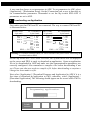
A designer can design a button which requires a password to execute it. For
example, a Goto Screen button can be designed with a high level of security;
that is, it will require a password with a high level of privilege. As the button is
selected and the current user has a lower privilege than the button which has
been set for, PWS will prompt a user to ask for a password. See above. A user
will need a password with at least the level of privilege which the button has
been set for. This function can restrict a user to access to certain parts of an
application.
Scenario 4: Enter a password to copy or upload an application.
Once F3 – Copy in the System Menu or [File] / [Upload Application] in ADP is
selected, PWS will also prompt a user to ask for a password. A user will need to
enter the correct password to download or copy an application from one PWS to
another. Note that this password is different from those passwords set in
Scenario 1~3. To set this password, select [Application] / [Workstation Setup]
in ADP. On the [Password] tab, a designer is then able to set the password.
HITECH ELECTRONICS CORP.
–– a Beijer Electronics Group company
Beijer Electronics AB Box 426 SE-201 24 Malmö, Sweden
Tel: +46 40 35 86 00 Fax: +46 40 35 86 01 http://www.beijerelectronics.com
Branch Office: 4th Fl., No 501-15 Chung-Cheng Rd., Shin-Tien, Taipei Shien, Taiwan, R.O.C.
Tel: 886-2-22183660 Fax: 886-2-22189547 http://www.hitechsite.com
Head Office:
Copyright © 2005 Hitech Electronics Corp. All rights reserved. Specification subject to change without notice
4/16/2007/V.1 6A0018+06