1
FORENSIC FALCONTM FAQ
What is a “filter-based file copy”?
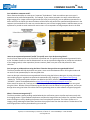
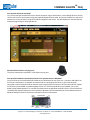
In many cases, investigators want to image only specific file types on a suspect’s hard drive, this can be useful to
shorten the imaging process. The Falcon’s “file” mode allows users to specify by extension type e.g. .jpeg, .pdf,
.mov, .xls etc. which files they want to image. The files will be sorted by path (based on where the file is located
on the Source). If a hash method is selected, each file will be hashed.
Does the Falcon provide log files?
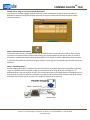
Yes, each operation/task produces a log file. The log file is viewable on the Falcon screen (or remotely on a PC) in
an HTML format. The log files can be exported to a thumb drive (the Falcon can export in XML, HTML and PDF
format). XML log files can be customized using XML editors. The log files are stored on the internal hard drive
within Falcon and are accessible by pressing the log file icon from the left-side navigation bar on the Falcon
screen.
How do I delete log files?
Log files can be deleted from the Falcon GUI. Log files can be deleted one at a time or an option is available to
delete all log files. Log files can also be deleted via the CLI (Command Line Interface).
Can I remove the internal hard drive for secure locations or SCIFs?
Often investigators must work in a sensitive compartmentalized information facility (SCIF). These secure areas
have very stringent requirements regarding the use of electronic devices to ensure sensitive information does not
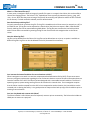
leave the confines of the SCIF. The Falcon has been designed with a removable internal hard drive. The Falcon’s
operating system, system settings and log files are all stored on this internal drive. If an investigation requires
that the Falcon must be removed from the SCIF or be transported to another location, the internal drive can be
removed prior to leaving the facility. It is a good practice to always make a back-up copy of the hard drive prior to
entering a secure location.
Can I use a keyboard and a mouse with Falcon?
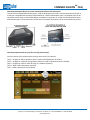
The Falcon includes 2 USB 2.0 host ports for keyboard, mouse or printer connectivity. The Falcon also includes an
HDMI port to connect to a projector.
Falcon FAQ-Rev 1.2 1/14
Logicube, Inc. 19755 Nordhoff Pl., Chatsworth, CA 91311 tel: +1-818-700-8488 fax: +1-818-435-0088
www.logicube.com