1
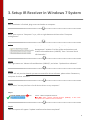
3. Setup IR Receiver in Windows 7 System
Step1:
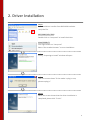
After installation is finished, plug smart card reader to computer.
Step2:
Move your cursor to “Computer” in pc, click on right button and then select “Computer
management”.
Step3:
Click left button to “Device Manager” in “Computer
Management” window. Find the yellow exclamation mark
“eHome Infrared Receiver. (USBCIR)” from “Universal Serial
USB Controller”.
Step4:
Click right button on “eHome Infrared Receiver (USBCIR)”, and select “Update driver software”
Step5:
System will ask you that how do you want to search for driver software, please select “Browse my
computer for driver software”
Step6:
Then, select “Let me pick from a list of device driver on my computer”.
Step7:
Select “USB Composite Device”
*DO NOT select “eHome Infrared Receiver (USBCIR)”, it will cause
incompletion in installation and mal-function.
Step8:
Then the system will appear “Update installment has been completed”
6