1
User’s Manual
35
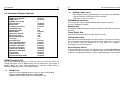
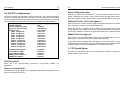
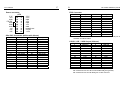
IDE HDD Block Mode
This allows hard disk controller to use the fast block mode to transfer data to and from hard
disk drive (HDD). Select “Enabled” only if hard drives support block mode.
IDE Primary/Secondary Master/Slave PIO
The four IDE PIO (Programmed Input/Output) fields allow setting a PIO mode (0-4) for each
of the four IDE devices which the onboard IDE interface supports. Modes 0 through 4 provide
successively increased performance. In auto mode, the system automatically determines the
best mode for each device.
IDE Primary/Secondary Master/Slaver UDMA
Ultra DMA/33 implementation is possible only if your IDE devices support it and the operating
environment includes a DMA drive (Windows 95 OSR2 or a third-party IDE bus master driver).
If the device and system software both support Ultra DMA/33, select “Auto” to enable BIOS
support.
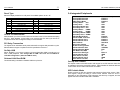
Onboard FDD Controller
This should be enabled if system has a floppy disk drive (FDD) installed on the system.
Note: FDD item is not available on ENDAT-3205S.
Onboard Serial Port 1/ Port 2 / Port 3 / Port 4
This item allows determining the I/O address and IRQ of the onboard serial port.
UART 2 Mode
This item allows determining which Infrared (IR) function of onboard I/O chip.
Onboard Parallel Port
This item allows determining the I/O address of onboard parallel port.
Onboard Parallel Mode
Select an operating mode for the onboard parallel port. Configuration options: Normal, EPP
(Extended Parallel Port), ECP (Extended Capabilities Port) and ECP+EPP. Select Normal,
unless it is sure that the hardware and software both support EPP or ECP mode. Assign DMA
for ECP or EPP mode when you not select Normal mode.
36
The ENDAT-3205M/S System Board
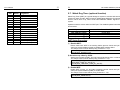
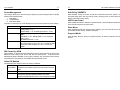
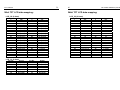
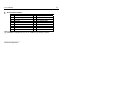
3-5. Power Management Setup
Item
ACPI function
Power Management
Power Management
HDD Power Down
Doze Mode
Suspend Mode
PM Control by APM
Video Off Option
Video Off Method
Soft-Off by PWRBTN
State After Power Failure
Wake Up Events
VGA
LPT & COM
HDD & FDD
PCI Master
Wake Up On LAN/Ring
RTC Alarm Resume
Date (of Month)
Resume Time (hh:mm:ss)
Primary INTR
IRQs Activity Monitoring
IRQ3 (COM 2)
IRQ4 (COM 1)
IRQ5 (LPT 2)
IRQ6 (Floppy Disk)
IRQ7 (LPT 1)
IRQ8 (RTC Alarm)
IRQ9 (IRQ2 Redir)
IRQ10 (Reserved)
IRQ11 (Reserved)
IRQ12 (PS/2 Mouse)
IRQ13 (Coprocessor)
IRQ14 (Hard Disk)
IRQ15 (Reserved)
Available Options:
Enabled
Press Enter
User Define
1~15Min or Disable
1 Min
1 Min
Yes
Always On
Blank Screen
Instant-Off
Off
Press Enter
OFF
LPT/COM
ON
OFF
Disable
Disable
0
0 : 00 : 00
ON
Press Enter
Disable
Disable
Disable
Disable
Disable
Disable
Disable
Disable
Disable
Disable
Disable
Disable
Disable